Introduction
BLVM (Bitcoin Low-Level Virtual Machine) implements Bitcoin consensus from the Orange Paper, provides protocol abstraction for multiple Bitcoin variants, a reference full node with P2P networking, a developer SDK, and cryptographic governance for transparent development.
Who is this for?
Running a Bitcoin node? Operator guide: Installation, Quick Start, First Node Setup (mainnet IBD hub). Read Deployment posture before exposing RPC on mainnet.
Building a module or integrating with the SDK? Developer guide: Building your first module, then Building modules.
Studying the spec or contributing to consensus? The Orange Paper is the normative spec. Formal Verification explains verification. Contributors: Repository layout, Contributing.
What is BLVM?
BLVM is compiler-like infrastructure for Bitcoin implementations. The Orange Paper is the mathematical specification (IR), readable by mathematicians without implementation code. blvm-consensus implements those rules; BLVM Specification Lock (Z3), differential testing, fuzzing, and tests check the code against the spec. See compiler-like architecture, Formal Verification, and the six-layer stack.
Why "LVM"? Like LLVM’s shared compiler infrastructure, BLVM provides shared infrastructure for Bitcoin implementations; the Orange Paper is the reference spec; node and consensus code is validated against it.
Documentation Structure
The sidebar follows three paths from Who is this for:
- Operators: Getting Started → Node → Security
- Developers: Getting Started → SDK and modules → Module runtime (under Architecture)
- Spec and consensus: Architecture → Consensus → Protocol → Reference (Orange Paper)
Cross-cutting: Governance, Development, Appendices.
Documentation is maintained in source repositories alongside code and is aggregated at docs.thebitcoincommons.org. Machine-readable index: docs llms.txt.
Getting Help
Report bugs or request features via GitHub Issues, ask questions in GitHub Discussions, or report security issues to security@thebitcoincommons.org.
Operator guide
How-to hub for running a BLVM node. You do not need the Consensus, Protocol, or Governance sections for day-to-day operations.
New to BLVM? Installation → Quick Start (regtest, ~5 minutes) → this page for ongoing tasks.
First sync and daily run
| Task | Guide |
|---|---|
| Config, RPC verify, and mainnet IBD | First Node Setup (mainnet IBD) |
| Regtest local dev (5 min) | Quick Start |
| Start / stop / backup | Node Operations |
| Import Bitcoin Core datadir | Operations: Core datadir |
| Configuration file and env | Node configuration |
| All config keys (reference) | Configuration Reference |
Initial block download (IBD)
Mainnet first sync touches several docs, use this map instead of reading them in arbitrary order.
| Topic | Guide |
|---|---|
| First mainnet sync (config, RPC verify, checklist) | First Node Setup: Mainnet IBD |
| Parallel download, chunk tuning, assume-valid | Performance: Parallel IBD |
Optional age-tiered UTXO store (BLVM_IBD_ENGINE=1) | IBD UTXO engine |
| Bandwidth limits when serving peers during their IBD | IBD bandwidth protection |
| Stuck, slow, or quiet sync | Troubleshooting: Mainnet IBD |
[ibd] keys and BLVM_IBD_* env vars | Configuration Reference: IBD |
Security before mainnet
| Task | Guide |
|---|---|
| Pre-mainnet checklist | Deployment posture |
| RPC auth and transport | RPC transport × authentication |
| Threat surfaces | Threat models |
RPC and monitoring
| Task | Guide |
|---|---|
| JSON-RPC methods and parity | RPC API Reference |
| Error codes | JSON-RPC error reference |
| Health / metrics / logs | Operations: Monitoring |
Storage and network
| Task | Guide |
|---|---|
| Database backends | Storage Backends |
| LAN peering (faster sync when LAN peers exist) | LAN Peering |
| Transports (TCP default) | Transport abstraction |
| Mempool / RBF policies | RBF and Mempool Policies |
Mining (optional)
| Task | Guide |
|---|---|
| Mining overview | Mining Integration |
| Stratum V2 | Stratum V2 + Merge Mining, Stratum V2 module |
| DATUM / Ocean | Datum module |
Optional modules
| Module | Page |
|---|---|
| Full catalog | Module catalog |
| ZMQ notifications | ZMQ module |
| FIBRE block relay | FIBRE module |
| Mesh payments | Mesh module |
Examples and troubleshooting
When you need deeper context
- Stack overview: what the crates are
- Node overview: node architecture
- API Index: cross-repo API map
Developer guide
How-to hub for building modules and integrating with the SDK. Consensus and governance docs are optional unless you change consensus-critical code.
Start here: Quick Start (verify a node) → Building your first module (~15 minutes).
Module development
| Task | Guide |
|---|---|
| First module tutorial | Building your first module |
| Full module guide | Building modules |
| Module system design | Module system (design) |
| IPC protocol | Module IPC Protocol |
| Events | Module events, Janitorial events |
| Module catalog | Module catalog |
SDK and APIs
| Task | Guide |
|---|---|
| SDK overview | SDK overview |
| SDK API reference | SDK API Reference |
| Governance key tooling | SDK Examples |
| Node JSON-RPC | RPC API Reference |
| API cross-index | API Index |
Contributing
| Task | Guide |
|---|---|
| Contributing | Contributing |
| PR process | PR Process |
| PR security classification | PR security control classification |
| Testing | Testing Infrastructure |
| Docs standards | Contributing to Documentation |
Spec and verification (when touching consensus)
| Task | Guide |
|---|---|
| Orange Paper | Orange Paper |
| Consensus overview | Consensus overview |
| Formal verification | Formal Verification |
| In-book math digest | Mathematical Specifications |
| Repository layout | Repository layout |
Architecture context
Installation
Pre-built blvm binaries, Linux packages, Windows builds, and Docker images are published on GitHub Releases. The book does not pin release numbers: use the install page for the current tag, filenames, and checksum commands.
Install (downloads + verify): btcdecoded.org/install
Always verify checksums.sha256 (or the release checksum file) before running a downloaded artifact.
Platform matrix
| Artifact | Platform | Feature set | Typical use |
|---|---|---|---|
| Release tarball / package | Linux x86_64 | Full defaults (rest-api, bip70-http, compression, governance, iroh, dandelion, utxo-commitments, …) | Production mainnet / testnet |
| Release tarball / package | Linux aarch64, Windows x86_64 | Portable subset (sled, redb, production, protocol-verification, utxo-commitments; no REST / BIP70 HTTP / compression) | Lighter deployments |
| Docker | GHCR ghcr.io/btcdecoded/blvm | Per-release tag | Container ops |
| Source build | Any supported Rust target | Explicit --features | Experimental flags, custom arch |
Details: Release process: Build variants.
Local cargo build in the blvm repo uses default features unless you pass --no-default-features or explicit --features.
Experimental build variant
Stable GitHub Releases ship the base binary set per tag (platform-specific features: see Release process: Build variants). Extra compile-time features: BIP119 CTV, Stratum V2 node demux, sigop counting, Quinn transport, and flags not in your platform artifact: require a source build with explicit --features.
Build from source
For other architectures, experimental compile-time features, or development: blvm on GitHub and Release process.
Managed installs (not ready yet)
Umbrel App Store: coming soon. Use btcdecoded.org/install, Docker on GHCR, or build from source until managed marketplace listings ship.
Who is this for?
- Operators: Quick Start (regtest) → First Node Setup (config + mainnet IBD)
- Module developers: Building your first module
- Researchers: Introduction
Next steps
- Quick Start
- Deployment posture (before mainnet RPC)
- Node configuration
See also
- Install page: current release downloads
- GitHub Releases (latest)
Quick Start
Tutorial: install the binary, run a regtest node, query RPC, and mine one block. About five minutes. For mainnet, use First Node Setup: Mainnet IBD instead of the steps below.
Prerequisites: Installation completed (blvm on your PATH).
1. Verify the binary
blvm version
blvm --help
You should see a version string and help text (no “command not found”). Version is a subcommand (blvm version), not blvm --version.
2. Start a regtest node
Use a dedicated data directory and a minimal config so regtest mining RPCs work (generatetoaddress is admin-only):
mkdir -p ~/.local/share/blvm-quickstart
cat > ~/.local/share/blvm-quickstart/blvm.toml <<'EOF'
transport_preference = "tcponly"
protocol_version = "Regtest"

[storage]
data_dir = "~/.local/share/blvm-quickstart"

[rpc_auth]
admin_tokens = ["quickstart"]
EOF

blvm --config ~/.local/share/blvm-quickstart/blvm.toml --verbose
In the first log lines, confirm:
Network: Regtest(or equivalent)- RPC listening on
127.0.0.1:18443(regtest default; testnet uses 18332)
Leave this process running. On a fresh datadir, wait until logs show Component startup complete or NodeStartupCompleted (~10-15 seconds) before mining in step 4: RPC listens earlier, but generatetoaddress needs an initialized chain tip.
3. Check chain state
Regtest uses RPC port 18443 (Core-aligned; mainnet 8332, testnet 18332):
curl -s -X POST http://127.0.0.1:18443 \
 -H "Content-Type: application/json" \
 -d '{"jsonrpc":"2.0","method":"getblockchaininfo","params":[],"id":1}'
Expected at genesis: "chain":"regtest" and "blocks":0.
4. Mine one block (regtest)
generatetoaddress requires an admin Bearer token (listed in [rpc_auth].admin_tokens):
curl -s -X POST http://127.0.0.1:18443 \
 -H "Content-Type: application/json" \
 -H "Authorization: Bearer quickstart" \
 -d '{"jsonrpc":"2.0","method":"generatetoaddress","params":[1,"bc1qw508d6qejxtdg4y5r3zarvary0c5xw7kv8f3t4"],"id":2}'
Expected: JSON result with an array of one block hash (hex). Without the Bearer header you get HTTP 403 (requires admin privileges).
5. Confirm the new height
Run getblockchaininfo again (step 3). Expected: "blocks":1 (or higher if you mined more).
You now have a running regtest node that processed at least one block.
Next steps
- Config file and mainnet/testnet: First Node Setup
- Mainnet: First Node Setup: Mainnet IBD and Deployment posture
- Core datadir import: Starting from a Bitcoin Core datadir
- Build a module: Building your first module
- RPC details: RPC API Reference
- Configuration: Node Configuration
First Node Setup
Config-file walkthrough: create ~/.config/blvm/blvm.toml, validate it, start the node, and confirm RPC. For a five-minute regtest tutorial, use Quick Start instead.
Choose a network
| Network | protocol_version | Default P2P | Default RPC | Next step |
|---|---|---|---|---|
| Mainnet | BitcoinV1 | 0.0.0.0:8333 | 127.0.0.1:8332 | Mainnet initial sync below |
| Testnet | Testnet3 | 0.0.0.0:18333 | 127.0.0.1:18332 | Steps 1-4 below |
| Regtest | Regtest | 0.0.0.0:18444 | 127.0.0.1:18443 | Quick Start |
Bind addresses and CLI defaults: Node Configuration. Wire magic bytes and ports: Protocol variants.
Use a separate [storage].data_dir per network so chain state never mixes.
not bare --network mainnet] M -->|Testnet| STEPS[Steps 1-4 below] M -->|Regtest: quick try| QS[Quick Start] IBD --> SYNC[Mainnet initial sync section] STEPS --> RPC[Validate config → start → curl RPC] IBD --> DIR[Unique data_dir per network] STEPS --> DIR QS --> DIR
Step 1: Create configuration directory
mkdir -p ~/.config/blvm
Step 2: Create blvm.toml
Example for testnet (~/.config/blvm/blvm-testnet.toml) or learning config shape:
transport_preference = "tcponly"
listen_addr = "0.0.0.0:18333"
protocol_version = "Testnet3"

[storage]
data_dir = "~/.local/share/blvm-testnet"
database_backend = "auto"

[logging]
level = "info"
For mainnet first sync, skip this minimal template: use the IBD example config (blvm-mainnet-ibd.toml.example) with pruning and parallel IBD instead.
transport_preferenceis required in TOML (no serde default when loading a file).- RPC bind uses
--rpc-addr/BLVM_RPC_ADDR; the optional[rpc]table is limits only: see Node Configuration. - Production: configure
[rpc_auth]before exposing RPC beyond loopback. See Deployment posture.
Step 2b: Validate the file
blvm config validate ~/.config/blvm/blvm-testnet.toml
Expected: Configuration file is valid: (with the path).
Step 3: Start the node
env -u BLVM_ASSUME_VALID_HEIGHT \
 blvm --config ~/.config/blvm/blvm-testnet.toml --verbose
Confirm in the first log lines: config loaded, Network: …, and Data directory: matches [storage].data_dir.
Step 4: Verify RPC
Testnet 18332; regtest 18443; mainnet 8332:
curl -s -X POST http://127.0.0.1:18332 \
 -H "Content-Type: application/json" \
 -d '{"jsonrpc":"2.0","method":"getblockchaininfo","params":[],"id":1}'
See RPC API Reference for authentication and the full method list.
Mainnet initial sync
After Installation. Do not start first mainnet sync with bare blvm --network mainnet: use the release IBD example config (pruning, [ibd].mode = "parallel", [modules].enabled = false during sync). Source: blvm-mainnet-ibd.toml.example.
From a release directory (contains blvm, scripts/, and the example TOML):
cd /path/to/your/blvm-release
./scripts/start-ibd-mainnet.sh
Seed ~/.config/blvm/blvm.toml from the example: ./scripts/start-ibd-mainnet.sh --init-config, edit peers if you have LAN Core, then run again.
With blvm on PATH only:
blvm --config /path/to/blvm-mainnet-ibd.toml.example \
 --network mainnet \
 --data-dir ~/.local/share/blvm-mainnet \
 --verbose
What you should see: config loads → Network: Mainnet → quiet 15-60s (peer discovery) → IBD: <height> / <tip> in logs. Plan for ~15 GB+ pruned disk, hours on WAN-only (faster with LAN Core). Validation slows near ~900k+ when assume-valid ends: expected.
Monitor (match start flags):
blvm --network mainnet \
 --config ~/.config/blvm/blvm.toml \
 --data-dir ~/.local/share/blvm-mainnet \
 sync
Resume: reuse the same --data-dir; never delete the active backend dir (heed3/, rocksdb/, …) mid-IBD.
Tune when needed: BLVM_IBD_PEERS, BLVM_IBD_MODE, BLVM_IBD_WAN_SINGLE_PEER=1, BLVM_IBD_ENGINE=1: see Node configuration: IBD, IBD UTXO engine, Troubleshooting: Mainnet IBD.
Other network examples
Regtest (local dev)
transport_preference = "tcponly"
listen_addr = "127.0.0.1:18445" # default P2P is 18444
protocol_version = "Regtest"

[storage]
data_dir = "~/.local/share/blvm-regtest"
database_backend = "auto"

[rpc_auth]
admin_tokens = ["dev"]
No public seeds: see Quick Start for generatetoaddress.
Storage
Blocks, UTXO set, chain state, and indexes live under [storage].data_dir. See Storage Backends.
Peers and sync
- Mainnet / testnet: DNS seeds and addr relay.
- Regtest: only configured peers; height stays at genesis until you add one.
See also
- Node Configuration · Configuration Reference
- Node Operations: backup, Core datadir import
- Deployment posture: before exposing mainnet RPC
Building your first module
Tutorial: load a minimal read-only module on a regtest node and confirm it receives NewBlock events.
Prerequisites: Quick Start (regtest node running), Rust toolchain, Module system overview.
Time: ~15 minutes for an experienced Rust developer.
What you will build
hello-module: a process-isolated module that:
- Declares
read_blockchainandsubscribe_eventsinmodule.toml - Subscribes to
NewBlockand logs the block hash - Loads via a
[modules]pin inblvm.toml
Full patterns (manifest fields, NodeAPI, publishing events) live in Building modules.
1. Scaffold the crate
mkdir -p modules/hello-module/src
cd modules/hello-module
Cargo.toml (minimal):
[package]
name = "hello-module"
version = "0.1.0" # your crate semver (not tied to BLVM releases)
edition = "2024"

[dependencies]
blvm-sdk = "0.1"
tokio = { version = "1", features = ["macros", "rt-multi-thread"] }
tracing = "0.1"
tracing-subscriber = "0.3"
module.toml:
name = "hello-module"
version = "0.1.0" # manifest semver for your module
description = "Tutorial hello module"
entry_point = "hello-module"

capabilities = [
 "read_blockchain",
 "subscribe_events",
]
Implement main.rs using the blvm-sdk module runner: subscribe to NewBlock, log block_hash from the event payload. Copy the event-loop skeleton from Building modules: Module lifecycle and replace the handler body with a tracing::info! on NewBlock.
2. Build the binary
cargo build --release
Expected: target/release/hello-module with no errors.
3. Install on the module search path
Either copy into the node modules directory:
NODE_MODULES=~/.local/share/blvm/modules
mkdir -p "$NODE_MODULES/hello-module/target/release"
cp target/release/hello-module "$NODE_MODULES/hello-module/target/release/"
cp module.toml "$NODE_MODULES/hello-module/"
Or pin a published crate via the registry (production path): see Installing modules.
4. Enable in blvm.toml
On the regtest node from Quick Start, add:
[modules]
registry_url = "https://raw.githubusercontent.com/BTCDecoded/blvm/main/registry/modules.json"
hello-module = "0.1.*" # local build: place binary under modules_dir first
modules_dir = "~/.local/share/blvm-quickstart/modules"
Restart the node with --verbose.
5. Verify loading
Expected log lines (wording may vary):
- Module
hello-moduleloaded / started - No capability or manifest errors
Mine a block (Quick Start step 4) or use First Node Setup. Expected when a block connects:
NewBlocklog line with a 32-byte hash from your module
Troubleshooting
| Symptom | Check |
|---|---|
| Module not loaded | Binary path matches module.toml entry_point; modules_dir correct |
| Manifest error | module.toml beside binary; capabilities match what the code requests |
| No events | Node actually connected a block; module subscribed to NewBlock |
Build fails on blvm-sdk | MSRV and crate version: see Contributing |
Next steps
- Building modules: IPC, NodeAPI, publishing events, inter-module calls
- Module catalog: production modules (mesh, zmq, stratum-v2, …)
- SDK overview
Stack overview
Bitcoin Commons is a Bitcoin implementation ecosystem built as a six-layer technology stack on the Orange Paper.
“Layer” here means stack position, not governance repository layers or PR tiers. blvm-consensus and blvm-protocol share blvm-primitives for types, serialization, and crypto.
The stack implements consensus from the spec, abstracts protocol variants, ships a reference full node, SDK, and governance enforcement tooling.
Six-layer stack (architecture)
Mathematical Foundation] L2[blvm-consensus
Pure Math Implementation] L3[blvm-protocol
Protocol Abstraction] L4[blvm-node
Full Node Implementation] L5[blvm-sdk
Developer Toolkit] L6[blvm-commons
Governance Enforcement] L1 -->|direct implementation| L2 L2 -->|protocol abstraction| L3 L3 -->|full node| L4 L4 -->|ergonomic API| L5 L5 -->|cryptographic governance| L6
Component Overview
Stack layer 1: Orange Paper (Mathematical Foundation)
- Mathematical specifications for Bitcoin consensus rules
- Source of truth for all implementations
- Timeless, immutable consensus rules
Stack layer 2: blvm-consensus (Pure Math Implementation)
- Direct implementation of Orange Paper functions
- Formal proofs verify mathematical correctness
- Side-effect-free, deterministic functions
- Consensus-critical dependencies and transitive pins follow
Cargo.toml(BLVM crates use published ranges; many third-party crates use=where pinned)
Stack layer 3: blvm-protocol (Protocol Abstraction)
- Bitcoin protocol abstraction for multiple variants
- Supports mainnet, testnet, regtest
- Commons-specific protocol extensions (UTXO commitments, ban list sharing)
- BIP implementations (BIP152, BIP157, BIP158, BIP173/350/351)
Stack layer 4: blvm-node (Node Implementation)
- Reference full node: non-consensus storage, P2P, RPC, and module system
- Multi-transport networking and operational hardening for real deployments
- Component detail, lifecycle, and features: Node overview
Stack layer 5: blvm-sdk (Developer Toolkit)
- Governance primitives (key management, signatures, multisig)
- CLI tools (blvm-keygen, blvm-sign, blvm-verify)
- Composition framework (declarative node composition)
- Bitcoin-compatible signing standards
Stack layer 6: blvm-commons (Governance Enforcement)
- GitHub App for governance enforcement
- Cryptographic signature verification
- Multisig threshold enforcement
- Audit trail management
- OpenTimestamps integration
Data Flow
Runtime data flow and crate dependencies: Component Relationships.
Cross-Layer Validation
Dependency rules, crate-graph boundaries, and version coordination: Component Relationships.
Key Features
Mathematical Rigor
- Direct implementation of Orange Paper specifications
- Formal verification with BLVM Specification Lock
- Property-based testing for mathematical invariants
- Formal proofs verify critical consensus functions
Protocol Abstraction
- Multiple Bitcoin variants (mainnet, testnet, regtest)
- Commons-specific protocol extensions
- BIP implementations (BIP152, BIP157, BIP158)
- Protocol evolution support
Node and operational features
- Full Bitcoin node-style functionality when configured and secured appropriately
- Details: Node overview, performance, storage backends, transport abstraction
Governance Infrastructure
- Cryptographic governance primitives
- Multisig threshold enforcement
- Transparent audit trails
- Forkable governance rules
Source repositories
| Stack layer | Crate | Repository |
|---|---|---|
| 2 | blvm-consensus | BTCDecoded/blvm-consensus |
| 3 | blvm-protocol | BTCDecoded/blvm-protocol |
| 4 | blvm-node | BTCDecoded/blvm-node |
| 5 | blvm-sdk | BTCDecoded/blvm-sdk |
| 6 | blvm-commons | BTCDecoded/blvm-commons |
| Umbrella binary | blvm | BTCDecoded/blvm |
See Also
- Crate dependencies - Dependency graph and governance layers by crate
- Design Philosophy - Core design principles
- Module System - Module system architecture
- Node Overview - Node implementation details
- Consensus Overview - Consensus layer details
- Protocol Overview - Protocol layer details
Design Philosophy
BLVM is built for teams who need Bitcoin consensus correctness to be checkable, protocol evolution to be bounded, and node features to be extensible without touching consensus. The principles below are the reasoning behind that shape, not slogans.
Core Principles
1. Mathematical correctness first
Problem: Hand-wavy “Bitcoin-compatible” implementations drift from mainnet rules under edge cases (witness nesting, sighash variants, soft-fork activation boundaries).
Alternative: Interpret Bitcoin Core’s C++ informally and patch when differential tests fail.
Choice: The Orange Paper is the normative spec, written so consensus can be reviewed in mathematical notation without reading implementation code. blvm-consensus implements it; BLVM Specification Lock, differential testing, fuzzing, and review keep the code aligned with that document. Pure functions where the design allows so behavior is reproducible in tests and proofs.
2. Layered architecture
Problem: Monolithic nodes mix networking bugs with consensus bugs; upgrades become risky all-or-nothing releases.
Alternative: Microservices with shared mutable state (harder to reason about than a disciplined monolith).
Choice: Strict crate layers: spec → consensus → protocol → node → SDK → governance tooling. Lower layers do not depend on RPC or modules. Each layer can be tested and versioned independently within release sets.
3. Zero consensus re-implementation
Problem: A payment module or RPC handler that “fixes” validation logic creates a fork risk invisible until mainnet.
Alternative: Allow application code to call internal consensus helpers with ad hoc flags.
Choice: All rule changes flow through blvm-consensus. blvm-protocol varies network parameters and message framing; blvm-node orchestrates I/O. Modules run out-of-process and cannot rewrite the UTXO set or block acceptance rules.
4. Cryptographic governance
Problem: Open-source governance often relies on social consensus alone; capture and silent policy drift are hard to detect.
Alternative: Fully automated on-chain governance (inappropriate for a node implementation project).
Choice: Apply Bitcoin-style multisig and audit trails to repository and release policy (governance). Power is visible; changing security-critical code requires documented tiers and signatures, not a single maintainer click.
5. User sovereignty
Problem: Forced upgrades and opaque defaults push operators onto configurations they did not choose.
Alternative: Infinite per-user consensus forks in one binary (unmaintainable).
Choice: Operators pick network, features, and modules. Governance is forkable: disagree with policy → run a fork with transparent rules rather than hidden behavior in a shared binary.
Design Decisions (expanded)
Why pure functions in consensus?
Deterministic, side-effect-free validation makes differential testing against Core, property tests, and spec-lock proofs tractable. The cost is explicit data passing (UTXO views, flags) instead of hidden global state, which is appropriate for consensus.
Why formal verification alongside tests?
Tests cannot exhaust script and block combinatorics. BLVM Specification Lock, differential testing, fuzzing, and proptest form a continuous assurance stack on top of the Orange Paper. See Formal Verification.
Why process-isolated modules?
In-process plugins are faster but share address space with the node. Choice: optional features (Lightning, Stratum, ZMQ, mesh) as separate processes with capability-based IPC. A module crash should not corrupt chainstate; a malicious module should not get write access to consensus state.
Why cryptographic governance instead of policy docs only?
Policy PDFs do not enforce themselves on GitHub. Wiring security-control classification into PR tiers makes “who must sign this change?” a machine-checkable question for contributors. Operators still rely on Deployment posture for runtime exposure, not this system.
Trade-offs
| Tension | Choice | Mitigation |
|---|---|---|
| Performance vs correctness | Correctness first | Profile after correctness gates; PGO and batch validation in hot paths |
| Flexibility vs safety | Safety first | Protocol abstraction for experiments without consensus edits |
| Simplicity vs features | Simplicity in consensus | Features in node/modules; consensus grows only via spec + BIP process |
Design Evolution
BLVM targets long-horizon Bitcoin infrastructure:
- Protocol evolution through blvm-protocol variants and BIPs, not ad hoc node patches
- Feature addition via modules and optional compile-time features (experimental builds)
- Governance evolution through documented tier changes, not silent CI edits
- Multiple implementations sharing the Orange Paper as common IR
See Also
- Stack overview: Six-layer stack summary
- Crate dependencies: Dependency graph
- Consensus Overview: How correctness is structured in code
- Governance Overview: Cryptographic governance
- Orange Paper: Mathematical foundation
Crate dependencies
BLVM is a six-layer stack. Stack layer means architecture position, not governance repository layers or governance tiers (PR classification). Layer descriptions and the stack diagram: Stack overview.
Dependency Graph
Edges point from a crate toward a crate it depends on (library import direction). The Orange Paper is not a Rust crate; it informs consensus (dotted).
blvm-primitives (types, serialization, crypto) sits under blvm-consensus and blvm-protocol; it is not shown as its own stack layer here.
Governance repository layers by crate
| Stack layer | Crate | Governance layer |
|---|---|---|
| 1 | blvm-spec (Orange Paper) | Layer 1: 6-of-7, 180 days |
| 2 | blvm-consensus | Layer 2: 6-of-7, 180 days |
| 3 | blvm-protocol | Layer 3: 4-of-5, 90 days |
| 4 | blvm-node | Layer 4: 3-of-5, 60 days |
| 5 | blvm-sdk | Layer 5: 2-of-3, 14 days |
| 6 | blvm-commons | Layer 5: 2-of-3, 14 days |
See Governance layers and tiers for how layers combine with PR tiers.
Data flow
The dependency graph above is the accurate picture for crate dependencies. At runtime, blocks and transactions flow through the node, which calls into protocol and consensus libraries to validate; the Orange Paper remains the specification those libraries implement.
 Figure: Operational view (IBD, validation, modules, governance). For which crate depends on which, use the dependency graph in this page.
- Orange Paper specifies consensus rules.
- blvm-consensus implements those rules (pure functions).
- blvm-protocol layers network parameters, wire helpers, and protocol policy on top of consensus types.
- blvm-node runs networking, storage, RPC, and orchestration; validation calls into protocol + consensus.
- blvm-sdk supplies governance crypto, composition, and (optional) node integration for modules.
- blvm-commons runs governance enforcement services using blvm-sdk and blvm-protocol types.
Cross-Layer Validation
- Dependencies between layers are strictly enforced in the crate graph (no application layer should reimplement consensus).
- Consensus rule modifications are prevented in application layers by design (validation calls into blvm-consensus).
- The Orange Paper is the specification; blvm-consensus is checked with formal verification, tests, and review, not a single “one-shot” equivalence proof of the whole spec.
- Version coordination (Cargo / release sets) keeps compatible crate versions together.
See Also
- Stack overview - Six-layer stack and component summary
- Design Philosophy - Core design principles
- Consensus Overview - Consensus layer details
- Protocol Overview - Protocol layer details
- Node Overview - Node implementation details
Module system (design)
Overview
Optional features (Lightning Network, merge mining, privacy relays) run in separate processes with IPC communication.
Registry-backed modules (blvm-zmq, blvm-miniscript, blvm-governance, blvm-fibre, optional blvm-marketplace) bootstrap from [modules].registry_url (registry/modules.json) when pinned under [modules]: see Module catalog.
Available modules
- Lightning Network Module: Lightning payment processing
- Commons Mesh Module: Payment-gated mesh overlay; four JSON-RPC methods when
blvm-meshis loaded - Stratum V2 Module: Stratum V2 mining protocol
- Datum Module: DATUM Gateway mining protocol
- blvm-zmq: ZMQ module
- blvm-miniscript: Miniscript module
- blvm-governance: Governance module
- blvm-fibre: FIBRE module
- blvm-marketplace: Marketplace module (optional; registry bootstrap usually does not need it)
For detailed documentation on each module, see the Modules section.
Writing modules: Use the SDK declarative style (blvm-sdk attribute macros and run_module!) to define CLI, RPC, and event handling in one impl block without manual IPC loops; see Building modules. Alternatively use the integration API or low-level IPC for custom control.
Architecture
Process Isolation
Each module runs in a separate process with isolated memory. The base node consensus state is protected and read-only to modules.
Protected, Read-Only] MM[Module Manager
Orchestration] NM[Network Manager] SM[Storage Manager] RM[RPC Manager] end subgraph "Module Process 1
blvm-lightning" LS[Lightning State
Isolated Memory] SB1[Sandbox
Resource Limits] end subgraph "Module Process 2
blvm-mesh" MS[Mesh State
Isolated Memory] SB2[Sandbox
Resource Limits] end subgraph "Module Process 3
blvm-stratum-v2" SS[Stratum V2 State
Isolated Memory] SB3[Sandbox
Resource Limits] end MM -->|IPC Unix Sockets| LS MM -->|IPC Unix Sockets| MS MM -->|IPC Unix Sockets| SS CS -.->|Read-Only Access| MM NM --> MM SM --> MM RM --> MM style CS fill:#fbb,stroke:#333,stroke-width:3px style MM fill:#bbf,stroke:#333,stroke-width:2px style LS fill:#bfb,stroke:#333,stroke-width:2px style MS fill:#bfb,stroke:#333,stroke-width:2px style SS fill:#bfb,stroke:#333,stroke-width:2px
Core Components
ModuleManager
Orchestrates all modules, handling lifecycle, runtime loading/unloading/reloading, and coordination.
Features:
- Module discovery and loading
- Process spawning and monitoring
- IPC server management
- Event subscription management
- Dependency resolution
- Registry integration
Process Isolation
Modules run in separate processes via ModuleProcessSpawner:
- Separate memory space
- Isolated execution environment
- Resource limits enforced
- Crash containment
IPC Communication
Modules communicate with the base node via Unix domain sockets (Unix) or named pipes (Windows):
- Request/response protocol
- Event subscription system (
SubscribeEvents/EventType: node → module notifications) - Correlation IDs for async operations
- Type-safe message serialization
- Targeted node control (module → node):
NodeAPI/ IPC also exposes bounded writes that are not consensus changes: e.g. P2P serve denylists (block/txgetdatapolicy),get_sync_status,ban_peer, and block-serve maintenance mode. Details: Module IPC Protocol, Module development.
Security Sandbox
Modules run in sandboxed environments with:
- Resource limits (CPU, memory, file descriptors)
- Filesystem restrictions
- Network restrictions
- Permission-based API access
Permission System
Modules request capabilities that are validated before API access. Capabilities use snake_case in module.toml (e.g., read_blockchain) and map to Permission enum variants (e.g., ReadBlockchain).
Core Permissions:
read_blockchain/ReadBlockchain- Read-only blockchain access (blocks, headers, transactions)read_utxo/ReadUTXO- Query UTXO set (read-only)read_chain_state/ReadChainState- Query chain state (height, tip)subscribe_events/SubscribeEvents- Subscribe to node eventssend_transactions/SendTransactions- Submit transactions to mempool (future: may be restricted)
Mempool & Network Permissions:
read_mempool/ReadMempool- Read mempool data (transactions, size, fee estimates)read_network/ReadNetwork- Read network data (peers, stats)network_access/NetworkAccess- Send network packets (mesh packets, etc.)
Lightning & Payment Permissions:
read_lightning/ReadLightning- Read Lightning network dataread_payment/ReadPayment- Read payment data
Storage Permissions:
read_storage/ReadStorage- Read from module storagewrite_storage/WriteStorage- Write to module storagemanage_storage/ManageStorage- Manage storage (create/delete trees, manage quotas)
Filesystem Permissions:
read_filesystem/ReadFilesystem- Read files from module data directorywrite_filesystem/WriteFilesystem- Write files to module data directorymanage_filesystem/ManageFilesystem- Manage filesystem (create/delete directories, manage quotas)
RPC & Timers Permissions:
register_rpc_endpoint/RegisterRpcEndpoint- Register RPC endpointsmanage_timers/ManageTimers- Manage timers and scheduled tasks
Metrics Permissions:
report_metrics/ReportMetrics- Report metricsread_metrics/ReadMetrics- Read metrics
Module Communication Permissions:
discover_modules/DiscoverModules- Discover other modulespublish_events/PublishEvents- Publish events to other modulescall_module/CallModule- Call other modules' APIsregister_module_api/RegisterModuleApi- Register in-process module API, or (spawned) send method descriptor so the node installsIpcForwardingModuleAPI
Module Lifecycle
Discovery → Verification → Loading → Execution → Monitoring
 │ │ │ │ │
 │ │ │ │ │
 ▼ ▼ ▼ ▼ ▼
Registry Signer Loader Process Monitor
Discovery
Modules are discovered through:
- Local filesystem: scan
[modules].modules_dirformodule.toml+ binaries - Registry bootstrap: when
[modules].registry_urlis set and a module is pinned (inlineblvm-zmq = "0.1.*"etc.), missing versions are downloaded from GitHub Releases (see Installing modules) - Runtime load:
loadmodule/blvm loadafter the node is running (admin RPC) - Optional marketplace:
blvm-marketplacemodule for paid installs and legacy registry URL fallback;loadmoduleremote auto-fetch is opt-in and off by default
Verification
Each module verified through:
- Hash verification (binary integrity)
- Signature verification (multisig maintainer signatures)
- Permission checking (capability validation)
- Compatibility checking (version requirements)
Loading
Module loaded into isolated process:
- Sandbox creation (resource limits)
- IPC connection establishment
- API subscription setup
Execution
Module runs in isolated process:
- Separate memory space
- Resource limits enforced
- IPC communication only
- Event subscription active
Monitoring
Module health monitored:
- Process status tracking
- Resource usage monitoring
- Error tracking
- Crash isolation
Security Model
Consensus Isolation
Modules cannot:
- Modify consensus rules
- Modify UTXO set
- Access node private keys
- Bypass security boundaries
- Affect other modules
Guarantee: Module failures are isolated and cannot affect consensus.
Crash Containment
Module crashes are isolated and do not affect the base node. The ModuleProcessMonitor detects crashes and automatically removes failed modules.
Security Flow
Module Binary
 │
 ├─→ Hash Verification ──→ Integrity Check
 │
 ├─→ Signature Verification ──→ Multisig Check ──→ Maintainer Verification
 │
 ├─→ Permission Check ──→ Capability Validation
 │
 └─→ Sandbox Creation ──→ Resource Limits ──→ Isolation
Module Manifest
Module manifests use TOML format:
# Module Identity (manifest `name` must match [modules] pin and [modules.<name>] tables)
name = "blvm-lightning"
version = "1.2.3"
description = "Lightning Network implementation"
author = "Alice <alice@example.com>"

# Governance
[governance]
tier = "application"
maintainers = ["alice", "bob", "charlie"]
threshold = "2-of-3"
review_period_days = 14

# Signatures
[signatures]
maintainers = [
 { name = "alice", key = "02abc...", signature = "..." },
 { name = "bob", key = "03def...", signature = "..." }
]
threshold = "2-of-3"

# Binary
[binary]
hash = "sha256:abc123..."
size = 1234567
download_url = "https://github.com/BTCDecoded/blvm-lightning/releases/download/v1.2.3/blvm-lightning"

# Dependencies
[dependencies]
"blvm-node" = ">=1.0.0"
"another-module" = ">=0.5.0"

# Compatibility
[compatibility]
min_consensus_version = "1.0.0"
min_protocol_version = "1.0.0"
min_node_version = "1.0.0"
tested_with = ["1.0.0", "1.1.0"]

# Capabilities
capabilities = [
 "read_blockchain",
 "subscribe_events"
]
API Hub
The ModuleApiHub routes API requests from modules to the appropriate handlers:
- Blockchain API (blocks, headers, transactions)
- Governance API (proposals, votes)
- Communication API (P2P messaging)
Event System
Modules subscribe to node state changes, blockchain events, and system lifecycle events through the event system.
Event Subscription
Modules subscribe to events they need during initialization:
#![allow(unused)]
fn main() {
let event_types = vec![
 EventType::NewBlock,
 EventType::NewTransaction,
 EventType::ModuleLoaded,
 EventType::ConfigLoaded,
];
client.subscribe_events(event_types).await?;
}
Event Categories
Catalog of shared EventType variants on the node bus. Individual modules subscribe/publish subsets only: see each module page (e.g. blvm-lightning does not emit ChannelOpened; blvm-stratum-v2 does not emit MiningPoolConnected).
NewBlock- Block connected to chainNewTransaction- Transaction in mempoolBlockDisconnected- Block disconnected (reorg)ChainReorg- Chain reorganization
Payment Events:
PaymentRequestCreated- Payment request createdPaymentSettled- Payment settled (confirmed on-chain)PaymentFailed- Payment failedPaymentVerified- Lightning payment verifiedPaymentRouteFound- Payment route discoveredPaymentRouteFailed- Payment routing failedChannelOpened- Lightning channel openedChannelClosed- Lightning channel closed
Mining Events:
BlockMined- Block mined successfullyBlockTemplateUpdated- Block template updatedMiningDifficultyChanged- Mining difficulty changedMiningJobCreated- Mining job createdShareSubmitted- Mining share submittedMergeMiningReward- Merge mining reward receivedMiningPoolConnected- Mining pool connectedMiningPoolDisconnected- Mining pool disconnected
Mesh Networking Events:
MeshPacketReceived- Mesh packet received from network
Stratum V2 Events:
StratumV2MessageReceived- Stratum V2 message received from network
Module Lifecycle Events:
ModuleLoaded- Module loaded (published after subscription)ModuleUnloaded- Module unloadedModuleCrashed- Module crashedModuleDiscovered- Module discoveredModuleInstalled- Module installedModuleUpdated- Module updatedModuleRemoved- Module removed
Configuration Events:
ConfigLoaded- Node configuration loaded/changed
Node Lifecycle Events:
NodeStartupCompleted- Node fully operationalNodeShutdown- Node shutting downNodeShutdownCompleted- Shutdown complete
Maintenance Events:
DataMaintenance- Unified cleanup/flush event (replaces StorageFlush + DataCleanup)MaintenanceStarted- Maintenance startedMaintenanceCompleted- Maintenance completedHealthCheck- Health check performed
Resource Management Events:
DiskSpaceLow- Disk space lowResourceLimitWarning- Resource limit warning
Governance Events:
GovernanceProposalCreated- Proposal createdGovernanceProposalVoted- Vote castGovernanceProposalMerged- Proposal mergedGovernanceForkDetected- Governance fork detectedWebhookSent- Webhook sentWebhookFailed- Webhook delivery failed
Network Events:
PeerConnected- Peer connectedPeerDisconnected- Peer disconnectedPeerBanned- Peer bannedPeerUnbanned- Peer unbannedMessageReceived- Network message receivedMessageSent- Network message sentBroadcastStarted- Broadcast startedBroadcastCompleted- Broadcast completedRouteDiscovered- Route discoveredRouteFailed- Route failedConnectionAttempt- Connection attempt (success/failure)AddressDiscovered- New peer address discoveredAddressExpired- Peer address expiredNetworkPartition- Network partition detectedNetworkReconnected- Network partition reconnectedDoSAttackDetected- DoS attack detectedRateLimitExceeded- Rate limit exceeded
Consensus Events:
BlockValidationStarted- Block validation startedBlockValidationCompleted- Block validation completed (success/failure)ScriptVerificationStarted- Script verification startedScriptVerificationCompleted- Script verification completedUTXOValidationStarted- UTXO validation startedUTXOValidationCompleted- UTXO validation completedDifficultyAdjusted- Network difficulty adjustedSoftForkActivated- Soft fork activated (SegWit, Taproot, CTV, etc.)SoftForkLockedIn- Soft fork locked in (BIP9)ConsensusRuleViolation- Consensus rule violation detected
Sync Events:
HeadersSyncStarted- Headers sync startedHeadersSyncProgress- Headers sync progress updateHeadersSyncCompleted- Headers sync completedBlockSyncStarted- Block sync started (IBD)BlockSyncProgress- Block sync progress updateBlockSyncCompleted- Block sync completed
Mempool Events:
MempoolTransactionAdded- Transaction added to mempoolMempoolTransactionRemoved- Transaction removed from mempoolFeeRateChanged- Fee rate changed
Additional Event Categories:
- Dandelion++ Events (DandelionStemStarted, DandelionStemAdvanced, DandelionFluffed, etc.)
- Compact Blocks Events (CompactBlockReceived, BlockReconstructionStarted, etc.)
- FIBRE Events (FibreBlockEncoded, FibreBlockSent, CompanionUdpPeerRegistered / CompanionUdpPeerUnregistered for NODE_FIBRE companion UDP)
- Package Relay Events (PackageReceived, PackageRejected)
- UTXO Commitments Events (UtxoCommitmentReceived, UtxoCommitmentVerified)
- Ban List Sharing Events (BanListShared, BanListReceived)
For a complete list of all event types, see EventType enum.
Delivery guarantees, timing (ModuleLoaded ordering), backpressure, and monitoring: Module events. Maintenance payloads: Janitorial events.
Module Registry
Two related mechanisms:
| Mechanism | Purpose |
|---|---|
[modules].registry_url bootstrap | Built into the node: download pinned modules from modules.json + GitHub Releases when not on disk |
blvm-marketplace module | Optional: registry proxy, module payments, and opt-in loadmodule auto-fetch via IPC |
Bootstrap does not require the marketplace module for standard pins (blvm-zmq, blvm-miniscript, …). See Marketplace module.
Verification at install time includes release checksums (sha256sums.txt on module tags) when using bootstrap; additional signature/multisig policy is deployment-specific.
Usage
Loading a Module
#![allow(unused)]
fn main() {
use blvm_node::module::{ModuleManager, ModuleMetadata};

let mut manager = ModuleManager::new(
 modules_dir,
 data_dir,
 socket_dir,
);

manager.start(socket_path, node_api).await?;

manager.load_module(
 "blvm-lightning",
 binary_path,
 metadata,
 config,
).await?;
}
Auto-Discovery
#![allow(unused)]
fn main() {
// Automatically discover and load all modules
manager.auto_load_modules().await?;
}
Benefits
- Consensus Isolation: Modules cannot affect consensus rules
- Crash Containment: Module failures don't affect base node
- Security: Process isolation and permission system
- Extensibility: Add features without consensus changes
- Flexibility: Load/unload modules at runtime
- Governance: Modules subject to governance approval
Use Cases
- Lightning Network: Payment channel management
- Merge Mining: Auxiliary chain support
- Privacy Enhancements: Transaction mixing, coinjoin
- Alternative Mempool Policies: Custom transaction selection
- Smart Contracts: Layer 2 contract execution
Components
The module system includes:
- Process isolation
- IPC communication
- Security sandboxing
- Permission system
- Module registry
- Event system
- API hub
IPC Communication
Modules communicate with the node via the Module IPC Protocol:
- Protocol: Length-delimited binary messages over Unix domain sockets
- Message Types: Requests, Responses, Events, Logs
- Security: Process isolation, permission-based API access, resource sandboxing
- Performance: Persistent connections, concurrent requests, correlation IDs
Integration Approaches
There are two approaches for modules to integrate with the node:
1. ModuleIntegration (Recommended for New Modules)
The ModuleIntegration API wraps connect, subscribe, and RPC helpers:
#![allow(unused)]
fn main() {
use blvm_node::module::integration::ModuleIntegration;

// Connect to node (socket_path must be PathBuf)
let socket_path = std::path::PathBuf::from(socket_path);
let mut integration = ModuleIntegration::connect(
 socket_path,
 module_id,
 module_name,
 version,
).await?;

// Subscribe to events
integration.subscribe_events(event_types).await?;

// Get NodeAPI
let node_api = integration.node_api();

// Get event receiver
let mut event_receiver = integration.event_receiver();
}
Benefits:
- One API for connect, subscribe, and RPC calls
- Automatic handshake and connection management
- Simplified event subscription
- Direct access to NodeAPI and event receiver
Used by: blvm-mesh and its submodules (blvm-onion, blvm-mining-pool, blvm-messaging, blvm-bridge)
2. ModuleClient + NodeApiIpc (Legacy Approach)
The traditional approach uses separate components:
#![allow(unused)]
fn main() {
use blvm_node::module::ipc::client::ModuleIpcClient;
use blvm_node::module::api::node_api::NodeApiIpc;

// Connect to IPC socket
let mut ipc_client = ModuleIpcClient::connect(&socket_path).await?;

// Perform handshake manually
let handshake_request = RequestMessage { /* ... */ };
let response = ipc_client.request(handshake_request).await?;

// Create NodeAPI wrapper
// NodeApiIpc requires Arc<Mutex<ModuleIpcClient>> and module_id
let ipc_client_arc = Arc::new(tokio::sync::Mutex::new(ipc_client));
let node_api = Arc::new(NodeApiIpc::new(ipc_client_arc, "my-module".to_string()));

// Create ModuleClient for event subscription
let mut client = ModuleClient::connect(/* ... */).await?;
client.subscribe_events(event_types).await?;
let mut event_receiver = client.event_receiver();
}
Benefits:
- More granular control over IPC communication
- Direct access to IPC client for custom requests
- Established, stable API
Used by: blvm-lightning, blvm-stratum-v2, blvm-datum, blvm-miningos
Migration: New modules should use ModuleIntegration. Existing modules can continue using ModuleClient + NodeApiIpc, but migration to ModuleIntegration is recommended for consistency and simplicity.
For detailed protocol documentation, see Module IPC Protocol.
Source
- mod.rs
- manager.rs
- spawner.rs
- protocol.rs
- network.rs
- permissions.rs
- discovery.rs
- manifest_validator.rs
- monitor.rs
- manifest.rs
- hub.rs
- events.rs
- client.rs
- blvm-node/src/module/
See Also
- Module IPC Protocol - Complete IPC protocol documentation
- Module catalog - Overview of all available modules
- Lightning Network Module - Lightning Network payment processing
- Commons Mesh Module - Payment-gated mesh networking
- Stratum V2 Module - Stratum V2 mining protocol
- Datum Module - DATUM Gateway mining protocol
- Building modules - Guide for developing custom modules
Module IPC Protocol
Overview
The Module IPC (Inter-Process Communication) protocol enables secure communication between process-isolated modules and the base node. Modules run in separate processes and communicate via Unix domain sockets using a length-delimited binary message protocol.
Architecture
┌─────────────────────────────────────┐
│ blvm-node Process │
│ ┌───────────────────────────────┐ │
│ │ Module IPC Server │ │
│ │ (Unix Domain Socket) │ │
│ └───────────────────────────────┘ │
└─────────────────────────────────────┘
 │ IPC Protocol
 │ (Unix Domain Socket)
 │
┌─────────────┴─────────────────────┐
│ Module Process (Isolated) │
│ ┌───────────────────────────────┐ │
│ │ Module IPC Client │ │
│ │ (Unix Domain Socket) │ │
│ └───────────────────────────────┘ │
└─────────────────────────────────────┘
Protocol Format
Message Encoding
Messages use length-delimited binary encoding:
[4-byte length][message payload]
- Length: 4-byte little-endian integer (message size)
- Payload: Binary-encoded message (bincode serialization)
Message Types
The protocol uses length-delimited ModuleMessage variants:
- Request: module → node (NodeAPI calls, handshake,
RegisterModuleApi, …) - Response: node → module
- Event: node → module (subscribed notifications)
- Log: module → node (forwarded to node logging)
- Invocation: node → module (CLI, RPC, or
ModuleApidispatch) - InvocationResult: module → node (correlated reply)
Message Structure
Request Message
#![allow(unused)]
fn main() {
pub struct RequestMessage {
 pub correlation_id: CorrelationId,
 pub request_type: MessageType,
 pub payload: RequestPayload,
}
}
Request types (representative):
Reads and subscriptions include GetBlock, GetBlockHeader, GetTransaction, GetChainTip, GetBlockHeight, GetUTXO, SubscribeEvents, GetMempoolTransactions, GetNetworkStats, GetNetworkPeers, GetChainInfo, and many others (mining, storage, RPC, timers, …).
P2P serve policy & sync (module → node):
MessageType | Role |
|---|---|
MergeBlockServeDenylist | Add block hashes that must not receive full block on getdata (notfound instead). |
GetBlockServeDenylistSnapshot | Bounded snapshot of the block denylist. |
ClearBlockServeDenylist / ReplaceBlockServeDenylist | Clear or replace the full set. |
MergeTxServeDenylist | Same pattern for full tx on getdata. |
GetTxServeDenylistSnapshot | Bounded snapshot of the tx denylist. |
ClearTxServeDenylist / ReplaceTxServeDenylist | Clear or replace the tx set. |
GetSyncStatus | Sync coordinator status (SyncStatus). |
BanPeer | Ban peer by address; optional duration. |
SetBlockServeMaintenanceMode | Refuse all full-block getdata answers when enabled. |
These affect relay/serving only, not consensus validation. See NodeAPI for the Rust surface.
Response Message
#![allow(unused)]
fn main() {
pub struct ResponseMessage {
 pub correlation_id: CorrelationId,
 pub payload: ResponsePayload,
}
}
Response payload variants carry typed data (blocks, templates, snapshots, booleans, errors, etc.); denylist merges return dedicated merged/snapshot payloads where applicable.
Event Message
#![allow(unused)]
fn main() {
pub struct EventMessage {
 pub event_type: EventType,
 pub payload: EventPayload,
}
}
Event types: The node defines many EventType values (chain, mempool, network, payments, mining, mesh, sync, modules, governance, maintenance, …). Modules subscribe to a subset via SubscribeEvents. See the EventType enum in traits.rs for the authoritative list: do not assume a fixed count in docs.
Log Message
#![allow(unused)]
fn main() {
pub struct LogMessage {
 pub level: LogLevel,
 pub message: String,
 pub module_id: String,
}
}
Log Levels: Error, Warn, Info, Debug, Trace
Communication Flow
Request-Response Pattern
- Module sends Request: Module sends request message with correlation ID
- Node processes Request: Node processes request and generates response
- Node sends Response: Node sends response with matching correlation ID
- Module receives Response: Module matches response to request using correlation ID
Invocation pattern (CLI, RPC, ModuleAPI)
The node sends Invocation messages to a connected module subprocess:
InvocationType | Use |
|---|---|
Cli | runmodulecli / module CLI dispatch |
Rpc | Module-registered RPC methods |
ModuleApi | Inter-module call_module forwarded to the subprocess handler |
The module replies with InvocationResult (same correlation_id). For ModuleApi, the payload is opaque bytes (InvocationResultPayload::ModuleApi).
Subprocess ModuleAPI registration
Spawned modules use blvm-sdk run_module_with_setup_and_api (not plain run_module!) when they register a ModuleAPI over IPC.
Spawned modules cannot pass Arc<dyn ModuleAPI> into the node process. Instead:
- Module sends
RegisterModuleApiwith method names and API version. - Node installs
IpcForwardingModuleAPIin the module registry. - Other callers use
call_module(or node RPC such asmeshsendpacket) → node sendsInvocationType::ModuleApito the subprocess. - On disconnect, the node unregisters the proxy.
Cross-task invocations use ModuleIpcHandle so callers do not lock the server accept loop.
Event Subscription Pattern
- Module subscribes: Module sends
SubscribeEventsrequest with event types - Node confirms: Node sends subscription confirmation
- Node publishes Events: Node sends event messages as they occur
- Module receives Events: Module processes events asynchronously
Connection Management
Handshake
On connection, the module sends a handshake as the first Request:
#![allow(unused)]
fn main() {
RequestPayload::Handshake {
 module_id,
 module_name,
 version,
}
}
The node replies with HandshakeAck (node version). Modules without a handshake receive a fallback connection id (legacy path).
Connection Lifecycle
- Connect: Module connects to Unix domain socket
- Handshake: Module sends handshake, node validates
- Active: Connection active, ready for requests/events
- Disconnect: Connection closed (graceful or error)
Security
Process Isolation
- Modules run in separate processes with isolated memory
- No shared memory between node and modules
- Module crashes don't affect the base node
Permission System
Modules request capabilities that are validated before API access:
ReadBlockchain- Read-only blockchain accessReadUTXO- Query UTXO set (read-only)ReadChainState- Query chain state (height, tip)SubscribeEvents- Subscribe to node eventsSendTransactions- Submit transactions to mempool
Sandboxing
Modules run in sandboxed environments with:
- Resource limits (CPU, memory, file descriptors)
- Filesystem restrictions (module data dir)
- Network: modules do not open arbitrary sockets; P2P and mesh sends go through NodeAPI with the
network_accesscapability - Permission-based API access
Error Handling
Error Types
#![allow(unused)]
fn main() {
pub enum ModuleError {
 ConnectionError(String),
 ProtocolError(String),
 PermissionDenied(String),
 ResourceExhausted(String),
 Timeout(String),
}
}
Error Recovery
- Connection Errors: Automatic reconnection with exponential backoff
- Protocol Errors: Clear error messages, connection termination
- Permission Errors: Detailed error messages, request rejection
- Timeout Errors: Request timeout, connection remains active
Performance
Message Serialization
- Format: bincode (binary encoding)
- Size: Compact binary representation
- Speed: Fast serialization/deserialization
Connection Pooling
- Persistent Connections: Connections remain open for multiple requests
- Concurrent Requests: Multiple requests can be in-flight simultaneously
- Correlation IDs: Match responses to requests asynchronously
Implementation Details
IPC Server
The node-side IPC server:
- Listens on Unix domain sockets under
[modules].socket_dir(defaultdata/modules/sockets, relative to the process unless configured inblvm.toml) - Accepts module connections (one socket per spawned module process)
- Routes requests to NodeAPI implementation
- Publishes events to subscribed modules
IPC Client
The module-side IPC client ( blvm-sdk runner):
- Connects to the socket path passed in
ModuleContext.socket_pathat spawn - Sends requests and receives responses
- Subscribes to events
- Handles connection errors
Source
- mod.rs
- protocol.rs (
ModuleMessage) - protocol.rs
- protocol.rs, traits.rs
- server.rs
- server.rs, ipc_proxy.rs, runner.rs
- spawner.rs
- permissions.rs
- mod.rs, permissions.rs
- traits.rs
- client.rs
See Also
- Module System - Module system architecture
- Building modules - Building modules
- Module catalog - Available modules
Module Events
Delivery reliability, timing guarantees, and integration patterns for the module event system. For the full event type catalog and subscription API, see Module system. For maintenance event payloads, see Janitorial events.
Event timing
Event types follow fixed timing so modules subscribe before receiving ModuleLoaded.
ModuleLoaded
ModuleLoaded events are only published after a module has subscribed (startup complete).
Flow:
- Module process is spawned
- Module connects via IPC and sends Handshake
- Module sends
SubscribeEvents - At subscription time:
- Module receives
ModuleLoadedfor all already-loaded modules ModuleLoadedis published for the newly subscribing module (if loaded)
- Module is operational
Why: subscription completes before ModuleLoaded, so hotloaded modules receive existing modules and ordering is always subscription → ModuleLoaded.
Startup (Module A first): spawn → connect → subscribe → ModuleLoaded for A.
Hotload (Module B later): B subscribes → receives ModuleLoaded for A → ModuleLoaded published for B.
DataMaintenance
Single event for flush/cleanup (replaces StorageFlush and DataCleanup).
Payload: operation (flush, cleanup, both), urgency (low, medium, high), reason, optional target_age_days, optional timeout_seconds.
#![allow(unused)]
fn main() {
// Shutdown flush
DataMaintenance { operation: "flush", urgency: "high", reason: "shutdown", timeout_seconds: Some(5) }

// Periodic cleanup
DataMaintenance { operation: "cleanup", urgency: "low", reason: "periodic", target_age_days: Some(30) }
}
Migration from old events:
#![allow(unused)]
fn main() {
// Old: separate StorageFlush / DataCleanup handlers
// New: one DataMaintenance handler keyed on operation + urgency
match event_type {
 EventType::DataMaintenance => {
 if let EventPayload::DataMaintenance { operation, .. } = payload {
 if operation == "flush" || operation == "both" { flush_data().await?; }
 if operation == "cleanup" || operation == "both" { cleanup_data().await?; }
 }
 }
 _ => {}
}
}
Delivery and backpressure
Reliability model
- At-most-once per subscriber; full channel drops the event (no retry)
- Best-effort: slow or dead modules may miss events; statistics track success/failure
- Per-module ordering on a single channel; no cross-module ordering guarantee
Channel behavior
- Buffer: 100 events per module (hardcoded today)
- Non-blocking publish:
try_send; publisher never blocks - Channel full: event dropped with warning; subscription kept (module is slow, not dead)
- Channel closed: subscription removed (module dead)
#![allow(unused)]
fn main() {
let stats = event_manager.get_delivery_stats("module_id").await;
// Option<(successful_deliveries, failed_deliveries, channel_full_count)>
}
Hotload and missed events
Newly subscribing modules receive ModuleLoaded for all already-loaded modules so late starters get a consistent view without replaying the full event log.
Event categories (summary)
Full enum lists and subscription examples: Module system → Event System.
| Category | Examples |
|---|---|
| Blockchain | NewBlock, NewTransaction, BlockDisconnected, ChainReorg |
| Governance | GovernanceProposalCreated, GovernanceProposalVoted, GovernanceProposalMerged, GovernanceForkDetected |
| Network | PeerConnected, PeerDisconnected, PeerBanned, MessageReceived |
| Module lifecycle | ModuleLoaded, ModuleUnloaded, ModuleCrashed, ModuleHealthChanged |
| Maintenance | DataMaintenance, MaintenanceStarted, MaintenanceCompleted, HealthCheck |
| Resources | DiskSpaceLow, ResourceLimitWarning |
| Node lifecycle | NodeStartupCompleted, NodeShutdown, NodeShutdownCompleted |
Monitoring
#![allow(unused)]
fn main() {
let stats = event_manager.get_delivery_stats("module_id").await;
let all_stats = event_manager.get_all_delivery_stats().await;
let subscribers = event_manager.get_subscribers(EventType::NewBlock).await;
event_manager.reset_delivery_stats("module_id").await; // testing
}
Module developer checklist
- Subscribe immediately after handshake
- Handle
ModuleLoadedto discover peer modules - Keep handlers non-blocking
- Handle
NodeShutdownand high-urgencyDataMaintenance - Monitor delivery statistics if events seem missing
Node developer checklist
- Publish through
EventPublisherat stable code points - Log delivery warnings
- Watch per-module channel-full counts for slow consumers
- Cover startup, hotload, and slow-module paths in integration tests
Extending events
- Add variants to
EventTypeandEventPayload - Add publisher helpers on
EventPublisher - Follow existing patterns (e.g.
DataMaintenancefor maintenance)
See Also
- Module system (design): IPC, lifecycle, event catalog
- Janitorial events: maintenance event payloads
- Module IPC Protocol: wire protocol
Janitorial and Maintenance Events
Overview
Janitorial and maintenance events let modules participate in node lifecycle, resource management, and data maintenance in sync with the node.
Event Categories
1. Node Lifecycle Events
NodeShutdown
When: Node is shutting down (before components stop) Purpose: Allow modules to clean up gracefully Payload:
reason: String - Shutdown reason ("graceful", "signal", "rpc", "error")timeout_seconds: u64 - Graceful shutdown timeout
Module Action:
- Save state
- Close connections
- Flush data
- Clean up resources
NodeShutdownCompleted
When: Node shutdown is complete Purpose: Notify modules that shutdown finished Payload:
duration_ms: u64 - Shutdown duration
NodeStartupCompleted
When: Node startup is complete (all components initialized) Purpose: Notify modules that node is fully operational Payload:
duration_ms: u64 - Startup durationcomponents:Vec<String>- Components that were initialized
Module Action:
- Initialize connections
- Load state
- Start processing
2. Storage Events
DataMaintenance (Unified)
When: Data maintenance is requested (shutdown, periodic, low disk, manual) Purpose: Allow modules to flush data and/or clean up old data Payload:
operation: String - "flush", "cleanup", or "both"urgency: String - "low", "medium", or "high"reason: String - "periodic", "shutdown", "low_disk", "manual"target_age_days:Option<u64>- Target age for cleanup (if operation includes cleanup)timeout_seconds:Option<u64>- Timeout for high urgency operations
Module Action:
- Flush: Write pending data to disk
- Cleanup: Delete old data based on target_age_days
- Both: Flush and cleanup
Urgency Levels:
- Low: Periodic maintenance, can be done asynchronously
- Medium: Scheduled maintenance, should complete soon
- High: Urgent (shutdown, low disk), must complete quickly
3. Maintenance Events
MaintenanceStarted
When: Maintenance operation started Purpose: Allow modules to prepare for maintenance Payload:
maintenance_type: String - "backup", "cleanup", "prune"estimated_duration_seconds:Option<u64>- Estimated duration
Module Action:
- Pause non-critical operations
- Prepare for maintenance
MaintenanceCompleted
When: Maintenance operation completed Purpose: Notify modules that maintenance finished Payload:
maintenance_type: String - Maintenance typesuccess: bool - Success statusduration_ms: u64 - Duration in millisecondsresults:Option<String>- Results/statistics (optional JSON)
Module Action:
- Resume normal operations
- Process results if needed
HealthCheck
When: Health check performed Purpose: Allow modules to report their health status Payload:
check_type: String - "periodic", "manual", "startup"node_healthy: bool - Node health statushealth_report:Option<String>- Health report (optional JSON)
Module Action:
- Report module health status
- Perform internal health checks
4. Resource Management Events
DiskSpaceLow
When: Disk space is low Purpose: Allow modules to clean up data to free space Payload:
available_bytes: u64 - Available space in bytestotal_bytes: u64 - Total space in bytespercent_free: f64 - Percentage freedisk_path: String - Disk path
Module Action:
- Clean up old data
- Reduce data retention
- Flush and compress data
ResourceLimitWarning
When: Resource limit approaching Purpose: Allow modules to reduce resource usage Payload:
resource_type: String - "memory", "cpu", "disk", "network"usage_percent: f64 - Current usage percentagecurrent_usage: u64 - Current usage valuelimit: u64 - Limit valuethreshold_percent: f64 - Warning threshold percentage
Module Action:
- Reduce resource usage
- Clean up resources
- Optimize operations
Usage Examples
Handling Shutdown
#![allow(unused)]
fn main() {
match event_type {
    EventType::NodeShutdown => {
        if let EventPayload::NodeShutdown { reason, timeout_seconds } = payload {
            info!("Node shutting down: {}, timeout: {}s", reason, timeout_seconds);

            // Save state
            save_state().await?;

            // Close connections
            close_connections().await?;

            // Flush data
            flush_data().await?;
        }
    }
    _ => {}
}
}
Handling Data Maintenance
#![allow(unused)]
fn main() {
match event_type {
    EventType::DataMaintenance => {
        if let EventPayload::DataMaintenance { operation, urgency, reason, target_age_days, timeout_seconds } = payload {
            match operation.as_str() {
                "flush" => {
                    flush_pending_data().await?;
                }
                "cleanup" => {
                    let age_days = target_age_days.unwrap_or(30);
                    cleanup_old_data(age_days).await?;
                }
                "both" => {
                    flush_pending_data().await?;
                    let age_days = target_age_days.unwrap_or(30);
                    cleanup_old_data(age_days).await?;
                }
                _ => {}
            }

            if urgency == "high" {
                // High urgency - must complete quickly
                if let Some(timeout) = timeout_seconds {
                    tokio::time::timeout(
                        Duration::from_secs(timeout),
                        maintenance_operation()
                    ).await?;
                }
            }
        }
    }
    _ => {}
}
}
Handling Disk Space Low
#![allow(unused)]
fn main() {
match event_type {
    EventType::DiskSpaceLow => {
        if let EventPayload::DiskSpaceLow { available_bytes, percent_free, .. } = payload {
            warn!("Disk space low: {} bytes available, {:.2}% free", available_bytes, percent_free);

            // Clean up old data
            cleanup_old_data(7).await?; // Keep only last 7 days

            // Compress data
            compress_data().await?;
        }
    }
    _ => {}
}
}
Best Practices
- Always Handle Shutdown: Modules must handle
NodeShutdownandDataMaintenance(urgency: "high") - Non-Blocking Operations: Keep maintenance operations fast and non-blocking
- Respect Timeouts: For high urgency operations, respect timeout_seconds
- Clean Up Resources: Always clean up resources on shutdown
- Monitor Health: Report health status during
HealthCheckevents
Integration Timing
Startup Sequence
- Node starts
- Modules load
- Modules subscribe to events
NodeStartupCompletedpublished- Modules can start processing
Shutdown Sequence
NodeShutdownpublished (with timeout)- Modules clean up (within timeout)
DataMaintenancepublished (urgency: "high", operation: "flush")- Modules flush data
- Node components stop
NodeShutdownCompletedpublished
Periodic Maintenance
DataMaintenancepublished (urgency: "low", operation: "cleanup", reason: "periodic")- Modules clean up old data
MaintenanceCompletedpublished
See Also
- Module System - Module system architecture
- Module events - Delivery, timing, and integration patterns
- Module IPC Protocol - IPC communication details
Consensus Layer Overview
blvm-consensus answers one question: given a transaction, block, UTXO set, and activation flags, does Bitcoin consensus accept it? It does not open sockets, read blvm.toml, or choose mainnet vs regtest. That belongs to blvm-protocol and blvm-node.
What this layer is for
Consensus code is the trust anchor of the stack. Wallets, pools, and modules depend on the node reporting chain state that matches what every other Bitcoin mainnet participant would accept. If validation is wrong here, every higher layer is wrong.
The layer implements rules from the Orange Paper as deterministic Rust: script execution, block connection, subsidy and difficulty math, mempool acceptance rules used by the node, and soft-fork behavior at documented activation heights. Block and script logic live in block/ and script/ submodules; canonical types, serialization, and crypto come from blvm-primitives (re-exported by blvm-consensus for API stability).
Relationship to the Orange Paper
The Orange Paper is the specification (implementation-agnostic IR). blvm-consensus is the implementation, validated against that spec, not generated from it. Optimization passes speed the code without changing specified meaning; see Optimization passes.
Chain of trust: Orange Paper → blvm-consensus → tests + spec-lock → node deployment
Verification methodology, coverage, and CI: Formal Verification. Policy: verification policy, proof limitations.
What lives here vs elsewhere
| Concern | Layer |
|---|---|
| Script/block/UTXO math | blvm-consensus (this page) |
| Network magic, ports, message serialization | blvm-protocol |
| Storage, P2P, RPC, modules | blvm-node |
| Fast sync (UTXO commitments, peer consensus, spam filtering) | node docs (blvm-protocol / blvm-node, not consensus rules) |
| Orange Paper function catalog & Rust API names | API Index: Consensus |
Architecture position
Stack layer 2: between the Orange Paper (layer 1) and protocol abstraction (layer 3). Full stack: Stack overview.
Design principles
- Pure functions: Deterministic validation; explicit inputs instead of hidden globals
- No rule interpretation in apps: Node calls into consensus; modules never patch rules
- Controlled dependencies:
Cargo.tomlpins and ranges are the source of truth for crypto and BLVM crates - Testing in depth: Testing, property-based tests, differential testing via blvm-bench
- Formal verification: Spec-lock proofs complement tests; see Formal Verification
- No consensus rule interpretation: Only mathematical implementation of the Orange Paper
- Optimization passes: Runtime optimizations speed the code without changing specified meaning; see Optimization passes
Core functions
Transaction validation
- Transaction structure and limit validation
- Input validation against UTXO set
- Script execution and verification
Block validation
- Block connection and validation
- Transaction application to UTXO set
- Proof of work verification
Economic model
- Block reward calculation
- Total supply computation
- Difficulty adjustment
Mempool protocol
- Transaction mempool validation
- Standard transaction checks
- Transaction replacement (RBF) logic
Mining protocol
- Block creation from mempool
- Block mining and nonce finding
- Block template generation
Chain management
- Reorganization primitives in blvm-consensus (
src/reorganization.rs); blvm-node wires them for the liveprocess_blockpath (block index, chainwork tip selection, undo persistence, events: see blvm-node fork choice and reorg) - P2P network message processing
Advanced features
- SegWit: Witness data validation and weight calculation (see BIP141)
- Taproot: P2TR output validation and key aggregation (see BIP341)
Optimization passes
The implementation is validated against the Orange Paper; optimization passes optimize the implementation code (not the spec). Meaning is defined by the Orange Paper; see compiler-like architecture. Production and Rayon feature flags: consensus features.
- Constant folding: Pre-computed constants and constant propagation
- Memory layout optimization: Cache-aligned structures and compact stack frames
- SIMD vectorization: Batch hash operations with parallel processing
- Bounds check optimization: Removes redundant runtime bounds checks using BLVM Specification Lock-proven bounds
- Dead code elimination: Removes unused code paths
- Inlining hints: Aggressive inlining of hot functions
Spec maintenance workflow
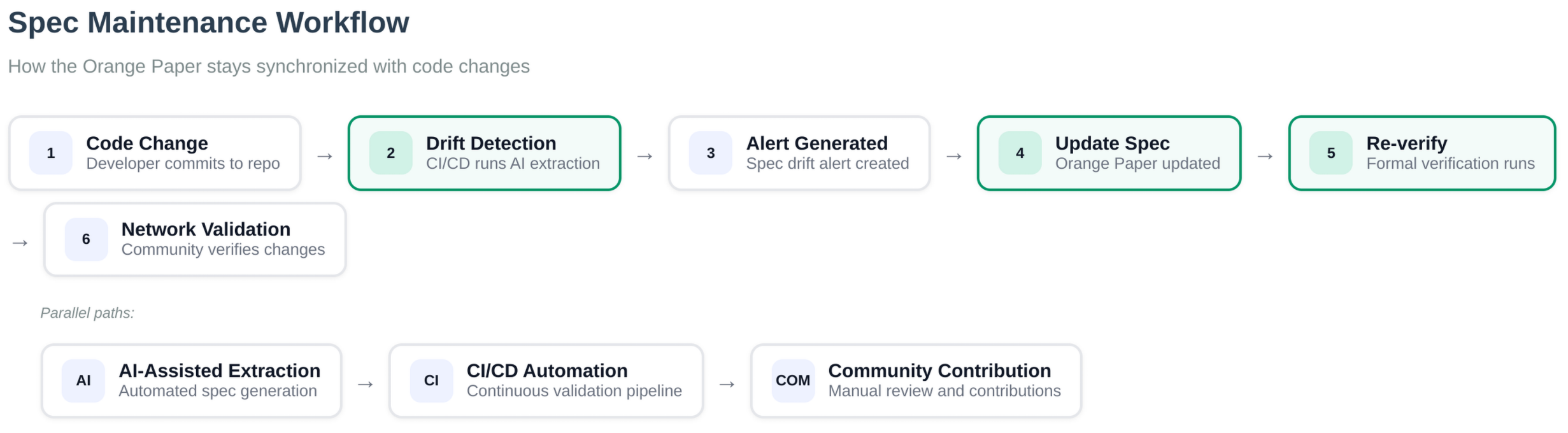 Figure: Specification maintenance workflow showing how changes are detected, verified, and integrated.
BIP implementation
Consensus integrates consensus-critical BIPs in validation paths, for example BIP30/34/66/90/147 in block connection and script verification. Activation heights and network variants are coordinated with blvm-protocol network parameters.
Performance
Consensus hot paths support PGO builds (./scripts/pgo-build.sh in blvm-consensus), batch script verification, and optimization passes. Optimize after correctness gates; measure on your workload.
Mathematical protection mechanisms and formal properties are documented in Mathematical Specifications.
Dependencies
Declare versions from blvm-consensus Cargo.toml. blvm-primitives supplies shared types; consensus re-exports many for API stability.
Source code
| Area | Repository path |
|---|---|
| Crate root | blvm-consensus |
| Transactions / scripts | src/transaction.rs, src/script/ |
| Blocks / chain | src/block/ |
| Economic rules | src/economic.rs |
| Mempool rules | src/mempool.rs |
| Mining helpers | src/mining.rs |
| SegWit / Taproot | src/segwit.rs |
| Optimizations | src/optimizations.rs |
See Also
- API Index: Consensus functions
- Formal Verification: Methodology
- Mathematical Specifications: Formal properties
- Orange Paper: Normative spec
Mathematical Specifications
Canonical spec: The Orange Paper on thebitcoincommons.org (Consensus Spec). This page is an in-book digest of formal properties and notation used when reasoning about blvm-consensus, checked by tests and BLVM Specification Lock, not a substitute for the full commons spec.
Overview
Bitcoin Commons documents Orange Paper-aligned mathematical specifications for consensus behavior. The Rust code implements this spec, checked by tests and BLVM Specification Lock on spec-locked functions. Proof scope: proof limitations.
Specification Format
Mathematical specifications use formal notation to define consensus rules:
- Quantifiers: Universal (∀) and existential (∃) quantifiers
- Functions: Mathematical function definitions
- Invariants: Properties that must always hold
- Constraints: Bounds and limits
Core Specifications
Chain Selection
Mathematical Specification:
∀ chains C₁, C₂: work(C₁) > work(C₂) ⇒ select(C₁)
Invariants:
- Selected chain has maximum cumulative work
- Work calculation is deterministic
- Empty chains are rejected
- Chain work is always non-negative
Key functions:
should_reorganize: Longest-work selectioncalculate_chain_work: Cumulative work calculationexpand_target: Difficulty target edge cases (see also PoW specs)
Block Subsidy
Mathematical Specification:
∀ h ∈ ℕ: subsidy(h) = 50 * 10^8 * 2^(-⌊h/210000⌋) if ⌊h/210000⌋ < 64 else 0
Invariants:
- Subsidy halves every 210,000 blocks
- Subsidy is non-negative
- Subsidy decreases monotonically
- Total supply converges to 21 million BTC
Total Supply
Mathematical Specification:
∀ h ∈ ℕ: total_supply(h) = Σ(i=0 to h) subsidy(i)
Invariants:
- Total supply is monotonic (never decreases)
- Total supply is bounded (≤ 21 * 10^6 * 10^8 satoshis)
- Total supply converges to 21 million BTC
Difficulty Adjustment
Mathematical Specification:
target_new = target_old * (timespan / expected_timespan)
timespan_clamped = clamp(timespan, expected/4, expected*4)
Invariants:
- Target is always positive
- Timespan is clamped to [expected/4, expected*4]
- Difficulty adjustment is deterministic
Consensus Threshold
Mathematical Specification:
required_agreement_count = ceil(total_peers * threshold)
consensus_met ⟺ agreement_count >= required_agreement_count
Invariants:
1 <= required_agreement_count <= total_peersagreement_count >= required⟺ratio >= threshold- Integer comparison is deterministic
Median Calculation
Mathematical Specification:
median(tips) = {
 tips[n/2] if n is odd,
 (tips[n/2-1] + tips[n/2]) / 2 if n is even
}
Invariants:
min(tips) <= median <= max(tips)- Median is deterministic
- Checkpoint = max(0, median - safety_margin)
Proof of Work
Mathematical Specification:
∀ header H: CheckProofOfWork(H) = SHA256(SHA256(H)) < ExpandTarget(H.bits)
Target compression/expansion:
∀ bits ∈ [0x03000000, 0x1d00ffff]:
 Let expanded = expand_target(bits)
 Let compressed = compress_target(expanded)
 Let re_expanded = expand_target(compressed)

 Then:
 - re_expanded ≤ expanded (compression truncates, never increases)
 - re_expanded.0[2] = expanded.0[2] ∧ re_expanded.0[3] = expanded.0[3]
 - Precision loss in words 0, 1 is acceptable (compact format limitation)
Invariants:
- Hash must be less than target for valid proof of work
- Target expansion handles edge cases correctly
- Target compression preserves significant bits (words 2, 3) exactly
- Difficulty adjustment respects bounds [0.25, 4.0]
- Work calculation is deterministic
Key functions:
check_proof_of_work: hash vs targetexpand_target/compress_target: compact difficulty encodingget_next_work_required: difficulty adjustment bounds
Transaction Validation
Mathematical Specification:
∀ tx ∈ 𝒯𝒳: CheckTransaction(tx) = valid ⟺
 (|tx.inputs| > 0 ∧ |tx.outputs| > 0 ∧
 ∀o ∈ tx.outputs: 0 ≤ o.value ≤ M_max ∧
 |tx.inputs| ≤ M_max_inputs ∧ |tx.outputs| ≤ M_max_outputs ∧
 |tx| ≤ M_max_tx_size)
Invariants:
- Valid transactions have non-empty inputs and outputs
- Output values are bounded [0, MAX_MONEY]
- Input/output counts and transaction size respect limits
- Coinbase transactions have special validation rules
Key functions:
check_transaction: structural validitycheck_tx_inputs: input checks including coinbaseis_coinbase: coinbase detection
Block Connection
Mathematical Specification:
∀ block B, UTXO set US, height h: ConnectBlock(B, US, h) = (valid, US') ⟺
 (ValidateHeader(B.header) ∧
 ∀ tx ∈ B.transactions: CheckTransaction(tx) ∧ CheckTxInputs(tx, US, h) ∧
 VerifyScripts(tx, US) ∧
 CoinbaseOutput ≤ TotalFees + GetBlockSubsidy(h) ∧
 US' = ApplyTransactions(B.transactions, US))
Invariants:
- Valid blocks have valid headers and transactions
- UTXO set consistency is preserved
- Coinbase output respects economic rules
- Transaction application is atomic
Key functions:
connect_block: full block validationapply_transaction: UTXO updatescalculate_tx_id: transaction id
Specification Coverage
Functions with Specifications
Multiple functions have formal mathematical specifications:
- Chain selection (
should_reorganize,calculate_chain_work) - Block subsidy (
get_block_subsidy) - Total supply (
total_supply) - Difficulty adjustment (
get_next_work_required,expand_target) - Transaction validation (
check_transaction,check_tx_inputs) - Block validation (
connect_block,apply_transaction) - Script execution (
eval_script,verify_script) - Consensus threshold (
find_consensus) - Median calculation (
determine_checkpoint_height)
Mathematical Protections
Integer-Based Arithmetic
Floating-point arithmetic replaced with integer-based calculations:
#![allow(unused)]
fn main() {
// Integer-based threshold calculation
let required_agreement_count = ((total_peers as f64) * threshold).ceil() as usize;
if agreement_count >= required_agreement_count {
 // Consensus met
}
}
Runtime Assertions
Runtime assertions verify mathematical invariants:
- Threshold calculation bounds
- Consensus result invariants
- Median calculation bounds
- Checkpoint bounds
Checked Arithmetic
Checked arithmetic prevents overflow/underflow:
#![allow(unused)]
fn main() {
// Median calculation with overflow protection
let median_tip = if sorted_tips.len() % 2 == 0 {
 let mid = sorted_tips.len() / 2;
 let lower = sorted_tips[mid - 1];
 let upper = sorted_tips[mid];
 (lower + upper) / 2 // Safe: Natural type prevents overflow
} else {
 sorted_tips[sorted_tips.len() / 2]
};
}
How verification applies
BLVM Specification Lock uses Z3 to prove spec-locked functions against Orange Paper contracts. The symbolic specs on this page are not each a separate Z3 theorem; methodology, CI, and tooling live on Formal Verification. Proof bounds: proof limitations.
Property-based tests and runtime assertions (below) complement spec-lock on the same invariants.
Documentation
Consensus repository references (see consensus docs index):
- verification policy: how to run verification and what is in scope
- proof limitations: proof bounds, coverage, and protections beyond formal verification
Components
The mathematical specifications system includes formal notation, invariants, integer-based arithmetic, runtime assertions, and checked arithmetic on consensus paths. Verification tooling and CI: Formal Verification and Testing Infrastructure.
Source
See Also
- Consensus Overview: Consensus layer introduction
- Formal Verification: BLVM Specification Lock methodology
- Orange Paper: Normative specification on Bitcoin Commons
- Property-Based Testing: Property-based testing
Formal Verification
How BLVM checks consensus against the Orange Paper: spec-lock methodology, coverage, CI gates, and tooling. For what blvm-consensus implements and how it relates to the spec, see Consensus Overview.
BLVM Specification Lock binds #[spec_locked] Rust functions to Orange Paper contracts and discharges obligations with Z3. Empirical layers (testing, differential testing, fuzz, MIRI) stress the same surface from complementary angles. Together: Rust + Tests + Math Specs = Source of Truth.
Inventory and verification policy: consensus verification guide, spec-lock coverage inventory, and proof limitations.
What formal verification delivers
readable math IR] ANN["#[spec_locked]
contracts on code"] Z3[Z3 discharge] DRIFT[Spec drift check] CI[CI merge gate] OP --> ANN ANN --> Z3 OP --> DRIFT Z3 --> CI DRIFT --> CI
A human-auditable source of meaning. Consensus rules live in the Orange Paper first. Reviewers, including mathematicians who never read the node, can argue about subsidy, PoW, and script semantics in the same language the proofs use.
Proofs locked to the functions they protect. Annotation with #[spec_locked] attaches Orange Paper contracts to concrete Rust. Change the code, and the obligations travel with it: proofs are not a detached appendix that drifts from the implementation.
Machine-checked alignment on merge. Z3 verifies those contracts on every change. CI runs check-drift then verify on self-hosted runners, so a PR that softens a rule or breaks a proven invariant fails the gate instead of shipping as “still green on unit tests.”
Growing, measurable coverage. Spec-lock covers 251 #[spec_locked] functions across the stack (240 in blvm-consensus, 5 in blvm-node, 6 in blvm-protocol) and ~433 parseable obligations (reconfirm with cargo spec-lock coverage).
Confidence to evolve. Proven bounds feed optimization passes. Refactors and performance work land against the same contracts. Future implementations can share the Orange Paper as common IR; each codebase earns trust by locking to that IR, not by copying another node’s source.
A full assurance stack. Specification Lock answers: does this function still mean what the Orange Paper says? Property tests, fuzzing, MIRI, and differential testing against Bitcoin Core answer complementary questions about edge cases, undefined behavior, and historical mainnet agreement. Each layer strengthens the others; none is ornamental.
Consensus verification operates on public block data. Secret-path constant-time cryptography (signing, ECDH, MuSig secrets) lives in blvm-secp256k1, a deliberate split so conformance proofs and timing discipline each have the right home.
Verification Stack
Layer 1: Empirical Testing
- Unit tests: Broad coverage across consensus modules and public APIs
- Property-based tests: Randomized testing with
proptestto discover edge cases - Integration tests: Cross-system validation between consensus components
Layer 2: Symbolic Verification
- BLVM Specification Lock: Z3-backed proofs on spec-locked functions
- Mathematical specifications: in-book digest and Orange Paper contracts
- State space exploration: Paths relevant to spec-lock contracts
Layer 3: CI Enforcement
- Automated testing: Required for merge
- BLVM Specification Lock: Required on merge; see verification policy
- OpenTimestamps audit logging: Optional timestamps of verification artifacts
Verify JSON semantics (blvm-spec-lock)
cargo spec-lock verify emits structured status per function. Failed means the proof obligation did not pass: CI gates on these when strict mode is enabled. Partial marks obligations demoted or skipped (timeout, translation gap, advisory tier): read the log and verify JSON format for jq filters; treat Passed under explicit policy as the release signal.
Verification Statistics
Formal Proofs
BLVM Specification Lock runs a single verify pass over all spec-locked functions and merged F_* formula registry rows.
Coverage snapshot (count #[spec_locked] in source; re-run cargo spec-lock coverage for contract totals):
| Crate | Spec-locked functions |
|---|---|
| blvm-consensus | 240 |
| blvm-node | 5 |
| blvm-protocol | 6 |
| Total | 251 |
Parseable obligations: ~433 (reconfirm with cargo spec-lock coverage --spec-path …).
Verification Command (clone blvm-spec next to the crate so ../blvm-spec exists, or set SPEC_LOCK_SPEC_PATH):
# Install CLI (matches library floor; picks latest published 0.1.x)
cargo install blvm-spec-lock --version '>=0.1, <1' --locked --features z3

export SPEC_LOCK_STRICT=1
export SPEC_LOCK_Z3_TIMEOUT_SECS=120   # overrides --timeout when set

cargo spec-lock check-drift \
  --crate-path . \
  --spec-path ../blvm-spec/PROTOCOL.md ../blvm-spec/ARCHITECTURE.md \
  --scoped-unparseables

cargo spec-lock verify \
  --crate-path . \
  --spec-path ../blvm-spec/PROTOCOL.md ../blvm-spec/ARCHITECTURE.md \
  --timeout 120 \
  --format human \
  --json-out spec_lock_verify.json
Common filters (same verify subcommand):
cargo spec-lock verify --name get_block_subsidy --crate-path . --spec-path ../blvm-spec/PROTOCOL.md
cargo spec-lock verify --section 6.1 --crate-path . --spec-path ../blvm-spec/PROTOCOL.md
cargo spec-lock verify --subsystem economic --crate-path . --spec-path ../blvm-spec/PROTOCOL.md
There is no --tier flag. CI runs one full verify pass on self-hosted runners ([self-hosted, Linux, X64, builds]): check-drift (with --scoped-unparseables, and --scoped-formulas when the installed CLI supports it), then verify with --json-out. See the consensus CI workflow and spec-lock dependency guide.
Proof rigor (policy classification, not separate runner pools): verification-tiers.toml groups functions by expected proof depth:
- Tier 1: Full Z3 body proof required (subsidy, PoW, reorg primitives)
- Tier 2: Invariant + proptest coverage for complex bodies
- Tier 3: Differential equivalence harnesses (crypto backends, FFI boundaries)
Local development uses the same verify command as CI. For property tests, fuzz, MIRI, and the full test matrix, see Testing Infrastructure.
CI Integration
The Verify / verify jobs in blvm-consensus, blvm-node, and blvm-protocol CI are the authoritative cargo-spec-lock gates. Optional umbrella workflow_dispatch mirrors exist for multi-repo workspace checkouts.
- Unit & Property Tests (required in each crate CI):
cargo test --all-features - BLVM Specification Lock (required where
#[spec_locked]is enabled):check-driftthenverifyper the spec-lock dependency guide - OpenTimestamps Audit (non-blocking: consensus umbrella CI parity / monorepo only where enabled)
Run commands locally: Testing Infrastructure. Other subcommands: coverage, summary, list, check-formulas, verify-formulas. Full CLI reference: blvm-spec-lock.
Network Protocol Verification
blvm-protocol uses the same BLVM Specification Lock machinery for wire messages: headers, checksums, size limits, and round-trip properties for the message types in scope.
Proof targets: Header layout (magic, command, length, checksum), checksum validation, size limits, parse(serialize(msg)) == msg for covered messages.
Wire message groups (verification scope): Group A: Version, VerAck, Ping, Pong. Group B: Transaction, Block, Headers, Inv, GetData, GetHeaders. (This grouping is for protocol verification only, not governance tiers.)
Use the verify feature for full protocol verification builds; see protocol overview.
Consensus Coverage Comparison
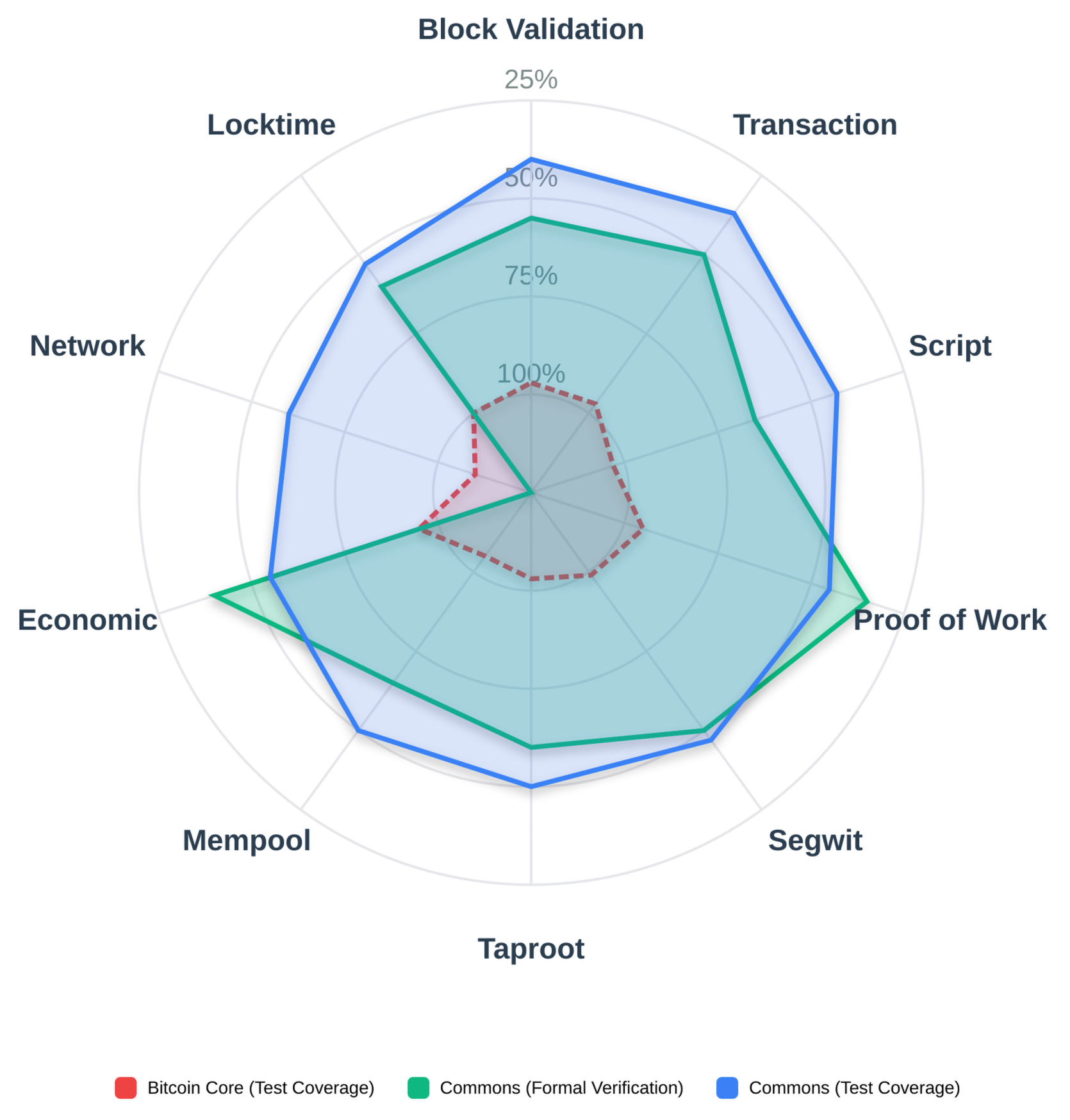 Figure: Baseline: broad tests and review. Bitcoin Commons adds BLVM Specification Lock and Orange Paper-driven methodology on top.
Proof Maintenance Cost
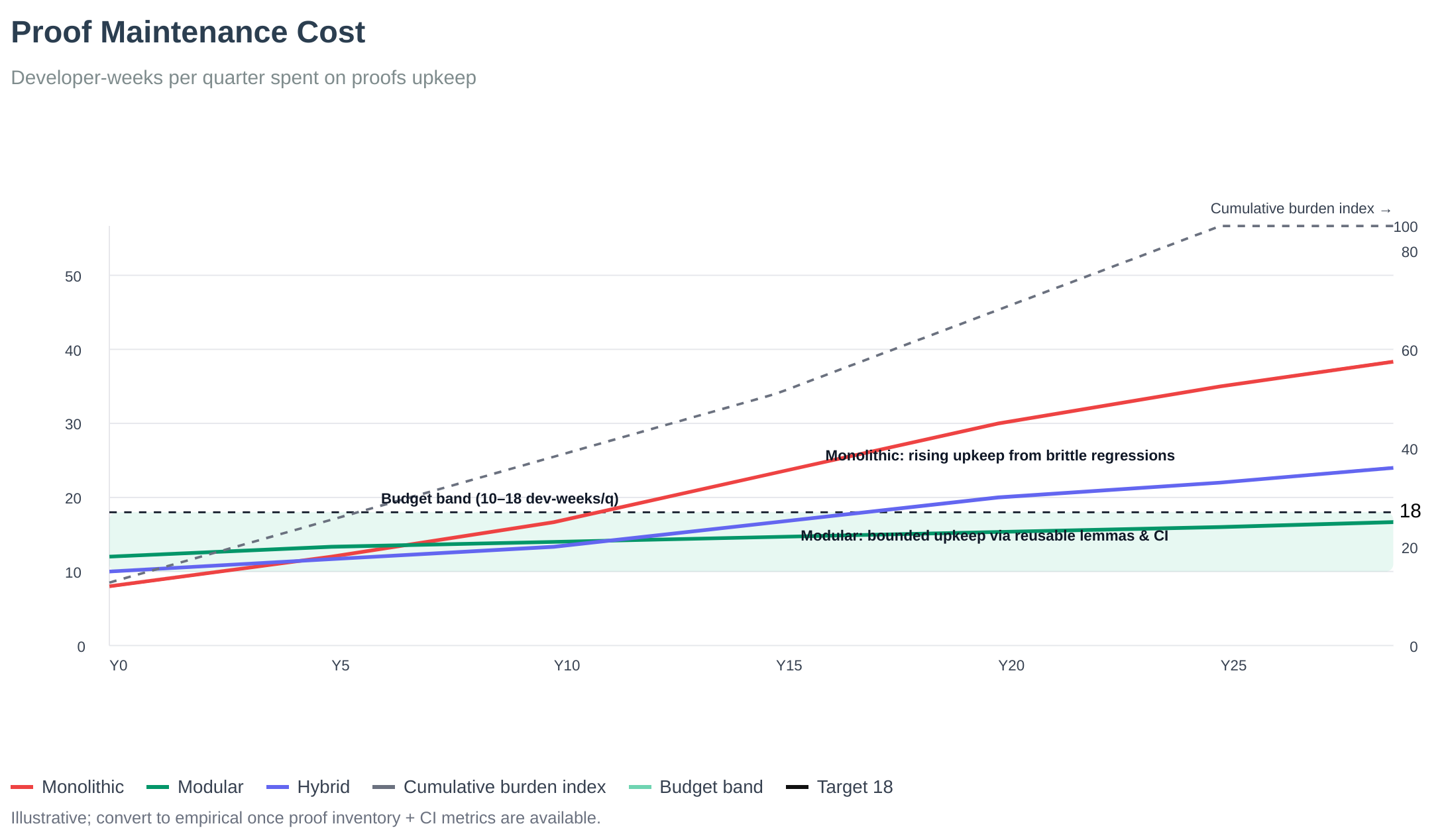 Figure: Proof maintenance cost: proofs changed per change by area; highlights refactor hotspots.
Spec Drift vs Test Coverage
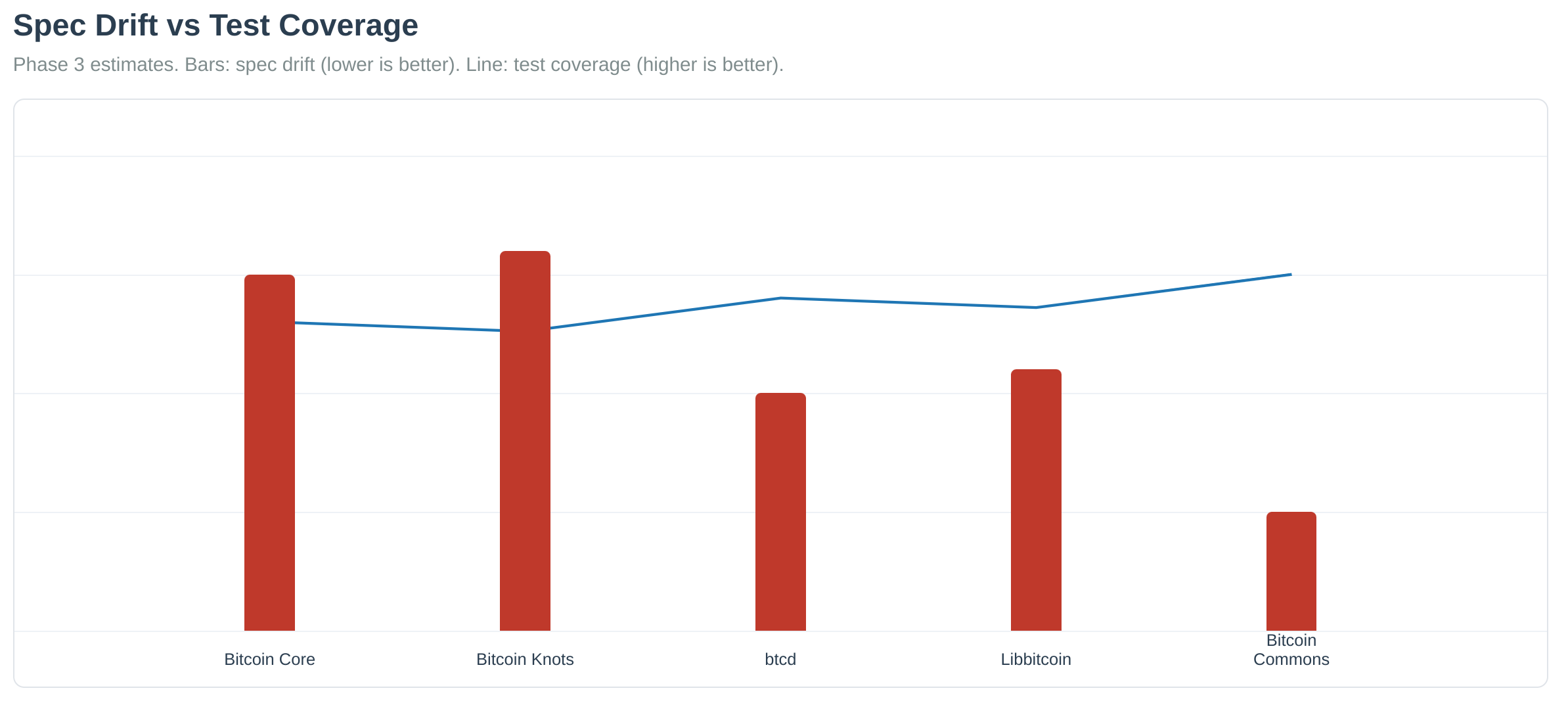 Figure: Spec drift decreases as test coverage increases. Higher test coverage reduces the likelihood of specification drift over time.
See also Network Protocol for transport and wire-format documentation.
Policy and inventory: verification policy and proof limitations. Formal properties per rule: Mathematical Specifications.
Source
- Consensus CI workflow (Verify job; MIRI when nightly is available)
See Also
- Consensus Overview: What the consensus layer implements
- Mathematical Specifications: Mathematical spec details
- Property-Based Testing: Property-based testing
- Differential Testing: BLVM vs Bitcoin Core
- Fuzzing: Fuzzing infrastructure
- Testing Infrastructure: Complete testing overview
Protocol Layer Overview
The protocol layer (blvm-protocol) abstracts Bitcoin protocol for multiple variants and protocol evolution. It sits between the pure mathematical consensus rules (blvm-consensus) and the Bitcoin node implementation (blvm-node), supporting mainnet, testnet, regtest, and future protocol variants.
Architecture Position
Stack layer 3: protocol abstraction between blvm-consensus and blvm-node.
1. Orange Paper (mathematical foundation)
2. blvm-consensus (pure math implementation)
3. blvm-protocol (Bitcoin abstraction) ← THIS CRATE
4. blvm-node (full node implementation)
5. blvm-sdk (developer toolkit)
6. blvm-commons (governance enforcement)
Full stack: Stack overview.
Protocol Variants
The protocol layer supports multiple Bitcoin network variants:
| Variant | Network Name | Magic (hex) | Default P2P | Default RPC (blvm) | Purpose |
|---|---|---|---|---|---|
| BitcoinV1 | mainnet | f9beb4d9 | 8333 | 8332 | Production Bitcoin network |
| Testnet3 | testnet | 0b110907 | 18333 | 18332 | Bitcoin test network |
| Regtest | regtest | fabfb5da | 18444 | 18443 | Regression testing network |
Network Parameters
Each variant also defines genesis block hash, difficulty targets, halving interval (210,000 blocks), and feature activation heights (SegWit, Taproot).
Core Components
Protocol Engine
The BitcoinProtocolEngine is the main interface:
#![allow(unused)]
fn main() {
pub struct BitcoinProtocolEngine {
 version: ProtocolVersion,
 network_params: NetworkParams,
 config: ProtocolConfig,
}
}
Features:
- Protocol variant selection
- Network parameter access
- Feature flag management
- Validation rule enforcement
Network Messages
Supports Bitcoin P2P protocol messages:
Core Messages:
Version,VerAck- Connection handshakeAddr,GetAddr- Peer address managementInv,GetData,NotFound- Inventory managementBlock,Tx- Block and transaction relayGetHeaders,Headers,GetBlocks- Header synchronizationPing,Pong- Connection keepaliveMemPool,FeeFilter- Mempool synchronization
BIP152 (Compact Block Relay):
SendCmpct- Compact block negotiationCmpctBlock- Compact block transmissionGetBlockTxn,BlockTxn- Transaction reconstruction
FIBRE Protocol:
FIBREPacket- High-performance relay protocol- Packet format and serialization
- Performance optimizations
Governance Messages:
- Governance messages via P2P protocol
- Message format and routing
- Integration with governance system
Commons Extensions:
GetUTXOSet,UTXOSet- UTXO commitment protocolGetFilteredBlock,FilteredBlock- Spam-filtered blocksGetBanList,BanList- Distributed ban list sharing
Service Flags
Service flags indicate node capabilities:
Standard Flags:
NODE_NETWORK- Full node with all blocksNODE_WITNESS- SegWit supportNODE_COMPACT_FILTERS- BIP157/158 supportNODE_NETWORK_LIMITED- Pruned node
Commons Flags:
NODE_UTXO_COMMITMENTS- UTXO commitment supportNODE_BAN_LIST_SHARING- Ban list sharingNODE_FIBRE- FIBRE protocol supportNODE_DANDELION- Dandelion++ privacy relayNODE_PACKAGE_RELAY- BIP331 package relay
Validation Rules
Protocol-specific validation rules:
- Size Limits: Block (4MB), transaction (1MB), script (10KB)
- Feature Flags: SegWit, Taproot, RBF support
- Fee Rules: Minimum and maximum fee rates
- DoS Protection: Message size limits, address count limits
Commons-Specific Extensions
UTXO Commitments
Protocol messages for UTXO set synchronization:
GetUTXOSet- Request UTXO set at specific heightUTXOSet- UTXO set response with merkle proof
Filtered Blocks
Spam-filtered block relay for efficient syncing:
GetFilteredBlock- Request filtered blockFilteredBlock- Filtered block with spam transactions removed
Ban List Sharing
Distributed ban list management:
GetBanList- Request ban listBanList- Ban list response with signatures
BIP Support
Compact block relay (BIP152)
Short transaction IDs and block reconstruction (SendCmpct, CmpctBlock). See Network messages above.
Client-side block filtering (BIP157/158)
GCS compact block filters and filter header chain. Node handlers and UTXO-commitment integration: BIP158 in UTXO Commitments.
Implemented Bitcoin Improvement Proposals:
- BIP152: Compact Block Relay: above
- BIP157: Client-side Block Filtering: above
- BIP158: Compact Block Filters: above
- BIP173/350/351: Bech32/Bech32m Address Encoding
- BIP70: Payment Protocol
Protocol Evolution
The protocol layer supports protocol evolution:
- Version Support: Multiple protocol versions
- Feature Management: Enable/disable features based on version
- Breaking Changes: Track and manage protocol evolution
- Backward Compatibility: Maintain compatibility with existing nodes
- Wire and transport: P2P message formats and Bitcoin-compatible peer behavior live in blvm-protocol; the reference node delivers them over transports (TCP by default; optional QUIC-based paths where features enable them). Treat encrypted Bitcoin P2P (BIP324) and other transport experiments as build- and release-specific, see
blvm-protocolandblvm-nodefeatures and release notes rather than assuming one global default.
Usage Example
#![allow(unused)]
fn main() {
use blvm_protocol::{BitcoinProtocolEngine, ProtocolVersion};

// Create a mainnet protocol engine
let engine = BitcoinProtocolEngine::new(ProtocolVersion::BitcoinV1)?;

// Get network parameters
let params = engine.get_network_params();
println!("Network: {}", params.network_name);
println!("Port: {}", params.default_port);

// Check feature support
if engine.supports_feature("segwit") {
 println!("SegWit is supported");
}
}
Source
- network_params.rs
- lib.rs
- network.rs (
NetworkMessage), wire/mod.rs (command names and serialization) - service_flags.rs
- validation.rs
- commons.rs (message structs); utxo_commitments/mod.rs (UTXO commitment protocol)
- commons.rs (
GetFilteredBlockMessage,FilteredBlockMessage) - commons.rs (
GetBanListMessage,BanListMessage) - bip157.rs
See Also
- Network Protocol - Transport abstraction, wire framing, and message types
- Protocol Specifications - BIP implementations
- Node Configuration - Configuring protocol variants
Network Protocol
Bitcoin P2P wire format and framing in blvm-protocol. For the protocol engine, variants, message catalog, service flags, and BIPs: Protocol Overview. For transports (TCP, Quinn, Iroh), transport_preference, and the NetworkManager: Transport Abstraction. For operator bind addresses and CLI defaults: Node Configuration.
Bitcoin wire and framing (blvm-protocol)
blvm-protocol owns Bitcoin P2P message framing (message type, length, payload, checksum) and related helpers. For TCP, entry points such as node_tcp tie that logic to the node’s socket path. Treat blvm-protocol src/ as the source of truth rather than this summary.
Wire envelope
| Field | Size | Role |
|---|---|---|
| Magic | 4 bytes | Separates mainnet / testnet / regtest on the wire |
| Command | 12 bytes | NUL-padded ASCII (version, inv, block, …) |
| Length | 4 bytes | Payload size (LE uint32) |
| Checksum | 4 bytes | Integrity check on payload |
| Payload | variable | Serialized per command |
Implementation: blvm-protocol wire layer.
Network identifiers on the wire
Magic bytes and default P2P/RPC ports per variant: Protocol overview: Protocol variants.
Message taxonomy
Handshake, inventory, sync, relay, keepalive, and Commons extension commands: Protocol overview: Network messages.
See Also
- Protocol Overview - Protocol layer introduction
- Transport Abstraction - TCP, Quinn, and Iroh transports
- Node Configuration - Network and transport configuration
- Protocol Specifications - BIP implementations
Node Implementation Overview
The node implementation (blvm-node) is a minimal reference Bitcoin node: it adds only non-consensus infrastructure on top of the consensus and protocol layers. Treat mainnet and high-value deployments like any consensus-adjacent system, hardening, monitoring, and review are required. Consensus logic comes from blvm-consensus, and protocol abstraction from blvm-protocol.
Release mainnet IBD: First Node Setup: Mainnet IBD.
Architecture
The node follows a layered architecture:
P2P networking, peer management] SL[Storage Layer
Block/UTXO storage] RS[RPC Server
JSON-RPC 2.0 API] MM[Module Manager
Process-isolated modules] MP[Mempool Manager
Transaction mempool] MC[Mining Coordinator
Block template generation] PP[Payment Processor
CTV support] end PROTO[blvm-protocol
Protocol abstraction] CONS[blvm-consensus
Consensus validation] NM --> PROTO SL --> PROTO MP --> PROTO MC --> PROTO PP --> PROTO PROTO --> CONS MM --> NM MM --> SL MM --> MP RS --> SL RS --> MP RS --> MC
Key Components
Network Manager
- P2P protocol implementation (Bitcoin wire protocol)
- Multi-transport support (TCP, Quinn QUIC, Iroh)
- Peer connection management
- Message routing and relay
- Privacy protocols (Dandelion++ when
dandelionfeature enabled; FIBRE viablvm-fibremodule) - Package relay (BIP331)
Storage Layer
- Database abstraction with multiple backends (see Storage Backends)
- Bitcoin Core drop-in: one-time import from a synced Core datadir into
<datadir>/blvm/when therocksdbfeature is enabled (see Operations: Starting from a Core datadir) - Automatic backend fallback on failure
- Block storage and indexing
- UTXO set management
- Chain state tracking
- Transaction indexing
- Pruning support
RPC Server
- JSON-RPC 2.0 compliant API (see RPC API Reference)
- Bearer token RBAC (
tokens,admin_tokens) and HTTP Basic (username,password) for ckpool / Core-style clients - Optional REST
/api/v1/*when built withrest-apiand[rest_api].enabled(separate bind; off by default: see RPC API: REST) - Optional JSON-RPC over QUIC / HTTP/3 (see RPC API: QUIC)
- Authentication and rate limiting
- Method coverage
Module System
- Process-isolated modules (see Module System Architecture)
- IPC communication (Unix domain sockets, see Module IPC Protocol)
- Security sandboxing
- Permission-based API access
- Hot reload support
Mempool Manager
- Transaction validation and storage
- Fee-based transaction selection
- RBF (Replace-By-Fee) support with 4 configurable modes (Disabled, Conservative, Standard, Aggressive)
- Mempool policies and limits
- Transaction expiry
- Advanced indexing (address and value range indexing)
Mining Coordinator
- Block template generation (RPC)
- Stratum V2 (optional
blvm-stratum-v2module)
Payment Processing
- CTV (CheckTemplateVerify) payment state machine when
ctvcompile-time feature is enabled - BIP70 HTTP payment RPC when
bip70-httpis in the binary (blvmdefault features; omitted from portable release builds: see Installation) - Lightning Network via optional
blvm-lightningmodule (not core node RPC) - Payment vaults / covenant tooling in
blvm-nodepayment layer (CTV-gated at runtime)
Governance Integration
- Optional
[governance]configuration (e.g. Commons URL, relay toggles) andNODE_GOVERNANCEP2P capability for extensions such as ban list sharing - Module-visible governance events (proposal lifecycle, webhooks, fork detection) for optional out-of-process modules
Design Principles
- Zero Consensus Re-implementation: All consensus logic delegated to blvm-consensus
- Protocol Abstraction: Uses blvm-protocol for variant support (mainnet, testnet, regtest)
- Pure Infrastructure: Adds storage, networking, RPC, orchestration only
- Feature-complete infrastructure: Full node-style behavior (storage, P2P, RPC, modules) with performance optimizations; not a substitute for operational security review before production
Features
Network Features
- Multi-transport architecture (TCP, QUIC)
- Transaction relay (Dandelion++; FIBRE via
blvm-fibremodule) - High-performance block relay (FIBRE module)
- Package relay (BIP331)
- UTXO commitments (compile-time feature in release binaries; enable at runtime when used)
- Peer consensus protocol, spam filtering (bandwidth optimization during sync)
- LAN peering system (automatic local network discovery for faster IBD when LAN peers exist)
- Parallel IBD with optional IBD UTXO engine (
BLVM_IBD_ENGINE=1)
Storage Features
- Multiple database backends with abstraction layer (
auto→ heed3 (LMDB) in typical release builds; optional RocksDB, redb, sled, tidesdb) - Common on-disk chain layouts via RocksDB backend
- Automatic backend fallback on failure
- Pruning support
- Advanced transaction indexing (address and value range indexes)
- UTXO set management
Security Features
- IBD bandwidth protection (per-peer/IP/subnet limits, reputation scoring)
Module Features
- Process isolation
- IPC communication
- Security sandboxing
- Hot reload
- Module registry
Mining Features
- Block template generation
- Stratum V2 protocol (optional
blvm-stratum-v2module) - Merge mining (optional
blvm-merge-miningplugin) - Mining pool coordination
Payment Features
- Lightning Network via optional
blvm-lightningmodule - CTV payment vaults and covenant proofs (requires
ctvfeature at build time) - BIP70 payment RPC (requires
bip70-httpin the binary) - Payment state machines (BIP70 / on-chain verify paths)
Integration Features
- Governance webhook integration
- ZeroMQ notifications (optional
blvm-zmqmodule: see ZMQ module) - Optional REST
/api/v1/*(same caveats as RPC Server) - Module registry (P2P discovery)
Node Lifecycle
- Initialization: Load configuration, initialize storage, create network manager
- Startup: Connect to P2P network, discover peers, load modules
- Sync: Download and validate blockchain history
- Running: Validate blocks/transactions, relay messages, serve RPC requests
- Shutdown: Graceful shutdown of all components
Metrics and Monitoring
The node includes metrics collection:
- Network Metrics: Peer count, bytes sent/received, connection statistics
- Storage Metrics: Block count, UTXO count, database size
- RPC Metrics: Request count, error rate, response times
- Performance Metrics: Block validation time, transaction processing time
- System Metrics: CPU usage, memory usage, disk I/O
Source
- network/mod.rs (module root), network_manager.rs (connection and message handling)
- mod.rs
- mod.rs
- manager.rs
- mempool.rs
- miner.rs
- mod.rs
- config/governance.rs, network/peer_manager.rs (
governancefeature), P2P governance extensions - mod.rs
- metrics.rs
See Also
- Installation - Installing the node
- Quick Start - Running your first node
- Node Configuration - Configuration options
- Node Operations - Node management and operations
- RPC API Reference - JSON-RPC API documentation
- Mining Integration - Mining functionality
- Module System - Module system architecture
- Storage Backends - Storage backend details
Node Operations
Operational guide for running and maintaining a BLVM node.
Operations runbook
| Task | Section |
|---|---|
| Start regtest / testnet / mainnet | Starting the Node |
| Import Bitcoin Core datadir | Starting from a Bitcoin Core datadir |
| Graceful shutdown | Maintenance: Updates (stop before upgrade; RPC stop or SIGTERM) |
| Backup datadir | Maintenance: Backup |
| Mainnet first sync | First Node Setup: Mainnet IBD |
| RPC hardening before exposure | Deployment posture |
| IBD stuck / slow | Troubleshooting: Mainnet IBD |
Starting the Node
Basic Startup
# Regtest mode (default, safe for development)
blvm

# Testnet mode
blvm --network testnet

# Mainnet: first sync: see First Node Setup (IBD example config), not bare mainnet
# blvm --network mainnet
With Configuration
blvm --config blvm.toml
Starting from a Bitcoin Core datadir
Use when Core is fully synced and you want the same tip without full IBD.
Stop bitcoind before migrate or start against a Core datadir. Running both nodes against the same chainstate can corrupt data.
auto-migrate on first start"] CHOICE -->|Explicit| MAN["blvm migrate core --verify
then start --data-dir .../blvm"] AUTO --> OUT["UTXO + indexes → datadir/blvm/"] MAN --> OUT OUT --> BLOCKS["blocks/ stays in Core path
BLVM reads block files in place"] BLOCKS --> KEEP[Do not delete blocks/ while node runs]
# Recommended: auto-migrate on start → ~/.bitcoin/blvm/
blvm start --network mainnet --data-dir ~/.bitcoin
On first start BLVM detects the Core layout, migrates once into <datadir>/blvm/, then opens the BLVM store. Block files are not copied by default: BLVM keeps reading bodies from Core blocks/ (~700 GB stays in one place). Only the UTXO set and indexes are converted into BLVM format (~15-30 GB under blvm/).
# Optional: explicit migrate with verify, then start the BLVM store
blvm migrate core --source ~/.bitcoin --destination ~/.bitcoin/blvm \
 --network mainnet --verify
blvm start --network mainnet --data-dir ~/.bitcoin/blvm
What gets migrated
| Core path | Migrated? | Notes |
|---|---|---|
chainstate/ (UTXO) | Yes → blvm/ | One-time convert; ~12 GB on mainnet |
blocks/blk*.dat | No (default) | BLVM reads in place; do not delete blocks/ |
blocks/index/ | Partial | Height/header metadata copied when readable |
Keep Core blocks/ on disk unless you explicitly copied block bodies into the BLVM store. Deleting blocks/ while BLVM reads them in place will break the node.
After a successful migrate you may delete Core chainstate/ (~12 GB) if you will not run bitcoind on that datadir again.
Flags and settings
| Flag / setting | Effect |
|---|---|
--no-auto-migrate | Skip Core import on start |
--migrate-destination PATH | BLVM store path (default <datadir>/blvm) |
--migrate-core-only | Migrate and exit |
storage.auto_migrate_core = false | Same as --no-auto-migrate |
storage.reuse_core_block_files = false | Copy block bodies into BLVM store (large disk use) |
BLVM_REUSE_CORE_BLOCK_FILES=0 | Same as reuse_core_block_files = false |
BLVM_CORE_MIGRATE_BLOCK_WORKERS / BLVM_CORE_MIGRATE_BLOCK_BATCH | Parallel block read tuning |
Requires the rocksdb Cargo feature (blvm default features; omitted from portable Windows/aarch64 release builds). Config and ENV details: Bitcoin Core drop-in, Storage Backends.
Verify: --verify on blvm migrate core; regtest test core_drop_in (fixture: blvm-node/scripts/gen-core-regtest-fixture.sh); mainnet smoke: blvm-node/scripts/core-drop-in-mainnet-smoke.sh.
Node Lifecycle
The node follows a lifecycle with multiple states and transitions.
Sync state machine
State descriptions:
| State | Meaning |
|---|---|
| Initial | Startup; components initializing |
| Headers | Downloading and validating block headers |
| Blocks | Downloading and validating full blocks |
| Synced | Caught up; normal relay and RPC |
| Error | Recoverable or fatal fault (logged) |
State transitions are managed by the SyncStateMachine (Initial → Headers → Blocks → Synced). Progress weighting in UI/logs uses ~30% at headers complete and ~60% at blocks complete before full sync.
Initial sync checklist
When starting for the first time, the node will:
- Initialize Components: Storage, network, RPC, modules
- Connect to P2P Network: Discover peers via DNS seeds or persistent peers
- Download Headers: Request and validate block headers
- Download Blocks: Request and validate blocks
- Build UTXO Set: Construct UTXO set from validated blocks
- Sync to Current Height: Continue until caught up with network
Running State
Once synced, the node maintains:
- Peer Connections: Active P2P connections
- Block Validation: Validates and relays new blocks (via blvm-consensus)
- Transaction Processing: Validates and relays transactions
- Chain State Updates: Updates chain tip and height
- RPC Requests: Serves JSON-RPC API requests
- Health Monitoring: Periodic health checks
Health States
The node tracks health status for each component:
- Healthy: Component operating normally
- Degraded: Component functional but with issues
- Unhealthy: Component not functioning correctly
- Down: Component not responding
Error Recovery
The node implements graceful error recovery:
- Network Errors: Automatic reconnection with exponential backoff
- Storage Errors: Timeout protection, graceful degradation
- Validation Errors: Logged and reported, node continues operation
- Disk Space: Periodic checks with warnings
Monitoring
Health Checks
# CLI health check (uses JSON-RPC getblockchaininfo on the configured RPC address)
blvm health
# Mainnet node:
blvm --network mainnet --rpc-addr 127.0.0.1:8332 health

# HTTP health on the RPC port (GET: same port as JSON-RPC)
curl -s http://127.0.0.1:8332/health # mainnet: quick status
curl -s http://127.0.0.1:18332/health # testnet
curl -s http://127.0.0.1:18443/health # regtest
curl -s http://127.0.0.1:18443/health/live # liveness (same body as /health)
curl -s http://127.0.0.1:18443/health/ready # readiness (healthy only)
curl -s http://127.0.0.1:18443/health/detailed # full gethealth JSON

# Prometheus metrics (GET /metrics: requires auth when [rpc_auth] is enabled)
curl -s http://127.0.0.1:8332/metrics

# JSON-RPC node health extension (blvm-node; not Bitcoin Core): use your RPC port
curl -X POST http://127.0.0.1:18443 \
 -H "Content-Type: application/json" \
 -d '{"jsonrpc": "2.0", "method": "gethealth", "params": [], "id": 1}'

# JSON-RPC metrics extension (blvm-node; not Bitcoin Core)
curl -X POST http://127.0.0.1:18443 \
 -H "Content-Type: application/json" \
 -d '{"jsonrpc": "2.0", "method": "getmetrics", "params": [], "id": 1}'

# JSON-RPC blockchain info
curl -X POST http://127.0.0.1:8332 \
 -H "Content-Type: application/json" \
 -d '{"jsonrpc": "2.0", "method": "getblockchaininfo", "params": [], "id": 1}'
Logging
The node uses structured logging. Set log level via environment variable:
# Set log level
RUST_LOG=info blvm

# Debug mode
RUST_LOG=debug blvm

# Trace all operations
RUST_LOG=trace blvm
Maintenance
Database Maintenance
The node automatically maintains block storage, UTXO set, chain indexes, and transaction indexes.
Backup
Regular backups recommended:
# Backup data directory
tar -czf blvm-backup-$(date +%Y%m%d).tar.gz /var/lib/blvm
Updates
When updating the node:
- Stop the node gracefully
- Backup data directory
- Download new binary from GitHub Releases
- Replace old binary with new one
- Restart node
Troubleshooting
See Troubleshooting for detailed solutions to common issues.
Source
See Also
- Node Configuration - Configuration options
- Node Overview - Node architecture and features
- RPC API Reference - Complete RPC API documentation
- Troubleshooting - Common issues and solutions
- Performance Optimizations - Performance tuning
Node Configuration
BLVM node configuration supports different use cases.
Protocol Variants
The node supports multiple Bitcoin protocol variants: Regtest (default, regression testing network for development), Testnet3 (Bitcoin test network), and BitcoinV1 (production Bitcoin mainnet). See Protocol Variants for details.
Configuration Precedence
CLI > ENV > config file > defaults
Environment variables (e.g. BLVM_DATA_DIR, BLVM_IBD_EVICTION) override config file values. See Environment variables in the configuration reference for the full list. Some options (relay, fibre, dandelion) are config-file-only; use CLI flags like --enable-dandelion for common overrides.
Network defaults (blvm binary, no --rpc-addr override)
| Network | protocol_version | P2P (--listen-addr) | RPC (--rpc-addr) |
|---|---|---|---|
| Mainnet | BitcoinV1 | 0.0.0.0:8333 | 127.0.0.1:8332 |
| Testnet | Testnet3 | 0.0.0.0:18333 | 127.0.0.1:18332 |
| Regtest (CLI default) | Regtest | 0.0.0.0:18444 | 127.0.0.1:18443 |
Separate data_dir per network. REST bind (when enabled) derives from RPC port: 8080 (mainnet), 18080 (testnet), 28443 (regtest).
Path Expansion
Config path fields (storage.data_dir, modules.modules_dir, ibd.dump_dir, etc.) support ~ expansion to the home directory when loading from file. Example: data_dir = "~/.local/share/blvm-mainnet" resolves to /home/user/.local/share/blvm-mainnet on Unix.
Configuration File
Create a blvm.toml configuration file. Keys are top-level or in nested tables such as [storage]: there is no [network] wrapper.
RPC bind address is set by the blvm binary (--rpc-addr / BLVM_RPC_ADDR), not by a port/host table. The optional [rpc] table holds RPC server limits only (e.g. max_request_size_bytes, IP rate limits). Auth uses [rpc_auth]. See the configuration reference.
# P2P listen address (NodeConfig library default: 127.0.0.1:8333; `blvm` CLI without config file uses network-aware ports)
listen_addr = "127.0.0.1:8333"

# TOML uses serde enum tags (lowercase, no underscore): tcponly, irohonly, quinnonly, hybrid, all
# The `blvm` CLI and BLVM_NODE_TRANSPORT accept forms like tcp_only
transport_preference = "tcponly"

max_peers = 100
protocol_version = "BitcoinV1" # mainnet-style; use "Regtest" / Testnet3 naming per protocol variant docs
enable_self_advertisement = true

[storage]
data_dir = "/var/lib/blvm"
database_backend = "auto" # auto | rocksdb | tidesdb | heed3 | redb | sled: see storage docs

# Optional: RPC limits only (not bind address)
# [rpc]
# max_request_size_bytes = 1048576
Defaults (two layers):
blvmoperator binary (no config file): default networkregtest. RPC when--rpc-addris omitted: mainnet127.0.0.1:8332, testnet127.0.0.1:18332, regtest127.0.0.1:18443(Core-aligned). P2P: mainnet0.0.0.0:8333, testnet0.0.0.0:18333, regtest0.0.0.0:18444. Override with--listen-addr/BLVM_LISTEN_ADDRand--rpc-addr/BLVM_RPC_ADDR.NodeConfiglibrary default (used when embeddingblvm-node):listen_addrlocalhost8333,protocol_version"BitcoinV1",transport_preferenceTCP-only,max_peers100.
Configuration is organized in logical sections (storage, ibd, modules, optional [stratum_v2], etc.) in the node codebase. Initial block download uses parallel IBD only.
Bitcoin Core bitcoin.conf versus BLVM
BLVM does not read bitcoin.conf. Runtime configuration is blvm.toml / JSON, blvm CLI, and BLVM_* environment variables.
Bitcoin Core (bitcoin.conf or CLI) | BLVM |
|---|---|
rpcuser / rpcpassword | [rpc_auth].username / password (HTTP Basic; password auto-granted admin), or tokens / admin_tokens with Authorization: Bearer … |
rpcbind / rpcport | blvm --rpc-addr / BLVM_RPC_ADDR |
port (P2P) | listen_addr (top-level TOML) or --listen-addr |
addnode= | persistent_peers or the addnode RPC after startup |
To draft a blvm.toml from a Core config file, use blvm config convert-core <path/to/bitcoin.conf> (or the convert-bitcoin-core-config shell/Rust tools in the blvm-node repo). Review and normalize the output: remove legacy [network] wrappers and nested [transport_preference] blobs. [rpc_auth].username / password are valid for HTTP Basic (map from Core rpcuser / rpcpassword), or use tokens / admin_tokens for Bearer auth: see the blvm-node Integration Guide: Migrating from bitcoin.conf. Always wire --rpc-addr and set storage.data_dir separately.
IBD Configuration
Default mode = "parallel". LAN peers are auto-preferred for download. On WAN-only sync, parallel mode uses multi-peer work-stealing; set BLVM_IBD_WAN_SINGLE_PEER=1 to force a single download peer. Overrides: BLVM_IBD_PEERS, BLVM_IBD_MODE, BLVM_IBD_ENGINE. First sync: First Node Setup: Mainnet IBD. Engine details: IBD UTXO engine.
[ibd]
chunk_size = 128
max_blocks_in_transit_per_peer = 128
download_timeout_secs = 30
mode = "parallel"
eviction = "fifo"
headers_timeout_secs = 30
headers_max_failures = 10
ENV: BLVM_IBD_*: see configuration reference.
Protocol Limits
Tune P2P message limits for constrained networks:
[protocol_limits]
max_protocol_message_length = 33554432 # 32 MB default
max_addr_to_send = 1000
max_inv_sz = 50000
max_headers_results = 2000
Environment Variables
You can also configure via environment variables (ENV overrides config file):
export BLVM_NETWORK=testnet
export BLVM_DATA_DIR=/var/lib/blvm
# Use the RPC socket your node binds (example: mainnet 8332; testnet 18332; regtest 18443)
export BLVM_RPC_ADDR=127.0.0.1:8332
export BLVM_IBD_EVICTION=dynamic
export BLVM_NETWORK_TARGET_PEER_COUNT=125
Common ENV vars: BLVM_DATA_DIR, BLVM_NETWORK, BLVM_LISTEN_ADDR, BLVM_RPC_ADDR, BLVM_LOG_LEVEL, BLVM_NODE_MAX_PEERS, BLVM_IBD_*, BLVM_NETWORK_TARGET_PEER_COUNT, BLVM_REQUEST_*, BLVM_MODULE_MAX_*, RPC_AUTH_TOKENS, COMMONS_API_KEY, RUST_LOG.
See Environment variables for the complete list.
Command Line Options
Precedence: CLI > ENV > config file > defaults
Global Options
| Option | Short | Default | Description |
|---|---|---|---|
--network | -n | regtest | Network: regtest, testnet, mainnet |
--rpc-addr | -r | network-aware when omitted | RPC bind: mainnet 127.0.0.1:8332; testnet 127.0.0.1:18332; regtest 127.0.0.1:18443 |
--listen-addr | -l | network-aware when omitted | P2P listen: mainnet 0.0.0.0:8333, testnet 0.0.0.0:18333, regtest 0.0.0.0:18444 |
--data-dir | -d | : | Data directory (overrides ENV and config) |
--config | -c | : | Configuration file path (TOML or JSON) |
--verbose | -v | false | Enable verbose logging |
--no-auto-migrate | false | Do not auto-migrate from a Bitcoin Core datadir on start (requires rocksdb) | |
--migrate-destination | : | BLVM store path when auto-migrating from Core (default: <datadir>/blvm) | |
--migrate-core-only | false | Migrate from Core datadir and exit (no P2P/RPC start; requires rocksdb) |
Feature Flags
--enable-stratum-v2, --enable-dandelion, --enable-sigop and corresponding --disable-* flags (each requires that compile-time feature in the binary).
BIP158: --enable-bip158 / --disable-bip158 adjust logged preference only, compact block filter code is compiled without a separate bip158 Cargo feature (present in typical blvm / blvm-node builds).
REST API: enable in blvm.toml with [rest_api].enabled = true (requires rest-api in the binary). Binds a separate loopback port (default 8080 when RPC is 8332, 18080 when RPC is 18332, otherwise RPC port + 10000: e.g. 28443 for regtest 18443). See RPC API: REST.
Advanced Options
--assumevalid, --noassumevalid, --assumeutxo, --target-peer-count, --async-request-timeout, --module-max-cpu-percent, --module-max-memory-bytes.
Commands
start (default), status, health, version, chain, peers, network, sync, config show|validate|path|set|convert-core, configpath <module> (offline module config path), load / unload / reload / module list (admin RPC to a running node), migrate core (requires rocksdb), rpc, plus dynamic module CLI (e.g. blvm sync-policy list when selective-sync is loaded). Remote subcommands use [rpc_auth] from the same --config as the node (admin Bearer token or Basic password).
blvm --network mainnet -d /var/lib/blvm
blvm migrate core --source ~/.bitcoin --destination ~/.bitcoin/blvm --network mainnet --verify
blvm start --data-dir ~/.bitcoin --migrate-core-only # migrate only, then exit
blvm config show
blvm status --rpc-addr 127.0.0.1:8332
Bitcoin Core drop-in
BLVM does not read Core chainstate in place. With rocksdb, a synced Core --data-dir triggers one-time migration into <datadir>/blvm/ unless disabled. After migrate, point --data-dir at the BLVM store or keep the Core path (node opens blvm/ when marked).
Default behavior: migrate UTXOs and indexes only; do not copy Core blocks/ (~700 GB on mainnet). BLVM reads block bodies from the original Core blocks/ directory via a fallback reader. Set storage.reuse_core_block_files = false (or BLVM_REUSE_CORE_BLOCK_FILES=0) only if you want a self-contained BLVM store that duplicates block files.
| Mechanism | Purpose |
|---|---|
--data-dir / BLVM_DATA_DIR | Core path for detect/migrate, or BLVM store after migrate |
--no-auto-migrate | Skip auto-import |
--migrate-destination | Override <datadir>/blvm |
--migrate-core-only | Migrate and exit |
blvm migrate core | Explicit import (--verify optional) |
[storage]
auto_migrate_core = true
# core_migrate_destination = "/var/lib/blvm-mainnet"
# reuse_core_block_files = true # default; set false to copy block bodies into BLVM store
ENV and reference: Configuration Reference (storage.auto_migrate_core, storage.reuse_core_block_files, BLVM_*). Operator flow: Operations. Storage details: Storage Backends. Map Core datadir= via blvm config convert-core: see bitcoin.conf vs BLVM.
Storage Backends
The node uses multiple storage backends with automatic fallback:
Database Backends
- auto (default): Resolve by build features, heed3 when
heed3feature enabled, then RocksDB, TidesDB, Redb, Sled (see Configuration Reference) - rocksdb, tidesdb, redb, sled: Force a specific backend (see Storage Backends);
automatchesdefault_backend()order in code
Storage Configuration
[storage]
data_dir = "/var/lib/blvm"
database_backend = "auto" # or "rocksdb", "tidesdb", "heed3", "redb", "sled"

[storage.cache]
block_cache_mb = 100
utxo_cache_mb = 50
header_cache_mb = 10

# Pruning uses PruningConfig: see configuration reference. Example: normal mode with ~288 recent blocks
[storage.pruning]
mode = { type = "normal", keep_from_height = 0, min_recent_blocks = 288 }
auto_prune = true
min_blocks_to_keep = 144
Backend Selection
When database_backend = "auto", the node selects by build features: heed3 (LMDB, if heed3 feature enabled: default), then RocksDB, TidesDB, Redb, Sled. Falls back to the next option if the preferred backend is unavailable.
Cache Configuration
Storage cache sizes can be configured:
- Block / UTXO / header cache: See Configuration Reference for canonical defaults (e.g. 100 / 50 / 10 MB).
Pruning
Pruning reduces storage requirements by trimming old block data. PruningConfig defaults in code use an aggressive-style mode with UTXO-commitment expectations; validate your build features (utxo-commitments for aggressive) or choose type = "normal" / type = "disabled" explicitly. See configuration reference and blvm-node pruning examples.
[storage.pruning]
mode = { type = "disabled" }
auto_prune = false
min_blocks_to_keep = 144
Note: Pruning reduces storage but limits ability to serve historical blocks to peers.
Network Configuration
Transport Options
Configure transport selection at the top level of blvm.toml (see Transport Abstraction):
# File (TOML): serde tags: tcponly | irohonly | quinnonly | hybrid | all
transport_preference = "tcponly"
Mapping (CLI / ENV vs config file):
- TOML/JSON on
NodeConfig: lowercase enum tags as above (tcponly, …). blvmflags /BLVM_NODE_TRANSPORT: e.g.tcp_only,iroh_only,hybrid(seeblvm --help).
Available Transport Options:
- TCP-only (
tcponlyin file): default, Bitcoin P2P compatible - Iroh-only (
irohonly): requiresirohfeature - Quinn-only (
quinnonly): requiresquinnfeature - Hybrid (
hybrid): TCP + Iroh; requiresirohfeature - All (
all): requires bothquinnandirohfeatures
Feature Requirements:
irohfeature: Enables Iroh QUIC transport with NAT traversalquinnfeature: Enables standalone Quinn QUIC transport
RBF Configuration
Configure Replace-By-Fee (RBF) behavior with 4 modes: Disabled, Conservative, Standard (default), and Aggressive.
RBF Modes
Disabled: No RBF replacements allowed
[rbf]
mode = "disabled"
Conservative: Strict rules with higher fee requirements
[rbf]
mode = "conservative"
min_fee_rate_multiplier = 2.0
min_fee_bump_satoshis = 5000
min_confirmations = 1
max_replacements_per_tx = 3
cooldown_seconds = 300
Standard (default): BIP125-compliant RBF
[rbf]
mode = "standard"
min_fee_rate_multiplier = 1.1
min_fee_bump_satoshis = 1000
Aggressive: Relaxed rules for miners
[rbf]
mode = "aggressive"
min_fee_rate_multiplier = 1.05
min_fee_bump_satoshis = 500
allow_package_replacements = true
See RBF and Mempool Policies for complete configuration guide.
Advanced Indexing
Enable address and value range indexing for efficient queries:
[storage.indexing]
enable_address_index = true
enable_value_index = true
strategy = "eager" # or "lazy"
max_indexed_addresses = 0 # 0 = unlimited
enable_compression = false # zstd index blobs; requires compression (blvm default features)
background_indexing = false # lazy only: index on txindex-bg thread
Module Configuration
Configure process-isolated modules. There is no hardcoded default module list in the node: copy pins from blvm.toml.example or set your own. An empty pin map auto-discovers modules already on disk under modules_dir (no HTTP bootstrap).
[modules]
enabled = true # Enable module system (default: true)
modules_dir = "modules" # Directory containing module binaries (default: "modules")
data_dir = "data/modules" # Directory for module data/state (default: "data/modules")
socket_dir = "data/modules/sockets" # Directory for IPC sockets (default: "data/modules/sockets")
registry_url = "https://raw.githubusercontent.com/BTCDecoded/blvm/main/registry/modules.json"
# Version pins (wildcard or exact semver). Omit pins to load on-disk modules only.
blvm-miniscript = "0.1.*"
# When a module needs spawn overrides, put the pin in its table as `version`:
[modules.blvm-zmq]
version = "0.1.*"
hashblock = "tcp://127.0.0.1:28332"
# Legacy unpinned allowlist: enabled_modules = ["blvm-miniscript"]
See Module System and node modules README for bootstrap and registry details. ZMQ topic endpoints: ZMQ module.
Module resource limits (optional) use the [module_resource_limits] table on NodeConfig, not [modules.resource_limits]:
[module_resource_limits]
default_max_cpu_percent = 50
default_max_memory_bytes = 536870912
default_max_file_descriptors = 256
default_max_child_processes = 10
module_startup_wait_millis = 100
module_socket_timeout_seconds = 5
module_socket_check_interval_millis = 100
module_socket_max_attempts = 50
See Module System for module configuration details.
See Also
- Node Overview - Node features and architecture
- Node Operations - Running and managing your node
- Storage Backends - Detailed storage backend information
- Transport Abstraction - Transport options
- Network Protocol - Protocol variants and network configuration
- Configuration Reference - Complete configuration reference
- Getting Started - Installation guide
- Troubleshooting - Common configuration issues
RPC API Reference
BLVM node provides both a JSON-RPC 2.0 interface (conventional Bitcoin RPC surface) and a modern REST API for interacting with the node.
On this page: API Overview · Connection · Authentication · JSON-RPC over QUIC · Methods operators use most · Core parity matrix · Available Methods · Errors · REST API
API Overview
- JSON-RPC 2.0: Methods aligned with widely documented Bitcoin node RPC docs. The
blvmbinary binds JSON-RPC to--rpc-addr/BLVM_RPC_ADDR. When omitted, RPC is network-aware: mainnet127.0.0.1:8332, testnet127.0.0.1:18332, regtest127.0.0.1:18443(Core-aligned). - REST API (optional): Requires
rest-apifeature and[rest_api].enabled = trueinblvm.toml. Binds a separate port (default 8080 when RPC is 8332, 18080 when RPC is 18332, otherwise RPC port + 10000). See REST API.
Connection
Use the same host:port you configure as --rpc-addr / BLVM_RPC_ADDR. Defaults: mainnet http://127.0.0.1:8332, testnet http://127.0.0.1:18332, regtest http://127.0.0.1:18443. There is no separate RPC port key in NodeConfig. See Node Configuration.
Authentication
Configure RPC authentication with [rpc_auth]. Two common patterns:
Bearer tokens (wallets, automation):
[rpc_auth]
required = true
tokens = ["your-long-random-token"]
admin_tokens = ["admin-token-for-mining-rpcs"] # optional; mining/destructive methods
Pass Authorization: Bearer <token> on each request. Tokens in tokens alone are read-only unless also listed in admin_tokens.
HTTP Basic (ckpool, Bitcoin Core-style tools, curl -u):
[rpc_auth]
required = true
username = "ckpool"
password = "your-long-random-secret"
The password is registered as admin automatically (required for getblocktemplate / submitblock). Bind RPC to loopback (--rpc-addr 127.0.0.1:8332): Basic auth is cleartext on the wire.
Optional: token_file, certificates, RPC_AUTH_TOKENS. [rpc] in NodeConfig is only for limits / rate limits, not credentials.
TLS client certificates are supported when QUIC transport and certificate fingerprints are configured (certificates in [rpc_auth]).
See RPC transport × authentication and Deployment posture.
JSON-RPC over QUIC (HTTP/3)
Bitcoin Commons optionally serves JSON-RPC over HTTP/3 on QUIC (Quinn + h3) alongside the default TCP HTTP server. Both paths share RpcServer and RpcAuthManager.
Authentication: Send Authorization: Bearer … on HTTP/3 requests; rpc_auth.required and token configuration match TCP HTTP. Read RPC transport × authentication before exposing QUIC RPC beyond localhost.
When to use: High-throughput internal services where clients support QUIC and you want built-in TLS without a separate layer.
When not to use: Most ecosystem tooling assumes TCP HTTP to port 8332 (mainnet), 18332 (testnet), or 18443 (regtest). Prefer TCP for scripts, curl, and Core-compatible clients.
Enable QUIC RPC
QUIC RPC requires the quinn feature:
[dependencies]
blvm-node = { path = "../blvm-node", features = ["quinn"] }
cargo build --features quinn
Server setup
#![allow(unused)]
fn main() {
use blvm_node::rpc::RpcManager;
use std::net::SocketAddr;

let tcp_addr: SocketAddr = "127.0.0.1:8332".parse().unwrap();
let quinn_addr: SocketAddr = "127.0.0.1:18332".parse().unwrap();

#[cfg(feature = "quinn")]
let mut rpc_manager = RpcManager::with_quinn(tcp_addr, quinn_addr);

// Or enable after creation:
// let mut rpc_manager = RpcManager::new(tcp_addr);
// #[cfg(feature = "quinn")]
// rpc_manager.enable_quinn(quinn_addr);

rpc_manager.start().await?;
}
QuinnRpcServer generates self-signed certificates for development; production deployments need proper certificate management. QUIC adds transport encryption; same security boundaries as TCP RPC (no wallet access).
QUIC client (example)
#![allow(unused)]
fn main() {
use quinn::Endpoint;
use std::net::SocketAddr;

let server_addr: SocketAddr = "127.0.0.1:18332".parse().unwrap();
let endpoint = Endpoint::client("0.0.0.0:0".parse().unwrap())?;
let connection = endpoint.connect(server_addr, "localhost")?.await?;
let (mut send, mut recv) = connection.open_bi().await?;

let request = r#"{"jsonrpc":"2.0","method":"getblockchaininfo","params":[],"id":1}"#;
send.write_all(request.as_bytes()).await?;
send.finish().await?;

let mut response = Vec::new();
recv.read_to_end(&mut response).await?;
}
Source: QUIC RPC, quinn_server.rs.
Example Requests
Get Blockchain Info
# Mainnet 8332; testnet 18332; regtest 18443
curl -X POST http://localhost:8332 \
 -H "Content-Type: application/json" \
 -d '{
 "jsonrpc": "2.0",
 "method": "getblockchaininfo",
 "params": [],
 "id": 1
 }'
Get Block
# Mainnet 8332; testnet 18332; regtest 18443
curl -X POST http://localhost:8332 \
 -H "Content-Type: application/json" \
 -d '{
 "jsonrpc": "2.0",
 "method": "getblock",
 "params": ["000000000019d6689c085ae165831e934ff763ae46a2a6c172b3f1b60a8ce26f"],
 "id": 1
 }'
Get Network Info
# Mainnet 8332; testnet 18332; regtest 18443
curl -X POST http://localhost:8332 \
 -H "Content-Type: application/json" \
 -d '{
 "jsonrpc": "2.0",
 "method": "getnetworkinfo",
 "params": [],
 "id": 1
 }'
Methods operators use most
Fifteen RPC methods cover most operator, wallet, and mining workflows. Full catalog: Available Methods below.
| Method | Purpose |
|---|---|
getblockchaininfo | Chain, height, sync status |
getnetworkinfo | P2P connections, protocol version |
getpeerinfo | Per-peer details |
getrawtransaction | Fetch tx by txid (with index when enabled) |
sendrawtransaction | Broadcast signed tx to mempool |
testmempoolaccept | Dry-run mempool acceptance |
getmempoolinfo | Mempool size and limits |
getrawmempool | List mempool txids |
validateaddress | Decode / validate an address |
getblocktemplate | Mining template (admin auth) |
submitblock | Submit mined block (admin auth) |
getmininginfo | Mining / chain mining state |
estimatesmartfee | Fee estimation |
stop | Stop the node (admin) |
uptime | Node uptime seconds |
getblockchaininfo (example response fields)
{
 "chain": "regtest",
 "blocks": 1,
 "headers": 1,
 "bestblockhash": "...",
 "difficulty": 1.0,
 "chainwork": "...",
 "pruned": false
}
On regtest at genesis, "blocks": 0, "difficulty": 1.0, and "initialblockdownload": true are typical.
sendrawtransaction
Submit hex-encoded signed transaction. Returns txid on success; errors if policy or consensus rejects the tx.
# Testnet example (18332); regtest uses 18443, mainnet 8332
curl -X POST http://127.0.0.1:18332 \
 -H "Content-Type: application/json" \
 -d '{"jsonrpc":"2.0","method":"sendrawtransaction","params":["<hex>"],"id":1}'
Requires valid auth when [rpc_auth].required = true.
Bitcoin Core RPC parity (selected)
BLVM targets common Bitcoin Core JSON-RPC shapes for interoperability (ckpool, scripts, wallets). This is not a complete Core parity audit: verify critical paths for your deployment.
| Method | Core parity | Notes |
|---|---|---|
getblockchaininfo | High | Standard fields; network names align with BLVM networks |
getblock / getblockheader | High | Verbosity levels supported |
getrawtransaction | High | Needs tx index or mempool/chain lookup context |
sendrawtransaction | High | Standard policy + relay |
testmempoolaccept | High | Multiple-tx batch where implemented |
getmempoolinfo / getrawmempool | High | |
getnetworkinfo / getpeerinfo | High | |
validateaddress | High | |
getblocktemplate | High | ckpool / Stratum workflows |
submitblock | High | Mining submission |
generatetoaddress | Regtest only | Not on mainnet; requires protocol engine |
savemempool | Partial | Writes mempool.dat under datadir |
verifyonchainpayment / verifyonchainpaymentbytx | BLVM-specific | BIP70 / payment state machine |
meshsendpacket / meshpollreceived | Module | Requires blvm-mesh |
REST /api/v1/* | BLVM-specific | rest-api feature + [rest_api].enabled; separate bind: see REST API |
Ports: BLVM defaults RPC to 18332 (testnet) and 18443 (regtest, Core-aligned). Set --rpc-addr / BLVM_RPC_ADDR when you need a different bind.
Available Methods
Core JSON-RPC: 75 methods in CORE_RPC_METHODS (see blvm-node/src/rpc/methods.rs). Module RPC (mesh, miniscript overrides, etc.) registers at runtime.
Blockchain Methods
| Method | Description |
|---|---|
getblockchaininfo | Chain, height, IBD flag, best block |
getblock | Block by hash (verbosity levels) |
getblockhash | Hash at height |
getblockheader | Header by hash |
getbestblockhash | Best block hash |
getblockcount | Current height |
getdifficulty | Current difficulty |
gettxoutsetinfo | UTXO set statistics |
verifychain | Verify blockchain database |
getblockfilter | Block filter (BIP158) |
getindexinfo | Index status |
getblockchainstate | Extended chain state |
invalidateblock / reconsiderblock | Mark block invalid / reconsider |
waitfornewblock / waitforblock / waitforblockheight | Block wait helpers |
getchaintips | All known tips |
getchaintxstats | Confirmed tx statistics to height |
getblockstats | Per-block fees, sizes, counts |
getpruneinfo | Pruning state |
pruneblockchain | Prune to height (admin) |
loadtxoutset | Load UTXO snapshot from file |
Raw Transaction Methods
| Method | Description |
|---|---|
getrawtransaction | Transaction by txid |
sendrawtransaction | Submit to mempool |
testmempoolaccept | Policy / consensus dry-run |
decoderawtransaction / createrawtransaction | Decode / build raw hex |
gettxout | UTXO by outpoint |
gettxoutproof / verifytxoutproof | Merkle proof |
getdescriptorinfo | Descriptor metadata (needs blvm-miniscript) |
analyzepsbt | PSBT analysis (needs blvm-miniscript) |
Mempool Methods
| Method | Description |
|---|---|
getmempoolinfo | Mempool statistics |
getrawmempool | Txids or verbose entries |
savemempool | Write {datadir}/mempool.dat |
getmempoolancestors / getmempooldescendants | Dependency graph |
getmempoolentry | Single mempool entry |
Network Methods
| Method | Description |
|---|---|
getnetworkinfo | Network and client info |
getpeerinfo / getconnectioncount | Peers |
ping | Ping peers |
addnode / disconnectnode | Manual peer control |
getnettotals | Traffic totals |
setban / listbanned / clearbanned | Ban management |
getaddednodeinfo / getnodeaddresses | Manual / addrman entries |
setnetworkactive | Enable/disable P2P |
Mining Methods
| Method | Description |
|---|---|
getmininginfo | Mining status |
getblocktemplate | Block template (admin; ckpool) |
submitblock | Submit solved block (admin) |
estimatesmartfee | Fee estimate |
prioritisetransaction | Mempool priority (admin) |
generatetoaddress | Regtest mine to address (admin, regtest only) |
Module Methods
| Method | Description |
|---|---|
loadmodule / unloadmodule / reloadmodule | Lifecycle (admin) |
listmodules | Loaded modules |
getmoduleclispecs / runmodulecli | Module CLI via RPC (admin) |
Dynamic module RPC (mesh, miniscript overrides, …) registers at load time. See module pages and JSON-RPC error reference.
Control Methods
| Method | Description |
|---|---|
stop | Graceful shutdown (admin) |
uptime | Process uptime |
getmemoryinfo | Memory stats |
getrpcinfo | RPC server info |
help / logging | Help and log levels |
gethealth / getmetrics | blvm-node extensions (not Core) |
Mesh Methods
Requires blvm-mesh loaded.
| Method | Description |
|---|---|
meshsendpacket | Send mesh payload (hex bincode) |
meshpollreceived | Poll delivered packets |
meshquoteroute | Quote route cost |
meshrequesthopinvoice | Hop invoice for routing |
See Commons Mesh Module.
Address Methods
| Method | Description |
|---|---|
validateaddress | Address validity |
getaddressinfo | Detailed address info |
Transaction Methods
| Method | Description |
|---|---|
gettransactiondetails | Extended transaction view |
Payment Methods (BIP70)
Build / platform:
bip70-httprequires fullblvmfeatures; portable Windows/aarch64 CI builds omit it.ctvis a separate compile-time feature. See Installation.
| Method | Description |
|---|---|
createpaymentrequest | BIP70 payment request (bip70-http) |
verifyonchainpayment / verifyonchainpaymentbytx | On-chain payment verification |
verifycovenantproof | Covenant proof (ctv feature) |
Source of truth: blvm-node/src/rpc/methods.rs (CORE_RPC_METHODS).
Error Codes
BLVM uses standard JSON-RPC 2.0 codes, Bitcoin-style application codes (-1, -5, -25, -27), BLVM server codes (-32001), and HTTP 401/403/429 for auth, admin RBAC, and rate limits.
Full catalog: JSON-RPC error reference: every code, error.data fields, admin-only methods, and transport vs JSON-RPC shapes.
Quick reference
| Code | Meaning |
|---|---|
| -32700 … -32603 | JSON-RPC protocol errors |
| -1 | Tx already in chain or missing inputs (read message) |
| -5 | Block, transaction, or UTXO not found |
| -25 | Transaction rejected (policy / consensus / fee) |
| -27 | Transaction already in mempool |
| -32001 | Method requires unloaded module (e.g. miniscript) |
| HTTP 401 / 403 / 429 | Auth failure, non-admin privileged method, or rate limit |
Example JSON-RPC error
{
 "jsonrpc": "2.0",
 "error": {
 "code": -32602,
 "message": "Invalid params",
 "data": {
 "param": "blockhash",
 "reason": "Invalid hex string"
 }
 },
 "id": 1
}
Rate Limiting
Rate limiting is enforced per IP, per user, and per method:
- Authenticated users: 100 burst, 10 req/sec
- Unauthenticated: 50 burst, 5 req/sec
- Per-method limits: May override defaults for specific methods
Request/Response Format
Request Format
{
 "jsonrpc": "2.0",
 "method": "getblockchaininfo",
 "params": [],
 "id": 1
}
Response Format
Success Response:
{
 "jsonrpc": "2.0",
 "result": {
 "chain": "regtest",
 "blocks": 123456,
 "headers": 123456,
 "bestblockhash": "0000...",
 "difficulty": 4.656542373906925e-10
 },
 "id": 1
}
Error Response:
{
 "jsonrpc": "2.0",
 "error": {
 "code": -32602,
 "message": "Invalid params"
 },
 "id": 1
}
Batch Requests
Multiple requests can be sent in a single batch:
[
 {"jsonrpc": "2.0", "method": "getblockchaininfo", "params": [], "id": 1},
 {"jsonrpc": "2.0", "method": "getblockhash", "params": [100], "id": 2},
 {"jsonrpc": "2.0", "method": "getblock", "params": ["0000..."], "id": 3}
]
Responses are returned in the same order as requests.
Implementation Status
The RPC API implements JSON-RPC 2.0 methods documented in the Available Methods section above.
REST API
Overview
The REST API is a separate HTTP server from JSON-RPC (blvm-node/src/rpc/rest/). It requires the rest-api compile-time feature (included in blvm default features; omitted from portable Windows/aarch64 release builds).
Operator note: REST is off by default (
[rest_api].enabled = false). When enabled, it binds its own address (default loopback 8080 / 18080 from RPC port). Handler coverage matchesrest/server.rsrouting, not every function inrest/*.rs.
When enabled programmatically, REST binds its own address (tests use 127.0.0.1:8080). It does not share the JSON-RPC port (8332 / 18332 / 18443). HTTP GET /health on the RPC port is separate (see Node Operations).
Base URL (when running): http://<rest-bind>/api/v1/
Authentication
Same RpcAuthConfig / RpcAuthManager as JSON-RPC when the REST server is built with RestServer::with_auth(...) (Bearer tokens, HTTP Basic, admin tokens). If auth is enabled on that instance, unauthenticated requests receive 401 Unauthorized before route handlers run: same guard as JSON-RPC. When auth is disabled, REST accepts anonymous requests (still subject to per-IP rate limits). Embedders must call with_auth explicitly; default test servers may run without it.
Admin RBAC mirrors JSON-RPC admin_rpc_methods() via rest/rbac.rs: each REST path maps to an equivalent RPC method; privileged routes return 403 Forbidden for authenticated non-admin tokens. Examples: GET /api/v1/mining/block-template, POST /api/v1/node/stop, POST /api/v1/transactions. Non-admin POST routes include POST /api/v1/transactions/decode, …/test, POST /api/v1/chain/verify, and POST /api/v1/network/ping. Unmapped POST/DELETE paths (e.g. payment writes) fail closed (admin required).
Endpoints (wired in rest/server.rs)
Chain
GET /api/v1/chain/tip: Best block hashGET /api/v1/chain/height: Block heightGET /api/v1/chain/info: Blockchain state summaryGET /api/v1/chain/difficulty: Current difficultyGET /api/v1/chain/utxo-set: UTXO set summaryGET /api/v1/chain/tips: Known chain tipsGET /api/v1/chain/tx-stats?nblocks={n}: Transaction statisticsGET /api/v1/chain/prune-info: Pruning statusPOST /api/v1/chain/verify: Verify chain (optional JSON:checklevel,numblocks)POST /api/v1/chain/prune: Prune to height (JSON:height)
Indexes
GET /api/v1/indexes: Index status (optional?index={name})
Blocks
GET /api/v1/blocks/{hash}: Block by hashGET /api/v1/blocks/{hash}/header: Block headerGET /api/v1/blocks/{hash}/stats: Block statisticsGET /api/v1/blocks/{hash}/filter: Block filterGET /api/v1/blocks/{hash}/transactions: Block transactionsGET /api/v1/blocks/height/{height}: Block by heightPOST /api/v1/blocks/{hash}/invalidate: Invalidate block (admin)POST /api/v1/blocks/{hash}/reconsider: Reconsider block (admin)
Transactions
GET /api/v1/transactions/{txid}: Transaction detailsGET /api/v1/transactions/{txid}/confirmationsGET /api/v1/transactions/{txid}/outputs/{n}?include_mempool=true: Output detailsPOST /api/v1/transactions: Submit raw hex (body)POST /api/v1/transactions/test: Test mempool acceptancePOST /api/v1/transactions/decode: Decode raw hexPOST /api/v1/transactions/create: Create raw tx (JSON:inputs,outputs, optionallocktime,replaceable,version)
Addresses
GET /api/v1/addresses/{address}/balanceGET /api/v1/addresses/{address}/transactionsGET /api/v1/addresses/{address}/utxos
Mempool
GET /api/v1/mempool: List txids (verbosevia query where supported)GET /api/v1/mempool/transactions/{txid}: Mempool entryGET /api/v1/mempool/transactions/{txid}/ancestors: Ancestor txidsGET /api/v1/mempool/transactions/{txid}/descendants: Descendant txidsGET /api/v1/mempool/stats: Mempool info (maps togetmempoolinfo)POST /api/v1/mempool/save: Persist mempool to diskPOST /api/v1/mempool/transactions/{txid}/priority: Adjust effective fee (JSON:fee_delta; admin; maps toprioritisetransaction)
Network
GET /api/v1/network/infoGET /api/v1/network/peersGET /api/v1/network/connections/countGET /api/v1/network/connections/totalsGET /api/v1/network/nodes: Known nodesGET /api/v1/network/addresses: Network addressesGET /api/v1/network/bans: Ban listPOST /api/v1/network/ping: Ping peersPOST /api/v1/network/nodes: Add/remove node (JSON:address,command)POST /api/v1/network/active: Set network active (JSON:state)POST /api/v1/network/bans: Ban subnet (JSON body)DELETE /api/v1/network/nodes/{addr}: Disconnect nodeDELETE /api/v1/network/bans/{subnet}: Remove ban
Node
GET /api/v1/node/uptimeGET /api/v1/node/memoryGET /api/v1/node/rpc-infoGET /api/v1/node/help?command={name}GET /api/v1/node/loggingPOST /api/v1/node/stop: Stop node (admin)POST /api/v1/node/logging: Set logging categories (JSON body)
Mining
GET /api/v1/mining/infoGET /api/v1/mining/block-templatePOST /api/v1/mining/blocks: Submit block (JSON body)
Fees
GET /api/v1/fees/estimate?blocks=6: Smart fee estimate (default 6 blocks)
Payment / CTV (bip70-http, ctv)
When the REST server is running and payment state is configured:
GET|POST /api/v1/payments: List / create payment requestsGET /api/v1/payments/{id}: Payment statePOST /api/v1/payments/{id}/covenant: CTV covenant proof (ctvfeature)- Vault:
POST /api/v1/vaults,GET /api/v1/vaults/{id},POST …/unvault,POST …/withdraw - Pool:
POST /api/v1/pools,GET /api/v1/pools/{id},POST …/join,POST …/distribute - Batch:
POST /api/v1/batches,GET /api/v1/batches/{id},POST …/transactions,POST …/broadcast GET /api/v1/congestion: Congestion metrics
Legacy BIP70 HTTP also registers under /api/v1/payment/* when bip70-http is enabled.
Response format
Success and error envelopes use ApiResponse (status, data / error, request_id). See rest/types.rs.
Error codes
Standard HTTP status codes: 200, 400, 401, 404, 429, 500, 503 (feature or payment engine unavailable).
Source
- auth.rs
- server.rs
- types.rs
- rest/mod.rs
- rest/server.rs
- rest/types.rs
- rest/node.rs
- rest/blocks.rs
- rest/network.rs
- rest/payment.rs
- rest/vault.rs
- rest/pool.rs
- rest/congestion.rs
See Also
- Node Overview - Node implementation details
- Node Configuration - RPC configuration options
- JSON-RPC error reference - Error codes and HTTP auth failures
- Node Operations - Node management
- Getting Started - Quick start guide
- API Index - Cross-reference to all APIs
- Troubleshooting - Common RPC issues
- Commons Mesh Module - Payment endpoints and mesh networking
- Module System - Module architecture and IPC
Storage Backends
Overview
The node supports multiple database backends for persistent storage of blocks, UTXO set, and chain state. When database_backend = "auto" (the default), the backend is chosen by build features via default_backend(): not by host OS. heed3 (LMDB) wins when the heed3 feature is compiled in, then RocksDB, TidesDB, Redb, Sled. blvm / blvm-node Cargo.toml defaults enable heed3, so auto → heed3 on a normal local build and on Linux x86_64 release artifacts. Windows portable and Linux aarch64 cross-release builds include heed3 (bundled LMDB) plus redb/sled fallbacks: omit rocksdb and other native-heavy deps. There auto → heed3. See Configuration Reference.
Supported Backends
| Backend | Typical auto rank | Production | Core migrate | Notes |
|---|---|---|---|---|
| heed3 (LMDB) | 1st (default builds) | Yes | No | {datadir}/heed3/; needs liblmdb |
| rocksdb | 2nd | Yes | Yes | Explicit or fallback; needs libclang |
| tidesdb | 3rd | When enabled | No | Optional feature |
| redb | 4th (Windows portable) | Yes | No | Pure Rust |
| sled | Last | Dev / fallback | No | Not recommended for production |
rocksdb (optional; explicit config or fallback)
RocksDB remains available when the rocksdb feature is enabled (default builds include both heed3 and rocksdb). Use database_backend = "rocksdb" to keep or create a RocksDB store, or when migrating from Core LevelDB layouts:
- High performance for large chain state
- Interop: Can work with typical LevelDB-format chain state and
blk*.datlayouts where supported - Build: Requires system libclang / LLVM for the
librocksdb-sysstack - Feature:
rocksdb(on by default inblvm-node/blvmdefault features)
Note: RocksDB and erlay features are mutually exclusive in this tree (dependency conflicts).
redb (pure Rust)
redb is a production-ready embedded database. It is chosen by auto only when RocksDB and TidesDB are not in the build (or you set database_backend = "redb"):
- Pure Rust: No C dependencies
- ACID Compliance: Full ACID transactions
- Typical use:
--no-default-features/ minimal builds that omit RocksDB, or explicit operator choice
tidesdb
TidesDB is optional; in auto it is preferred over Redb/Sled only when RocksDB is not enabled. See crate features and Configuration Reference.
heed3 (LMDB mdb.master3)
heed3 wraps LMDB with MVCC concurrent readers (WithoutTls read transactions). Default backend when database_backend = "auto" in standard builds (heed3 feature enabled):
- MVCC: Many concurrent read transactions; single writer (LMDB model)
- rkyv UTXO encoding: Zero-copy field access from mmap'd pages (
storage/rkyv_codec.rs,storage/utxo_value_codec.rs) - Build: Requires system liblmdb
- Data directory:
{datadir}/heed3/ - Feature:
heed3(enabled in defaultblvm/blvm-nodefeatures)
LMDB map size defaults to 64 GiB (max(65536, dbcache_mb × 128) MB). Override only if you know your UTXO footprint:
[storage]
database_backend = "heed3"

[storage.heed3]
# map_size_mb = 65536 # default; required headroom for mainnet UTXO set
max_readers = 512
Existing RocksDB datadir: auto on a tree that already has {datadir}/rocksdb/ does not migrate it. Use a fresh datadir for heed3, or set database_backend = "rocksdb" to keep the existing store.
sled (Fallback)
sled is available as a fallback option:
- Beta Quality: Not recommended for production
- Pure Rust: No C dependencies
- Performance: Good for development and testing
- Storage: Key-value storage with B-tree indexing
Backend Selection
When database_backend = "auto", the node picks the first compiled-in backend below (not OS). Explicit values skip this chain.
Core chainstate import requires the rocksdb feature: use blvm migrate core / auto-migrate, independent of auto selection above.
Selection order (auto)
- heed3 / LMDB (if the
heed3feature is enabled: default in standard builds) - RocksDB (if the
rocksdbfeature is enabled) - TidesDB (if the
tidesdbfeature is enabled and neither heed3 nor RocksDB is) - Redb (if the
redbfeature is enabled and no higher-priority backend is) - Sled (if the
sledfeature is enabled and no other backend is)
At least one backend feature must be enabled at build time. If the chosen backend fails to open (e.g. missing data dir or lock), the node may fall back to another enabled backend where implemented.
Interop: When RocksDB is enabled, the node may detect and use existing LevelDB-format chain data. That is separate from the auto selection order above.
Core LevelDB interop
Bitcoin Core chainstate/ uses LevelDB (.ldb / .log files). BLVM’s rocksdb migration path reads typical Core layouts via a dedicated LevelDB reader: not by opening chainstate as a native RocksDB database.
| Layout | Expected use |
|---|---|
Core chainstate/ + blocks/ | blvm start --data-dir … or blvm migrate core with rocksdb feature; imports into <datadir>/blvm/ |
Mixed or corrupt index (.ldb + stray .sst, wrong magic) | Migration fails: do not rm -rf blindly; stop the node, back up the datadir, fix or use a fresh Core sync |
Existing {datadir}/heed3/ or rocksdb/ BLVM store | Core drop-in does not overwrite; use a fresh datadir or explicit backend choice |
Portable Windows/aarch64 builds without rocksdb cannot run Core chainstate migration: use Linux x86_64 / default-feature builds or sync without Core import.
See Starting from a Bitcoin Core datadir and Troubleshooting: Corrupted database.
Automatic Fallback
If the backend chosen by auto fails to open, the node may fall back to another enabled backend (see fallback_backend() in code).
#![allow(unused)]
fn main() {
// Backend is chosen by default_backend() when using "auto"; fallback on open failure
let storage = Storage::new(data_dir)?;
}
Database Abstraction
The storage layer uses one database abstraction interface:
Database Trait
#![allow(unused)]
fn main() {
pub trait Database: Send + Sync {
 fn open_tree(&self, name: &str) -> Result<Box<dyn Tree>>;
 fn flush(&self) -> Result<()>;
}
}
Tree Trait
#![allow(unused)]
fn main() {
pub trait Tree: Send + Sync {
 fn insert(&self, key: &[u8], value: &[u8]) -> Result<()>;
 fn get(&self, key: &[u8]) -> Result<Option<Vec<u8>>>;
 fn remove(&self, key: &[u8]) -> Result<()>;
 fn contains_key(&self, key: &[u8]) -> Result<bool>;
 fn len(&self) -> Result<usize>;
 fn iter(&self) -> Box<dyn Iterator<Item = Result<(Vec<u8>, Vec<u8>)>> + '_>;
}
}
Storage Components
BlockStore
Stores blocks by hash:
- Key: Block hash (32 bytes)
- Value: Serialized block data
- Indexing: Hash-based lookup
UtxoStore
Manages UTXO set:
- Key: OutPoint (36 bytes: txid + output index)
- Value: UTXO data (script, amount)
- Operations: Add, remove, query UTXOs
ChainState
Tracks chain metadata:
- Tip Hash: Current chain tip
- Height: Current block height
- Chain Work: Cumulative proof-of-work
- UTXO Stats: Cached UTXO set statistics
TxIndex
Transaction indexing:
- Key: Transaction ID (32 bytes)
- Value: Transaction data and metadata
- Lookup: Fast transaction retrieval
Configuration
Backend Selection
[storage]
data_dir = "/var/lib/blvm"
database_backend = "auto" # typical release: heed3 (LMDB); or "rocksdb" | "tidesdb" | "redb" | "sled"
Options:
"auto": Select by build features (heed3 whenheed3enabled, then RocksDB, TidesDB, Redb, Sled)"heed3": Force heed3 / LMDB (requiresheed3feature; rkyv UTXO encoding)"rocksdb": Force RocksDB (requiresrocksdbfeature)"tidesdb": Force TidesDB (requirestidesdbfeature)"redb": Force redb backend"sled": Force sled backend
RocksDB Configuration
The rocksdb feature is enabled by default in blvm-node / blvm; you only need flags when building a minimal tree without RocksDB:
cargo build -p blvm-node --features rocksdb
System Requirements:
libclangmust be installed (required for RocksDB FFI bindings)- On Ubuntu/Debian:
sudo apt-get install libclang-dev - On Arch:
sudo pacman -S clang - On macOS:
brew install llvm
Default data directories (common layouts): The system can detect typical Bitcoin-style data directories:
- Mainnet:
~/.bitcoin/or~/Library/Application Support/Bitcoin/ - Testnet:
~/.bitcoin/testnet3/or~/Library/Application Support/Bitcoin/testnet3/ - Regtest:
~/.bitcoin/regtest/or~/Library/Application Support/Bitcoin/regtest/
Cache Configuration
[storage.cache]
block_cache_mb = 100
utxo_cache_mb = 50
header_cache_mb = 10
Cache Sizes: See Configuration Reference for canonical defaults (e.g. block 100 MB, UTXO 50 MB, header 10 MB).
Performance Characteristics
redb Backend
- When: Explicit
database_backend = "redb"orautowithout RocksDB/TidesDB in the build - Read Performance: Excellent for sequential and random reads
- Write Performance: Good for batch writes
- Production: A solid pure-Rust choice when you are not using RocksDB
heed3 (LMDB) Backend
- When: Default
autopath in standardblvmbuilds (heed3feature enabled) - Read/Write: LMDB + rkyv UTXO encoding; mmap-friendly reads for IBD
RocksDB Backend
- When: Explicit
database_backend = "rocksdb", orautowhen theheed3feature is absent from the build (Windows portable CI). Standard Linux / default-feature builds use heed3 forauto. - Read/Write: Tuned for large chain-state workloads; required for Core LevelDB migration reader
sled Backend
- Read Performance: Good for sequential reads
- Write Performance: Good for batch writes
- Storage Efficiency: Efficient with B-tree indexing
- Memory Usage: Higher memory footprint
- Production Ready: Beta quality, not recommended for production
Migration
Bitcoin Core drop-in (migrate on start)
With the rocksdb feature (blvm default features; omitted from portable Windows/aarch64 release builds), point --data-dir at a synced Core tree (chainstate/ + blocks/) to import once into <datadir>/blvm/. Stop bitcoind first; match --network to the datadir.
Operator steps: Starting from a Bitcoin Core datadir. Flags and ENV: Bitcoin Core drop-in. Config keys: storage.auto_migrate_core, core_migrate_destination, storage.reuse_core_block_files.
After success, blvm_meta/migration.json marks the store; interrupted runs resume via blvm_meta/migration_checkpoint.json.
Reuse Core block files (default): storage.reuse_core_block_files defaults to true. Migration converts the UTXO set and builds indexes under blvm/ but leaves Core blocks/ in place: BLVM reads blk*.dat via a fallback reader. Do not delete the Core blocks/ directory while this mode is active. Disable with storage.reuse_core_block_files = false or BLVM_REUSE_CORE_BLOCK_FILES=0 to copy block bodies into the BLVM store (requires roughly double disk space for blocks).
Pruned Core: migration may fail if block files do not cover the chain tip; use a full node datadir or disable reuse and accept limited coverage.
Limits: no concurrent Core + BLVM on the same chainstate; no write-back into Core LevelDB.
Code: bitcoin_core_migrate.rs, storage/mod.rs (open_for_node).
Backend migration
To migrate between backends:
- Export Data: Export all data from current backend
- Import Data: Import data into new backend
- Verify: Verify data integrity
Note: Manual migration is supported. Export data from the current backend and import into the new backend.
Pruning Support
All backends support pruning:
[storage.pruning]
mode = { type = "normal", keep_from_height = 0, min_recent_blocks = 288 }
auto_prune = true
auto_prune_interval = 144
Pruning Modes:
- Disabled: Keep all blocks (archival node)
- Normal: Conservative pruning (keep recent blocks)
- Aggressive: Prune with UTXO commitments (requires utxo-commitments feature)
- Custom: Fine-grained control over what to keep
Error Handling
The storage layer handles backend failures gracefully:
- Automatic Fallback: Falls back to alternative backend if primary fails
- Error Recovery: Attempts to recover from transient errors
- Data Integrity: Verifies data integrity on startup
- Corruption Detection: Detects and reports database corruption
Source
- database/mod.rs (
default_backend(),fallback_backend(),Database/Treetraits) - heed3_impl.rs
- storage/mod.rs, bitcoin_core_migrate.rs
- blockstore.rs, utxostore.rs, chainstate.rs, txindex.rs
- config/storage.rs, bitcoin_core_detection.rs
See Also
- Node Configuration - Storage configuration options
- Node Operations - Storage operations and maintenance
- Pruning: pruning configuration on this page; see also Node configuration
IBD Bandwidth Protection
Protects your node when serving block data to peers during their IBD: not the same as download tuning. IBD doc map: Operator guide: IBD hub. If you are downloading the chain, see IBD UTXO engine: Sync tuning guide and Performance: Parallel IBD.
Overview
The node protects against Initial Block Download (IBD) bandwidth exhaustion attacks.
Protection summary
| Layer | Limit | Default (config key) |
|---|---|---|
| Per peer | Daily / hourly GB | 50 / 10 (max_bandwidth_per_peer_per_day_gb, …) |
| Per IP | Daily / hourly GB | 100 / 20 |
| Per subnet | Daily / hourly GB | 500 / 100 |
| Concurrent servers | Max peers served at once | 3 (max_concurrent_ibd_serving) |
| Reputation | Cooldown after suspicious reconnects | 3600 s cooldown |
Protection Mechanisms
Per-Peer Bandwidth Limits
Tracks bandwidth usage per peer with configurable daily and hourly limits:
- Daily Limit: Maximum bytes a peer can request per day
- Hourly Limit: Maximum bytes a peer can request per hour
- Automatic Throttling: Blocks requests when limits are exceeded
- Legitimate Node Protection: First request always allowed, reasonable limits for legitimate sync
Per-IP Bandwidth Limits
Tracks bandwidth usage per IP address to prevent single-IP attacks:
- IP-Based Tracking: Monitors all peers from the same IP
- Aggregate Limits: Combined daily/hourly limits for all peers from an IP
- Attack Detection: Identifies coordinated attacks from single IP
Per-Subnet Bandwidth Limits
Tracks bandwidth usage per subnet to prevent distributed attacks:
- IPv4 Subnets: Tracks /24 subnets (256 addresses)
- IPv6 Subnets: Tracks /64 subnets
- Subnet Aggregation: Combines bandwidth from all IPs in subnet
- Distributed Attack Mitigation: Prevents coordinated attacks from subnet
Concurrent IBD Serving Limits
Limits how many peers can simultaneously request IBD:
- Concurrent Limit: Maximum number of peers serving IBD at once
- Queue Management: Queues additional requests when limit reached
- Fair Serving: Rotates serving to queued peers
Peer Reputation Scoring
Tracks peer behavior to identify malicious patterns:
- Reputation System: Scores peers based on behavior
- Suspicious Pattern Detection: Identifies rapid reconnection with new peer IDs
- Cooldown Periods: Enforces cooldown after suspicious activity
- Legitimate Node Protection: First-time sync always allowed
Configuration
Default Limits
[ibd_protection]
max_bandwidth_per_peer_per_day_gb = 50
max_bandwidth_per_peer_per_hour_gb = 10
max_bandwidth_per_ip_per_day_gb = 100
max_bandwidth_per_ip_per_hour_gb = 20
max_bandwidth_per_subnet_per_day_gb = 500
max_bandwidth_per_subnet_per_hour_gb = 100
max_concurrent_ibd_serving = 3
ibd_request_cooldown_seconds = 3600
suspicious_reconnection_threshold = 3
reputation_ban_threshold = -100
enable_emergency_throttle = false
emergency_throttle_percent = 50
Configuration Options
- max_bandwidth_per_peer_per_day_gb: Daily limit per peer (default: 50 GB)
- max_bandwidth_per_peer_per_hour_gb: Hourly limit per peer (default: 10 GB)
- max_bandwidth_per_ip_per_day_gb: Daily limit per IP (default: 100 GB)
- max_bandwidth_per_ip_per_hour_gb: Hourly limit per IP (default: 20 GB)
- max_bandwidth_per_subnet_per_day_gb: Daily limit per subnet (default: 500 GB)
- max_bandwidth_per_subnet_per_hour_gb: Hourly limit per subnet (default: 100 GB)
- max_concurrent_ibd_serving: Maximum concurrent IBD serving (default: 3)
- ibd_request_cooldown_seconds: Cooldown period after suspicious activity (default: 3600 seconds)
- suspicious_reconnection_threshold: Number of reconnections in 1 hour to be considered suspicious (default: 3)
- reputation_ban_threshold: Reputation score below which peer is banned (default: -100)
- enable_emergency_throttle: Enable emergency bandwidth throttling (default: false)
- emergency_throttle_percent: Percentage of bandwidth to throttle when emergency throttle is enabled (default: 50)
Attack Mitigation
Single IP Attack
Attack: Attacker runs multiple fake nodes from same IP Protection: Per-IP bandwidth limits aggregate all peers from IP Result: Blocked after IP limit reached
Subnet Attack
Attack: Attacker distributes fake nodes across subnet Protection: Per-subnet bandwidth limits aggregate all IPs in subnet Result: Blocked after subnet limit reached
Rapid Reconnection Attack
Attack: Attacker disconnects and reconnects with new peer ID Protection: Reputation scoring detects pattern, enforces cooldown Result: Blocked during cooldown period
Distributed Attack
Attack: Coordinated attack from multiple IPs/subnets Protection: Concurrent serving limits prevent serving too many peers simultaneously Result: Additional requests queued, serving rotated fairly
Legitimate New Node
Scenario: Legitimate new node requests full sync Protection: First request always allowed, reasonable limits accommodate legitimate sync Result: Allowed to sync within limits
Resource pressure during IBD (memory and queues)
The limits above address bandwidth and fair serving to peers. Initial block download can also stress RAM and internal queues when blocks arrive quickly (parallel fetch, fast sync paths). If the process OOMs, stalls, or thrashes despite healthy bandwidth settings, check blvm-node configuration and release notes for IBD / sync resource behavior, not only the bandwidth counters in this chapter.
Integration
The IBD protection is automatically integrated into the network manager:
- Automatic Tracking: Tracks bandwidth when serving Headers/Block messages
- Request Protection: Protects GetHeaders and GetData requests
- Cleanup: Automatically cleans up tracking on peer disconnect
LAN Peer Prioritization
LAN peers are auto-preferred for IBD download (still subject to bandwidth limits). See LAN Peering System.
Source
- ibd_protection.rs
- network_manager.rs (IBD protection wiring and config)
See Also
- LAN Peering System - Automatic local network discovery and prioritization
- Network Operations - General network operations
- Node Configuration - IBD protection configuration
- PR security control classification - Contributor CI security control mapping
IBD UTXO engine
Sync tuning guide
First mainnet sync always starts from First Node Setup: Mainnet IBD (release IBD example config). For other IBD topics, use the operator IBD hub or:
| Topic | Page |
|---|---|
| Parallel download, pipelining, assume-valid | Performance optimizations |
[ibd] keys and BLVM_IBD_* | Configuration reference: IBD |
| Serving-side bandwidth limits | IBD bandwidth protection |
| LAN Core / same-subnet peers | LAN peering |
Overview
During parallel initial block download (IBD), the node validates blocks in height order while downloading from one or more peers. By default, UTXO updates use the legacy in-process store. When enabled, an age-tiered UTXO engine holds live UTXOs in memory and on disk under storage/ibd_engine/, with mid-sync checkpoints for crash-safe resume.
Enable the engine only when you understand checkpoint storage and disk use. The release mainnet IBD example config does not turn it on.
Enable
Set before starting sync:
export BLVM_IBD_ENGINE=1
Optional environment variables:
| Variable | Purpose |
|---|---|
BLVM_IBD_ENGINE_PATH | Directory for engine table files (default: temp dir per process) |
BLVM_IBD_CHECKPOINT_INTERVAL | Fixed block interval for mid-IBD checkpoint export (engine mode) |
BLVM_IBD_DEFER_CHECKPOINT_INTERVAL | RAM-tier default override for deferred checkpoint spacing |
BLVM_IBD_EXPORT_HEIGHT_OVERRIDE | Force resume/export from a specific height (recovery / tests) |
Download scheduling still uses parallel IBD ([ibd].mode = "parallel"). The engine replaces how validated blocks apply UTXO changes during that pipeline.
Architecture
- Index and table: Age-tiered structures track live UTXOs and support fast spend lookups during validation.
- Spend session: Batches spend/create operations per block and feeds the engine from the validation loop.
- Checkpoint export: Periodic snapshots of engine state allow resume after interruption without re-downloading from genesis.
- Import / seed: On restart, the node seeds validation from the last exported checkpoint height when present.
Operator notes
- Use the same
storage.data_diron every run; do not delete the active database backend directory (heed3/,rocksdb/, …) mid-sync. - On SIGTERM / SIGINT during parallel IBD, the node drains in-flight validation and flushes the UTXO watermark before exit when possible.
io_uringaccelerates engine table I/O on Linux; other platforms use apreadfallback (engine still runs on Windows).- Assume-valid skips signature verification below a configured height; block structure, Merkle roots, and proof-of-work are still checked.
- First mainnet sync: First Node Setup: Mainnet IBD. Tune
[ibd]in config orBLVM_IBD_*overrides only when you need explicit peer or mode control.
Configuration
See IBD Configuration for [ibd] keys and BLVM_IBD_* environment variables shared with parallel download.
Source
See Also
- Operator guide: IBD hub: Map of all IBD docs
- Performance Optimizations: Parallel download, pipelining, reorder buffer
- IBD Bandwidth Protection: Serving-side bandwidth limits
- LAN Peering System: LAN peer preference during download
- Storage Backends:
database_backendanddata_dir
UTXO Commitments
Layer: Optional node fast-sync feature (blvm-protocol / blvm-node). Not part of Orange Paper consensus rules; see Consensus overview.
Build:
utxo-commitmentsis inblvmdefault features (Linux x86_64 release artifacts; also in portable Windows/aarch64 CI subset). Enable at runtime via config when your deployment uses it.
Overview
UTXO Commitments enable fast synchronization of the Bitcoin UTXO set without requiring a naïve full-block replay of the entire chain. The system uses cryptographic Merkle tree commitments with peer consensus verification. Reported savings are scenario-dependent (chain size, filter usage, peer set); treat order-of-magnitude comparisons as illustrations, not guarantees.
Architecture
Core Components
- Merkle Tree: Sparse Merkle Tree for incremental UTXO set updates
- Peer Consensus: N-of-M diverse peer verification model
- Spam Filtering: Filters spam transactions from commitments
- Verification: PoW-based commitment verification
- Network Integration: Works with TCP and Iroh transports
Merkle Tree Implementation
Sparse Merkle Tree
The system uses a sparse Merkle tree for efficient incremental updates:
- Incremental Updates: Insert/remove UTXOs without full tree rebuild
- Proof Generation: Generate Merkle proofs for UTXO inclusion
- Root Calculation: Efficient root hash calculation
- SHA256 Hashing: Uses SHA256 for all hashing operations
Usage
#![allow(unused)]
fn main() {
use blvm_protocol::utxo_commitments::{UtxoMerkleTree, UtxoCommitment};
use blvm_consensus::types::{OutPoint, UTXO};

// Create UTXO Merkle tree
let mut tree = UtxoMerkleTree::new()?;

// Add UTXO
let outpoint = OutPoint { hash: [1; 32], index: 0 };
let utxo = UTXO { value: 1000, script_pubkey: vec![].into(), height: 0, is_coinbase: false };
tree.insert(outpoint, utxo)?;

// Generate commitment
let commitment = tree.generate_commitment(block_hash, height);
}
Peer Consensus Protocol
N-of-M Verification Model
The peer consensus protocol discovers diverse peers and finds consensus among them to verify UTXO commitments without trusting any single peer.
Peer Diversity
Peers are selected for diversity across:
- ASN (Autonomous System Number): Maximum 2 peers per ASN
- Country: Geographic distribution
- Subnet: /16 subnet distribution
- Implementation: Different Bitcoin implementations may adopt commitment schemes independently
Consensus Configuration
#![allow(unused)]
fn main() {
pub struct ConsensusConfig {
 pub min_peers: usize, // Minimum: 5
 pub target_peers: usize, // Target: 10
 pub consensus_threshold: f64, // 0.8 (80% agreement)
 pub max_peers_per_asn: usize, // 2
 pub safety_margin: Natural, // 2016 blocks (~2 weeks)
}
}
Consensus Process
- Discover Diverse Peers: Find peers across different ASNs, countries, subnets
- Request Commitments: Query each peer for UTXO commitment at checkpoint height
- Group Responses: Group commitments by value (merkle root + supply + count + height)
- Find Consensus: Identify group with highest agreement
- Verify Threshold: Check if agreement meets consensus threshold (80%)
- Verify Commitment: Verify consensus commitment against block headers and PoW
Fast Sync Protocol
Initial Sync Process
- Download Headers: Download block headers from genesis to tip
- Select Checkpoint: Choose checkpoint height (safety margin back from tip)
- Request UTXO Sets: Query diverse peers for UTXO commitment at checkpoint
- Find Consensus: Use peer consensus to verify commitment
- Verify Commitment: Verify against block headers and PoW
- Sync Forward: Download filtered blocks from checkpoint to tip
- Update Incrementally: Update UTXO set incrementally for each block
Bandwidth savings
Fast sync downloads far less data than replaying every full block for all heights, headers plus filtered or incremental payloads instead of full blocks at each height. Actual volume and ratios depend on tip height, peer behavior, and configuration; measure on your deployment.
Conceptually:
- Headers only vs full blocks per height reduces volume dramatically
- Filtered blocks and incremental updates avoid re-downloading the entire chain as raw blocks
- At comparable tips, a naïve full-block archive can be orders of magnitude larger than a headers + filters + incremental path
Spam Filtering Integration
UTXO Commitments use spam filtering to reduce bandwidth during sync. Spam filtering is a general-purpose feature that can be used independently of UTXO commitments.
For detailed spam filtering documentation, see: Spam Filtering
Integration with UTXO Commitments
When processing blocks for UTXO commitments, spam filtering is applied:
- Location: initial_sync.rs
- Process: All transactions are processed, but spam outputs are filtered out
- Benefit: Additional bandwidth reduction during ongoing sync in some configurations
- Critical Design: INPUTS are always removed (maintains UTXO consistency), OUTPUTS are filtered (bandwidth savings)
Effect on bandwidth (spam filtering)
- Maintains consensus correctness
- Enables efficient UTXO commitment synchronization
BIP158 Compact Block Filters
BIP158 compact block filters support light clients and integrate with UTXO commitments for efficient filtered block serving.
Location
- Protocol (algorithm):
blvm-protocol/src/bip158.rs,blvm-protocol/src/bip157.rs: GCS filter construction and filter header chain - Node (handlers):
blvm-node/src/network/bip157_handler.rs,blvm-node/src/network/filter_service.rs: serving and network integration
Capabilities
Filter Generation
- Golomb-Rice Coded Sets (GCS) for efficient encoding
- False Positive Rate: ~1 in 524,288 (P=19)
- Filter Contents:
- All spendable output scriptPubKeys in the block
- All scriptPubKeys from outputs spent by block's inputs
Filter Header Chain
- Maintains filter header chain for efficient verification
- Checkpoints every 1000 blocks (per BIP157)
- Enables light clients to verify filter integrity
Algorithm
- Collect Scripts: All output scriptPubKeys from block transactions and all scriptPubKeys from UTXOs being spent
- Hash to Range: Hash each script with SHA256, map to range [0, N*M) where N = number of elements, M = 2^19
- Golomb-Rice Encoding: Sort hashed values, compute differences, encode using Golomb-Rice
- Filter Matching: Light clients hash their scripts and check if script hash is in set
Integration with UTXO Commitments
BIP158 filters can be included in FilteredBlockMessage alongside spam-filtered transactions and UTXO commitments, enabling efficient light client synchronization.
Verification
Verification Levels
- Minimal: Peer consensus only
- Standard: Peer consensus + PoW + supply checks
- Paranoid: All checks + background genesis verification
Verification Checks
- PoW Verification: Verify block headers have valid proof-of-work
- Supply Verification: Verify total supply matches expected value
- Header Chain Verification: Verify commitment height matches header chain
- Merkle Root Verification: Verify Merkle root matches UTXO set
Network Integration
Transport Support
UTXO Commitments work with both TCP and Iroh transports via the transport abstraction layer:
- TCP: Bitcoin P2P compatible
- Iroh/QUIC: QUIC with NAT traversal and DERP
Network Messages
GetUTXOSet: Request UTXO commitment from peerUTXOSet: Response with UTXO commitmentGetFilteredBlock: Request filtered block (spam-filtered)FilteredBlock: Response with filtered block
Configuration
Sync Modes
- PeerConsensus: Use peer consensus for initial sync (fast, trusts N of M peers)
- Genesis: Sync from genesis (slow, but no trust required)
- Hybrid: Use peer consensus but verify from genesis in background
Configuration Example
``toml [utxo_commitments] sync_mode = "PeerConsensus" # or "Genesis" or "Hybrid" verification_level = "Standard" # or "Minimal" or "Paranoid"
[utxo_commitments.consensus] min_peers = 5 target_peers = 10 consensus_threshold = 0.8 max_peers_per_asn = 2 safety_margin = 2016
[utxo_commitments.spam_filter] min_value = 546 # dust threshold min_fee_rate = 1 # sat/vB ``
Formal Verification
The UTXO Commitments module includes blvm-spec-lock proofs verifying:
- Merkle tree operations (insert, remove, root calculation)
- Commitment generation
- Verification logic
- Peer consensus calculations
Storage correctness for UTXO set operations is covered by tests and blvm-spec-lock verification in the consensus and protocol crates. The UTXO commitments implementation in blvm-protocol (merkle tree, verification, peer consensus) is the reference for commitment-related logic.
Usage
Initial Sync
#![allow(unused)]
fn main() {
use blvm_protocol::utxo_commitments::InitialSync;

let sync = InitialSync::new(
 peer_consensus,
 network_client,
 config,
);

// Sync from checkpoint
let commitment = sync.sync_from_checkpoint(
 header_chain,
 diverse_peers,
).await?;

// Complete sync forward with full validation
// Note: checkpoint_utxo_set should be obtained from the verified commitment
// For now, passing None starts with empty set (commitment verified at checkpoint)
sync.complete_sync_from_checkpoint(
 &mut utxo_tree,
 checkpoint_height,
 current_tip,
 network_client,
 get_block_hash_fn,
 peer_id,
 Network::Mainnet,
 network_time,
 Some(&header_chain),
 None, // checkpoint_utxo_set - can be obtained separately if needed
).await?;
}
Update After Block
#![allow(unused)]
fn main() {
use blvm_protocol::utxo_commitments::update_commitments_after_block;

update_commitments_after_block(
 &mut utxo_tree,
 block,
 height,
)?;
}
Benefits
- Fast sync: Substantially less data than naïve full-block replay (see Bandwidth savings)
- Security: N-of-M peer consensus prevents single peer attacks
- Efficiency: Incremental updates, no full set download
- Flexibility: Multiple sync modes and verification levels
- Transport Agnostic: Works with TCP or QUIC
- Formal Verification: blvm-spec-lock proofs ensure correctness
Components
The UTXO Commitments system includes:
- Sparse Merkle Tree with incremental updates
- Peer consensus protocol (N-of-M verification)
- Spam filtering
- Commitment verification
- Network integration (TCP and Iroh)
- Fast sync protocol
- blvm-spec-lock proofs
Source
- mod.rs
- merkle_tree.rs
- peer_consensus.rs
- initial_sync.rs
- bip158.rs
- config.rs
- verification.rs
- utxo_commitments_client.rs
- network_integration.rs
- blvm-protocol/src/utxo_commitments/
- blvm-protocol/src/utxo_commitments/, blvm-node/src/network/utxo_commitments_client.rs (blvm-node/src/network/utxo_commitments_client.rs`)
See Also
- Node overview
- Peer Consensus Protocol
- Spam Filtering
- Network Protocol
- Node Configuration
- Storage Backends
- Performance Optimizations
- Formal Verification: Spec-lock proofs on commitment code paths
Peer Consensus Protocol
Layer: N-of-M peer verification for UTXO commitments (blvm-protocol / blvm-node). Distinct from Bitcoin consensus (block/script rules in blvm-consensus).
Overview
Bitcoin Commons implements an N-of-M peer consensus protocol for UTXO set verification. The protocol discovers diverse peers and finds consensus among them to verify UTXO commitments without trusting any single peer.
Architecture
N-of-M Consensus Model
The protocol uses an N-of-M consensus model:
- N: Minimum number of peers required
- M: Target number of diverse peers
- Threshold: Consensus threshold (e.g., 70% agreement)
- Diversity: Peers must be diverse across ASNs, subnets, geographic regions
Peer Information
Peer information tracks diversity:
#![allow(unused)]
fn main() {
pub struct PeerInfo {
 pub address: IpAddr,
 pub asn: Option<u32>, // Autonomous System Number
 pub country: Option<String>, // Country code (ISO 3166-1 alpha-2)
 pub implementation: Option<String>, // Bitcoin implementation
 pub subnet: u32, // /16 subnet for diversity checks
}
}
Diverse Peer Discovery
Diversity Requirements
Peers must be diverse across:
- ASNs: Maximum N peers per ASN
- Subnets: No peers from same /16 subnet
- Geographic Regions: Geographic diversity
- Bitcoin Implementations: Implementation diversity
Discovery Process
- Collect All Peers: Gather all available peers
- Filter by ASN: Limit peers per ASN
- Filter by Subnet: Remove duplicate subnets
- Select Diverse Set: Select diverse peer set
- Stop at Target: Stop when target number reached
Consensus Finding
Commitment Grouping
Commitments are grouped by their values:
- Merkle Root: UTXO commitment Merkle root
- Total Supply: Total Bitcoin supply
- UTXO Count: Number of UTXOs
- Block Height: Block height of commitment
Consensus Threshold
Consensus threshold check:
- Threshold: Configurable threshold (e.g., 70%)
- Agreement Count: Number of peers agreeing
- Required Count:
ceil(total_peers * threshold) - Verification: Check if agreement count >= required count
Mathematical Invariants
Consensus finding maintains invariants:
required_agreement_count <= total_peersrequired_agreement_count >= 1best_agreement_count <= total_peers- If
agreement_count >= required_agreement_count, thenagreement_count/total_peers >= threshold
Checkpoint Height Determination
Median-Based Checkpoint
Checkpoint height determined from peer chain tips:
- Median Calculation: Uses median of peer tips
- Safety Margin: Subtracts safety margin to prevent deep reorgs
- Mathematical Invariants:
- Median is always between min(tips) and max(tips)
- Checkpoint height is always >= 0
- Checkpoint height <= median_tip
Ban List Sharing
Ban List Protocol
Nodes share ban lists to protect against malicious peers:
- Ban List Messages:
GetBanList,BanListprotocol messages - Hash Verification: Ban list hash verification
- Merging: Ban list merging from multiple peers
- Network-Wide Protection: Protects entire network
Ban List Validation
Ban list entries are validated:
- Entry Validation: Each entry validated
- Hash Verification: Ban list hash verified
- Merging Logic: Merged with local ban list
- Duplicate Prevention: Duplicate entries prevented
Ban List Merging
Ban lists are merged from multiple peers:
- Hash Verification: Verify ban list hash
- Entry Validation: Validate each ban entry
- Merging: Merge with local ban list
- Conflict Resolution: Resolve conflicts (longest ban wins)
Filtered Blocks
Filtered Block Protocol
Nodes can request filtered blocks:
- GetFilteredBlock: Request filtered block
- FilteredBlock: Response with filtered block
- Efficiency: More efficient than full blocks
- Privacy: Better privacy for light clients
Network-Wide Malicious Peer Protection
Protection Mechanisms
Network-wide protection against malicious peers:
- Ban List Sharing: Share ban lists across network
- Peer Reputation: Track peer reputation
- Auto-Ban: Automatic banning of abusive peers
- Eclipse Prevention: Prevent eclipse attacks
Configuration
Consensus Configuration
#![allow(unused)]
fn main() {
pub struct ConsensusConfig {
 pub min_peers: usize, // Minimum peers required
 pub target_peers: usize, // Target number of diverse peers
 pub consensus_threshold: f64, // Consensus threshold (0.0-1.0)
 pub max_peers_per_asn: usize, // Max peers per ASN
 pub safety_margin_blocks: Natural, // Safety margin for checkpoint
}
}
Benefits
- No Single Point of Trust: No need to trust any single peer
- Diversity: Diverse peer set reduces attack surface
- Consensus: Majority agreement ensures correctness
- Network Protection: Ban list sharing protects entire network
- Efficiency: Filtered blocks reduce bandwidth
Components
The peer consensus protocol includes:
- N-of-M consensus model
- Diverse peer discovery
- Consensus finding algorithm
- Checkpoint height determination
- Ban list sharing
- Filtered block protocol
- Network-wide malicious peer protection
Source
- peer_consensus.rs
- mod.rs
- ban_list_merging.rs
- protocol.rs
- security policy
- blvm-protocol/src/utxo_commitments/peer_consensus.rs, blvm-node/src/network/ban_list_merging.rs, blvm-node/src/network/mod.rs (blvm-node/src/network/ban_list_merging.rsblvm-node/src/network/mod.rs`)
See Also
Transport abstraction
Platform / build: Iroh is in
blvmdefault features (Linux x86_64 release artifacts use the same default set; portable Windows/aarch64 CI omits several defaults). Quinn requires thequinnfeature (source build). All release binaries default to TCP-capable builds; settransport_preferencein config. See Release process: Build variants.
Overview
Multiple network transport protocols (TCP for Bitcoin P2P compatibility and QUIC) share one abstraction so the node can run both at once.
Architecture
NetworkManager
 └── Transport Trait (abstraction)
 ├── TcpTransport (Bitcoin P2P compatible)
 ├── QuinnTransport (direct QUIC)
 └── IrohTransport (QUIC with NAT traversal)
Transport Types
Transport Comparison
| Feature | TCP | Quinn QUIC | Iroh QUIC |
|---|---|---|---|
| Protocol | TCP/IP | QUIC | QUIC + DERP |
| Compatibility | Bitcoin P2P | Bitcoin P2P compatible | Commons-specific |
| Addressing | SocketAddr | SocketAddr | Public Key |
| NAT Traversal | ❌ No | ❌ No | ✅ Yes (DERP) |
| Multiplexing | ❌ No | ✅ Yes | ✅ Yes |
| Encryption | ❌ No (TLS optional) | ✅ Built-in | ✅ Built-in |
| Connection Migration | ❌ No | ✅ Yes | ✅ Yes |
| Latency | Standard | Lower | Lower |
| Bandwidth | Standard | Better | Better |
| Default | ✅ Yes | ❌ No | ❌ No |
| Feature Flag | Always enabled | quinn | iroh |
TCP Transport
Traditional TCP transport for Bitcoin P2P protocol compatibility:
- Uses standard TCP sockets
- Maintains Bitcoin wire protocol format
- Compatible with standard Bitcoin nodes
- Default transport for backward compatibility
- No built-in encryption (TLS optional)
- No connection multiplexing
Quinn QUIC Transport
Direct QUIC transport using the Quinn library:
- QUIC protocol benefits (multiplexing, encryption, connection migration)
- SocketAddr-based addressing (similar to TCP)
- Lower latency and better congestion control
- Built-in TLS encryption
- Stream multiplexing over single connection
- Optional feature flag:
quinn
Iroh Transport
QUIC-based transport using Iroh for P2P networking:
- Public key-based peer identity
- NAT traversal support via DERP (Distributed Endpoint Relay Protocol)
- Decentralized peer discovery
- Built-in encryption and multiplexing
- Connection migration support
- Optional feature flag:
iroh
Performance Characteristics
TCP Transport:
- Latency: Standard (RTT-dependent)
- Throughput: Standard (TCP congestion control)
- Connection Overhead: Low (no encryption by default)
- Use Case: Bitcoin P2P compatibility, standard networking
Quinn QUIC Transport:
- Latency: Lower (0-RTT connection establishment)
- Throughput: Higher (better congestion control)
- Connection Overhead: Moderate (built-in encryption)
- Use Case: Modern applications, improved performance
Iroh QUIC Transport:
- Latency: Lower (0-RTT + DERP routing)
- Throughput: Higher (QUIC + optimized routing)
- Connection Overhead: Higher (DERP relay overhead)
- Use Case: NAT traversal, decentralized networking
Transport Abstraction
Transport Trait
The Transport trait is the shared interface:
#![allow(unused)]
fn main() {
pub trait Transport: Send + Sync {
 fn connect(&self, addr: TransportAddr) -> Result<Box<dyn TransportConnection>>;
 fn listen(&self, addr: TransportAddr) -> Result<Box<dyn TransportListener>>;
 fn transport_type(&self) -> TransportType;
}
}
TransportAddr
Unified address type supporting all transports:
#![allow(unused)]
fn main() {
pub enum TransportAddr {
 Tcp(SocketAddr),
 Quinn(SocketAddr),
 Iroh(Vec<u8>), // Public key bytes
}
}
TransportType
Runtime transport selection:
#![allow(unused)]
fn main() {
pub enum TransportType {
 Tcp,
 Quinn,
 Iroh,
}
}
Transport Selection
Transport Preference
Runtime preference for transport selection:
- TcpOnly: Use only TCP transport
- IrohOnly: Use only Iroh transport
- Hybrid: Prefer Iroh if available, fallback to TCP
Feature Negotiation
Peers negotiate transport capabilities during connection:
- Service flags indicate transport support
- Automatic fallback if preferred transport unavailable
- Transport-aware message routing
Protocol Adapter
The ProtocolAdapter handles message serialization between:
- Consensus-proof
NetworkMessagetypes - Transport-specific wire formats (TCP Bitcoin P2P vs Iroh message format)
Message Bridge
The MessageBridge bridges blvm-consensus message processing with transport layer:
- Converts messages to/from transport formats
- Processes incoming messages
- Generates responses
Network Manager Integration
The NetworkManager supports multiple transports:
- Runtime transport selection
- Transport-aware peer management
- Unified message routing
- Automatic transport fallback
Benefits
- Backward Compatibility: TCP transport maintains Bitcoin P2P compatibility
- Modern Protocols: QUIC support for improved performance
- Flexibility: Runtime transport selection
- Unified Interface: Single API for all transports
- NAT Traversal: Iroh transport enables NAT traversal
- Extensible: Easy to add new transport types
Usage
Configuration
NodeConfig uses top-level keys (see config/mod.rs, TransportPreferenceConfig). Example:
listen_addr = "0.0.0.0:8333"
transport_preference = "hybrid" # TOML serde: tcponly | irohonly | quinnonly | hybrid | all
P2P listen address is listen_addr, not a nested [network.tcp] table. quinn / iroh must be enabled in the binary for non-TCP preferences to work.
Code Example
TransportAddr wraps TCP / optional Quinn / optional Iroh addresses. Wire-up is via NetworkManager and the running node: see crate examples and integration tests rather than copying a minimal new/connect snippet here.
Components
The transport abstraction includes:
- Transport trait definitions
- TCP transport implementation
- Quinn QUIC transport (optional)
- Iroh QUIC transport (optional)
- Protocol adapter for message conversion
- Message bridge for unified routing
- Network manager integration
Source
- transport.rs
- tcp_transport.rs
- quinn_transport.rs
- iroh_transport.rs
- protocol.rs
- protocol_adapter.rs
- message_bridge.rs
- mod.rs
LAN Peering System
Overview
The LAN peering system automatically discovers and prioritizes local network (LAN) Bitcoin nodes for Initial Block Download (IBD), reducing sync time when a local node is available. Security is maintained through checkpoint validation and peer diversity requirements.
Benefits
- Lower latency: LAN peers have much lower latency than remote internet peers
- Local throughput: Local network capacity exceeds most residential uplinks
- Stable connectivity: LAN peers are not subject to internet path failures
- Automatic Discovery: Scans local network automatically during startup
- Secure by Default: Internet checkpoint validation prevents eclipse attacks
How It Works
Automatic Discovery
During node startup, the system automatically:
- Detects Local Network Interfaces: Identifies private network interfaces (10.x, 172.16-31.x, 192.168.x)
- Scans Local Subnet: Scans /24 subnets (254 IPs per subnet) for Bitcoin nodes on your node's P2P listen port (same as
--listen-addr, e.g. mainnet 8333, testnet 18333). Regtest skips LAN discovery entirely. - Parallel Scanning: Uses up to 64 concurrent connection attempts for fast discovery
- Verifies Peers: Performs protocol handshake and chain verification before accepting
LAN Peer Detection
A peer is considered a LAN peer if its IP address is in one of these ranges:
IPv4 Private Ranges:
10.0.0.0/8- Class A private network172.16.0.0/12- Class B private network (172.16-31.x)192.168.0.0/16- Class C private network (most common for home networks)127.0.0.0/8- Loopback addresses169.254.0.0/16- Link-local addresses
IPv6 Private Ranges:
::1- Loopbackfd00::/8- Unique Local Addresses (ULA)fe80::/10- Link-local addresses
Progressive Trust System
LAN peers start with limited trust and earn higher priority over time:
-
Initial Trust (1.5x multiplier):
- Newly discovered LAN peers
- Whitelisted peers start at maximum trust instead
-
Level 2 Trust (2.0x multiplier):
- After 1000 valid blocks received
- Indicates reliable peer behavior
-
Maximum Trust (3.0x multiplier):
- After 10000 valid blocks AND 1 hour of connection time
- Maximum priority for block downloads
-
Demoted (1.0x multiplier, no bonus):
- After 3 failures
- Loses LAN status but remains connected
-
Banned (0.0x multiplier, not used):
- Checkpoint validation failure
- Permanent ban (1 year duration)
Peer Prioritization
IBD auto-prefers LAN peers. On WAN-only parallel sync, multiple peers work-steal download chunks by default; set BLVM_IBD_WAN_SINGLE_PEER=1 to use a single peer. Override peers with BLVM_IBD_PEERS or [ibd].preferred_peers. See parallel_ibd/mod.rs.
Security Model
Hard Limits
The system enforces strict security limits to prevent eclipse attacks:
- Maximum 25% LAN Peers: Hard cap on LAN peer percentage
- Minimum 75% Internet Peers: Required for security
- Minimum 3 Internet Peers: Required for checkpoint validation
- Maximum 1 Discovered LAN Peer: Limits automatically discovered peers (whitelisted are separate)
Checkpoint Validation
Internet checkpoints are the primary security mechanism. Even with discovery enabled, eclipse attacks are prevented through regular checkpoint validation:
- Block Checkpoints: Every 1000 blocks, validate block hash against internet peers
- Header Checkpoints: Every 10000 blocks, validate header hash against internet peers
- Consensus Requirement: Requires agreement from at least 3 internet peers
- Failure Response: Checkpoint failure results in permanent ban (1 year)
- Request Timeout: 5 seconds per checkpoint request
- Max Retries: 3 retry attempts per checkpoint
- Protocol Verify Timeout: 5 seconds for protocol handshake verification
- Headers Verify Timeout: 10 seconds for headers verification
- Max Header Divergence: 6 blocks maximum divergence allowed
Security Constants:
BLOCK_CHECKPOINT_INTERVAL: 1000 blocksHEADER_CHECKPOINT_INTERVAL: 10000 blocksMIN_CHECKPOINT_PEERS: 3 internet peers requiredCHECKPOINT_FAILURE_BAN_DURATION: 1 year (31,536,000 seconds)CHECKPOINT_REQUEST_TIMEOUT: 5 secondsCHECKPOINT_MAX_RETRIES: 3 retriesPROTOCOL_VERIFY_TIMEOUT: 5 secondsHEADERS_VERIFY_TIMEOUT: 10 secondsMAX_HEADER_DIVERGENCE: 6 blocks
Security Guarantees
- No Eclipse Attacks: 75% internet peer minimum ensures honest network connection
- Checkpoint Validation: Regular validation prevents chain divergence
- LAN Address Privacy: LAN addresses are never advertised to external peers
- Progressive Trust: New LAN peers start with limited trust
- Failure Handling: Multiple failures result in demotion or ban
Configuration
Whitelisting
You can whitelist trusted LAN peers to start at maximum trust:
#![allow(unused)]
fn main() {
// Whitelisted peers start at maximum trust
policy.add_to_whitelist("192.168.1.100:8333".parse().unwrap());
}
Discovery Control
LAN discovery is enabled by default. The system automatically discovers peers during startup, but you can control this behavior through the security policy.
Use Cases
Home Networks
If you run multiple Bitcoin nodes on your home network (e.g., Start9, Umbrel, RaspiBlitz), the system can discover and prioritize them for IBD.
Example: Node on 192.168.1.50 automatically discovers node on 192.168.1.100 and uses it for fast IBD.
Docker/VM Environments
The system also checks common Docker/VM bridge networks:
- Docker default bridge:
172.17.0.1 - Common VM network:
10.0.0.1
Local Development
For local development and testing, LAN peering speeds up blockchain sync when running multiple nodes locally.
Troubleshooting
LAN Peers Not Discovered
Problem: LAN peers are not being discovered automatically.
Solutions:
- Verify both nodes are on the same network (check IP ranges)
- Verify Bitcoin P2P port (default 8333) is open and accessible
- Check firewall rules (local network traffic may be blocked)
- Verify network interface detection (check logs for "Detected local interface")
Checkpoint Failures
Problem: LAN peer is being banned due to checkpoint failures.
Solutions:
- Verify LAN peer is on the correct chain (not a testnet/mainnet mismatch)
- Verify internet peers are available (need at least 3 for validation)
- Check network connectivity (LAN peer may be on different chain due to network issues)
- Verify LAN peer is not malicious (check logs for checkpoint failure details)
Trust Level Not Increasing
Problem: LAN peer trust level is not increasing beyond initial.
Solutions:
- Verify peer is actually sending valid blocks (check block validation logs)
- Wait for required blocks (1000 for Level 2, 10000 for Maximum)
- Verify connection time (Maximum trust requires 1 hour of connection)
- Check for failures (3 failures result in demotion)
Performance Issues
Problem: LAN peer is not being used or sync is slow.
Solutions:
- Verify network speed (check actual bandwidth between nodes)
- Check peer trust level (higher trust = more priority)
- Verify peer is not demoted (check trust level in logs)
- Check for network congestion (other traffic may affect performance)
Integration with IBD Protection
LAN peers are integrated with the IBD bandwidth protection system:
- Bandwidth Limits: LAN peers still respect per-peer bandwidth limits
- Priority Assignment: LAN peers get priority within bandwidth limits
- Reputation Scoring: LAN peer behavior affects reputation scoring
See IBD Bandwidth Protection for details.
Security Considerations
Eclipse Attack Prevention
The 25% LAN peer cap and 75% internet peer minimum ensure that even if all LAN peers are malicious, the node maintains connection to the honest network through internet peers.
Checkpoint Validation
Regular checkpoint validation ensures that LAN peers cannot diverge from the honest chain. Checkpoint failures result in immediate ban.
LAN Address Privacy
LAN addresses are never advertised to external peers, preventing information leakage about your local network topology.
Source
- lan_discovery.rs
- peer_scoring.rs
- lan_security.rs
- lan_security.rs (progressive trust and auto-trust thresholds)
See Also
- IBD Bandwidth Protection - How LAN peers interact with bandwidth protection
- Network Operations - General network operations
- Security Threat Models - Security model details
- Node Configuration - Configuration options
Transaction relay
Platform / build: Dandelion++ (
dandelion) is inblvmdefault features; portable Windows/aarch64 release CI builds omit it. FIBRE is a loadable module (blvm-fibre), not an in-node config table. See Release process: Build variants.
Overview
The node supports Dandelion++ for privacy-preserving transaction relay (optional dandelion compile-time feature). FIBRE is block relay over UDP/FEC: provided by the loadable blvm-fibre module, not an in-node [network.fibre] table. See FIBRE module. Package relay (BIP331) is documented in Package Relay (BIP331).
blvm default features include Dandelion++ (Linux x86_64 release artifacts use the same default set). Portable Windows/aarch64 releases use a smaller CI subset. CTV, Stratum V2 node demux, and other flags may still require explicit --features: see Release process: Build variants.
Dandelion++ (experimental build)
Dandelion++ provides privacy-preserving transaction relay with formal anonymity guarantees against transaction origin analysis. It operates in two phases: stem phase (obscures origin) and fluff phase (standard diffusion).
Requires: dandelion Cargo feature in the binary (blvm default features; omitted from portable release builds).
Architecture
Dandelion++ operates in two phases:
- Stem Phase: Transaction relayed along a random path (obscures origin)
- Fluff Phase: Transaction broadcast to all peers (standard diffusion)
Stem Path Management
Each peer maintains a stem path to a randomly selected peer:
#![allow(unused)]
fn main() {
pub struct StemPath {
 pub next_peer: String,
 pub expiry: Instant,
 pub hop_count: u8,
}
}
Stem Phase Behavior
- Transactions relayed to next peer in stem path
- Random path selection obscures transaction origin
- Stem timeout: 10 seconds (default)
- Fluff probability: 10% per hop (default)
- Maximum stem hops: 2 (default)
Fluff Phase Behavior
- Transaction broadcast to all peers
- Standard Bitcoin transaction diffusion
- Triggered by:
- Random probability at each hop
- Stem timeout expiration
- Maximum hop count reached
Configuration
Enable at runtime via [relay].enable_dandelion (or --enable-dandelion when the binary includes the feature). Tune stem/fluff under [dandelion]:
[relay]
enable_dandelion = true

[dandelion]
stem_timeout_seconds = 10
fluff_probability = 0.1 # 10%
max_stem_hops = 2
Benefits
- Privacy: Obscures transaction origin
- Formal Guarantees: Anonymity guarantees against origin analysis
- Backward Compatible: Falls back to standard relay if disabled
- Configurable: Adjustable timeouts and probabilities
FIBRE block relay (module)
FIBRE (Fast Internet Bitcoin Relay Engine) is block transport over UDP with FEC: not transaction propagation.
- Operator path: load
blvm-fibre(FIBRE module): outbound onNewBlock/BlockMined, inbound viaqueue_received_block_bytes. - Node support: advertises
NODE_FIBREon P2P and publishesCompanionUdpPeerRegistered/CompanionUdpPeerUnregisteredwhen peers advertise FIBRE (companion UDP = peer TCP port + 1) so the module can register dynamic peers.
There is no in-node network/fibre.rs or [network.fibre] configuration table.
Integration
Relay Manager
The RelayManager coordinates relay protocols:
- Standard block/transaction relay
- Dandelion++ integration (optional
dandelionfeature +[relay].enable_dandelion) - Package relay (optional; see Package Relay (BIP331))
FIBRE block relay runs in the blvm-fibre module process, not inside RelayManager.
Protocol Selection
Relay protocols are selected based on:
- Compile-time features (
dandelion, etc.) - Peer capabilities
- Configuration settings
- Runtime preferences
Components
- Dandelion++ stem/fluff phase management
- Relay manager coordination
- P2P
NODE_FIBREservice bit and companion-UDP events for modules
Source
- network_manager.rs (companion UDP events), blvm-fibre (UDP/FEC relay)
- relay.rs
- dandelion.rs
Package Relay (BIP331)
Overview
Package Relay (BIP331) enables nodes to relay and validate groups of transactions together as atomic units. This is particularly useful for fee-bumping (RBF) transactions, CPFP (Child Pays For Parent) scenarios, and atomic transaction sets.
Specification: BIP 331
Architecture
Package Structure
A transaction package contains:
#![allow(unused)]
fn main() {
pub struct TransactionPackage {
    pub transactions: Vec<Transaction>,  // Ordered: parents first
    pub package_id: PackageId,
    pub combined_fee: u64,
    pub combined_weight: usize,
}
}
Package ID
Package ID is calculated as double SHA256 of all transaction IDs:
#![allow(unused)]
fn main() {
pub fn from_transactions(transactions: &[Transaction]) -> PackageId {
    let mut hasher = Sha256::new();
    for tx in transactions {
        let txid = calculate_txid(tx);
        hasher.update(txid);
    }
    let first = hasher.finalize();
    let mut hasher2 = Sha256::new();
    hasher2.update(first);
    PackageId(final_hash)
}
}
Validation Rules
Size Limits
- Maximum Transactions: 25 (BIP331 limit)
- Maximum Weight: 404,000 WU (~101,000 vB)
- Minimum Fee Rate: Configurable (default: 1 sat/vB)
Ordering Requirements
Transactions must be ordered with parents before children:
- Each transaction's inputs that reference in-package parents must reference earlier transactions
- Invalid ordering results in
InvalidOrderrejection
Fee Calculation
Package fee is calculated as sum of all transaction fees:
#![allow(unused)]
fn main() {
combined_fee = sum(inputs) - sum(outputs) for all transactions
}
Fee rate is calculated as:
#![allow(unused)]
fn main() {
fee_rate = combined_fee / combined_weight
}
Use Cases
Fee-Bumping (RBF)
Parent transaction + child transaction that increases fee:
Package:
  - Parent TX (low fee)
  - Child TX (bumps parent fee)
CPFP (Child Pays For Parent)
Child transaction pays for parent's fees:
Package:
  - Parent TX (insufficient fee)
  - Child TX (pays for parent)
Atomic Transaction Sets
Multiple transactions that must be accepted together:
Package:
  - TX1 (depends on TX2)
  - TX2 (depends on TX1)
Package Manager
PackageRelay
The PackageRelay manager handles:
- Package validation
- Package state tracking
- Package acceptance/rejection
- Package relay to peers
Package States
#![allow(unused)]
fn main() {
pub enum PackageStatus {
    Pending,      // Awaiting validation
    Accepted,     // Validated and accepted
    Rejected { reason: PackageRejectReason },
}
}
Rejection Reasons
#![allow(unused)]
fn main() {
pub enum PackageRejectReason {
    TooManyTransactions,
    WeightExceedsLimit,
    FeeRateTooLow,
    InvalidOrder,
    DuplicateTransactions,
    InvalidStructure,
}
}
Validation Process
- Size Check: Verify transaction count ≤ 25
- Weight Check: Verify combined weight ≤ 404,000 WU
- Ordering Check: Verify parents before children
- Duplicate Check: Verify no duplicate transactions
- Fee Calculation: Calculate combined fee and fee rate
- Fee Rate Check: Verify fee rate ≥ minimum
- Structure Check: Verify valid package structure
Network Integration
Package Messages
PackageRelay: Relay package to peersPackageAccept: Package accepted by peerPackageReject: Package rejected with reason
Handler Integration
The PackageRelayHandler processes incoming package messages:
- Receives package relay requests
- Validates packages
- Accepts or rejects packages
- Relays accepted packages to other peers
Configuration
[network.package_relay]
enabled = true
max_package_size = 25
max_package_weight = 404000  # 404k WU
min_fee_rate = 1000  # 1 sat/vB
Benefits
- Efficient Fee-Bumping: Better fee rate calculation for packages
- Reduced Orphans: Reduces orphan transactions in mempool
- Atomic Validation: Package validated as unit
- DoS Resistance: Size and weight limits prevent abuse
- CPFP Support: Enables child-pays-for-parent scenarios
Components
The Package Relay system includes:
- Package structure and validation
- Package ID calculation
- Fee and weight calculation
- Ordering validation
- Package manager
- Network message handling
Source
Spam Filtering
Layer: Bandwidth and mempool filtering in blvm-protocol (optional
utxo-commitmentsintegration). Does not change consensus accept/reject for valid blocks.
Overview
Spam filtering provides transaction-level filtering for bandwidth optimization and non-monetary transaction detection. The system filters spam transactions to achieve 40-60% bandwidth savings during ongoing sync while maintaining consensus correctness.
Spam filtering is implemented in the protocol layer (blvm-protocol). It can be used independently of UTXO commitments; mempool and consensus config reference it where needed.
Spam Detection Types
1. Ordinals/Inscriptions (SpamType::Ordinals)
Detects data embedded in Bitcoin transactions:
- Witness Scripts: Detects data embedded in witness scripts (SegWit v0 or Taproot) - PRIMARY METHOD
- OP_RETURN Outputs: Detects OP_RETURN outputs with large data pushes
- Envelope Protocol: Detects envelope protocol patterns (OP_FALSE OP_IF ... OP_ENDIF)
- Pattern Detection: Large scripts (>100 bytes) or OP_RETURN with >80 bytes
- Witness Detection: Large witness stacks (>1000 bytes) or suspicious data patterns
2. Dust Outputs (SpamType::Dust)
Filters outputs below threshold:
- Threshold: Default 546 satoshis (configurable)
- Detection: All outputs must be below threshold for transaction to be considered dust
- Configuration:
SpamFilterConfig::dust_threshold
3. BRC-20 Tokens (SpamType::BRC20)
Detects BRC-20 token transactions:
- Pattern Matching: Detects BRC-20 JSON patterns in OP_RETURN outputs
- Patterns:
"p":"brc-20","op":"mint","op":"transfer","op":"deploy"
4. Large Witness Data (SpamType::LargeWitness)
Detects transactions with suspiciously large witness data:
- Threshold: Default 1000 bytes (configurable)
- Indication: Potential data embedding in witness data
- Configuration:
SpamFilterConfig::max_witness_size
5. Low Fee Rate (SpamType::LowFeeRate)
Detects transactions with suspiciously low fee rates:
- Detection: Low fee rate relative to transaction size
- Indication: Non-monetary transactions pay minimal fees
- Threshold: Default 1 sat/vbyte (configurable)
- Configuration:
SpamFilterConfig::min_fee_rate - Status: Disabled by default (can be too aggressive)
6. High Size-to-Value Ratio (SpamType::HighSizeValueRatio)
Detects transactions with very large size relative to value transferred:
- Pattern: >1000 bytes per satoshi (default threshold)
- Indication: Non-monetary use (large data, small value)
- Configuration:
SpamFilterConfig::max_size_value_ratio
7. Many Small Outputs (SpamType::ManySmallOutputs)
Detects transactions with many small outputs:
- Pattern: >10 outputs below dust threshold (default)
- Indication: Common in token distributions and Ordinal transfers
- Configuration:
SpamFilterConfig::max_small_outputs
Critical Design: Output-Only Filtering
Important: Spam filtering applies to OUTPUTS only, not entire transactions.
When processing a spam transaction:
- ✅ INPUTS are ALWAYS removed from UTXO tree (maintains consistency)
- ❌ OUTPUTS are filtered out (bandwidth savings)
This ensures UTXO set consistency even when spam transactions spend non-spam inputs.
Implementation: blvm-protocol utxo_commitments/initial_sync.rs (output-only filtering when processing blocks for UTXO commitments).
Configuration
Default Configuration
#![allow(unused)]
fn main() {
use blvm_protocol::spam_filter::{SpamFilter, SpamFilterConfig};

// Default configuration (all detection methods enabled except low_fee_rate)
let filter = SpamFilter::new();
}
Custom Configuration
#![allow(unused)]
fn main() {
let config = SpamFilterConfig {
 filter_ordinals: true,
 filter_dust: true,
 filter_brc20: true,
 filter_large_witness: true, // Detect large witness stacks
 filter_low_fee_rate: false, // Disabled by default (too aggressive)
 filter_high_size_value_ratio: true, // Detect high size/value ratio
 filter_many_small_outputs: true, // Detect many small outputs
 dust_threshold: 546, // satoshis
 min_output_value: 546, // satoshis
 min_fee_rate: 1, // satoshis per vbyte
 max_witness_size: 1000, // bytes
 max_size_value_ratio: 1000.0, // bytes per satoshi
 max_small_outputs: 10, // count
};

let filter = SpamFilter::with_config(config);
}
Witness Data Support
For improved detection accuracy, especially for Taproot/SegWit-based Ordinals, use is_spam_with_witness():
#![allow(unused)]
fn main() {
use blvm_consensus::witness::Witness;

let filter = SpamFilter::new();
let witnesses: Vec<Witness> = /* witness data for each input */;

// Better detection with witness data
let result = filter.is_spam_with_witness(&tx, Some(&witnesses));

// Backward compatible (works without witness data)
let result = filter.is_spam(&tx);
}
Usage
Basic Usage
#![allow(unused)]
fn main() {
use blvm_protocol::spam_filter::SpamFilter;

let filter = SpamFilter::new();
let result = filter.is_spam(&transaction);

if result.is_spam {
 println!("Transaction is spam: {:?}", result.spam_type);
 for spam_type in &result.detected_types {
 println!(" - {:?}", spam_type);
 }
}
}
Block Filtering
#![allow(unused)]
fn main() {
let spam_filter = SpamFilter::new();
let (filtered_txs, spam_summary) = spam_filter.filter_block(&block.transactions);

// Spam summary provides statistics:
// - filtered_count: Number of transactions filtered
// - filtered_size: Total bytes filtered
// - by_type: Breakdown by spam type (ordinals, dust, brc20)
}
Block Filtering with Witness Data
#![allow(unused)]
fn main() {
let spam_filter = SpamFilter::new();
let witnesses: Vec<Vec<Witness>> = /* witness data for each transaction */;

let (filtered_txs, spam_summary) = spam_filter.filter_block_with_witness(
 &block.transactions,
 Some(&witnesses)
);
}
Mempool-Level Spam Filtering
In addition to block-level filtering, spam filtering can be applied at the mempool entry point to reject spam transactions before they enter the mempool.
Configuration
Enable mempool-level spam filtering in MempoolConfig:
#![allow(unused)]
fn main() {
use blvm_consensus::config::MempoolConfig;

let mut config = MempoolConfig::default();
config.reject_spam_in_mempool = true; // Enable spam rejection at mempool entry

// Optional: Customize spam filter configuration
#[cfg(feature = "utxo-commitments")]
{
 use blvm_protocol::spam_filter::SpamFilterConfigSerializable;
 config.spam_filter_config = Some(SpamFilterConfigSerializable {
 filter_ordinals: true,
 filter_dust: true,
 filter_brc20: true,
 // ... other spam filter settings
 });
}
}
Standard Transaction Checks
The mempool also enforces stricter standard transaction checks:
OP_RETURN Limits
- Maximum OP_RETURN size: 80 bytes (common policy default, configurable)
- Multiple OP_RETURN rejection: By default, transactions with more than 1 OP_RETURN output are rejected
- Configuration:
MempoolConfig::max_op_return_size,max_op_return_outputs,reject_multiple_op_return
Envelope Protocol Rejection
- Envelope protocol detection: Rejects scripts starting with
OP_FALSE OP_IF(used by Ordinals) - Configuration:
MempoolConfig::reject_envelope_protocol(default: true)
Script Size Limits
- Maximum standard script size: 200 bytes (configurable)
- Configuration:
MempoolConfig::max_standard_script_size
Per-Peer Transaction Rate Limiting
To prevent peer flooding, transaction rate limiting is enforced per peer:
- Burst limit: 10 transactions (configurable)
- Rate limit: 1 transaction per second (configurable)
- Configuration:
MempoolPolicyConfig::tx_rate_limit_burst,tx_rate_limit_per_sec - Location:
blvm-node/src/network/mod.rs
Transactions exceeding the rate limit are dropped before processing.
Example Configuration
[mempool]
# Enable spam filtering at mempool entry
reject_spam_in_mempool = true

# OP_RETURN limits
max_op_return_size = 80
max_op_return_outputs = 1
reject_multiple_op_return = true

# Standard script checks
max_standard_script_size = 200
reject_envelope_protocol = true

# Fee rate requirements for large transactions
min_fee_rate_large_tx = 2
large_tx_threshold_bytes = 1000

[mempool_policy]
# Per-peer transaction rate limiting
tx_rate_limit_burst = 10
tx_rate_limit_per_sec = 1

# Per-peer byte rate limiting
tx_byte_rate_limit = 100000 # 100 KB/s
tx_byte_rate_burst = 1000000 # 1 MB burst

# Spam-aware eviction
eviction_strategy = "spamfirst"

[spam_ban]
# Spam-specific peer banning
spam_ban_threshold = 10
spam_ban_duration_seconds = 3600 # 1 hour
Integration Points
UTXO Commitments
Spam filtering is used in UTXO commitment processing to reduce bandwidth during sync:
- Location:
blvm-protocol/src/utxo_commitments/initial_sync.rs - Usage: Filters outputs when processing blocks for UTXO commitments
- Benefit: 40-60% bandwidth reduction during ongoing sync
Protocol Extensions
Spam filtering is used in protocol extensions for filtered block generation:
- Location:
blvm-node/src/network/protocol_extensions.rs - Usage: Generates filtered blocks for network peers
- Benefit: Reduces bandwidth for filtered block relay
Mempool Entry
Spam filtering can be applied at mempool entry to reject spam transactions:
- Location:
blvm-consensus/src/mempool.rs::accept_to_memory_pool_with_config() - Usage: Optional spam check before accepting transactions to mempool
- Benefit: Prevents spam from entering mempool, reducing memory usage
- Status: Opt-in (default: disabled) to maintain backward compatibility
Bandwidth Savings
- 40-60% bandwidth reduction during ongoing sync
- Maintains consensus correctness
- Enables efficient UTXO commitment synchronization
- Reduces storage requirements for filtered block relay
Performance Characteristics
- CPU Overhead: Minimal (pattern matching)
- Memory: O(1) per transaction
- Detection Speed: Fast (heuristic-based pattern matching)
Use Cases
- UTXO Commitment Sync: Reduce bandwidth during initial sync
- Ongoing Sync: Skip spam transactions in filtered blocks
- Bandwidth Optimization: For nodes with limited bandwidth
- Storage Optimization: Reduce data that needs to be stored
- Network Efficiency: Reduce bandwidth for filtered block relay
- Mempool Management: Reject spam transactions at mempool entry (opt-in)
- Peer Flooding Prevention: Rate limit transactions per peer to prevent DoS
Additional Spam Mitigation
Already Implemented
- Input/Output Limits: Consensus-level limits (MAX_INPUTS = 1000, MAX_OUTPUTS = 1000) prevent transactions with excessive inputs/outputs
- Ancestor/Descendant Limits: Package limits prevent transaction package spam (default: 25 transactions, 101 kB)
- DoS Protection: Automatic peer banning for connection rate violations
- Per-Peer Byte Rate Limiting: Limits bytes per second per peer (default: 100 KB/s, 1 MB burst)
- Fee Rate Requirements for Large Transactions: Requires higher fees for large transactions (default: 2 sat/vB for transactions >1000 bytes)
- Spam-Aware Eviction: Evict spam transactions first when mempool is full (eviction strategy:
SpamFirst) - Spam-Specific Peer Banning: Auto-ban peers that repeatedly send spam transactions (default: ban after 10 spam transactions, 1 hour duration)
Per-Peer Byte Rate Limiting
Prevents large transaction flooding by limiting bytes per second per peer:
[mempool_policy]
tx_byte_rate_limit = 100000 # 100 KB/s
tx_byte_rate_burst = 1000000 # 1 MB burst
Fee Rate Requirements for Large Transactions
Large transactions must pay higher fees to discourage spam:
[mempool]
min_fee_rate_large_tx = 2 # 2 sat/vB (higher than standard 1 sat/vB)
large_tx_threshold_bytes = 1000 # Transactions >1 KB require higher fees
Spam-Aware Eviction Strategy
When mempool is full, spam transactions are evicted first:
[mempool_policy]
eviction_strategy = "spamfirst" # Evict spam transactions first
Note: Requires utxo-commitments feature. Falls back to lowest_fee_rate if feature is disabled.
Spam-Specific Peer Banning
Tracks spam violations per peer and auto-bans repeat offenders:
[spam_ban]
spam_ban_threshold = 10 # Ban after 10 spam transactions
spam_ban_duration_seconds = 3600 # Ban for 1 hour
Peers that repeatedly send spam transactions are automatically banned for the configured duration.
Source
See Also
RBF and Mempool Policies
Configure Replace-By-Fee (RBF) behavior and mempool policies to control transaction acceptance, eviction, and limits.
RBF and Mempool Flow
RBF Configuration
RBF allows transactions to be replaced by new transactions that spend the same inputs but pay higher fees. BLVM supports 4 configurable RBF modes.
RBF Modes
Disabled
No RBF replacements are allowed. All transactions are final once added to the mempool.
Use Cases:
- Enterprise/compliance requirements
- Nodes that prioritize transaction finality
- Exchanges with strict security policies
Configuration:
[rbf]
mode = "disabled"
Conservative
Strict RBF rules with higher fee requirements and additional safety checks.
Features:
- 2x fee rate multiplier (100% increase required)
- 5000 sat minimum absolute fee bump
- 1 confirmation minimum before allowing replacement
- Maximum 3 replacements per transaction
- 300 second cooldown period
Use Cases:
- Exchanges
- Wallets prioritizing user safety
- Nodes that want to prevent RBF spam
Configuration:
[rbf]
mode = "conservative"
min_fee_rate_multiplier = 2.0
min_fee_bump_satoshis = 5000
min_confirmations = 1
max_replacements_per_tx = 3
cooldown_seconds = 300
Standard (Default)
BIP125-compliant RBF with standard fee requirements.
Features:
- 1.1x fee rate multiplier (10% increase, BIP125 minimum)
- 1000 sat minimum absolute fee bump (BIP125 MIN_RELAY_FEE)
- No confirmation requirement
- Maximum 10 replacements per transaction
- 60 second cooldown period
Use Cases:
- General purpose nodes
- Default configuration
- Familiar defaults for operators coming from common node configs
Configuration:
[rbf]
mode = "standard"
min_fee_rate_multiplier = 1.1
min_fee_bump_satoshis = 1000
Aggressive
Relaxed RBF rules for miners and high-throughput nodes.
Features:
- 1.05x fee rate multiplier (5% increase)
- 500 sat minimum absolute fee bump
- Package replacement support
- Maximum 10 replacements per transaction
- 60 second cooldown period
Use Cases:
- Mining pools
- High-throughput nodes
- Nodes prioritizing fee revenue
Configuration:
[rbf]
mode = "aggressive"
min_fee_rate_multiplier = 1.05
min_fee_bump_satoshis = 500
allow_package_replacements = true
max_replacements_per_tx = 10
cooldown_seconds = 60
RBF Configuration Parameters
| Parameter | Description | Default |
|---|---|---|
mode | RBF mode: disabled, conservative, standard, aggressive | standard |
min_fee_rate_multiplier | Minimum fee rate multiplier for replacement | Mode-specific |
min_fee_bump_satoshis | Minimum absolute fee bump in satoshis | Mode-specific |
min_confirmations | Minimum confirmations before allowing replacement | 0 |
allow_package_replacements | Allow package replacements | false |
max_replacements_per_tx | Maximum replacements per transaction | Mode-specific |
cooldown_seconds | Replacement cooldown period | Mode-specific |
BIP125 Compliance
All modes enforce BIP125 rules:
- Existing transaction must signal RBF (sequence < 0xffffffff)
- New transaction must have higher fee rate
- New transaction must have higher absolute fee
- New transaction must conflict with existing transaction
- No new unconfirmed dependencies
Mode-specific requirements are applied in addition to BIP125 rules.
Mempool Policies
Configure mempool size limits, fee thresholds, eviction strategies, and transaction expiry.
Size Limits
[mempool]
max_mempool_mb = 300 # Maximum mempool size in MB (default: 300)
max_mempool_txs = 100000 # Maximum number of transactions (default: 100000)
Fee Thresholds
[mempool]
min_relay_fee_rate = 1 # Minimum relay fee rate (sat/vB, default: 1)
min_tx_fee = 1000 # Minimum transaction fee (satoshis, default: 1000)
incremental_relay_fee = 1000 # Incremental relay fee (satoshis, default: 1000)
Eviction Strategies
Choose from 5 eviction strategies when mempool limits are reached:
Lowest Fee Rate (Default)
Evicts transactions with the lowest fee rate first. Maximizes average fee rate of remaining transactions.
Best for:
- Mining pools
- Nodes prioritizing fee revenue
- Familiar defaults for operators coming from common node configs
[mempool]
eviction_strategy = "lowest_fee_rate"
Oldest First (FIFO)
Evicts the oldest transactions first, regardless of fee rate.
Best for:
- Nodes with strict time-based policies
- Preventing transaction aging issues
[mempool]
eviction_strategy = "oldest_first"
Largest First
Evicts the largest transactions first to free the most space quickly.
Best for:
- Nodes with limited memory
- Quick space recovery
[mempool]
eviction_strategy = "largest_first"
No Descendants First
Evicts transactions with no descendants first. Prevents orphaning dependent transactions.
Best for:
- Nodes prioritizing transaction package integrity
- Preventing cascading evictions
[mempool]
eviction_strategy = "no_descendants_first"
Hybrid
Combines fee rate and age with configurable weights.
Best for:
- Custom eviction policies
- Balancing multiple factors
[mempool]
eviction_strategy = "hybrid"
Ancestor/Descendant Limits
Prevent transaction package spam and ensure mempool stability:
[mempool]
max_ancestor_count = 25 # Maximum ancestor count (default: 25)
max_ancestor_size = 101000 # Maximum ancestor size in bytes (default: 101000)
max_descendant_count = 25 # Maximum descendant count (default: 25)
max_descendant_size = 101000 # Maximum descendant size in bytes (default: 101000)
Ancestors: Transactions that a given transaction depends on (parent transactions) Descendants: Transactions that depend on a given transaction (child transactions)
Transaction Expiry
[mempool]
mempool_expiry_hours = 336 # Transaction expiry in hours (default: 336 = 14 days)
Mempool Persistence
Persist mempool across restarts:
[mempool]
persist_mempool = true
mempool_persistence_path = "data/mempool.dat"
Configuration Examples
Exchange Node (Conservative)
For exchanges that need to protect users from unexpected transaction replacements:
[rbf]
mode = "conservative"
min_fee_rate_multiplier = 2.0
min_fee_bump_satoshis = 5000
min_confirmations = 1
max_replacements_per_tx = 3
cooldown_seconds = 300

[mempool]
max_mempool_mb = 500
max_mempool_txs = 200000
min_relay_fee_rate = 2
eviction_strategy = "lowest_fee_rate"
max_ancestor_count = 25
max_descendant_count = 25
persist_mempool = true
Why: Conservative RBF (2× fee increase), 1 confirmation before replacement, higher relay fee (2 sat/vB), and mempool persistence for restart reliability.
Mining Pool (Aggressive)
For mining pools that want to maximize fee revenue:
[rbf]
mode = "aggressive"
min_fee_rate_multiplier = 1.05
min_fee_bump_satoshis = 500
allow_package_replacements = true
max_replacements_per_tx = 10
cooldown_seconds = 60

[mempool]
max_mempool_mb = 1000
max_mempool_txs = 500000
min_relay_fee_rate = 1
eviction_strategy = "lowest_fee_rate"
max_ancestor_count = 50
max_descendant_count = 50
Why: Aggressive RBF (5% fee bump), package replacements, 1 GB mempool, relaxed ancestor limits for larger packages.
Standard Node (Default)
For general-purpose nodes using conventional mempool defaults:
[rbf]
mode = "standard"
min_fee_rate_multiplier = 1.1
min_fee_bump_satoshis = 1000

[mempool]
max_mempool_mb = 300
max_mempool_txs = 100000
min_relay_fee_rate = 1
eviction_strategy = "lowest_fee_rate"
max_ancestor_count = 25
max_descendant_count = 25
mempool_expiry_hours = 336
Why: BIP125-compliant standard RBF (10% fee increase) with conventional mainnet mempool parameters.
Testing RBF configuration
Test transaction replacement
- Create initial transaction (RBF signaling: sequence <
0xffffffff):
bitcoin-cli sendtoaddress <address> 0.001 "" "" true
- Replace with higher fee:
bitcoin-cli bumpfee <txid> --fee_rate 20
- Verify replacement:
curl -X POST http://localhost:8332 \
 -H "Content-Type: application/json" \
 -d '{"jsonrpc": "2.0", "method": "getmempoolentry", "params": ["<new_txid>"], "id": 1}'
Monitor RBF activity
curl -X POST http://localhost:8332 \
 -H "Content-Type: application/json" \
 -d '{"jsonrpc": "2.0", "method": "getmempoolinfo", "params": [], "id": 1}'
Expected fields include size, bytes, maxmempool, mempoolminfee, and minrelaytxfee.
Best Practices
- Exchanges: Use conservative RBF and higher fee thresholds
- Miners: Use aggressive RBF and larger mempool sizes
- General Users: Use standard/default settings
- High-Throughput Nodes: Increase size limits and use aggressive eviction
Default policy alignment
These defaults match widely used mainnet mempool parameters:
max_mempool_mb: 300 MBmin_relay_fee_rate: 1 sat/vBmax_ancestor_count: 25max_ancestor_size: 101 kBmax_descendant_count: 25max_descendant_size: 101 kBeviction_strategy:lowest_fee_rate
See Also
- Node Configuration - Complete node configuration guide
- Node Overview - Node features and architecture
- Mempool Manager - Mempool implementation details
Transaction Indexing
Overview
The node provides advanced transaction indexing capabilities for efficient querying of blockchain data. Indexes are built on-demand and support both address-based and value-based queries.
Index Types
Transaction Hash Index
Basic transaction lookup by hash:
- Key: Transaction hash (32 bytes)
- Value: Transaction metadata (block hash, height, index, size, weight)
- Lookup: O(1) hash-based lookup
- Always Enabled: Core indexing functionality
Address Index (Optional)
Indexes transactions by output addresses:
- Key: Address hash (20 bytes for P2PKH, 32 bytes for P2SH/P2WPKH)
- Value: List of (transaction hash, output index) pairs
- Lookup: Fast address balance and transaction history queries
- Indexing: Built during block connect when
enable_address_index = true(off by default) - Configuration:
storage.indexing.enable_address_index = true
Value Range Index (Optional)
Indexes transactions by output value ranges:
- Key: Value bucket (logarithmic buckets: 0-1, 1-10, 10-100, 100-1000, etc.)
- Value: List of (transaction hash, output index, value) tuples
- Lookup: Efficient queries for transactions in specific value ranges
- Indexing: Built during block connect when
enable_value_index = true(off by default) - Configuration:
storage.indexing.enable_value_index = true
Indexing Strategy
strategy | Behavior |
|---|---|
eager (default) | Address and value indexes updated during block connect when enable_* is true |
lazy | Advanced indexes deferred until first query (get_transactions_by_address / value-range query scans and persists), or built in a background thread when background_indexing = true |
max_indexed_addresses: cap distinct address keys in the address index (0 = unlimited). enable_compression: zstd-compress auxiliary index blobs when enabled in config (requires compression in the binary: part of blvm default features; omitted from portable Windows/aarch64 release builds). background_indexing: with lazy, enqueue per-block advanced indexing on a txindex-bg thread instead of blocking connect or waiting for a query.
Configuration
Enable Indexing
[storage.indexing]
enable_address_index = true
enable_value_index = true
Index Statistics
Query indexing statistics:
#![allow(unused)]
fn main() {
use blvm_node::storage::txindex::TxIndex;

let stats = txindex.get_stats()?;
println!("Total transactions: {}", stats.total_transactions);
println!("Indexed addresses: {}", stats.indexed_addresses);
println!("Indexed value buckets: {}", stats.indexed_value_buckets);
}
Usage
Query by Address
#![allow(unused)]
fn main() {
use blvm_node::storage::txindex::TxIndex;

// Query all transactions for an address
let address = "1A1zP1eP5QGefi2DMPTfTL5SLmv7DivfNa";
let transactions = txindex.query_by_address(&address)?;
}
Query by Value Range
#![allow(unused)]
fn main() {
// Query transactions with outputs in value range [1000, 10000] satoshis
let transactions = txindex.query_by_value_range(1000, 10000)?;
}
Query Transaction Metadata
#![allow(unused)]
fn main() {
// Get transaction metadata by hash
let tx_hash = Hash::from_hex("...")?;
let metadata = txindex.get_metadata(&tx_hash)?;
}
Performance Characteristics
- Hash Lookup: O(1) constant time
- Address Lookup: O(1) after initial indexing, O(n) for first query (indexes on-demand)
- Value Range Lookup: O(log n) for bucket lookup, O(m) for results (where m is number of matches)
- Index Building: Lazy, only builds what's queried
- Storage Overhead: Minimal for basic index, grows with address/value index usage
Source
See Also
- Storage Backends - Database backend options
- Node Configuration - Indexing configuration options
- Node Operations - Index maintenance and operations
Mining Integration
The reference node includes mining coordination functionality as part of the Bitcoin protocol. The system provides block template generation, mining coordination, and optional Stratum V2 protocol support.
Mining RPC and admin auth
These JSON-RPC methods require admin credentials (admin-only methods):
| Method | Use |
|---|---|
getblocktemplate | Pool / solo template (ckpool, Stratum module via NodeAPI) |
submitblock | Submit mined block |
generatetoaddress | Regtest/test lab block generation |
prioritisetransaction | Adjust effective mempool fee priority |
savemempool | Persist mempool snapshot to disk |
Configure [rpc_auth].admin_tokens, list tokens in admin_tokens, or set HTTP Basic password (auto-admin). Non-admin callers get HTTP 403. Regtest labs: see Quick Start for Bearer + generatetoaddress.
Block Template Generation
Block templates are built from blvm-consensus helpers (e.g. template construction) aligned with Orange Paper Section 12.4, with tests and spec-lock proofs on the relevant consensus paths.
Algorithm Overview
- Get Chain State: Retrieve current chain tip, height, and difficulty
- Get Mempool Transactions: Fetch transactions from mempool
- Get UTXO Set: Load UTXO set for fee calculation
- Select Transactions: Choose transactions based on fee priority
- Create Coinbase: Generate coinbase transaction with subsidy + fees
- Calculate Merkle Root: Compute merkle root from transaction list
- Build Template: Construct block header with all components
Transaction Selection
Transactions are selected using a fee-based priority algorithm:
- Prioritize by Fee Rate: Transactions sorted by fee rate (satoshis per byte)
- Size Limits: Respect maximum block size (1MB) and weight (4M weight units)
- Minimum Fee: Filter transactions below minimum fee rate (1 sat/vB default)
- UTXO Validation: Verify all transaction inputs exist in UTXO set
Fee Calculation
Transaction fees are calculated using the UTXO set:
#![allow(unused)]
fn main() {
fee = sum(input_values) - sum(output_values)
fee_rate = fee / transaction_size
}
The coinbase transaction includes:
- Block Subsidy: Calculated based on halving schedule
- Transaction Fees: Sum of all fees from selected transactions
Block Template Structure
#![allow(unused)]
fn main() {
pub struct Block {
 header: BlockHeader {
 version: 1,
 prev_block_hash: [u8; 32],
 merkle_root: [u8; 32],
 timestamp: u32,
 bits: u32,
 nonce: 0, // To be filled by miner
 },
 transactions: Vec<Transaction>, // Coinbase first
}
}
Mining Process
Template Generation
The getblocktemplate RPC method generates a block template:
- Uses
create_block_template(or equivalent) fromblvm-consensus, covered by tests and upstream verification policy - Converts to JSON-RPC format (BIP 22/23)
- Returns template ready for mining
Proof of Work
Mining involves finding a nonce that satisfies the difficulty target:
- Nonce Search: Iterate through nonce values (0 to 2^32-1)
- Hash Calculation: Compute SHA256(SHA256(block_header))
- Target Check: Verify hash < difficulty target
- Success: Return mined block with valid nonce
Block Submission
Mined blocks are submitted via submitblock RPC method:
- Validation: Block validated against consensus rules
- Connection: Block connected to chain
- Confirmation: Block added to blockchain
Mining Coordinator
The MiningCoordinator manages mining operations:
- Template Generation: Creates block templates from mempool
- Mining Loop: Continuously generates and mines blocks
- Stratum V2: Pool/miner TCP and protocol server live in the
blvm-stratum-v2module; the node exposes P2P demux andNodeAPIhooks - Merge Mining: Available via optional
blvm-merge-miningmodule (paid plugin)
Stratum V2 Support
Optional Stratum V2 protocol support provides:
- Binary Protocol: 50-66% bandwidth savings vs Stratum V1
- Encrypted Communication: TLS/QUIC encryption
- Multiplexed Channels: QUIC stream multiplexing
- Merge Mining: Simultaneous mining of multiple chains
Configuration
There is no [mining] table on NodeConfig. Mining uses RPC (getblocktemplate, submitblock), optional blvm-stratum-v2 for Stratum traffic, and optional blvm-merge-mining.
ckpool solo (Bitaxe / Stratum V1)
Stack: synced blvm node → ckpool (-B solo) → miners on :3333.
[rpc_auth]
required = true
username = "ckpool"
password = "change-me-to-a-strong-secret"
blvm --network mainnet --rpc-addr 127.0.0.1:8332
HTTP Basic password is auto-granted admin (required for getblocktemplate / submitblock). Point ckpool btcd.url at the RPC port with matching auth / pass. Regtest lab: seed chain height with generatetoaddress (admin Bearer or Basic: see Quick Start) before GBT. Smoke test: blvm-node/examples/ckpool-solo/smoke-rpc.sh. See the blvm-node Integration Guide: ckpool.
Stratum V2 (node + module)
See Stratum V2 + Merge Mining for split node vs module config.toml examples and p2p_stratum_demux.
Source
- mining.rs
- miner.rs
- blvm-stratum-v2 (module: dedicated miner TCP); node: P2P demux in network_manager.rs,
NodeAPI::send_peer_transport_payload - config/mod.rs, StratumV2Config
See Also
- Node Operations - Node operation and management
- RPC API Reference - Mining RPC (
getblocktemplate,submitblock,generatetoaddress) and admin auth - Stratum V2 + Merge Mining - Stratum V2 protocol details
- Node Configuration - Mining configuration options
- Protocol Specifications - Stratum V2 and mining protocols
Stratum V2 Mining Protocol
Node P2P demux: The
stratum-v2node compile-time feature (P2P TLV demux) is not in portable Windows/aarch64 release builds. Use theblvm-stratum-v2module for miner TCP in all builds. See Release process: Build variants.
Overview
The Stratum V2 mining stack is implemented primarily in the blvm-stratum-v2 module repository (pool/server/protocol). The reference node integrates P2P-side handling: TLV-shaped bytes on the Bitcoin transport can be demuxed into NetworkMessage::StratumV2MessageReceived for the Stratum module. Dedicated miner TCP is bound only by blvm-stratum-v2, not by the node process.
Merge mining is a separate optional plugin (blvm-merge-mining) that depends on the Stratum V2 module.
Where the code lives
| Piece | Repository / path |
|---|---|
| Protocol, messages, pool, server, module API | blvm-stratum-v2 (src/protocol.rs, messages.rs, pool.rs, server.rs, module.rs, config.rs) |
Node: P2P TLV demux → StratumV2MessageReceived | network_manager.rs (stratum-v2 feature) |
Node: StratumV2Config, [stratum_v2] in config | config/rpc.rs (type), config/mod.rs (top-level config) |
Stratum V2 Protocol
Protocol features
- Binary protocol: TLV framing (see module
messages/protocol) - Server and pool: Implemented in
blvm-stratum-v2(server.rs, pool.rs) - Message encoding: protocol.rs, messages.rs
Dedicated miner TCP (module)
Miners connect to blvm-stratum-v2’s configured listen_addr. The node does not run an in-process stratum_v2_listener; TLV framing matches the module’s protocol / messages implementation.
P2P ingress
When the stratum-v2 feature is enabled and [stratum_v2].p2p_stratum_demux is true (default), the network layer may detect Stratum V2 TLV on P2P bytes and emit NetworkMessage::StratumV2MessageReceived for dispatch to modules. Set p2p_stratum_demux = false to disable that path (miner TCP on blvm-stratum-v2 is unchanged).
Transport
Mining traffic uses the same transport stack as P2P; see Transport abstraction.
Merge mining (optional plugin)
Merge mining is not part of the core node. It is provided by blvm-merge-mining, which builds on blvm-stratum-v2.
- Requires the Stratum V2 module
- Activation fee / revenue model: see module and marketplace docs
Documentation
- Module system
- Merge-mining module repository (if present in your workspace):
blvm-merge-mining
Configuration
Node blvm.toml (merge-mining / pool-related fields and P2P demux: does not open miner TCP):
[stratum_v2]
enabled = true
pool_url = "tcp://pool.example.com:3333" # optional upstream / orchestration
# listen_addr here is informational on the node; miners connect to the module’s listen_addr
listen_addr = "0.0.0.0:3333"
p2p_stratum_demux = true # false = disable P2P Stratum TLV demux only
transport_preference = "tcponly"
merge_mining_enabled = false
secondary_chains = []
Module config.toml (inside <modules.data_dir>/blvm-stratum-v2/: this is where miners connect):
listen_addr = "0.0.0.0:3333"
difficulty_target = 1
max_connections = 100
Overrides: [modules.blvm-stratum-v2] in node blvm.toml (same flat keys, passed as MODULE_CONFIG_*). See Stratum V2 module.
Usage
Integrate via the blvm-stratum-v2 crate as a node module (StratumV2Module, lib.rs). The module calls node getblocktemplate / submitblock through NodeAPI: ensure the node RPC auth config grants admin to the operator or pool (same rules as Mining integration). Older snippets that imported blvm_node::network::stratum_v2::StratumV2Server are obsolete; use the module’s examples and the shared [stratum_v2] keys above (miner TCP is bound by the module, not by blvm-node).
Benefits
- Bandwidth: Stratum V2 binary framing vs Stratum V1 text
- Modularity: Server/pool logic and miner
listen_addrlive inblvm-stratum-v2; the node provides chain APIs, optional P2P Stratum TLV demux, andNodeAPI(includingsend_peer_transport_payloadfor peer-oriented bytes) - Optional merge mining: Separate commercial module
See also
Source
- network_manager.rs, network_message_dispatch.rs, network/mod.rs (message variants)
- transport.rs
- StratumV2Config
Performance Optimizations
Overview
The node implements performance optimizations for initial block download (IBD), parallel validation, and efficient UTXO operations. Actual speedup depends on hardware, network, and workload. For current numbers, see benchmarks.thebitcoincommons.org (when available) or run benchmarks locally (Benchmarking).
Parallel Initial Block Download (IBD)
Overview
Parallel IBD downloads and validates blocks from multiple peers concurrently. The pipeline uses checkpoint-based header download, block pipelining, streaming validation, and batch storage writes.
The node uses parallel IBD for initial sync. Code: parallel_ibd/mod.rs
The parallel IBD system consists of several coordinated optimizations:
- Checkpoint Parallel Headers: Download headers in parallel using hardcoded checkpoints
- Block Pipelining: Download multiple blocks concurrently from each peer
- Streaming Validation: Validate blocks as they arrive using a reorder buffer
- Batch Storage: Use batch writes for efficient UTXO set updates
Checkpoint Parallel Headers
Headers are downloaded in parallel using hardcoded checkpoints at well-known block heights. This allows multiple header ranges to be downloaded simultaneously from different peers.
Checkpoints: Genesis, 11111, 33333, 74000, 105000, 134444, 168000, 193000, 210000 (first halving), 250000, 295000, 350000, 400000, 450000, 500000, 550000, 600000, 650000, 700000, 750000, 800000, 850000
Algorithm:
- Identify checkpoint ranges for the target height range
- Download headers in parallel for each range
- Each range uses the checkpoint hash as its starting locator
- Verification ensures continuity and checkpoint hash matching
Block Pipelining
Blocks are downloaded with deep pipelining per peer, allowing multiple outstanding block requests to hide network latency.
Configuration (see IBD Configuration and Node Configuration):
chunk_size: blocks per chunk (default: 128; ENVBLVM_IBD_CHUNK_SIZE16-2000)max_blocks_in_transit_per_peer: in-flight blocks per peer (default: 128; keep ≥chunk_size)download_timeout_secs: timeout per block in seconds (default: 30)max_concurrent_per_peer: fixed at 64 in code (not in[ibd]config; seeParallelIBDConfig)
Dynamic Work Dispatch:
- Uses a shared work queue instead of static chunk assignment
- Fast peers automatically grab more work as they finish chunks
- On WAN-only
parallelsync, multi-peer work-stealing is default; setBLVM_IBD_WAN_SINGLE_PEER=1for single-peer download. Peers that exceed max download failures are blacklisted for 300 seconds before reassignment. - FIFO ordering ensures lowest heights are processed first
Streaming Validation with Reorder Buffer
Blocks may arrive out of order from parallel downloads. A reorder buffer ensures blocks are validated in sequential order while allowing downloads to continue.
Implementation:
- Reorder buffer (BTreeMap) holds blocks until next expected height; buffer limit is height-dependent (see memory.rs).
- Streaming validation: validates blocks in order as they become available.
- Backpressure: downloads pause when buffer is full.
Batch Storage Operations
UTXO set updates use batch writes for efficient bulk operations (single transaction vs many).
BatchWriter Trait:
- Accumulates multiple put/delete operations
- Commits all operations atomically in a single transaction
- Ensures database consistency even on crash
Usage:
#![allow(unused)]
fn main() {
let mut batch = tree.batch();
for (key, value) in utxo_updates {
 batch.put(key, value);
}
batch.commit()?; // Single atomic commit
}
Peer Scoring and Filtering
The system tracks peer performance and filters out extremely slow peers during IBD:
- Latency Tracking: Monitors average block download latency per peer
- Slow Peer Filtering: Drops peers with >90s average latency (keeps at least 2)
- Dynamic Selection: Fast peers automatically get more work
Configuration
[ibd]
chunk_size = 128
download_timeout_secs = 30
mode = "parallel"
eviction = "fifo"
max_blocks_in_transit_per_peer = 128
headers_timeout_secs = 30
headers_max_failures = 10
(max_concurrent_per_peer is fixed at 64 in the node; not in IbdConfig. See Node Configuration and configuration-reference.)
Parallel headers, pipelining, streaming validation, and batch storage all contribute to faster IBD compared to a single-threaded sequential sync. See benchmarks for current measurements.
IBD UTXO engine (optional)
When BLVM_IBD_ENGINE=1, validated blocks apply UTXO changes through the age-tiered engine under storage/ibd_engine/ (checkpoints, crash-safe resume). Download still uses the parallel pipeline above.
See IBD UTXO engine for enablement, architecture, and checkpoint env vars.
Parallel Block Validation
Architecture
Blocks are validated in parallel when they are deep enough from the chain tip. This optimization uses Rayon for parallel execution.
Safety Conditions
Parallel validation is only used when:
- Blocks are beyond
max_parallel_depthfrom tip (default in code: 100 blocks; seeParallelBlockValidator::default) - Each block uses its own UTXO set snapshot (independent validation)
- Blocks are validated sequentially if too close to tip
Implementation
#![allow(unused)]
fn main() {
pub fn validate_blocks_parallel(
 &self,
 contexts: &[BlockValidationContext],
 depth_from_tip: usize,
 network: Network,
) -> Result<Vec<(ValidationResult, UtxoSet)>> {
 if depth_from_tip <= self.max_parallel_depth {
 return self.validate_blocks_sequential(contexts, network);
 }

 // Parallel validation using Rayon
 use rayon::prelude::*;
 contexts.par_iter().map(|context| {
 connect_block(&context.block, ...)
 }).collect()
}
}
Batch UTXO Operations
Batch Fee Calculation
Transaction fees are calculated in batches by pre-fetching all UTXOs before validation:
- Collect all prevouts from all transactions
- Batch UTXO lookup (single pass through HashMap)
- Cache UTXOs for fee calculation
- Calculate fees using cached UTXOs
Implementation
#![allow(unused)]
fn main() {
// Pre-collect all prevouts for batch UTXO lookup
let all_prevouts: Vec<&OutPoint> = block
 .transactions
 .iter()
 .filter(|tx| !is_coinbase(tx))
 .flat_map(|tx| tx.inputs.iter().map(|input| &input.prevout))
 .collect();

// Batch UTXO lookup (single pass)
let mut utxo_cache: HashMap<&OutPoint, &UTXO> =
 HashMap::with_capacity(all_prevouts.len());
for prevout in &all_prevouts {
 if let Some(utxo) = utxo_set.get(prevout) {
 utxo_cache.insert(prevout, utxo);
 }
}
}
Tuning (environment variables)
Batch UTXO lookups and parallel validation batch size are not blvm.toml keys: NodeConfig has no [performance] table (unknown tables are ignored). Tune via consensus env vars loaded at node startup:
export BLVM_BATCH_UTXO_LOOKUPS=1 # default true
export BLVM_PARALLEL_BATCH_SIZE=8 # transactions per parallel batch
See Performance configuration for the full env list.
Assume-Valid Height
Overview
Assume-valid height skips expensive signature verification for blocks before a configured height, reducing IBD time. The node merges [block_validation] into consensus validation config at startup.
Safety
This optimization is safe because:
- These blocks are already validated by the network
- Block structure, Merkle roots, and proof-of-work are still validated
- Only signature verification is skipped (the expensive operation)
Configuration
[block_validation]
assume_valid_height = 912683 # mainnet library default when unset; use 0 for full script checks
# assume_valid_hash = "…" # optional: hash at assume_valid_height (-assumevalid)
Environment variable (overrides file):
export BLVM_ASSUME_VALID_HEIGHT=912683
Network defaults when neither file nor env is set: mainnet 912 683, testnet 4 550 000, regtest 0. See configuration-reference.
Signature verification is a major cost; skipping it for blocks below the threshold speeds IBD. Set assume_valid_height = 0 for maximum script-validation assurance.
Parallel Transaction Validation
Architecture
Within a block, transaction validation is parallelized where safe:
- Parallel validation (read-only UTXO access): transaction structure, input validation, fee calculation, script verification.
- Sequential application (write operations): UTXO set updates and state transitions to maintain correctness.
Implementation
#![allow(unused)]
fn main() {
#[cfg(feature = "rayon")]
{
 use rayon::prelude::*;
 // Parallel validation (read-only)
 let validation_results: Vec<Result<...>> = block
 .transactions
 .par_iter()
 .map(|tx| { check_transaction(tx)?; check_tx_inputs(tx, &utxo_cache, height)?; ... })
 .collect();
 // Sequential application (write operations)
 for (tx, validation) in transactions.zip(validation_results) {
 apply_transaction(tx, &mut utxo_set)?;
 }
}
}
Advanced Indexing
Address Indexing
Indexes transactions by address for fast lookup:
- Address Database: Maps addresses to transaction history
- Fast Lookup: O(1) address-to-transaction mapping
- Incremental Updates: Updates on each block
Value Range Indexing
Indexes UTXOs by value range for efficient queries:
- Range Queries: Find UTXOs in value ranges
- Optimized Lookups: Indexed by value range for efficient queries
- Memory Efficient: Sparse indexing structure
Runtime Optimizations
Constant Folding
Pre-computed constants avoid runtime computation:
#![allow(unused)]
fn main() {
pub mod precomputed_constants {
 pub const U64_MAX: u64 = u64::MAX;
 pub const MAX_MONEY_U64: u64 = MAX_MONEY as u64;
 pub const BTC_PER_SATOSHI: f64 = 1.0 / (SATOSHIS_PER_BTC as f64);
}
}
Bounds Check Optimization
Optimized bounds checking for proven-safe access patterns:
#![allow(unused)]
fn main() {
pub fn get_proven<T>(slice: &[T], index: usize, bound_check: bool) -> Option<&T> {
 if bound_check {
 slice.get(index)
 } else {
 // Unsafe only when bounds are statically proven
 unsafe { ... }
 }
}
}
Cache-Friendly Memory Layouts
32-byte aligned hash structures for better cache performance:
#![allow(unused)]
fn main() {
#[repr(align(32))]
pub struct CacheAlignedHash([u8; 32]);
}
Performance configuration
Consensus performance tuning uses environment variables (see blvm-consensus config.rs). There is no [performance] section in blvm.toml.
| Variable | Default | Purpose |
|---|---|---|
BLVM_SCRIPT_THREADS | 0 (auto CPU count) | Script verification thread pool |
BLVM_PARALLEL_BATCH_SIZE | 8 | Transactions per parallel validation batch |
BLVM_SIMD | true | SIMD / vectorization when available |
BLVM_CACHE_OPTIMIZATIONS | true | Cache-friendly memory layouts |
BLVM_BATCH_UTXO_LOOKUPS | true | Pre-fetch UTXOs before batch validation |
BLVM_IBD_CHUNK_THRESHOLD | hardware-derived | Parallelize IBD when sig count exceeds threshold |
BLVM_IBD_MIN_CHUNK_SIZE | hardware-derived | Minimum chunk size for parallel IBD batches |
Assume-valid height is configured in blvm.toml under [block_validation] or via BLVM_ASSUME_VALID_HEIGHT (see above). IBD download tuning uses [ibd] and BLVM_IBD_* env vars (configuration-reference).
Benchmark Results
Benchmark results are published at benchmarks.thebitcoincommons.org, generated by workflows in the blvm-bench repository. Run benchmarks locally for your hardware; see Benchmarking.
Components
The performance optimization system includes:
- Parallel block validation
- Batch UTXO operations
- Assume-valid height (signature skip below threshold)
- Parallel transaction validation
- Advanced indexing (address, value range)
- Runtime optimizations (constant folding, bounds checks, cache-friendly layouts)
- Performance configuration
Source
- parallel_ibd/checkpoints.rs
- ParallelIBDConfig
- parallel_ibd (feeder, validation_loop when
productionfeature enabled) - BatchWriter (trait and backend impls)
- parallel_ibd (peer scoring and filtering)
- parallel_ibd/mod.rs
- validation/mod.rs
- block/apply.rs
- config.rs
- config/mod.rs (
BlockValidationNodeConfig), block/mod.rs - block/mod.rs
- txindex.rs, Transaction Indexing
- optimizations.rs
See Also
- Operator guide: IBD hub: Map of all IBD docs
- Node Overview - Node implementation details
- Node Configuration -
[ibd],[block_validation], and CLI flags - Benchmarking - Performance benchmarking
- Storage Backends - Storage performance
- Consensus Overview - Optimization passes
- UTXO Commitments - UTXO proof verification and fast sync
- IBD UTXO engine: Optional age-tiered UTXO store during sync
- IBD Bandwidth Protection - IBD bandwidth management
Deployment posture
Canonical operator-facing guidance for running blvm / blvm-node: exposure classes, minimum controls, and RPC transport × authentication.
Published copy: Deployment posture (BLVM docs).
How to read this page
| Term | Meaning |
|---|---|
| Required | Omitting this on the stated network / bind pattern materially increases risk of unauthorized RPC abuse, fund theft adjacent systems, or confidentiality loss. |
| Recommended | Strongly advised operational hygiene; omissions reduce resilience or auditability. |
| Unsupported | Not a supported safety combination in current code: do not rely on it as a security boundary. |
Supported contexts
- Regtest / local development: Supported for day-to-day work when P2P and RPC are unreachable from untrusted networks (typical loopback defaults).
rpc_auth.required = falseis acceptable only while RPC stays on127.0.0.1,::1, or equivalent loopback. - Testnet: Treat as internet-adjacent: peer set is untrusted; apply Recommended items below before exposing RPC beyond loopback. (Signet is not yet a supported network in BLVM.)
- Mainnet: High assurance: assume global attackers on P2P and opportunistic scanning on RPC-shaped ports. Meet Required items for any non-loopback control plane.
Critical deployment concerns
Control plane (JSON-RPC, REST, QUIC RPC)
- Required (non-loopback):
[rpc_auth]withrequired = true. Use Bearer tokens (tokens,admin_tokens,token_file,RPC_AUTH_TOKENS) and/or HTTP Basic (username,passwordfor ckpool / Core-style clients). TLS client certificates remain supported when configured. See Configuration reference and RPC transport × authentication. - REST note:
/api/v1/*requires compile-timerest-apiand[rest_api].enabled = true(separate bind; off by default). Uses the sameRpcAuthManageras JSON-RPC when auth is configured. - Recommended: Bind RPC to loopback when using HTTP Basic: credentials are cleartext on the wire. Use a reverse proxy or firewall allowlists when exposing RPC beyond localhost; server-side rate limits do not replace edge policy.
- Recommended: Grant admin access only to operators and mining tooling (
getblocktemplate,submitblock,generatetoaddress, destructive control methods). Bearer tokens intokensalone are read-only unless also listed inadmin_tokens;[rpc_auth].passwordis registered as admin automatically when set. - Note (QUIC): JSON-RPC over QUIC uses HTTP/3 (ALPN
h3) and shares the sameRpcAuthManageras TCP HTTP (Bearer and Basic). Treat the UDP listener as its own exposure surface. See RPC transport × authentication.
Peer layer (P2P)
- Required (mainnet/testnet): Run maintained releases; keep
listen_addrbound intentionally (avoid accidental0.0.0.0without firewall intent). - Recommended: Monitor peer bans / DoS logs; cap LAN peer assumptions using documented LAN-peering rules (Threat models).
Data directory, backups, integrity
- Required: Protect the configured
data_dirwith host filesystem permissions (only the node OS user). - Recommended: Encrypted backups of wallet-adjacent artifacts elsewhere: the node is not a wallet, but keys or module secrets on the same host still warrant backup hygiene.
- Recommended: Snapshot
data_dironly when the node is stopped or via backend-specific backup guidance (Storage backends) to avoid torn pages.
Modules, WASM, IPC
- Required: Treat third-party modules as supply-chain code: verify signatures / maintainer policy before production enablement.
- Recommended: For
wasm-modules, set embedder budget keys documented inblvm-nodenode configuration guide; prefer process-isolated modules when in-process WASM is unnecessary.
Supply chain and patching
- Recommended: Run
cargo audit(or distributor SBOM process) on lockfiles you ship; reconcileblvm-nodeAUDIT_SUPPRESSIONSwhen upgradingiroh,quinn,hickory, ortime. - Recommended: Prefer
--lockedbuilds where your repo policy commits a lockfile (blvmumbrella does; library-style crates may not: see workspaceCargo.lockpolicy).
Secrets and logging
- Required: Never commit
RPC_AUTH_TOKENS,[rpc_auth].password, TLS keys, ortoken_filepaths into config repos; restrict log forwarding so Bearer tokens and Basic credentials are not captured in HTTP access logs. - Recommended: Rotate tokens after operational incidents.
Software maturity
- Required acknowledgment: BLVM remains pre-production for mainnet high assurance unless your organization has independently validated releases: see Threat models and security policy.
Before mainnet (first sync checklist)
Complete before running a mainnet node or exposing RPC beyond loopback:
- Release verification: Download from btcdecoded.org/install or GitHub Releases; verify
checksums.sha256(Installation). - Sync path: First Node Setup: Mainnet IBD (
start-ibd-mainnet.shor bundled example TOML), not bareblvm --network mainnet. - Data directory: Dedicated path (e.g.
~/.local/share/blvm-mainnet); restrict filesystem permissions to the node OS user. - IBD tuning: Review bundled
blvm-mainnet-ibd.toml.example; optionalBLVM_IBD_ENGINEper IBD UTXO engine. - Modules: Keep third-party modules disabled during first sync; verify maintainer policy before production enablement.
- Backups: Plan snapshot/backup policy; snapshot
data_dirwhen stopped or per Storage backends. - RPC exposure: Before binding RPC off loopback, complete the Minimum checklist (non-loopback RPC) below.
Then meet Required items under Supported contexts → Mainnet above.
Minimum checklist (non-loopback RPC)
- Set
rpc_auth.required = true(or equivalent env) unless RPC listens only on127.0.0.1/::1(loopback). - Provide Bearer tokens (
tokens,admin_tokens,token_file,RPC_AUTH_TOKENS) and/or HTTP Basic (username/password) or TLS client certificates as documented in Configuration reference. - Prefer
transport_preference = "tcponly"until QUIC RPC + strong auth is explicitly required: see RPC transport × authentication.
Relationship to other docs
- Threat models: Attack surfaces and boundaries (developer + operator framing).
- First node: Config-based setup; links here for production-facing posture.
RPC transport × authentication matrix
Operator reference for which JSON-RPC surface supports which auth model. P2P transport comparison (TCP vs QUIC) lives under Transport abstraction: different scope.
Matrix
| Surface | Feature / bind | Bearer ([rpc_auth]) | HTTP Basic | TLS client certs | Notes |
|---|---|---|---|---|---|
| JSON-RPC (TCP HTTP) | Default blvm RPC | Yes: Authorization: Bearer | Yes: Authorization: Basic (ckpool; password auto-admin) | When configured | Prefer loopback for Basic (cleartext on wire). |
| JSON-RPC (QUIC HTTP/3) | quinn listener; ALPN h3 | Yes: same RpcAuthManager as TCP | Yes: HTTP/3 request headers | Server TLS on UDP listener | Shares live Arc<RpcServer> with TCP HTTP. UDP TLS cert lifecycle may differ from TCP unless you terminate at a proxy. |
REST (/api/v1/) | rest-api feature; [rest_api].enabled | Yes: when REST server built with_auth | Same auth stack; admin RBAC via rest/rbac.rs | Off by default | Separate bind (default 8080 / 18080 / 28443). See RPC API: REST. |
Practical guidance
- Strict RPC auth (
rpc_auth.required = true): Bearer and HTTP Basic enforcement apply on both TCP HTTP JSON-RPC and HTTP/3 JSON-RPC over QUIC: configure[rpc_auth]once; semantics match (**sameRpcAuthManager, shareddispatch_json_rpc_post_bodypath). Mining pools (ckpool) typically use Basic on loopback. - QUIC JSON-RPC: Requires an HTTP/3-capable client (QUIC + ALPN
h3). Deployment posture still governs exposure class (UDP firewall rules differ from TCP). - Non-loopback RPC: Same posture doc + First node production notes.
Historical note (G2.3, QUIC × strict auth)
Earlier builds exposed JSON-RPC on QUIC without HTTP headers and therefore skipped the QUIC RPC listener when rpc_auth.required was true. Current quinn RPC uses HTTP/3, so Authorization and rate limits match TCP HTTP. Proxy / mutual-TLS termination remains deployment-specific.
Source anchors
- QUIC RPC +
Arc<RpcServer>:blvm-node/src/rpc/mod.rs,blvm-node/src/rpc/quinn_server.rs. - Shared POST dispatch:
blvm-node/src/rpc/server.rs(dispatch_json_rpc_post_body). RpcAuthConfig::default():required: false: local-dev friendly; tighten for LAN/WAN.
Threat Models
Overview
Bitcoin Commons implements security boundaries and threat models to protect against various attack vectors. The system uses defense-in-depth principles with multiple layers of security.
Operator-facing maturity language (required / recommended / unsupported for deployments) lives in Deployment posture: use that page for bind addresses, RPC exposure, and QUIC × auth limitations.
Security Boundaries
Node Security Boundaries
What blvm-node Handles:
- Consensus validation (delegated to blvm-consensus)
- Network protocol (P2P message parsing, peer management)
- Storage layer (block storage, UTXO set, chain state)
- RPC interface (JSON-RPC 2.0 API)
- Module orchestration (loading, IPC, lifecycle management)
- Mempool management
- Mining coordination
What blvm-node NEVER Handles:
- Consensus rule validation (delegated to blvm-consensus)
- Protocol variant selection (delegated to blvm-protocol)
- Private key management (no wallet functionality)
- Cryptographic key generation (delegated to blvm-sdk or modules)
- Governance enforcement (delegated to blvm-commons)
Consensus validation and timing: blvm-consensus verifies signatures and scripts on public block data only, variable-time verify paths are appropriate. It does not sign or hold private keys. Secret-path constant-time signing lives in blvm-secp256k1 (timing policy); governance signing in blvm-sdk delegates there. Spec-lock (Formal Verification) checks consensus conformance, not side-channels.
Module System Security Boundaries
Process Isolation:
- Modules run in separate processes with isolated memory
- Node consensus state is protected and read-only to modules
- Module crashes are isolated and do not affect the base node
What Modules Cannot Do:
- Modify consensus rules
- Modify UTXO set
- Access node private keys
- Bypass security boundaries
- Affect other modules
Threat Model: Pre-Production Testing
Operator-facing maturity: Deployment posture (published: docs.thebitcoincommons.org).
Environment
- Network: Trusted network only
- Timeline: Extended testing before production use
- Threats: Limited to development and testing scenarios
Threats NOT Applicable (Trusted Network)
- Eclipse attacks
- Sybil attacks
- Network partitioning attacks
- Malicious peer injection
Threats That Apply
- Code vulnerabilities in consensus validation
- Memory corruption in parsing
- Integer overflow in calculations
- Resource exhaustion (DoS)
- Supply chain attacks on dependencies
Threat Model: Mainnet Deployment
Environment
- Network: Public Bitcoin network
- Timeline: After security audit and hardening
- Threats: Full Bitcoin network threat model
Additional Threats for Mainnet
- Eclipse attacks - malicious peers isolate node
- Sybil attacks - fake peer identities
- Network partitioning - routing attacks
- Resource exhaustion - memory/CPU DoS
- Protocol manipulation - malformed messages
Attack Vectors
Eclipse Attacks
Threat: Malicious peers isolate node from honest network
Mitigations:
- IP diversity tracking
- Limits connections from same IP range
- LAN peering security: 25% LAN peer cap, 75% internet peer minimum, checkpoint validation
- Geographic diversity requirements
- ASN diversity tracking
Sybil Attacks
Threat: Attacker creates many fake peer identities
Mitigations:
- Connection rate limiting
- Per-IP connection limits
- Peer reputation tracking
- Ban list sharing
Resource Exhaustion (DoS)
Threat: Attacker exhausts node resources (memory, CPU, network)
Mitigations:
- Connection rate limiting (token bucket)
- Message queue limits
- Auto-ban for abusive peers
- Resource monitoring
- Per-user RPC rate limiting
Protocol Manipulation
Threat: Attacker sends malformed messages to exploit parsing bugs
Mitigations:
- Input validation and sanitization
- Fuzzing (overview)
- Formal verification
- Property-based testing
- Network protocol validation
Memory Corruption
Threat: Buffer overflows, use-after-free, double-free
Mitigations:
- Rust memory safety
- MIRI integration (undefined behavior detection)
- Fuzzing with sanitizers (ASAN, UBSAN, MSAN)
- Runtime assertions
Integer Overflow
Threat: Integer overflow in calculations causing consensus divergence
Mitigations:
- Checked arithmetic
- Formal verification (Z3 proofs via BLVM Specification Lock)
- Property-based testing
- Runtime assertions
Supply Chain Attacks
Threat: Malicious dependencies compromise node
Mitigations:
- Version constraints and lockfiles as defined per repository (
Cargo.toml; use--lockedwhen a lockfile is part of that project’s workflow) - Regular security audits (cargo audit)
- Minimal dependency set
- Trusted dependency sources
Security Hardening
Pre-Production (Current)
- Fix signature verification with real transaction hashes
- Implement proper Bitcoin double SHA256 hashing
- Review Cargo.toml dependency constraints and run
cargo audit - Add network protocol input validation
- Prefer
database_backend = "auto"with supported backends over ad-hoc defaults; use redb when omitting RocksDB/heed3 for pure-Rust minimal builds - Add DoS protection mechanisms
- Add RPC authentication
- Implement rate limiting
- Add fuzzing
- Add eclipse attack prevention
- Add storage bounds checking
Production Readiness
- All pre-production items completed
- Professional security audit (external, requires security firm)
- Formal verification of critical paths
- Advanced peer management
Module System Security
Process Isolation
Modules run in separate processes:
- Isolated Memory: Each module has separate memory space
- IPC Communication: Modules communicate only via IPC
- Crash Isolation: Module crashes don't affect node
- Resource Limits: CPU, memory, and network limits enforced
Sandboxing
Modules are sandboxed:
- File System: Restricted file system access
- Network: Network access controlled
- Process: Resource limits enforced
- Capabilities: Permission-based access control
Permission System
Modules require explicit permissions:
- Capability Checks: Permission validator checks capabilities
- Tier Validation: Tier-based permission system
- Resource Limits: Enforced resource limits
- Request Validation: All requests validated
RPC Security
Authentication
RPC authentication implemented:
- Token-Based: Token-based authentication
- Certificate-Based: Certificate-based authentication
- Configurable: Authentication method configurable
Rate Limiting
RPC rate limiting implemented:
- Per-User: Per-user rate limiting
- Token Bucket: Token bucket algorithm
- Configurable: Rate limits configurable
Input Validation
RPC input validation:
- Sanitization: Input sanitization
- Validation: Input validation
- Access Control: Access control via authentication
Network Security
DoS Protection
DoS protection mechanisms:
- Connection Rate Limiting: Token bucket, per-IP connection limits
- Message Queue Limits: Limits on message queue size
- Auto-Ban: Automatic banning of abusive peers
- Resource Monitoring: Resource usage monitoring
Eclipse Attack Prevention
Eclipse attack prevention:
- IP Diversity Tracking: Tracks IP diversity
- Subnet Limits: Limits connections from same IP range
- Geographic Diversity: Geographic diversity requirements
- ASN Diversity: ASN diversity tracking
Storage Security
Database Security
Storage layer security:
auto/ heed3: Default path in typical builds (mmap UTXO reads + rkyv);rocksdb: explicit choice or fallback (performance + Core layout interop; see storage docs)- redb / sled / tidesdb: Alternative backends with different trust and build surfaces; redb is pure Rust when RocksDB is not used
- Database Abstraction: Allows switching backends explicitly
- Storage Bounds: Storage bounds checking
LAN Peering Security
The LAN peering system includes multiple security mechanisms to prevent eclipse attacks while allowing fast local network sync:
Security Limits
- 25% LAN Peer Cap: Maximum percentage of peers that can be LAN peers (hard limit)
- 75% Internet Peer Minimum: Minimum percentage of peers that must be internet peers
- Minimum 3 Internet Peers: Required for checkpoint validation consensus
- Maximum 1 Discovered LAN Peer: Limits automatically discovered peers (whitelisted are separate)
Checkpoint Validation
Internet checkpoints are the primary security mechanism for LAN peering:
- Block Checkpoints: Every 1000 blocks, validate block hash against internet peers
- Header Checkpoints: Every 10000 blocks, validate header hash against internet peers
- Consensus Requirement: Requires agreement from at least 3 internet peers
- Failure Response: Checkpoint failure results in permanent ban (1 year duration)
Progressive Trust System
LAN peers start with limited trust and earn higher priority over time:
- Initial Trust: 1.5x multiplier for newly discovered peers
- Level 2 Trust: 2.0x multiplier after 1000 valid blocks
- Maximum Trust: 3.0x multiplier after 10000 blocks AND 1 hour connection
- Demotion: After 3 failures, peer loses LAN status
- Banning: Checkpoint failure results in permanent ban
Eclipse Attack Prevention
The security model ensures eclipse attack prevention:
- Internet Peer Majority: 75% minimum ensures connection to honest network
- Checkpoint Validation: Regular validation prevents chain divergence
- LAN Address Privacy: LAN addresses never advertised to external peers
- Failure Handling: Multiple failures result in demotion or ban
For complete documentation, see LAN Peering System.
Source
- security policy
- module system security
- proof limitations
- mod.rs
- mod.rs
- lan_security.rs
- security policy
- module/
See Also
- LAN Peering System - Complete LAN peering documentation
- PR security control classification - Automated PR classification (contributors)
- Developer Security Checklist - Security checklist for developers
- Security Architecture Review Template - Architecture review process
- Security Testing Template - Security testing guidelines
- Node Overview - Node security features
- Contributing - Security in development workflow
Components
The threat model and security boundaries include:
- Node security boundaries (what node handles vs. never handles)
- Module system security (process isolation, sandboxing)
- Threat models (pre-production, mainnet)
- Attack vectors and mitigations
- Security hardening roadmap
- RPC security (authentication, rate limiting)
- Network security (DoS protection, eclipse prevention)
- Storage security
Developer SDK Overview
The developer SDK (blvm-sdk) provides governance infrastructure and a composition framework for Bitcoin. It includes reusable governance primitives and a composition framework for building alternative Bitcoin implementations.
Architecture Position
Stack layer 5 of the six-layer Bitcoin Commons architecture (technology stack):
1. Orange Paper (mathematical foundation)
2. blvm-consensus (pure math implementation)
3. blvm-protocol (Bitcoin abstraction)
4. blvm-node (full node implementation)
5. blvm-sdk (governance + composition) ← THIS LAYER
6. blvm-commons (governance enforcement)
Core Components
Module authoring (blvm-sdk + macros)
For node modules (process-isolated extensions), blvm-sdk provides:
blvm_sdk::module::preludeandrun_module!/run_module_main!: bootstrap, DB, IPC main loop without hand-written event plumbing.blvm-sdk-macros:#[module],#[command],#[rpc_method],#[on_event],#[config],#[migration], etc., to declare CLI, RPC, events, and config in one place.
Requires the node feature on blvm-sdk. See Building modules (especially SDK declarative style) and the hello-module example.
Governance Primitives
Cryptographic primitives for governance operations:
- Key Management: Generate and manage governance keypairs
- Signature Creation: Sign governance messages using Bitcoin-compatible secp256k1 keys
- Signature Verification: Verify signatures and multisig thresholds
- Multisig Logic: Threshold-based collective decision making
- Nested Multisig: Team-based governance with hierarchical multisig support
- Message Formats: Structured messages for releases, approvals, decisions
CLI Tools
Command-line tools for governance operations:
blvm-keygen: Generate governance keypairs (PEM, JSON formats)blvm-sign: Sign governance messages (releases, approvals)blvm-verify: Verify signatures and multisig thresholdsblvm-compose: Declarative node composition from modulesblvm-sign-binary: Sign binary files for release verificationblvm-verify-binary: Verify binary file signaturesblvm-aggregate-signatures: Aggregate multiple signatures
Composition Framework
Declarative node composition from modules:
- Module Registry: Discover and manage available modules
- Lifecycle Management: Load, unload, reload modules at runtime
- Dependency Resolution: Automatic module dependency handling
Key Features
Governance Primitives
#![allow(unused)]
fn main() {
use blvm_sdk::governance::{
 GovernanceKeypair, GovernanceMessage, Multisig
};

// Generate a keypair
let keypair = GovernanceKeypair::generate()?;

// Create a message to sign
let message = GovernanceMessage::Release {
 version: "v1.0.0".to_string(),
 commit_hash: "abc123".to_string(),
};

// Sign the message
let signature = keypair.sign(&message.to_signing_bytes())?;

// Verify with multisig
let multisig = Multisig::new(6, 7, maintainer_keys)?;
let valid = multisig.verify(&message.to_signing_bytes(), &[signature])?;
}
Multisig Support
Threshold-based signature verification:
- N-of-M Thresholds: Configurable signature requirements (policy thresholds: Multisig Configuration)
- Key Management: Maintainer key registration and rotation
- Signature Aggregation: Combine multiple signatures
- Verification: Cryptographic verification of threshold satisfaction
Bitcoin-Compatible Signing
Uses Bitcoin message signing standards:
- Message Format: Bitcoin message signing format
- Signature Algorithm: secp256k1 ECDSA
- Hash Function: Double SHA256
- Compatibility: Works with common PSBT/signing workflows used across the ecosystem
Design Principles
- Governance Crypto is Reusable: Clean library API for external consumers
- No GitHub Logic: SDK is pure cryptography + composition, not enforcement
- Bitcoin-Compatible: Uses Bitcoin message signing standards
- Test coverage: Treat governance crypto as security-critical, target exhaustive unit and integration tests before release
- Document for Consumers: Governance app developers are the customer
What This Is NOT
- NOT a general-purpose Bitcoin library
- NOT the GitHub enforcement engine (that's blvm-commons)
- NOT handling wallet keys or user funds
- NOT competing with rust-bitcoin or BDK
Usage Examples
CLI Usage
# Generate a keypair
blvm-keygen --output alice.key --format pem

# Sign a release
blvm-sign release \
 --version v1.0.0 \
 --commit abc123 \
 --key alice.key \
 --output signature.txt

# Verify signatures
blvm-verify release \
 --version v1.0.0 \
 --commit abc123 \
 --signatures sig1.txt,sig2.txt,sig3.txt,sig4.txt,sig5.txt,sig6.txt \
 --threshold 6-of-7 \
 --pubkeys keys.json
Library Usage
#![allow(unused)]
fn main() {
use blvm_sdk::governance::{GovernanceKeypair, GovernanceMessage};

// Generate keypair
let keypair = GovernanceKeypair::generate()?;

// Sign message
let message = GovernanceMessage::Release {
 version: "v1.0.0".to_string(),
 commit_hash: "abc123".to_string(),
};
let signature = keypair.sign(&message.to_signing_bytes())?;
}
Quick start
Author a node module
- Add
blvm-sdkwith thenodefeature and use the SDK declarative style (#[module],run_module!). For subprocess ModuleAPI modules, userun_module_with_setup_and_apiinstead of plainrun_module!. - Ship a binary +
module.tomlunder the node’s modules directory (see Building modules). - Optional: register CLI subcommands so users invoke your module via
blvm <your-cli-group> …when loaded (Module CLI under blvm).
For more detail, see the blvm-sdk README.
Source
See Also
- Building modules - Module development guide
- API Reference - Complete SDK API documentation
- SDK Examples - Usage examples
- Governance Overview - Governance system
Building modules
Optional node features (Lightning, merge mining, privacy relays, and similar) run in separate processes with IPC. See Module system (design).
Core Principles
- Process Isolation: Each module runs in a separate process with isolated memory
- API Boundaries: Modules communicate only through well-defined APIs
- Crash Containment: Module failures don't propagate to the base node
- Consensus Isolation: Modules cannot modify consensus rules, UTXO set, or block validation
- State Separation: Module state is completely separate from consensus state
Communication
Modules communicate with the node via Inter-Process Communication (IPC) using Unix domain sockets. Protocol uses length-delimited binary messages (bincode serialization) with message types: Requests, Responses, Events. Connection is persistent for request/response pattern; events use pub/sub pattern for real-time notifications.
Module Structure
Directory Layout
Each module should be placed in a subdirectory within the modules/ directory:
modules/
└── my-module/
 ├── Cargo.toml
 ├── src/
 │ └── main.rs
 └── module.toml # Module manifest (required)
Module Manifest (module.toml)
Every module must include a module.toml manifest file:
# ============================================================================
# Module Manifest
# ============================================================================

# ----------------------------------------------------------------------------
# Core Identity (Required)
# ----------------------------------------------------------------------------
name = "my-module"
version = "1.0.0"
entry_point = "my-module"

# ----------------------------------------------------------------------------
# Metadata (Optional)
# ----------------------------------------------------------------------------
description = "Description of what this module does"
author = "Your Name <your.email@example.com>"

# ----------------------------------------------------------------------------
# Capabilities
# ----------------------------------------------------------------------------
# Permissions this module requires to function
capabilities = [
 "read_blockchain", # Query blockchain data
 "subscribe_events", # Receive node events
]

# ----------------------------------------------------------------------------
# Dependencies
# ----------------------------------------------------------------------------
# Required dependencies (module cannot load without these)
[dependencies]
"blvm-lightning" = ">=1.0.0"

# Optional dependencies (module can work without these)
[optional_dependencies]
"blvm-mesh" = ">=0.5.0"

# ----------------------------------------------------------------------------
# Configuration Schema (Optional)
# ----------------------------------------------------------------------------
[config_schema]
poll_interval = "Polling interval in seconds (default: 5)"
Required Fields:
name: Module identifier (alphanumeric with dashes/underscores)version: Semantic version (e.g., "1.0.0")entry_point: Binary name or path
Optional Fields:
description: Human-readable descriptionauthor: Module authorcapabilities: List of required permissionsdependencies: Required (hard) dependencies - module cannot load without themoptional_dependencies: Optional (soft) dependencies - module can work without them
Dependency Version Constraints:
>=1.0.0- Greater than or equal to version<=2.0.0- Less than or equal to version=1.2.3- Exact version match^1.0.0- Compatible version (>=1.0.0 and <2.0.0)~1.2.0- Patch updates only (>=1.2.0 and <1.3.0)
Authoring modules
SDK declarative style (recommended)
The blvm-sdk crate provides attribute macros and a run_module! macro so you can define CLI, RPC, and event handling in one place without manual IPC or event loops. This is the recommended way to build new modules.
Dependency: Add blvm-sdk with the node feature. Use the prelude:
#![allow(unused)]
fn main() {
use blvm_sdk::module::prelude::*;
}
Module struct and config:
#[blvm_module]/#[module]on the struct:#[module(name = "my-module", config = MyConfig)]. Optionalmigrations = ((1, up_initial), (2, up_add_cache))generatesModuleMetaforrun_module_main!.#[module_config(name = "my-module")]/#[config(name = "my-module")]on a config struct: generatesCONFIG_SECTION_NAME(matches node[modules.my-module]),apply_env_overrides(), andload(path). Field-level#[config_env]or#[config_env("ENV_NAME")]uses env vars to override (default:MODULE_CONFIG_<FIELD>).
Single impl for CLI, RPC, and events:
#[module(name = "my-module")]on the impl block generatescli_spec(),dispatch_cli(),rpc_method_names(),dispatch_rpc(),event_types(), anddispatch_event()from one set of methods:- Methods with
ctx: &InvocationContext(and no#[rpc_method]/#[on_event]) become CLI subcommands. Use#[command]to mark them explicitly. Parameters can use#[arg(long)],#[arg(short = 'n')],#[arg(default = "value")]for CLI parsing. #[rpc_method]/#[rpc_method(name = "method_name")]marks RPC endpoints.#[on_event(NewBlock, NewTransaction)]marks event handlers; use with#[event_handlers]on the impl to generateevent_types()anddispatch_event().- Payload injection: For event types listed in
blvm-sdk-macrosevent_payload_map(same field names asEventPayloadinblvm-node), a handler can take payload fields by name plus optionalctx: &InvocationContextinstead of only&EventMessage. The match is on&event.payload, so use reference types (e.g.packet_data: &[u8], peer_addr: &str). Example:#[on_event(MeshPacketReceived)]with(packet_data: &[u8], peer_addr: &str, ctx: &InvocationContext). The_ctx/_contextnames are also recognized for the legacy(&event, ctx)style.
Migrations: #[migration(version = N)] on a function; use with db.run_migrations(&[(1, up_initial), ...]) or via #[module(migrations = (...))].
Entry point:
ModuleBootstrap::from_env()readsMODULE_ID,SOCKET_PATH,DATA_DIRwhen the node spawns the module; for manual runs you can useModuleBootstrap::init_module("my-module")or parse CLI.ModuleDb::open(&bootstrap.data_dir)opens the module DB; thenrun_module! { bootstrap, module_name, module, module_type, db }runs the main loop (IPC connect, CLI/RPC/event dispatch, no manual event loop).run_module_main!(MyModule): when your struct has#[module(config = MyConfig, migrations = (...))]and implementsModuleMeta, this macro expands to a fullmainthat does bootstrap, migrations, config load, andrun_module!.
Example (skeleton):
use blvm_sdk::module::prelude::*;
use blvm_sdk::module::{ModuleBootstrap, ModuleDb};

#[derive(Clone, Default, serde::Serialize, serde::Deserialize)]
#[config(name = "my-module")]
pub struct MyConfig { #[config_env] pub setting: String }

#[derive(Clone)]
#[module(name = "my-module", config = MyConfig)]
pub struct MyModule { config: MyConfig }

#[module(name = "my-module")]
impl MyModule {
 #[command]
 fn status(&self, _ctx: &InvocationContext) -> Result<String, ModuleError> {
 Ok("ok".into())
 }
 #[rpc_method(name = "my_method")]
 fn my_method(&self, params: &serde_json::Value, _db: &std::sync::Arc<dyn blvm_node::storage::database::Database>) -> Result<serde_json::Value, ModuleError> {
 Ok(serde_json::json!({}))
 }
}

#[tokio::main]
async fn main() -> Result<(), Box<dyn std::error::Error>> {
 let bootstrap = ModuleBootstrap::from_env().unwrap_or_else(|_| ModuleBootstrap::init_module("my-module"));
 let db = ModuleDb::open(&bootstrap.data_dir)?;
 let config = MyConfig::load(bootstrap.data_dir.join("config.toml")).unwrap_or_default();
 let module = MyModule { config };
 blvm_sdk::run_module! {
 bootstrap: &bootstrap,
 module_name: "my-module",
 module: module,
 module_type: MyModule,
 db: db.as_db(),
 }?;
 Ok(())
}
Code: blvm-sdk-macros (attribute definitions), hello-module example, selective-sync (real module using this style).
Module CLI under the blvm binary
Modules that expose CLI handlers (methods with InvocationContext / #[command]) register a CLI spec with the node when they connect over IPC. The main blvm binary discovers registered specs and dispatches invocations to the running module process (node RPC: e.g. listing specs and forwarding runmodulecli-style calls). Users run blvm <command-group> <subcommand> (e.g. blvm sync-policy list for selective-sync). The module must be loaded; otherwise those top-level commands are unavailable. See blvm-node module docs for the full CLI flow.
Basic module structure (integration API)
If you need more control than the SDK declarative style (e.g. custom bootstrap or no macros), you can implement the lifecycle and connect via IPC directly. Two approaches:
Using ModuleIntegration
use blvm_node::module::integration::ModuleIntegration;
use blvm_node::module::EventType;

#[tokio::main]
async fn main() -> Result<(), Box<dyn std::error::Error>> {
 // Parse command-line arguments
 let args = Args::parse();

 // Connect to node using ModuleIntegration
 // Note: socket_path must be PathBuf (convert from String if needed)
 let socket_path = std::path::PathBuf::from(&args.socket_path);
 let mut integration = ModuleIntegration::connect(
 socket_path,
 args.module_id.unwrap_or_else(|| "my-module".to_string()),
 "my-module".to_string(),
 env!("CARGO_PKG_VERSION").to_string(),
 ).await?;

 // Subscribe to events
 let event_types = vec![EventType::NewBlock, EventType::NewTransaction];
 integration.subscribe_events(event_types).await?;

 // Get NodeAPI
 let node_api = integration.node_api();

 // Get event receiver (broadcast::Receiver returns Result, not Option)
 let mut event_receiver = integration.event_receiver();

 // Main module loop
 loop {
 match event_receiver.recv().await {
 Ok(ModuleMessage::Event(event_msg)) => {
 // Process event
 match event_msg.payload {
 // Handle specific event types
 _ => {}
 }
 }
 Ok(_) => {} // Other message types
 Err(tokio::sync::broadcast::error::RecvError::Lagged(skipped)) => {
 warn!("Event receiver lagged, skipped {} messages", skipped);
 }
 Err(tokio::sync::broadcast::error::RecvError::Closed) => {
 break; // Channel closed, exit loop
 }
 }
 }

 Ok(())
}
Using ModuleIpcClient + NodeApiIpc (Legacy)
use blvm_node::module::ipc::client::ModuleIpcClient;
use blvm_node::module::api::node_api::NodeApiIpc;
use blvm_node::module::ipc::protocol::{RequestMessage, RequestPayload, MessageType};
use std::sync::Arc;
use std::path::PathBuf;

#[tokio::main]
async fn main() -> Result<(), Box<dyn std::error::Error>> {
 // Parse command-line arguments
 let args = Args::parse();

 // Connect to node IPC socket (PathBuf required)
 let socket_path = PathBuf::from(&args.socket_path);
 let mut ipc_client = ModuleIpcClient::connect(&socket_path).await?;

 // Perform handshake
 let correlation_id = ipc_client.next_correlation_id();
 let handshake_request = RequestMessage {
 correlation_id,
 request_type: MessageType::Handshake,
 payload: RequestPayload::Handshake {
 module_id: "my-module".to_string(),
 module_name: "my-module".to_string(),
 version: env!("CARGO_PKG_VERSION").to_string(),
 },
 };
 let response = ipc_client.request(handshake_request).await?;
 // Verify handshake response...

 // Create NodeAPI wrapper (requires Arc<Mutex<ModuleIpcClient>> and module_id)
 let ipc_client_arc = Arc::new(tokio::sync::Mutex::new(ipc_client));
 let node_api = Arc::new(NodeApiIpc::new(ipc_client_arc.clone(), "my-module".to_string()));

 // Subscribe to events using NodeAPI
 let event_types = vec![EventType::NewBlock, EventType::NewTransaction];
 let mut event_receiver = node_api.subscribe_events(event_types).await?;

 // Main module loop (mpsc::Receiver returns Option)
 while let Some(event) = event_receiver.recv().await {
 match event {
 ModuleMessage::Event(event_msg) => {
 // Process event
 }
 _ => {}
 }
 }

 Ok(())
}
Recommendation: Prefer the SDK declarative style for new modules. Otherwise use ModuleIntegration for simplicity. The legacy IPC client approach is still supported but requires more boilerplate.
Module Lifecycle
Modules receive command-line arguments (--module-id, --socket-path, --data-dir) and configuration via environment variables (MODULE_CONFIG_*). Lifecycle: Initialization (connect IPC) → Start (subscribe events) → Running (process events/requests) → Stop (clean shutdown).
Querying Node Data
Modules can query blockchain data through the Node API. Recommended approach: Use NodeAPI methods directly:
#![allow(unused)]
fn main() {
// Get NodeAPI from integration
let node_api = integration.node_api();

// Get current chain tip
let chain_tip = node_api.get_chain_tip().await?;

// Get a block by hash
let block = node_api.get_block(&block_hash).await?;

// Get block header
let header = node_api.get_block_header(&block_hash).await?;

// Get transaction
let tx = node_api.get_transaction(&tx_hash).await?;

// Get UTXO
let utxo = node_api.get_utxo(&outpoint).await?;

// Get chain info
let chain_info = node_api.get_chain_info().await?;
}
Alternative (Low-Level IPC): For advanced use cases, you can use the IPC protocol directly:
#![allow(unused)]
fn main() {
// Note: This requires request_type field in RequestMessage
let request = RequestMessage {
 correlation_id: client.next_correlation_id(),
 request_type: MessageType::GetChainTip,
 payload: RequestPayload::GetChainTip,
};
let response = client.send_request(request).await?;
}
Recommendation: Use NodeAPI methods for simplicity and type safety. Low-level IPC is only needed for custom protocols.
Available NodeAPI Methods:
Blockchain API:
get_block(hash)- Get block by hashget_block_header(hash)- Get block header by hashget_transaction(hash)- Get transaction by hashhas_transaction(hash)- Check if transaction existsget_chain_tip()- Get current chain tip hashget_block_height()- Get current block heightget_block_by_height(height)- Get block by heightget_utxo(outpoint)- Get UTXO by outpoint (read-only)get_chain_info()- Get chain information (tip, height, difficulty, etc.)
Mempool API:
get_mempool_transactions()- Get all transaction hashes in mempoolget_mempool_transaction(hash)- Get transaction from mempool by hashget_mempool_size()- Get mempool size informationcheck_transaction_in_mempool(hash)- Check if transaction is in mempoolget_fee_estimate(target_blocks)- Get fee estimate for target confirmation blocks
Network API:
get_network_stats()- Get network statisticsget_network_peers()- Get list of connected peers
P2P serve policy & sync (read + targeted writes):
These calls affect what the node serves on the Bitcoin P2P wire (getdata responses) and sync introspection. They do not change consensus validation; withheld blocks/transactions are still validated if present locally. Use with care: broad denylists or bans affect relay and peer relationships.
- Block
getdatadenylist: additive merge, bounded snapshot, clear, or replace full-hash sets. Peers requesting a denied block hash getnotfoundinstead of a fullblockmessage. merge_block_serve_denylist(hashes)get_block_serve_denylist_snapshot()clear_block_serve_denylist()replace_block_serve_denylist(hashes)- Transaction
getdatadenylist: same pattern for fulltxserves ongetdata. merge_tx_serve_denylist(hashes)get_tx_serve_denylist_snapshot()clear_tx_serve_denylist()replace_tx_serve_denylist(hashes)- Sync status: finer-grained view than
get_chain_info()alone (coordinator phase / progress); seeSyncStatusin the trait. get_sync_status()- Operational maintenance: when enabled, the node refuses all full-block answers on
getdata(coarse knob for degraded operation). set_block_serve_maintenance_mode(enabled)- Peer ban: request a ban by peer address string; optional duration (
None= permanent). High-impact; subject to node policy and review. ban_peer(peer_addr, ban_duration_seconds)
Corresponding IPC MessageType / RequestPayload names match the NodeAPI methods (see Module IPC Protocol). Implementation: traits.rs, getdata_serve.rs.
Storage API:
storage_open_tree(name)- Open a storage tree (isolated per module)storage_insert(tree_id, key, value)- Insert a key-value pairstorage_get(tree_id, key)- Get a value by keystorage_remove(tree_id, key)- Remove a key-value pairstorage_contains_key(tree_id, key)- Check if key existsstorage_iter(tree_id)- Iterate over all key-value pairsstorage_transaction(tree_id, operations)- Execute atomic batch of operations
Filesystem API:
read_file(path)- Read a file from module's data directorywrite_file(path, data)- Write data to a filedelete_file(path)- Delete a filelist_directory(path)- List directory contentscreate_directory(path)- Create a directoryget_file_metadata(path)- Get file metadata (size, type, timestamps)
Module Communication API:
call_module(target_module_id, method, params)- Call an API method on another module (uses in-process API or subprocessModuleApiinvocation)publish_event(event_type, payload)- Publish an event to other modulesregister_module_api(api)- Register in-process module API (same process as the node)register_subprocess_module_api/unregister_subprocess_module_api- Node-side only: install IPC proxy after subprocess sendsRegisterModuleApidiscover_modules()- Discover all available modulesget_module_info(module_id)- Get information about a specific moduleis_module_available(module_id)- Check if a module is available
RPC API:
register_rpc_endpoint(method, description)- Register a JSON-RPC endpointunregister_rpc_endpoint(method)- Unregister an RPC endpoint
Timers API:
register_timer(interval_seconds, callback)- Register a periodic timercancel_timer(timer_id)- Cancel a registered timerschedule_task(delay_seconds, callback)- Schedule a one-time task
Metrics API:
report_metric(metric)- Report a metric to the nodeget_module_metrics(module_id)- Get module metricsget_all_metrics()- Get aggregated metrics from all modules
Lightning & Payment API:
get_lightning_node_url()- Get Lightning node connection infoget_lightning_info()- Get Lightning node informationget_payment_state(payment_id)- Get payment state by payment ID
Network Integration API:
send_mesh_packet_to_peer(peer_addr, packet_data): send mesh bytes to a P2P peer (requiresnetwork_access)send_mesh_packet_to_module(module_id, packet_data, peer_addr): delegate to a mesh module viacall_module
Spawned modules should declare network_access, register_module_api, publish_events, and read_payment in module.toml when they register a ModuleAPI, publish routing events, or verify payments (see Commons Mesh Module).
For complete API reference, see NodeAPI trait.
Spawned modules and ModuleAPI
Use run_module_with_setup_and_api and declare register_module_api in module.toml. See Module IPC Protocol and Commons Mesh Module.
IBD hook: modules such as blvm-selective-sync may implement filter_block_before_store on ModuleAPI: the node calls it before persisting witness data during parallel IBD when the module enables ibd_filter_enabled.
Subscribing to events
Modules subscribe with SubscribeEvents and receive EventType / EventPayload streams (chain, mempool, network, payments, mining, governance, maintenance, etc.). Events are notifications; changing serve policy or sync-adjacent behavior uses the NodeAPI methods above (denylists, maintenance mode, bans), not events alone.
Modules can subscribe to real-time node events. The approach depends on which integration method you're using:
Using ModuleIntegration
#![allow(unused)]
fn main() {
// Subscribe to events
let event_types = vec![EventType::NewBlock, EventType::NewTransaction];
integration.subscribe_events(event_types).await?;

// Get event receiver
let mut event_receiver = integration.event_receiver();

// Receive events in main loop
while let Some(event) = event_receiver.recv().await {
 match event {
 ModuleMessage::Event(event_msg) => {
 // Handle event
 }
 _ => {}
 }
}
}
Using ModuleClient
#![allow(unused)]
fn main() {
// Subscribe to events
let event_types = vec![EventType::NewBlock, EventType::NewTransaction];
client.subscribe_events(event_types).await?;

// Get event receiver
let mut event_receiver = client.event_receiver();

// Receive events in main loop
while let Some(event) = event_receiver.recv().await {
 match event {
 ModuleMessage::Event(event_msg) => {
 // Handle event
 }
 _ => {}
 }
}
}
Available Event Types: Catalog of shared EventType variants on the node bus: individual modules subscribe/publish subsets only (see module pages).
Core Blockchain Events:
NewBlock- New block connected to chainNewTransaction- New transaction in mempoolBlockDisconnected- Block disconnected (chain reorg)ChainReorg- Chain reorganization occurred
Payment Events:
PaymentRequestCreated,PaymentSettled,PaymentFailed,PaymentVerified,PaymentRouteFound,PaymentRouteFailed,ChannelOpened,ChannelClosed
Mining Events:
BlockMined,BlockTemplateUpdated,MiningDifficultyChanged,MiningJobCreated,ShareSubmitted,MergeMiningReward,MiningPoolConnected,MiningPoolDisconnected
Network Events:
PeerConnected,PeerDisconnected,PeerBanned,MessageReceived,MessageSent,BroadcastStarted,BroadcastCompleted,RouteDiscovered,RouteFailed
Module Lifecycle Events:
ModuleLoaded,ModuleUnloaded,ModuleCrashed,ModuleDiscovered,ModuleInstalled,ModuleUpdated,ModuleRemoved
Configuration & Lifecycle Events:
ConfigLoaded,NodeStartupCompleted,NodeShutdown,NodeShutdownCompleted
Maintenance & Resource Events:
DataMaintenance,MaintenanceStarted,MaintenanceCompleted,HealthCheck,DiskSpaceLow,ResourceLimitWarning
Governance Events:
GovernanceProposalCreated,GovernanceProposalVoted,GovernanceProposalMerged,WebhookSent,WebhookFailed,GovernanceForkDetected
Consensus Events:
BlockValidationStarted,BlockValidationCompleted,ScriptVerificationStarted,ScriptVerificationCompleted,DifficultyAdjusted,SoftForkActivated
Mempool Events:
MempoolTransactionAdded,MempoolTransactionRemoved,FeeRateChanged
And many more. For complete list, see EventType enum and Event System.
Configuration
Module system is configured in node config (see Node Configuration):
[modules]
enabled = true
modules_dir = "modules"
data_dir = "data/modules"
socket_dir = "data/modules/sockets"
registry_url = "https://raw.githubusercontent.com/BTCDecoded/blvm/main/registry/modules.json"
# Pin modules with semver constraints (see blvm.toml.example). Empty = on-disk only, no bootstrap.
blvm-miniscript = "0.1.*"

[modules.my-module]
setting1 = "value1"
Modules can have their own config.toml files, passed via environment variables.
Security Model
Permissions
Modules operate with whitelist-only access control. Each module declares required capabilities in its manifest. Capabilities use snake_case in module.toml and map to Permission enum variants.
Core Permissions:
read_blockchain- Access to blockchain dataread_utxo- Query UTXO set (read-only)read_chain_state- Query chain state (height, tip)subscribe_events- Subscribe to node eventssend_transactions- Submit transactions to mempool (future: may be restricted)
Additional Permissions:
read_mempool- Read mempool dataread_network- Read network data (peers, stats)network_access- Send network packetsread_lightning- Read Lightning network dataread_payment- Read payment dataread_storage,write_storage,manage_storage- Storage accessread_filesystem,write_filesystem,manage_filesystem- Filesystem accessregister_rpc_endpoint- Register RPC endpointsmanage_timers- Manage timers and scheduled tasksreport_metrics,read_metrics- Metrics accessdiscover_modules- Discover other modulespublish_events- Publish events to other modulescall_module- Call other modules' APIsregister_module_api- Register module API for other modules to call
For complete list, see Permission enum.
Sandboxing
Modules are sandboxed to ensure security:
- Process Isolation: Separate process, isolated memory
- File System: Access limited to module data directory
- Network: No network access (modules can only communicate via IPC)
- Resource Limits: CPU, memory, and file descriptor limits (configurable via node
module_resource_limits; on Linux applied viaprlimitafter spawn)
Request Validation
All module API requests are validated:
- Permission checks (module has required permission)
- Consensus protection (no consensus-modifying operations)
- Resource limits (enforced per module); rate limiting (planned)
API Reference
NodeAPI Methods: See Querying Node Data section above for complete list of available methods.
Event Types: See Subscribing to Events section above for complete list of available event types.
Permissions: See Permissions section above for complete list of available permissions.
For detailed API reference, see:
For detailed API reference, see blvm-node/src/module/ (traits, IPC protocol, Node API, security).
See Also
- SDK Overview - SDK introduction and capabilities
- SDK API Reference - Complete SDK API documentation
- SDK Examples - Module development examples
- Module System Architecture - Module system design
- Module IPC Protocol - IPC communication details
- Module catalog - Available modules
- Node Configuration - Configuring modules
SDK API Reference
Complete API documentation for the BLVM Developer SDK, including governance primitives and composition framework.
Overview
The BLVM SDK provides two main API categories:
- Governance Primitives: Cryptographic operations for governance (keys, signatures, multisig)
- Composition Framework: Module registry and node composition APIs
For more API overview and cross-references, see API Index in this book.
Governance Primitives
Core Types
GovernanceKeypair
Cryptographic keypair for signing governance messages.
#![allow(unused)]
fn main() {
pub struct GovernanceKeypair {
 // Private fields
}
}
Methods:
generate() -> GovernanceResult<Self>- Generate a new random keypairfrom_secret_key(secret_bytes: &[u8]) -> GovernanceResult<Self>- Create from secret key bytespublic_key(&self) -> PublicKey- Get the public keysecret_key_bytes(&self) -> [u8; 32]- Get the secret key bytes (32 bytes)public_key_bytes(&self) -> [u8; 33]- Get the compressed public key bytes (33 bytes)
Example:
#![allow(unused)]
fn main() {
use blvm_sdk::GovernanceKeypair;

let keypair = GovernanceKeypair::generate()?;
let pubkey = keypair.public_key();
}
PublicKey
Public key for governance operations (Bitcoin-compatible secp256k1).
#![allow(unused)]
fn main() {
pub struct PublicKey {
 // Private fields
}
}
Methods:
from_bytes(bytes: &[u8]) -> GovernanceResult<Self>- Create from bytesto_bytes(&self) -> [u8; 33]- Get compressed public key bytesto_compressed_bytes(&self) -> [u8; 33]- Get compressed formatto_uncompressed_bytes(&self) -> [u8; 65]- Get uncompressed format
Signature
Cryptographic signature for governance messages.
#![allow(unused)]
fn main() {
pub struct Signature {
 // Private fields
}
}
Methods:
from_bytes(bytes: &[u8]) -> GovernanceResult<Self>- Create from bytesto_bytes(&self) -> [u8; 64]- Get signature bytes (64 bytes)to_der_bytes(&self) -> Vec<u8>- Get signature in DER format
GovernanceMessage
Message types that can be signed for governance decisions.
#![allow(unused)]
fn main() {
pub enum GovernanceMessage {
 Release {
 version: String,
 commit_hash: String,
 },
 ModuleApproval {
 module_name: String,
 version: String,
 },
 BudgetDecision {
 amount: u64,
 purpose: String,
 },
}
}
Methods:
to_signing_bytes(&self) -> Vec<u8>- Convert to bytes for signingdescription(&self) -> String- Get human-readable description
Multisig
Multisig configuration for threshold signatures.
#![allow(unused)]
fn main() {
pub struct Multisig {
 // Private fields
}
}
Methods:
new(threshold: usize, total: usize, public_keys: Vec<PublicKey>) -> GovernanceResult<Self>- Create new multisig (e.g., 3-of-5)verify(&self, message: &[u8], signatures: &[Signature]) -> GovernanceResult<bool>- Verify signatures meet thresholdcollect_valid_signatures(&self, message: &[u8], signatures: &[Signature]) -> GovernanceResult<Vec<usize>>- Get indices of valid signaturesthreshold(&self) -> usize- Get threshold (e.g., 3)total(&self) -> usize- Get total number of keys (e.g., 5)public_keys(&self) -> &[PublicKey]- Get all public keysis_valid_signature(&self, signature: &Signature, message: &[u8]) -> GovernanceResult<Option<usize>>- Check if signature is valid and return key index
Example:
#![allow(unused)]
fn main() {
use blvm_sdk::{Multisig, PublicKey};

let multisig = Multisig::new(3, 5, public_keys)?;
let valid = multisig.verify(&message_bytes, &signatures)?;
}
Functions
sign_message
Sign a message with a secret key.
#![allow(unused)]
fn main() {
pub fn sign_message(secret_key: &SecretKey, message: &[u8]) -> GovernanceResult<Signature>
}
Parameters:
secret_key- The secret key to sign withmessage- The message bytes to sign
Returns: GovernanceResult<Signature> - The signature or an error
verify_signature
Verify a signature against a message and public key.
#![allow(unused)]
fn main() {
pub fn verify_signature(
 signature: &Signature,
 message: &[u8],
 public_key: &PublicKey,
) -> GovernanceResult<bool>
}
Parameters:
signature- The signature to verifymessage- The message that was signedpublic_key- The public key to verify against
Returns: GovernanceResult<bool> - true if signature is valid
Error Types
GovernanceError
Errors that can occur during governance operations.
#![allow(unused)]
fn main() {
pub enum GovernanceError {
 InvalidKey(String),
 SignatureVerification(String),
 InvalidMultisig(String),
 MessageFormat(String),
 Cryptographic(String),
 Serialization(String),
 InvalidThreshold { threshold: usize, total: usize },
 InsufficientSignatures { got: usize, need: usize },
 InvalidSignatureFormat(String),
}
}
GovernanceResult<T>
Result type alias for governance operations.
#![allow(unused)]
fn main() {
pub type GovernanceResult<T> = Result<T, GovernanceError>;
}
Composition Framework
Module Registry
ModuleRegistry
Manages module discovery, installation, and dependency resolution.
#![allow(unused)]
fn main() {
pub struct ModuleRegistry {
 // Private fields
}
}
Methods:
new<P: AsRef<Path>>(modules_dir: P) -> Self- Create registry for modules directorydiscover_modules(&mut self) -> Result<Vec<ModuleInfo>>- Discover all modules in directoryget_module(&self, name: &str, version: Option<&str>) -> Result<ModuleInfo>- Get module by name/versioninstall_module(&mut self, source: ModuleSource) -> Result<ModuleInfo>- Install module from sourceupdate_module(&mut self, name: &str, new_version: &str) -> Result<ModuleInfo>- Update module to new versionremove_module(&mut self, name: &str) -> Result<()>- Remove modulelist_modules(&self) -> Vec<ModuleInfo>- List all installed modulesresolve_dependencies(&self, module_names: &[String]) -> Result<Vec<ModuleInfo>>- Resolve module dependencies
Example:
#![allow(unused)]
fn main() {
use blvm_sdk::ModuleRegistry;

let mut registry = ModuleRegistry::new("modules");
let modules = registry.discover_modules()?;
let module = registry.get_module("blvm-lightning", Some("1.0.0"))?;
}
ModuleInfo
Information about a discovered module.
#![allow(unused)]
fn main() {
pub struct ModuleInfo {
 pub name: String,
 pub version: String,
 pub description: String,
 pub author: String,
 pub capabilities: Vec<String>,
 pub dependencies: HashMap<String, String>,
 pub entry_point: String,
 pub source: ModuleSource,
 pub status: ModuleStatus,
 pub health: ModuleHealth,
}
}
Node Composition
NodeComposer
Composes nodes from module specifications.
#![allow(unused)] fn main() { pub struct NodeComposer { // Private fields } }
Methods:
new<P: AsRef<Path>>(modules_dir: P) -> Self- Create composer with module registryvalidate_composition(&self, spec: &NodeSpec) -> Result<ValidationResult>- Validate node compositiongenerate_config(&self) -> String- Generate node configuration from compositionregistry(&self) -> &ModuleRegistry- Get module registryregistry_mut(&mut self) -> &mut ModuleRegistry- Get mutable registry
NodeSpec
Specification for a composed node.
#![allow(unused)] fn main() { pub struct NodeSpec { pub network_type: NetworkType, pub modules: Vec<ModuleSpec>, pub metadata: NodeMetadata, } }
ModuleSpec
Specification for a module in a composed node.
#![allow(unused)] fn main() { pub struct ModuleSpec { pub name: String, pub version: Option<String>, pub config: HashMap<String, String>, pub enabled: bool, } }
Module Lifecycle
ModuleLifecycle
Manages module lifecycle (start, stop, restart, health checks).
#![allow(unused)] fn main() { pub struct ModuleLifecycle { // Private fields } }
Methods:
new(registry: ModuleRegistry) -> Self- Create lifecycle managerwith_module_manager(mut self, manager: Arc<Mutex<ModuleManager>>) -> Self- Attach module managerstart_module(&mut self, name: &str) -> Result<()>- Start a modulestop_module(&mut self, name: &str) -> Result<()>- Stop a modulerestart_module(&mut self, name: &str) -> Result<()>- Restart a modulemodule_status(&self, name: &str) -> Result<ModuleStatus>- Get module statusmodule_health(&self, name: &str) -> Result<ModuleHealth>- Get module healthregistry(&self) -> &ModuleRegistry- Get module registry
ModuleStatus
Module runtime status.
#![allow(unused)] fn main() { pub enum ModuleStatus { Stopped, Starting, Running, Stopping, Error(String), } }
ModuleHealth
Module health information.
#![allow(unused)] fn main() { pub struct ModuleHealth { pub is_healthy: bool, pub last_heartbeat: Option<SystemTime>, pub error_count: u64, pub last_error: Option<String>, } }
CLI Tools
blvm-keygen
Generate governance keypairs.
blvm-keygen [OPTIONS]
Options:
-o, --output <OUTPUT> Output file [default: governance.key]
-f, --format <FORMAT> Output format (text, json) [default: text]
--seed <SEED> Generate deterministic keypair from seed
--show-private Show private key in output
blvm-sign
Sign governance messages.
blvm-sign [OPTIONS] <COMMAND>
Options:
-o, --output <OUTPUT> Output file [default: signature.txt]
-f, --format <FORMAT> Output format (text, json) [default: text]
-k, --key <KEY> Private key file
Commands:
release Sign a release message
module Sign a module approval message
budget Sign a budget decision message
blvm-verify
Verify governance signatures and multisig thresholds.
blvm-verify [OPTIONS] <COMMAND>
Options:
-f, --format <FORMAT> Output format (text, json) [default: text]
-s, --signatures <SIGS> Signature files (comma-separated)
--threshold <THRESHOLD> Threshold (e.g., "3-of-5")
--pubkeys <PUBKEYS> Public key files (comma-separated)
Commands:
release Verify a release message
module Verify a module approval message
budget Verify a budget decision message
Usage Examples
Basic Governance Operations
#![allow(unused)] fn main() { use blvm_sdk::{GovernanceKeypair, GovernanceMessage, sign_message, verify_signature}; // Generate keypair let keypair = GovernanceKeypair::generate()?; // Create message let message = GovernanceMessage::Release { version: "v1.0.0".to_string(), commit_hash: "abc123".to_string(), }; // Sign message let message_bytes = message.to_signing_bytes(); let signature = sign_message(&keypair.secret_key, &message_bytes)?; // Verify signature let verified = verify_signature(&signature, &message_bytes, &keypair.public_key())?; assert!(verified); }
Multisig Operations
#![allow(unused)] fn main() { use blvm_sdk::{GovernanceKeypair, GovernanceMessage, Multisig, sign_message}; // Generate keypairs for tier-1 multisig (3-of-5) let keypairs: Vec<_> = (0..5) .map(|_| GovernanceKeypair::generate().unwrap()) .collect(); let public_keys: Vec<_> = keypairs.iter() .map(|kp| kp.public_key()) .collect(); // Create multisig let multisig = Multisig::new(3, 5, public_keys)?; // Create message let message = GovernanceMessage::Release { version: "v1.0.0".to_string(), commit_hash: "abc123".to_string(), }; let message_bytes = message.to_signing_bytes(); // Sign with 3 keys let signatures: Vec<_> = keypairs[0..3] .iter() .map(|kp| sign_message(&kp.secret_key_bytes(), &message_bytes).unwrap()) .collect(); // Verify multisig threshold let verified = multisig.verify(&message_bytes, &signatures)?; assert!(verified); }
Module Registry Usage
#![allow(unused)] fn main() { use blvm_sdk::ModuleRegistry; // Create registry let mut registry = ModuleRegistry::new("modules"); // Discover modules let modules = registry.discover_modules()?; println!("Found {} modules", modules.len()); // Get specific module let module = registry.get_module("blvm-lightning", Some("1.0.0"))?; println!("Module: {} v{}", module.name, module.version); // Resolve dependencies let deps = registry.resolve_dependencies(&["blvm-lightning".to_string()])?; }
Module runtime (node feature)
When building modules against blvm-sdk with the node feature, the SDK re-exports IPC and storage helpers used by subprocess modules:
| Symbol | Role |
|---|---|
Module, ModuleContext, ModuleManifest | Module trait + manifest types |
ModuleIpcClient, NodeAPI | IPC to the running node |
EventType, EventPayload, EventMessage | Event subscription / publish |
open_module_db | Open module-local embedded DB under the module data dir |
Permission, PermissionSet | Capability checks |
Subprocess modules that register ModuleAPI over IPC should use run_module_with_setup_and_api (not plain run_module!): see Module IPC Protocol: Subprocess ModuleAPI registration and Building modules.
Governance NestedMultisig lives in blvm_sdk::governance::nested_multisig (not re-exported at crate root).
See Also
- Building modules - Building modules that use these APIs
- SDK Examples - More usage examples
- API Index - Cross-reference to all APIs
- API Index - Cross-reference to all BLVM APIs in this book
SDK Examples
The SDK provides examples for common governance operations and module development.
Complete Governance Workflow
Step 1: Generate Keypairs
Using CLI:
# Generate a keypair
blvm-keygen --output alice.key --format pem
# Generate multiple keypairs for a team
blvm-keygen --output bob.key --format pem
blvm-keygen --output charlie.key --format pem
Using Rust:
#![allow(unused)] fn main() { use blvm_sdk::governance::GovernanceKeypair; // Generate a keypair let keypair = GovernanceKeypair::generate()?; // Save to file keypair.save_to_file("alice.key", blvm_sdk::governance::KeyFormat::Pem)?; // Get public key let public_key = keypair.public_key(); println!("Public key: {}", public_key); }
Step 2: Create a Release Message
Using CLI:
blvm-sign release \
--version v1.0.0 \
--commit abc123def456 \
--key alice.key \
--output alice-signature.txt
Using Rust:
#![allow(unused)] fn main() { use blvm_sdk::governance::{GovernanceKeypair, GovernanceMessage}; // Load keypair let keypair = GovernanceKeypair::load_from_file("alice.key")?; // Create release message let message = GovernanceMessage::Release { version: "v1.0.0".to_string(), commit_hash: "abc123def456".to_string(), }; // Sign the message let signature = keypair.sign(&message.to_signing_bytes())?; // Save signature std::fs::write("alice-signature.txt", signature.to_string())?; }
Step 3: Collect Multiple Signatures
# Each maintainer signs independently
blvm-sign release --version v1.0.0 --commit abc123 --key alice.key --output sig1.txt
blvm-sign release --version v1.0.0 --commit abc123 --key bob.key --output sig2.txt
blvm-sign release --version v1.0.0 --commit abc123 --key charlie.key --output sig3.txt
Step 4: Verify Multisig Threshold
Using CLI:
blvm-verify release \
--version v1.0.0 \
--commit abc123 \
--signatures sig1.txt,sig2.txt,sig3.txt \
--threshold 3-of-5 \
--pubkeys maintainers.json
Using Rust:
#![allow(unused)] fn main() { use blvm_sdk::governance::{Multisig, GovernanceMessage, PublicKey}; // Load public keys let pubkeys = vec![ PublicKey::from_file("alice.pub")?, PublicKey::from_file("bob.pub")?, PublicKey::from_file("charlie.pub")?, PublicKey::from_file("dave.pub")?, PublicKey::from_file("eve.pub")?, ]; // Create multisig (3 of 5 threshold) let multisig = Multisig::new(3, 5, pubkeys)?; // Load signatures let signatures = vec![ load_signature("sig1.txt")?, load_signature("sig2.txt")?, load_signature("sig3.txt")?, ]; // Verify let message = GovernanceMessage::Release { version: "v1.0.0".to_string(), commit_hash: "abc123".to_string(), }; let valid = multisig.verify(&message.to_signing_bytes(), &signatures)?; if valid { println!("✓ Multisig verification passed (3/5 signatures)"); } else { println!("✗ Multisig verification failed"); } }
Nested Multisig Example
For team-based governance with hierarchical structure:
#![allow(unused)] fn main() { use blvm_sdk::governance::{Multisig, NestedMultisig}; // Team 1: 2 of 3 members let team1_keys = vec![alice_key, bob_key, charlie_key]; let team1 = Multisig::new(2, 3, team1_keys)?; // Team 2: 2 of 3 members let team2_keys = vec![dave_key, eve_key, frank_key]; let team2 = Multisig::new(2, 3, team2_keys)?; // Organization: 2 of 2 teams let nested = NestedMultisig::new(2, 2, vec![team1, team2])?; // Verify with signatures from both teams let valid = nested.verify(&message.to_signing_bytes(), &all_signatures)?; }
Binary Signing Example
Sign and verify binary files for release verification:
# Sign a binary
blvm-sign-binary \
--file target/release/blvm \
--key maintainer.key \
--output blvm.sig
# Verify binary signature
blvm-verify-binary \
--file target/release/blvm \
--signature blvm.sig \
--pubkey maintainer.pub
For more examples, see the blvm-sdk examples directory.
Node module example (hello-module)
The hello-module example shows the full declarative pattern: #[config], #[module] on struct (with migrations), #[module] on impl with #[command] and #[rpc_method], ModuleBootstrap, ModuleDb, and run_module!. After building and loading, blvm hello greet is served by the running module (top-level CLI group is derived from the module name, e.g. HelloModule → hello).
- Source: blvm-sdk/examples/hello-module
- Production-style reference: blvm-selective-sync (doc)
See Also
- SDK Overview - SDK introduction and architecture
- SDK Overview - Quick start and module authoring
- API Reference - Complete SDK API documentation
- Building modules - Building modules with the SDK
- Module System Architecture - Module system design
- Module catalog - Available modules
Module catalog
BLVM node runs optional features as separate, process-isolated modules. See Building modules to build your own.
Available modules
Core integration modules (documented in this book):
- Lightning Network Module: Lightning payment processing (LNBits, LDK, Stub)
- Commons Mesh Module: Payment-gated mesh overlay; four JSON-RPC methods when loaded
- Stratum V2 Module: Stratum V2 mining protocol
- Datum Module: DATUM Gateway (with Stratum V2)
- Selective Sync Module: IBD sync policy and witness filtering
Registry modules (bootstrap from registry/modules.json):
- blvm-zmq: ZMQ PUB notifications (ZMQ module)
- blvm-miniscript: Descriptor / PSBT RPC overrides (Miniscript module)
- blvm-governance: On-chain proposal webhook module (Governance module)
- blvm-marketplace: Optional registry/payments (Marketplace module)
- blvm-fibre: FIBRE UDP/FEC block relay (FIBRE module)
Module system architecture
Modules run in separate processes with IPC (Module System Architecture):
- Process isolation: Module crash does not take down the node
- Consensus isolation: Modules cannot alter consensus rules or the UTXO set
- Defined APIs: IPC, ModuleAPI, and optional JSON-RPC extension
Installing modules
Registry bootstrap (recommended)
Pin modules in blvm.toml under [modules] (merge into your existing file: a standalone snippet still needs transport_preference and network keys elsewhere in the file):
[modules]
registry_url = "https://raw.githubusercontent.com/BTCDecoded/blvm/main/registry/modules.json"
blvm-mesh = "0.1.*"
blvm-zmq = "0.1.*"
The node downloads version-pinned binaries from GitHub Releases (sha256sums.txt on each tag) when a pinned module is missing on disk. See blvm README in the blvm repository for the full bootstrap contract.
Build from source
cargo install blvm-lightning # when published on crates.io
# or clone BTCDecoded/blvm-<name>, cargo build --release, place binary per module.toml
Manual placement
- Build the module:
cargo build --release - Place the binary and
module.tomlunder the node module search path - Restart the node or load at runtime via configuration / module manager
Module configuration
Each module uses module.toml plus optional config.toml. See per-module pages linked above and Node configuration.
- Load at startup when pinned under
[modules](inlineblvm-zmq = "0.1.*") or loaded at runtime via RPC - Unload without stopping the base node
- Reload configuration where the module supports hot reload
WASM modules (wasm-modules)
When the node loads WebAssembly guests (wasm-modules / blvm-sdk embedding), treat them as trusted only if your governance policy says so. The embedder applies wasmtime fuel and store limits with conservative defaults; override per module via [modules.<name>] keys in node configuration guide.
See Also
Lightning Network Module
Overview
The Lightning Network module (blvm-lightning) handles invoice verification, payment routing, channel management, and payment state tracking for blvm-node.
Features
- Invoice Verification: Validates Lightning Network invoices (BOLT11) using multiple provider backends
- Payment Processing: Processes Lightning payments via LNBits API or LDK
- Provider Abstraction: Supports multiple Lightning providers (LNBits, LDK, Stub) through one interface
- Payment State Tracking: Monitors payment lifecycle from request to settlement
Installation
Via Cargo
cargo install blvm-lightning
When the crate is not on crates.io, use registry bootstrap or build from the GitHub repository.
Manual Installation
- Clone the repository:
git clone https://github.com/BTCDecoded/blvm-lightning.git
cd blvm-lightning
- Build the module:
cargo build --release
- Install to node modules directory:
mkdir -p /path/to/node/modules/blvm-lightning/target/release
cp target/release/blvm-lightning /path/to/node/modules/blvm-lightning/target/release/
cp module.toml /path/to/node/modules/blvm-lightning/
Requirements
blvm-nodewith the module system enabled.- External Lightning backend for real payments: LNBits (HTTP API) or LDK (embedded). Stub is for tests only.
- Secrets (
api_key,node_private_key) in module config: never commit to git.
Loading
Pin in blvm.toml:
[modules]
registry_url = "https://raw.githubusercontent.com/BTCDecoded/blvm/main/registry/modules.json"
blvm-lightning = "0.1.*"
Module config: <modules.data_dir>/blvm-lightning/config.toml (same schema as examples below). See Installing modules.
Configuration
The module supports multiple Lightning providers. Create a config.toml file in the module directory with flat top-level keys (no [lightning] wrapper: invalid tables are silently ignored and the module falls back to stub):
LNBits Provider (Recommended)
provider = "lnbits"
[lnbits]
api_url = "https://lnbits.example.com"
api_key = "your_lnbits_api_key"
wallet_id = "optional_wallet_id" # Optional
LDK Provider (Rust-native)
provider = "ldk"
[ldk]
network = "testnet" # or "mainnet" or "regtest"
node_private_key = "hex_encoded_private_key" # optional; generated when unset
Stub Provider (Testing, default)
provider = "stub"
When provider is omitted, the default is stub (safe for local dev; no real Lightning).
Global limits (all providers)
provider = "lnbits"
min_payment_sats = 1000 # optional; enforced in create_invoice
max_payment_sats = 1000000 # optional
channel_reserve = 10000 # optional; LDK channel reserve in sats
Configuration options
provider:"lnbits","ldk", or"stub"(defaultstub)- LNBits (
[lnbits]):api_url,api_key,wallet_id(optional) - LDK (
[ldk]):network(defaulttestnet),node_private_key(optional) - Stub: no extra keys
Provider Comparison
| Feature | LNBits | LDK | Stub |
|---|---|---|---|
| Status | Operational (REST) | Operational (Rust/LDK) | Stub / dev |
| API Type | REST (HTTP) | Rust-native (lightning-invoice) | None |
| Real Lightning | ✅ Yes | ✅ Yes | ❌ No |
| External Service | ✅ Yes | ❌ No | ❌ No |
| Invoice Creation | ✅ Via API | ✅ Native | ✅ Mock |
| Payment Verification | ✅ Via API | ✅ Native | ✅ Mock |
| Best For | Payment processing | Full control, Rust-native | Testing |
Switching Providers: All providers implement the same interface, so switching providers is just a configuration change. No code changes required.
Module Manifest
The module includes a module.toml manifest (see Building modules):
name = "blvm-lightning"
description = "Lightning Network payment processor module for blvm-node"
author = "Bitcoin Commons Team"
entry_point = "blvm-lightning"
capabilities = [
"read_blockchain",
"subscribe_events",
]
Shipped version is in each release’s module.toml and registry/modules.json: do not hardcode it in the book.
Events
Subscribed events
Via #[on_event(...)] in the module:
PaymentRequestCreatedPaymentSettledPaymentFailed
Published events
LightningProcessor may publish (depending on provider path):
PaymentRequestCreated: new invoice / payment requestPaymentVerified: Lightning payment verifiedPaymentSettled: on-chain settlement observed (when applicable)PaymentFailed: verification or payment failedPaymentRouteFound/PaymentRouteFailed: outgoing payment routingChannelClosed: channel close notification
ChannelOpened exists on the shared EventType enum but is not emitted by this module today.
Usage
Once installed and configured, the module automatically:
- Subscribes to payment-related events from the node (
PaymentRequestCreated,PaymentSettled,PaymentFailed) - Verifies Lightning invoices (BOLT11) when payment requests are created
- Processes payments using the configured provider (LNBits, LDK, or Stub)
- Publishes payment verification and status events (
PaymentVerified,PaymentRouteFound,PaymentRouteFailed) - Monitors payment lifecycle and publishes status events
The module automatically selects the provider based on configuration. All providers implement the same interface, so switching providers requires only a configuration change.
Provider Selection
The module uses the LightningProcessor to handle payment processing. The processor:
- Reads provider configuration from
lightning.provider - Creates the appropriate provider instance (LNBits, LDK, or Stub)
- Routes all payment operations through the provider interface
- Stores provider configuration in module storage for persistence
Batch Payment Verification
The module supports batch payment verification for improved performance when processing multiple payments:
#![allow(unused)] fn main() { use blvm_lightning::processor::LightningProcessor; // Verify multiple payments in parallel let payments = vec![ ("invoice1", "payment_id_1"), ("invoice2", "payment_id_2"), ("invoice3", "payment_id_3"), ]; let results = processor.verify_payments_batch(&payments).await?; // Returns Vec<bool> with verification results in same order as inputs }
Batch verification processes all payments concurrently, significantly improving throughput for high-volume payment processing scenarios.
API Integration
The module integrates with the node via ModuleClient and NodeApiIpc:
- Read-only blockchain access: Queries blockchain data for payment verification
- Event subscription: Receives real-time events from the node
- Event publication: Publishes Lightning-specific events
- Module storage: Stores provider configuration and channel statistics in module storage tree
lightning_config
Storage Usage
The module uses module storage to persist configuration and statistics:
provider_type: Current provider type (lnbits, ldk, stub)channel_count: Number of active Lightning channelstotal_capacity_sats: Total channel capacity in satoshis
Troubleshooting
| Symptom | Check |
|---|---|
| Module not loading | Binary at target/release/blvm-lightning; valid module.toml; node logs |
| LNBits errors | api_url, api_key; HTTPS reachability |
| LDK errors | network matches node; optional node_private_key valid hex |
| No payment events | Node publishes PaymentRequestCreated; provider not stub for real traffic |
Repository
- GitHub: blvm-lightning: releases and current
module.tomlversion
See Also
- Module catalog - Overview of all available modules
- Module System Architecture - Detailed module system documentation
- Building modules - Guide for developing custom modules
- SDK Overview - SDK introduction and capabilities
- SDK API Reference - Complete SDK API documentation
- SDK Examples - Module development examples
Commons Mesh Module
Payment-gated mesh overlay for blvm-node: route discovery, replay prevention, optional payment proofs, and subprocess ModuleAPI. Wire format and smoke tests live in the blvm-mesh repo (mesh transport, mesh API).
Install
Build and place the binary under the node modules directory:
git clone https://github.com/BTCDecoded/blvm-mesh.git && cd blvm-mesh
cargo build --release
mkdir -p /path/to/data/modules/blvm-mesh/target/release
cp target/release/blvm-mesh /path/to/data/modules/blvm-mesh/target/release/
Copy module.toml from the repo into the same module directory.
Configure
Module config: <modules.data_dir>/blvm-mesh/config.toml. Node override: [modules.blvm-mesh] in blvm.toml (table name must match manifest name).
Use flat top-level keys in config.toml (no [mesh] wrapper: a [mesh] table is silently ignored and enabled stays false):
enabled = true
mode = "payment_gated" # open | payment_gated | bitcoin_only
max_peers = 50
rate_limit_per_minute = 120 # 0 = off
# peers = [{ address = "127.0.0.1:8333", node_id_hex = "..." }]
Note:
identity_seed_hexfor mesh identity may appear under a[mesh]table in some tooling paths;MeshConfigfields (enabled,mode, …) must be at the root ofconfig.toml.
Enable in node config (merge into your full blvm.toml: include transport_preference and network keys):
[modules]
registry_url = "https://raw.githubusercontent.com/BTCDecoded/blvm/main/registry/modules.json"
blvm-mesh = "0.1.*"
module.toml capabilities: read_blockchain, subscribe_events, register_module_api, network_access, publish_events, read_payment.
Behaviour
mesh.mode | Effect |
|---|---|
open | Free mesh routing |
payment_gated | PacketType::Paid requires valid PaymentProof |
bitcoin_only | Reject mesh app traffic |
Routing policy uses packet_type on mesh packets, not payload sniffing. Fee quotes use a 60% / 30% / 10% split (destination / intermediate hops / source) in RoutingTable::calculate_routing_fee.
Events (subscribed): MeshPacketReceived, PeerConnected, PeerDisconnected, MessageReceived, MessageSent, payment and chain/mempool events as registered in the module. Published: RouteDiscovered, RouteFailed.
Node integration
Spawned modules register a ModuleAPI descriptor over IPC; the node installs IpcForwardingModuleAPI and forwards call_module. See Module IPC Protocol: Subprocess ModuleAPI.
| RPC | Purpose |
|---|---|
meshsendpacket | Hex bincode SendPacketRequest → send_packet |
meshpollreceived | Poll poll_local_deliveries by protocol_id |
meshquoteroute | Quote route to a destination (blvm-mesh JSON-RPC) |
meshrequesthopinvoice | Request hop invoice for mesh routing |
Details: RPC API: Mesh Methods. Core blvm-node does not register mesh JSON-RPC handlers; load blvm-mesh to expose the four methods above.
ModuleAPI
| Method | Purpose |
|---|---|
send_packet | Route outbound mesh packet |
discover_route | Find path to destination |
poll_local_deliveries | Dequeue app payloads delivered locally |
get_routing_stats / get_node_id | Stats and local node id |
register_protocol_handler | Legacy; prefer metadata.protocol + poll |
Full request/response types: mesh API.
Call from another module
#![allow(unused)] fn main() { use blvm_mesh::MeshClient; let mesh = MeshClient::new(node_api.clone(), "blvm-mesh".into()); let resp = mesh .send_packet("caller-id", destination, payload, payment_proof, Some("my-proto".into())) .await?; }
Or node_api.call_module(Some("blvm-mesh"), "send_packet", bincode::serialize(&req)?).
Edge radios (Meshtastic, Reticulum): use a separate adapter; do not duplicate mesh policy in the adapter. See mesh transport in the mesh repo.
Troubleshooting
| Issue | Check |
|---|---|
| Module not loading | Binary path, module.toml, required capabilities |
| No routes / no delivery | P2P peers up, mesh add-peer / hello, mode open for smoke tests |
| Payment rejected | Valid PaymentProof, payment_gated mode, replay/sequence limits |
| RPC bridge fails | Module loaded, ModuleAPI registered, mesh_module_id correct |
See Also
Stratum V2 Module
Overview
The Stratum V2 module (blvm-stratum-v2) implements Stratum V2 mining protocol support: server, pool management, and job distribution.
Note: Merge mining is available as a separate paid plugin module (blvm-merge-mining) that integrates with the Stratum V2 module. It is not built into the Stratum V2 module itself.
Features
- Stratum V2 Server: Full Stratum V2 protocol server implementation
- Mining Pool Management: Manages connections to mining pools
- Mining Job Distribution: Distributes mining jobs to connected miners
- Network integration: Uses
NodeAPIand node events; optional P2P Stratum TLV demux surfacesStratumV2MessageReceived(see Stratum V2 mining); dedicated miner TCP is served by this module
Installation
Via Cargo
cargo install blvm-stratum-v2
Manual Installation
- Clone the repository:
git clone https://github.com/BTCDecoded/blvm-stratum-v2.git
cd blvm-stratum-v2
- Build the module:
cargo build --release
- Install to node modules directory:
mkdir -p /path/to/node/modules/blvm-stratum-v2/target/release
cp target/release/blvm-stratum-v2 /path/to/node/modules/blvm-stratum-v2/target/release/
cp module.toml /path/to/node/modules/blvm-stratum-v2/
Requirements
blvm-nodewith the module system enabled.- Miners connect to this module’s
listen_addr(module-owned TCP), not the node P2P port. - Admin RPC auth for
getblocktemplate/submitblockwhen miners submit blocks via the node. - Optional: node
stratum-v2feature for P2P Stratum TLV demux: see Stratum V2 mining.
Loading
Pin in blvm.toml:
[modules]
registry_url = "https://raw.githubusercontent.com/BTCDecoded/blvm/main/registry/modules.json"
blvm-stratum-v2 = "0.1.*"
Per-module overrides in node blvm.toml (passed as MODULE_CONFIG_* on spawn):
[modules.blvm-stratum-v2]
listen_addr = "0.0.0.0:3333"
difficulty_target = 1
See Installing modules.
Configuration
Module config.toml at <modules.data_dir>/blvm-stratum-v2/config.toml (flat keys: same fields as [modules.blvm-stratum-v2] overrides):
listen_addr = "0.0.0.0:3333"
difficulty_target = 1
max_connections = 100
# pool_name = "My pool"
# extra_extranonce = "01020304"
| Key | Default | Purpose |
|---|---|---|
listen_addr | 0.0.0.0:3333 | Miner TCP bind (module-owned; not the node P2P port) |
difficulty_target | 1 | Default channel difficulty when the miner sends 0 |
max_connections | 100 | Max concurrent miner connections |
pool_name | : | Optional display name |
extra_extranonce | : | Optional extra extranonce bytes (hex) |
Scope: This TOML lives under
[modules].data_dirforblvm-stratum-v2, not in the node’s top-levelblvm.toml. Node-side Stratum P2P demux and merge-mining keys are under[stratum_v2]inblvm.toml: see Mining with Stratum V2. There is no moduleenabledorpool_urlkey; enable loading via a[modules]version pin (e.g.blvm-stratum-v2 = "0.1.*").
Module Manifest
The module includes a module.toml manifest (see Building modules):
name = "blvm-stratum-v2"
description = "Stratum V2 mining protocol module for blvm-node"
author = "Bitcoin Commons Team"
entry_point = "blvm-stratum-v2"
capabilities = [
"read_blockchain",
"subscribe_events",
]
Shipped version is in each release’s module.toml and registry/modules.json: do not hardcode it in the book.
Events
Subscribed events
| Event | Module action |
|---|---|
BlockMined | Refresh template / job distribution for locally mined blocks |
BlockTemplateUpdated | Pull new template and distribute jobs to miners |
MiningDifficultyChanged | Log; pool recalculates targets on next job |
MiningJobCreated | Coordination with other modules (e.g. merge mining); jobs are driven by BlockTemplateUpdated |
ShareSubmitted | Coordination with other modules |
StratumV2MessageReceived | Handle P2P-delivered Stratum TLV when node stratum-v2 feature + p2p_stratum_demux are enabled |
Published events
| Event | When |
|---|---|
StratumClientConnected | Miner completes setup on module TCP |
StratumClientDisconnected | Miner disconnects or times out |
ShareSubmitted | Valid share accepted by the pool |
Note: Merge mining events (such as MergeMiningReward) are published by the separate blvm-merge-mining module, not by this module.
Stratum V2 Protocol
The Stratum V2 specification defines binary TLV framing, optional encryption, and (in some deployments) multiplexed transports. In this stack, blvm-stratum-v2 binds listen_addr for miner TCP; blvm-node may demux Stratum-shaped TLV on P2P into StratumV2MessageReceived when the stratum-v2 feature is enabled (Stratum V2 mining). TLS, QUIC, or stream multiplexing apply only if your deployment actually uses those stacks.
Stratum V2 features commonly discussed in spec materials:
- Binary / TLV framing: compact binary messages vs Stratum V1 text
- Template and share flow: template distribution, share submission, channels (see upstream Stratum V2 docs)
Protocol Components
- Server:
StratumV2Servermanages connections and job distribution - Pool:
StratumV2Poolmanages miners, channels, and share validation - Template Generator:
BlockTemplateGeneratorcreates block templates from mempool - Protocol Parser: Handles TLV-encoded Stratum V2 messages
For detailed information about the Stratum V2 protocol, see Stratum V2 Mining Protocol.
Merge Mining (Separate Plugin)
Merge mining is NOT part of the Stratum V2 module. It is available as a separate paid plugin module (blvm-merge-mining) that integrates with the Stratum V2 module.
For merge mining functionality, see:
- blvm-merge-mining README: merge mining module documentation (repository; optional checkout beside
blvm-docs) - Stratum V2 + Merge Mining - How merge mining integrates with Stratum V2
Usage
Once installed and configured, the module typically:
- Subscribes to mining-related events from the node
- Accepts miner connections on
listen_addr(module-owned TCP) and parses Stratum V2 TLV frames locally - Optionally handles P2P-delivered Stratum-shaped traffic when the node publishes
StratumV2MessageReceived(stratum-v2feature on the node) - Creates and distributes mining jobs to connected miners
- Publishes
StratumClientConnected/ShareSubmitted/StratumClientDisconnectedfor observability - Tracks mining rewards via share and block submission paths
Note: Merge mining is handled by a separate module (blvm-merge-mining) that integrates with this module.
P2P path: With the node’s stratum-v2 feature, the network layer may classify inbound bytes as Stratum V2 TLV and dispatch StratumV2MessageReceived; that path does not replace the module’s miner listener. Firewalls and listen_addr still matter for miners connecting to the module.
Integration with Other Modules
- blvm-datum: Works together with
blvm-datumfor DATUM Gateway mining.blvm-stratum-v2handles miner connections whileblvm-datumhandles pool communication. - blvm-miningos: MiningOS can update pool configuration via this module's inter-module API.
- blvm-merge-mining: Separate module that integrates with Stratum V2 for merge mining functionality.
API Integration
The module integrates with the node via ModuleClient and NodeApiIpc:
- Read-only blockchain access: Queries blockchain data for block templates
- Event subscription: Receives mining and template events from the node
- Event publication: Publishes
StratumClientConnected,ShareSubmitted, andStratumClientDisconnected
The module also subscribes to MiningJobCreated and ShareSubmitted from other modules for coordination (e.g. merge mining); job creation is driven internally from BlockTemplateUpdated.
Troubleshooting
| Symptom | Check |
|---|---|
| Module not loading | Binary path; module.toml; capabilities in node logs |
| No mining jobs | Node synced; BlockTemplateUpdated events; miners connected on listen_addr |
| Miners cannot connect | Firewall on listen_addr; not the node P2P port |
Repository
- GitHub: blvm-stratum-v2: releases and current
module.tomlversion
External Resources
- Stratum V2 Specification: Stratum V2 Protocol Specification - Official Stratum V2 mining protocol specification
- Stratum V2 Documentation: Stratum V2 Docs - Complete Stratum V2 protocol documentation
See Also
- Module catalog - Overview of all available modules
- Module System Architecture - Detailed module system documentation
- Building modules - Guide for developing custom modules
- SDK Overview - SDK introduction and capabilities
- Stratum V2 + Merge Mining - Stratum V2 protocol documentation
- Mining Integration - Mining functionality
- Datum Module - DATUM Gateway mining protocol (works with Stratum V2)
Datum Module
Overview
The Datum module (blvm-datum) implements the DATUM Gateway mining protocol for Ocean pool support. Pool communication runs here; miners connect through blvm-stratum-v2.
Features
- DATUM Protocol Client: Encrypted communication with DATUM pools (Ocean)
- Decentralized Templates: Block templates generated locally via NodeAPI
- Coinbase Coordination: Coordinates coinbase payouts with DATUM pool
- Module Cooperation: Works with
blvm-stratum-v2for complete mining solution
Architecture
The module integrates with both the node and the Stratum V2 module:
┌─────────────────┐
│ blvm-node │
│ (Core Node) │
└────────┬────────┘
│ NodeAPI
│ (get_block_template, submit_block)
│
┌────┴────┐
│ │
▼ ▼
┌─────────┐ ┌──────────────┐
│ blvm- │ │ blvm-datum │
│ stratum │ │ (Module) │
│ v2 │ │ │
│ │ │ ┌──────────┐ │
│ ┌─────┐ │ │ │ DATUM │ │◄─── DATUM Pool (Ocean)
│ │ SV2 │ │ │ │ Client │ │ (Encrypted Protocol)
│ │Server│ │ │ └──────────┘ │
│ └─────┘ │ └──────────────┘
│ │
│ │ │
│ ▼ │
│ Mining │
│Hardware │
└─────────┘
Key Points:
blvm-datum: Handles DATUM pool communication onlyblvm-stratum-v2: Handles miner connections- Both modules share block templates via NodeAPI
- Both modules can submit blocks independently
Installation
Via Cargo
cargo install blvm-datum
Manual Installation
- Clone the repository:
git clone https://github.com/BTCDecoded/blvm-datum.git
cd blvm-datum
- Build the module:
cargo build --release
- Install to node modules directory:
mkdir -p /path/to/node/modules/blvm-datum/target/release
cp target/release/blvm-datum /path/to/node/modules/blvm-datum/target/release/
cp module.toml /path/to/node/modules/blvm-datum/
Requirements
blvm-nodewith the module system enabled.blvm-stratum-v2enabled: miners connect to Stratum V2; this module handles DATUM pool (Ocean) only.- Valid DATUM pool credentials (
pool_url,pool_username,pool_password). - Optional
pool_public_keyfor encrypted pool channel.
Loading
Pin both modules in blvm.toml:
[modules]
registry_url = "https://raw.githubusercontent.com/BTCDecoded/blvm/main/registry/modules.json"
blvm-stratum-v2 = "0.1.*"
blvm-datum = "0.1.*"
Example node overrides:
[modules.blvm-stratum-v2]
listen_addr = "0.0.0.0:3333"
[modules.blvm-datum]
pool_url = "https://ocean.xyz/datum"
pool_username = "user"
pool_password = "pass"
See Installing modules.
Configuration
Both blvm-stratum-v2 and blvm-datum must be pinned for full DATUM Gateway functionality.
Node overrides in blvm.toml:
[modules.blvm-stratum-v2]
listen_addr = "0.0.0.0:3333"
[modules.blvm-datum]
pool_url = "https://ocean.xyz/datum"
pool_username = "user"
pool_password = "pass"
Module data-dir config (optional, same keys): <modules.data_dir>/blvm-stratum-v2/config.toml and <modules.data_dir>/blvm-datum/config.toml.
Example blvm-datum module config.toml (matches DatumConfig in the module crate):
pool_url = "https://ocean.xyz/datum"
pool_username = "user"
pool_password = "pass"
pool_public_key = "hex_encoded_32_byte_public_key" # optional
reconnect_interval = 30 # seconds between reconnect attempts (default: 30)
# min_difficulty = 1 # optional pool min difficulty
Coinbase tags and payout outputs come from the DATUM pool at runtime (fetch_coinbaser / get_coinbase_payout inter-module API), not from static config keys.
Configuration Options
pool_url: DATUM pool URL (e.g.https://ocean.xyz/datum)pool_username: Pool usernamepool_password: Pool passwordpool_public_key(optional): Pool public key (32-byte hex) for encryptionreconnect_interval(default:30): Seconds between reconnect attemptsmin_difficulty(optional): Minimum difficulty hint for the pool
Node overrides use [modules.blvm-datum] (manifest name) with the same keys. There is no [mining] table and no enabled key in module config.toml: enable via [modules] pin / loadmodule.
Note: The blvm-stratum-v2 module must also be loaded for miners to connect.
Module Manifest
The module includes a module.toml manifest (see Building modules):
name = "blvm-datum"
description = "DATUM Gateway mining protocol module for blvm-node"
author = "Bitcoin Commons Team"
entry_point = "blvm-datum"
capabilities = [
"read_blockchain",
"subscribe_events",
]
Shipped version is in each release’s module.toml and registry/modules.json: do not hardcode it in the book.
Module CLI
When loaded, registers commands such as blvm datum status, datum_info, pool_status, reconnect, config_path, and submit_pow (see DatumModule in the module crate).
Events
Subscribed events
The module handles these node events (see #[on_event(...)] on DatumModule):
BlockMined,BlockTemplateUpdated,MiningDifficultyChanged,NewBlock,ChainReorg,ShareSubmitted
It does not publish separate custom event types; pool state is queried via module CLI or the inter-module get_coinbase_payout API.
Dependencies
blvm-node: Module system integrationsodiumoxide: Encryption for DATUM protocol (Ed25519, X25519, ChaCha20Poly1305, NaCl sealed boxes)ed25519-dalek: Ed25519 signature verificationx25519-dalek: X25519 key exchangechacha20poly1305: ChaCha20-Poly1305 authenticated encryptiontokio: Async runtime
API Integration
The module integrates with the node via ModuleClient and NodeApiIpc:
- Read-only blockchain access: Queries blockchain data for template generation
- Event subscription: Receives the mining/chain events listed above
- Inter-module API: Exposes
get_coinbase_payoutfor other modules (e.g. Stratum V2) - NodeAPI calls: Uses block template / submit paths via NodeAPI
Inter-Module Communication
The module exposes a ModuleAPI for other modules (e.g., blvm-stratum-v2) to query coinbase payout requirements:
get_coinbase_payout: Returns the current coinbase payout structure (outputs, tags, unique ID) required by the DATUM pool
This allows other modules to construct block templates with the correct coinbase structure for DATUM pool coordination.
Integration with Stratum V2
The blvm-datum module works in conjunction with blvm-stratum-v2:
- blvm-stratum-v2: Handles miner connections via Stratum V2 protocol
- Miners connect to the Stratum V2 server
- Receives mining jobs and submits shares
- blvm-datum: Handles DATUM pool communication
- Communicates with Ocean pool via encrypted DATUM protocol
- Coordinates coinbase payouts
- Shared templates: Both modules use NodeAPI to get block templates independently
- Independent submission: Either module can submit blocks to the network
Architecture Flow:
Miners → blvm-stratum-v2 (Stratum V2 server) → NodeAPI (block templates)
↓
Ocean Pool ← blvm-datum (DATUM client) ← NodeAPI (block templates)
Status
🚧 In Development - Initial implementation
Troubleshooting
| Symptom | Check |
|---|---|
| Module not loading | Binary path; module.toml; blvm-stratum-v2 also enabled |
| Pool connection fails | pool_url, credentials; TLS reachability to Ocean |
| Template / coinbase errors | Pool connectivity; inter-module get_coinbase_payout (tags come from pool, not config) |
| Miners idle | Stratum module listen_addr; miners point to Stratum not DATUM |
Repository
- GitHub: blvm-datum: releases and current
module.tomlversion - Status: 🚧 In Development
External Resources
- DATUM Gateway: Ocean DATUM Documentation - Official DATUM Gateway protocol documentation
- Ocean Pool: Ocean.xyz - Mining pool that supports DATUM Gateway protocol
See Also
- Module catalog - Overview of all available modules
- Stratum V2 Module - Stratum V2 mining protocol (required for miners to connect)
- Module System Architecture - Detailed module system documentation
- Building modules - Guide for developing custom modules
- DATUM Gateway Documentation - Official DATUM documentation
Selective Synchronization Module
The blvm-selective-sync module provides a configurable sync policy: operators can avoid serving or persisting certain flagged transaction content during IBD while keeping full cryptographic validation of the chain.
Requirements
- Node with modules enabled; blvm-selective-sync built and installed (see Module catalog).
- Typical workspace: blvm-node, blvm-sdk, blvm-protocol (path dependencies via
[patch.crates-io]in the module crate for local builds).
Loading
Pin and optional spawn overrides use manifest name blvm-selective-sync:
transport_preference = "tcponly"
[modules]
registry_url = "https://raw.githubusercontent.com/BTCDecoded/blvm/main/registry/modules.json"
blvm-selective-sync = "0.1.*"
After load, the module registers blvm sync-policy … CLI with the node (getmoduleclispecs).
User-facing CLI (blvm sync-policy …)
| Command | Purpose |
|---|---|
blvm sync-policy list | List subscribed registries |
blvm sync-policy subscribe <url> | Subscribe to a registry URL |
blvm sync-policy unsubscribe <url> | Remove a registry |
blvm sync-policy refresh | Fetch registries, quorum-merge, auto-apply denylists |
blvm sync-policy apply | Re-apply serve denylists from stored policy |
blvm sync-policy status | Policy counts, denylist snapshots, IBD filter state |
blvm sync-policy export-registry | Export merged policy JSON |
blvm sync-policy config-path | Path to module config.toml |
blvm sync-policy build-entry … | Build registry entry from transaction hex |
blvm sync-policy build-registry … | Build registry from block with spam-filter preset |
Use blvm sync-policy --help when the module is loaded for current flags.
Auth: Module CLI calls admin RPC (runmodulecli). Pass the same --config as the running node; the CLI uses [rpc_auth].admin_tokens (Bearer), tokens, or username/password from that file: see Quick Start.
Local development (workspace builds)
Release governance builds verify native module binaries against the GitHub registry checksums when [modules].registry_url is set (the default). A locally built copy under modules_dir without a [binary].hash in module.toml will fail auto-load with a registry lookup error even though the files are on disk.
For workspace testing:
- Install the built binary under
modules/blvm-selective-sync/with matchingmodule.toml, and either: - add a
[binary].hashfor the built artifact, or - clear the default registry:
registry_url = ""in[modules], or - bootstrap from the published registry (pin + default
registry_url). - Confirm load with
listmodules(non-empty) beforeblvm sync-policy …;runmodulecliblocks while the module subprocess is down. loadmoduleuses the sameModuleLoaderdiscovery and checksum path as auto-load (registry governance whenregistry_urlis set). The module must stay running; a crash removes it fromlistmodulesimmediately.
Configuration
Module config.toml (under <modules.data_dir>/blvm-selective-sync/; overridable via [modules.blvm-selective-sync]):
| Key | Purpose |
|---|---|
registries | Registry URLs |
min_registry_agreement | Quorum threshold (0.0-1.0) |
registry_refresh_interval | Periodic refresh interval (seconds) |
witness_mode | strict (default) or relaxed |
ibd_filter_enabled | Strip flagged witnesses during IBD persistence |
on_chain_registry_builder | Index flagged txs from each NewBlock |
audit_log / audit_log_path | Optional audit trail |
Example: enable IBD witness filtering:
ibd_filter_enabled = true
witness_mode = "strict"
registries = ["https://example.com/registry.json"]
Workflow:
blvm sync-policy subscribe https://example.com/registry.json
blvm sync-policy refresh
blvm sync-policy status
Serve policy (P2P)
After refresh or apply, merged tx/block hashes are pushed to the node via merge_tx_serve_denylist and merge_block_serve_denylist. Peers requesting denied hashes receive notfound for full block/tx relay. Requires network_access / read_network capabilities.
IBD witness filter
When ibd_filter_enabled = true, the module exposes filter_block_before_store via ModuleAPI. During parallel IBD, the node calls this hook before writing witness blobs to the blockstore. Flagged witness stacks are emptied; the module publishes IBDBlockFiltered events.
The node integration is generic (blvm-node module/pipeline.rs): not selective-sync-specific code in parallel_ibd/. On IPC failure the node fail-opens (stores unfiltered data).
Implementation notes
- Binary uses
run_module_with_setup_and_api(mesh pattern) for CLI + ModuleAPI IPC. - Periodic refresh uses module-local
tokio::intervalinsetup: notregister_timer. - Repository: blvm-selective-sync.
See also
FIBRE module (blvm-fibre)
UDP/FEC block relay as a loadable Commons module. Distinct from Dandelion++ transaction relay in Privacy relay.
Overview
blvm-fibre implements FIBRE-style block transport:
- Outbound: on
NewBlock/BlockMined, fetches the block viaNodeAPI::get_block, FEC-encodes, and sends UDP chunks to registered FIBRE peers. - Inbound: assembles chunks and enqueues raw block bytes via
NodeAPI::queue_received_block_bytes(same validation path as P2PBlockReceived).
The node core advertises NODE_FIBRE on P2P and emits companion-UDP events when peers advertise FIBRE (UDP port = peer TCP port + 1) for dynamic peer registration.
Wire types and FibreConfig live in blvm-protocol (fibre feature). The module crate owns UDP, Reed-Solomon, and relay logic.
Repository: BTCDecoded/blvm-fibre
Requirements
blvm-nodewith modules enabled.- Module listed in
registry/modules.json(bootstrap via[modules]version pin) or built locally. - Do not bind the same UDP port twice on one host (only one FIBRE listener per deployment unless ports are explicitly separated).
Loading
Pin in blvm.toml (example):
[modules]
registry_url = "https://raw.githubusercontent.com/BTCDecoded/blvm/main/registry/modules.json"
blvm-fibre = "0.1.*"
Or place a release binary + module.toml on the module search path. See Module catalog: Installing modules.
Configuration
Module config.toml (or [modules.blvm-fibre] overrides):
| Key | Purpose |
|---|---|
fibre.enabled | Enable relay when true (nested fibre table / FibreConfig) |
udp_bind | UDP listen host:port when not using TCP+1 follow mode (default 0.0.0.0:8334) |
udp_follow_node_tcp_plus_one | Listen on node P2P TCP port + 1 (node injects MODULE_CONFIG_NODE_P2P_LISTEN_* on spawn) |
register_peers_from_p2p | Register peers that advertise NODE_FIBRE on P2P (UDP = peer TCP port + 1) |
[[fibre_peers]] | Static outbound targets: peer_id, udp_addr |
FEC and timeout options are under the nested fibre table (FibreConfig in protocol), including fibre.enabled.
Example: follow node P2P port (mainnet P2P 8333 → FIBRE UDP 8334):
udp_follow_node_tcp_plus_one = true
register_peers_from_p2p = true
Example: static peer:
[[fibre_peers]]
peer_id = "relay-east"
udp_addr = "203.0.113.10:8334"
Events
| Event | Module action |
|---|---|
NewBlock | get_block → encode → send to registered FIBRE peers |
BlockMined | Same outbound path for locally mined blocks |
CompanionUdpPeerRegistered | Optional dynamic peer registration from P2P |
CompanionUdpPeerUnregistered | Remove dynamic peer |
Capabilities (module.toml)
read_blockchainsubscribe_eventsqueue_inbound_block
Node vs module
Node core (blvm-node) | blvm-fibre module | |
|---|---|---|
| FIBRE UDP/FEC | Not implemented in-process | Subprocess + IPC |
| P2P | Advertises NODE_FIBRE; companion UDP events | Registers peers; sends/receives UDP |
| Config | Module pins / [modules.blvm-fibre] | Module config.toml |
| Operator docs | Privacy relay | This page |
Troubleshooting
| Symptom | Check |
|---|---|
| No outbound FIBRE sends | Peers registered? NewBlock firing? get_block returns block? |
| UDP bind fails | Port clash with P2P+1 or another FIBRE listener; firewall |
| Blocks not accepted from FIBRE | queue_received_block_bytes path; check module logs |
| Dynamic peers missing | register_peers_from_p2p = true; remote advertises NODE_FIBRE |
See also
- Privacy relay: Dandelion++ and
NODE_FIBREpeer registration - Module IPC Protocol
- Building modules
ZMQ module (blvm-zmq)
Bitcoin-compatible ZeroMQ PUB notifications for blocks and mempool events. Replaces the former in-process [zmq] section on blvm-node: configure endpoints on this module instead.
Overview
blvm-zmq binds one ZMQ PUB socket per configured topic and publishes when the node emits matching events:
| Topic | Payload | When |
|---|---|---|
hashblock | 32-byte block hash | New block connected (NewBlock) |
hashtx | 32-byte tx hash | Mempool add (MempoolTransactionAdded) |
rawblock | Block wire bytes | New block (when block body is available via get_block) |
rawtx | Transaction wire bytes | Mempool add (when tx is available via get_mempool_transaction) |
sequence | 33 bytes (type + txid) | Mempool add (0x01) or remove (0x02) |
If the module cannot fetch a full block or transaction from the node API, it still publishes hash / sequence topics where configured (see Behaviour).
Repository: BTCDecoded/blvm-zmq
Requirements
blvm-nodewith the module system enabled.- Module pinned in
registry/modules.jsonor installed on the module search path. - Each topic is optional: omit endpoints you do not need. With no endpoints set, the module loads but does not bind sockets.
Loading
Pin in blvm.toml (example):
[modules]
registry_url = "https://raw.githubusercontent.com/BTCDecoded/blvm/main/registry/modules.json"
blvm-zmq = "0.1.*"
With per-topic overrides in the node config:
[modules.blvm-zmq]
hashblock = "tcp://127.0.0.1:28332"
hashtx = "tcp://127.0.0.1:28333"
rawblock = "tcp://127.0.0.1:28334"
rawtx = "tcp://127.0.0.1:28335"
sequence = "tcp://127.0.0.1:28336"
Or place a release binary + module.toml under the modules directory. See Module catalog: Installing modules.
Module data-dir config: <modules.data_dir>/blvm-zmq/config.toml (same keys as [modules.blvm-zmq]).
Configuration
| Key | Topic | Typical bind (mainnet-style) |
|---|---|---|
hashblock | Block hash | tcp://127.0.0.1:28332 |
hashtx | Transaction hash | tcp://127.0.0.1:28333 |
rawblock | Raw block | tcp://127.0.0.1:28334 |
rawtx | Raw transaction | tcp://127.0.0.1:28335 |
sequence | Mempool sequence | tcp://127.0.0.1:28336 |
Endpoint format: transport://address: tcp://, ipc://, or inproc:// (same as Bitcoin Core ZMQ).
Capabilities (module.toml): read_blockchain, subscribe_events
Wire format
- Topics: UTF-8 strings (
hashblock,hashtx,rawblock,rawtx,sequence) sent as the first frame withSNDMORE, payload as the second frame (Bitcoin ZMQ style). rawblock/rawtxpayloads: Bitcoin P2P wire serialization fromblvm-protocol(serialize_block_witnesses/serialize_tx): the same encoding as P2Pblock/txmessage bodies, not bincode. Subscribers must decode wire format.
Behaviour
NewBlock
get_block(block_hash)when possible →hashblock+rawblock.- If the block is not in storage →
hashblockonly.
MempoolTransactionAdded
get_mempool_transaction(tx_hash)when possible →hashtx+rawtx+sequence(entry=0x01).- If the tx is no longer in mempool →
hashtx+sequence(entry).
MempoolTransactionRemoved
sequenceonly (removal=0x02): nohashtx/rawtxon removal.
Subscribing (example)
import zmq
ctx = zmq.Context()
sub = ctx.socket(zmq.SUB)
sub.connect("tcp://127.0.0.1:28332")
sub.setsockopt(zmq.SUBSCRIBE, b"hashblock")
while True:
topic = sub.recv_string()
block_hash = sub.recv()
print(topic, block_hash.hex())
More examples and topic details: ZMQ notifications (operator reference; configuration lives in blvm-zmq, not [zmq] on the node).
Troubleshooting
| Symptom | Check |
|---|---|
| No ZMQ traffic | Endpoints configured? Module loaded? Check module logs for bind errors |
hashblock only, no rawblock | get_block returned none: block not available to module yet |
Subscriber cannot decode rawtx | Use P2P wire decoder, not bincode |
| Port already in use | Another process or duplicate bind on same tcp:// endpoint |
| Firewall | ZMQ binds on configured host; expose only on loopback unless intended |
See also
Miniscript module (blvm-miniscript)
Descriptor and PSBT helpers for blvm-node. Overrides two core JSON-RPC methods via the module RPC extender when loaded.
Overview
blvm-miniscript registers handlers for:
| RPC method | Purpose |
|---|---|
getdescriptorinfo | Descriptor metadata (checksum, canonical form, witness/version hints) |
analyzepsbt | PSBT analysis (inputs, outputs, fee, feasibility) |
Without the module loaded, core stubs return JSON-RPC -32001 with a message to loadmodule "blvm-miniscript". See JSON-RPC error reference.
Repository: BTCDecoded/blvm-miniscript
Requirements
blvm-nodewith the module system enabled.- Module pinned in
registry/modules.jsonor installed on the module search path. - Manifest declares
rpc_overridesforgetdescriptorinfoandanalyzepsbt(validated againstOVERRIDABLE_CORE_RPC_METHODSat load time).
Loading
Pin in blvm.toml (merge into your full file: include transport_preference and network keys):
[modules]
registry_url = "https://raw.githubusercontent.com/BTCDecoded/blvm/main/registry/modules.json"
blvm-miniscript = "0.1.*"
Runtime load (admin RPC; use the port from --rpc-addr: mainnet 8332, testnet 18332, regtest 18443):
curl -s -X POST http://127.0.0.1:18443 \
-H "Content-Type: application/json" \
-H "Authorization: Bearer <admin-token>" \
-d '{"jsonrpc":"2.0","method":"loadmodule","params":["blvm-miniscript"],"id":1}'
Or use blvm load blvm-miniscript / blvm module load blvm-miniscript when the node is running (admin RPC auth required).
Configuration
Optional module config: <modules.data_dir>/blvm-miniscript/config.toml
log_level = "info" # trace | debug | info | warn | error
Node spawn overrides: [modules.blvm-miniscript] in blvm.toml (same keys; table name must match manifest name).
See also
- RPC API: Available Methods (
getdescriptorinfo,analyzepsbt) - Module catalog
- Installing modules
Governance module (blvm-governance)
On-chain proposal tracking and optional webhook notifications for blvm-node. Distinct from the Bitcoin Commons governance framework documented under Governance: this page covers the loadable module only.
Overview
blvm-governance subscribes to chain events and can forward governance-related signals to an operator webhook (module-specific config). It does not replace tier signatures or repository governance rules.
Repository: BTCDecoded/blvm-governance
Requirements
blvm-nodewith the module system enabled.governancecompile-time feature on theblvmbuild (on by default inblvmdefault features / Linux x86_64 release artifacts) for registry bootstrap of pinned modules.- Module pinned in
registry/modules.jsonor built locally.
Loading
[modules]
registry_url = "https://raw.githubusercontent.com/BTCDecoded/blvm/main/registry/modules.json"
blvm-governance = "0.1.*"
Optional node override:
[modules.blvm-governance]
webhook_url = "https://example.com/governance-hook"
Module data dir config: <modules.data_dir>/blvm-governance/config.toml (same keys).
See also
- Governance overview: tiers, layers, signatures (not this module)
- Module catalog
- Installing modules
Marketplace module (blvm-marketplace)
Optional module discovery, registry, and payment integration for blvm-node. Most operators use [modules].registry_url bootstrap (GitHub Releases + modules.json) without loading this module.
Overview
blvm-marketplace can:
- Serve or proxy module registry metadata (legacy:
[modules.blvm-marketplace] registry_urlfallback when top-level[modules].registry_urlis unset) - Handle paid module installs and revenue split logic when payment features are enabled
- Respond to
fetch_moduleinter-module calls whenloadmodulemarketplace auto-fetch is enabled (opt-in, off by default)
Repository: BTCDecoded/blvm-marketplace
Requirements
blvm-nodewith the module system enabled.- Payment flows require compile-time
bip70-http/ payment processor wiring on the node (blvmdefault features; omitted from portable Windows/aarch64 release builds). - Not required for standard registry bootstrap of pinned modules: use Installing modules instead.
Loading
Optional pin (only if you use marketplace discovery/payments):
[modules]
registry_url = "https://raw.githubusercontent.com/BTCDecoded/blvm/main/registry/modules.json"
blvm-marketplace = "0.1.*"
Legacy registry URL placement (still supported when [modules].registry_url is omitted):
[modules.blvm-marketplace]
registry_url = "https://example.com/modules.json"
Prefer [modules].registry_url for bootstrap: see Configuration reference.
loadmodule and marketplace auto-fetch
By default, loadmodule "some-module" only loads modules already on disk under [modules].modules_dir. If the module is missing locally, RPC returns an error: marketplace auto-fetch is disabled.
When marketplace auto-fetch is enabled ([modules].marketplace_fetch_enabled = true, default false), the node may call blvm-marketplace via inter-module IPC (fetch_module) before retrying local discovery. Requires blvm-marketplace loaded.
Operator default: pin modules in blvm.toml, use registry bootstrap at startup, or blvm load <name> after placing binaries manually: do not rely on remote auto-fetch over RPC unless you explicitly enable and trust it.
See also
Governance Overview
Cryptographic governance for Bitcoin Commons repositories: tiers, signatures, and audit trails. Not required for operating a node.
Running a node? Use the Operator guide and Deployment posture. Return here when you contribute code, sign releases, or configure governance tooling.
Building modules? See the Developer guide and SDK overview.
Governance documentation
| Topic | Guide |
|---|---|
| Constitutional model, tiers, capture resistance | Governance Model |
| Layers × tiers and signature rules | Layer-tier model |
| PR lifecycle, signatures, merge rules | PR process |
| Human review and AI review intelligence | Review standards |
| Multisig thresholds | Multisig configuration |
| Maintainer key duties | Keyholder procedures |
| Audit logging and verification | Audit trails |
| Governance tooling config | Governance configuration |
| Governance forks | Governance fork system |
| P2P governance messages | P2P governance messages |
| blvm-commons enforcement | blvm-commons |
| OpenTimestamps / Nostr integrations | OpenTimestamps, Nostr |
| Operator FAQ (governance) | FAQ: governance |
The governance system enforces development processes cryptographically across Bitcoin Commons repositories. Module README (below) covers day-to-day governance module usage; the Governance Model page includes the full constitutional document.
Bitcoin Commons Governance System
Central source of truth for governance rules across all Bitcoin Commons repositories (managed by BTCDecoded organization).
⚠️ ACTIVATION STATUS
For verified system status: See SYSTEM_STATUS.md in the BTCDecoded organization repository.
Current Status: Phase 1 (Infrastructure Building)
- ✅ Infrastructure Complete: All core components implemented
- ⚠️ Not Yet Activated: Governance rules are not enforced
- 🔧 Test Keys Only: No real cryptographic enforcement
- 📋 Development Phase: System is in rapid AI-assisted development
Timeline: Phase 2 Activation: Governance enforcement begins | Phase 3 Full Operation: Mature, stable system
Overview
This repository defines:
- Repository Governance (Binding): Who can merge what, and when
- Protocol Governance (Advisory): User signaling for consensus changes
- Emergency Response: Three-tiered system for critical issues
- Maintainer Lifecycle: Selection, removal, and rotation processes
Key Distinction: We govern repository access (binding) and provide guidance for protocol changes (advisory). Users remain sovereign over Bitcoin's consensus rules.
Constitutional Governance Model
Bitcoin Commons implements a 5-tier constitutional governance system with complete transparency through cryptographic audit trails and user-protective mechanisms. That system operates under the Bitcoin Commons Compact.
Action Tiers
- Tier 1: Routine Maintenance (3-of-5, 7 days) - Bug fixes, documentation, performance
- Tier 2: Feature Changes (4-of-5, 30 days) - New RPC methods, P2P changes, wallet features
- Tier 3: Consensus-Adjacent (5-of-5, 90 days) - Changes affecting consensus validation
- Tier 4: Emergency Actions (4-of-5, 0 days review period) - Critical security patches, network threats
- Tier 5: Governance Changes (Special process, 180 days) - Changes to governance rules themselves
Layer Hierarchy
| Layer | Repository | Signatures | Review Period |
|---|---|---|---|
| 1 | blvm-spec | 6-of-7 | 180 days (365 for consensus) |
| 2 | blvm-consensus | 6-of-7 | 180 days (365 for consensus) |
| 3 | blvm-protocol | 4-of-5 | 90 days |
| 4 | blvm-node / blvm | 3-of-5 | 60 days |
| 5 | blvm-sdk | 2-of-3 | 14 days |
Documentation
Quick Reference
- GETTING_STARTED.md - Quick orientation
- QUICK_REFERENCE.md - Lookup tables and commands
- HOW_TO.md - Task instructions
- DECISION_TREES.md - Decision flows
Core Documentation
- docs/ACTION_TIERS.md - PR action tiers (
action-tiers.yml) vs emergency tiers - COMPACT.md - Bitcoin Commons Compact
- GOVERNANCE.md - Main governance process
- LAYER_TIER_MODEL.md - How layers and tiers combine
- SCOPE.md - Repository vs protocol governance
Guides
- guides/MAINTAINER_GUIDE.md — Maintainer guide
- guides/ONBOARDING.md — New maintainer onboarding
- REVIEW_EXPECTATIONS.md — Human reviewer expectations (guidelines for maintainers)
- guides/REVIEW_INTELLIGENCE.md — AI-assisted code review intelligence (operating document; Compact, Orange Paper, differential testing)
- blvm-commons - Governance enforcement application
- blvm-docs - Unified mdBook site: docs.thebitcoincommons.org
- Audit materials — see security and disclosure policy in this repo (
SECURITY.md,guides/) and organization-wide SECURITY.md where applicable
Review standards
Human maintainer expectations and AI-assisted “review intelligence” for Bitcoin Commons code are canonical in the governance repository; they are not duplicated in this book.
- Review expectations: Expected practices for human reviewers and maintainers (guidelines, not rigid rules; see challenge mechanism there).
- Review intelligence: Operating document for AI-assisted review of Bitcoin implementations: true alternative vs Core fork taxonomy, flag structure, and alignment with the Orange Paper and the Bitcoin Commons Compact.
For PR tiers, cryptographic signatures, and merge rules, see PR process and Layer-tier model.
See Also
- Governance Model: Constitutional model and included governance policy
- PR Process: How tiers apply to pull requests
- Multisig Configuration: Configuring multisig thresholds
- Keyholder Procedures: Maintainer responsibilities
- Audit Trails: Audit logging and verification
- SDK API Reference: Governance primitives API
blvm-commons
Overview
blvm-commons is the governance enforcement system for Bitcoin Commons. It provides GitHub integration, OpenTimestamps verification, Nostr integration, and cross-layer validation for the Bitcoin Commons governance framework.
Key Features
- GitHub Integration: GitHub App for cryptographic signature verification and merge enforcement
- OpenTimestamps: Immutable audit trail for governance artifacts
- Nostr Integration: Decentralized governance communication and voting
- Cross-Layer Validation: Security controls and validation across all layers
- CI/CD Workflows: Reusable workflows for Bitcoin Commons repositories
Components
GitHub Integration
The GitHub App enforces cryptographic signatures on pull requests, verifies signature thresholds, and blocks merges until governance requirements are met.
OpenTimestamps Integration
Provides immutable timestamping for governance artifacts, verification proofs, and audit trails.
Nostr Integration
Enables decentralized governance communication, voting, and proposal distribution through Nostr relays.
Security Controls
Validates code changes, detects placeholder implementations, and enforces security policies across all Bitcoin Commons repositories.
Documentation: PR security control classification
Repository
GitHub: blvm-commons
Source
See Also
- Governance Overview - Governance system introduction
- OpenTimestamps Integration - Audit trail system
- Nostr Integration - Decentralized communication
- PR security control classification - Security validation
- CI/CD Workflows - Reusable workflows
Governance Model
Bitcoin Commons implements a constitutional governance model that makes Bitcoin governance 6x harder to capture.
BTCDecoded Governance Process
⚠️ ACTIVATION STATUS
Current Status: Phase 1 (Infrastructure Building)
- ✅ Infrastructure Complete: All core components implemented
- ⚠️ Not Yet Activated: Governance rules are not enforced
- 🔧 Test Keys Only: No real cryptographic enforcement
- 📋 Development Phase: System is in rapid AI-assisted development
Timeline:
- Phase 2 Activation: 3-6 months (governance enforcement begins)
- Phase 3 Full Operation: 12+ months (mature, stable system)
Constitutional Governance Model
Bitcoin Commons implements a 5-tier constitutional governance system that makes Bitcoin governance 6x harder to capture than Bitcoin Core's current model, with complete transparency through cryptographic audit trails and user-protective mechanisms.
Core Innovation: Apply the same cryptographic enforcement to governance that Bitcoin applies to consensus - making power visible, capture expensive, and exit cheap.
How Governance Works
Action Tiers (Constitutional Model)
Tier 1: Routine Maintenance (3-of-5, 7 days)
- Bug fixes, documentation, performance optimizations
- Non-consensus changes only
Tier 2: Feature Changes (4-of-5, 30 days)
- New RPC methods, P2P changes, wallet features
- Must include technical specification
Tier 3: Consensus-Adjacent (5-of-5, 90 days)
- Changes affecting consensus validation code
- Consensus impact analysis and security audit expectations
Tier 4: Emergency Actions (4-of-5, 0 days review period)
- Critical security patches, network-threatening bugs
- Maintainer coordination, post-mortem required
Tier 5: Governance Changes (Special process, 180 days)
- Changes to governance rules themselves
- Extended public comment and maintainer unanimity per policy
Pull Request Process
- Developer opens PR
- Code:
blvm-commons/src/webhooks/pull_request.rs:handle_pull_request()
- Code:
- Governance App classifies tier automatically (with temp. manual override)
- Code:
blvm-commons/src/validation/tier_classification.rs:classify_tier()
- Code:
- Maintainers review and sign:
/governance-sign <signature>- Code:
blvm-commons/src/webhooks/comment.rs:handle_governance_sign()
- Code:
- Review period elapses (tier-specific duration)
- Code:
blvm-commons/src/validation/review_period.rs:check_review_period()
- Code:
- Requirements met → merge enabled
- Code:
blvm-commons/src/enforcement/merge_block.rs:should_block_merge()
- Code:
- PR merged
See HOW_TO.md for detailed step-by-step instructions.
Signature Requirements by Layer
- Layer 1-2 (Constitutional): 6-of-7 maintainers, 180 days (365 for consensus changes)
- Layer 3 (Implementation): 4-of-5 maintainers, 90 days
- Layer 4 (Application): 3-of-5 maintainers, 60 days
- Layer 5 (Extension): 2-of-3 maintainers, 14 days
Note: When both Layer and Tier requirements apply, the system uses the "most restrictive wins" rule. See LAYER_TIER_MODEL.md for detailed combination rules.
Layer + Tier Combination
The governance system combines two dimensions:
- Layers (Repository Architecture) - Which repository the change affects
- Tiers (Action Classification) - What type of change is being made
When both apply, the system takes the most restrictive (highest) requirements:
| Example | Layer | Tier | Final Signatures | Final Review | Source |
|---|---|---|---|---|---|
| Bug fix in blvm-protocol | 3 | 1 | 4-of-5 | 90 days | Layer 3 |
| New feature in blvm-sdk | 5 | 2 | 4-of-5 | 30 days | Tier 2 |
| Consensus change in blvm-spec | 1 | 3 | 6-of-7 | 180 days | Layer 1 |
| Emergency fix in blvm-node | 4 | 4 | 4-of-5 | 0 days | Tier 4 |
See LAYER_TIER_MODEL.md for the complete decision matrix.
Emergency Tier System
Bitcoin Commons uses a three-tiered emergency response system for proportional handling of critical issues.
Tier 1: Critical Emergency (Network-Threatening)
Activation Criteria:
- Inflation bugs (CVE-2010-5139 class)
- Consensus fork risks (CVE-2018-17144 class)
- P2P network DoS vulnerabilities
- Remote code execution
- Private key extraction
Requirements:
- 0 day review period
- 4-of-7 maintainer signatures
- 5-of-7 emergency keyholders to activate
- 7 day maximum duration
- No extensions allowed
Post-Activation:
- Post-mortem required within 30 days
- Security audit required within 60 days
- Public disclosure after patch deployment
Historical Examples:
- CVE-2010-5139 (2010): Value overflow allowing creation of 184B BTC. Fixed in 5 hours with hard fork.
- CVE-2018-17144 (2018): Inflation bug allowing double-spend of same input. Same-day patch, coordinated disclosure.
Rationale: Some vulnerabilities threaten network survival and require immediate action. Historical incidents show response times measured in hours, not days or weeks. Tier 1 enables this while maintaining multi-signature security (4-of-7).
Tier 2: Urgent Security Issue
Activation Criteria:
- Memory corruption vulnerabilities
- Privacy leaks (transaction linkage)
- Crash exploits (non-DoS)
- Privilege escalation
- Data corruption bugs
Requirements:
- 7 day review period
- 5-of-7 maintainer signatures
- 5-of-7 emergency keyholders to activate
- 30 day maximum duration
- One extension allowed (30 days, requires 6-of-7)
Post-Activation:
- Post-mortem required within 60 days
- Public disclosure after majority node deployment
Historical Examples:
- BIP66 Consensus Fork (2015): Non-upgraded miners accepted invalid block. Required urgent but not immediate coordination over hours/days.
Tier 3: Elevated Priority
Activation Criteria:
- Competitive response (other implementations advancing)
- Important bug fixes (non-security)
- Performance degradation issues
- Ecosystem compatibility problems
- User experience issues affecting adoption
Requirements:
- 30 day review period
- 6-of-7 maintainer signatures
- 5-of-7 emergency keyholders to activate
- 90 day maximum duration
- Two extensions allowed (30 days each, requires 6-of-7)
Post-Activation:
- Post-mortem required within 90 days
- Immediate public disclosure
Emergency Activation Process
- Emergency keyholder submits activation request with evidence
- Other emergency keyholders review and sign (5-of-7 required)
- Governance App activates tier and adjusts requirements
- Status checks reflect emergency parameters
- PRs merged under emergency rules
- Post-activation requirements tracked
- Automatic expiration at max duration unless extended
Safeguards
Abuse Prevention:
- All emergency activations logged in governance repository
- Post-mortem required for accountability
- Tier downgrades if criteria not met
- Community oversight via public disclosure
Automatic Expiration:
- No indefinite emergency modes
- Extensions require higher thresholds (6-of-7 vs 5-of-7)
- Multiple extensions discouraged
Escalation Path:
- Start with appropriate tier based on evidence
- Can escalate if situation worsens
- Cannot downgrade active emergency without resolution
See emergency-tiers.yml for complete configuration.
Consensus Rule Changes
Important: BTCDecoded governance is advisory only for Bitcoin protocol consensus changes. Maintainers cannot force network adoption.
Scope Clarification
What We Control (Repository Governance):
- Merge access to BTCDecoded repositories
- Maintainer selection and removal
- Official release creation
- Code quality standards
What We Don't Control (Protocol Governance):
- Bitcoin network consensus rules
- User adoption decisions
- Node operator choices
- Miner signaling
Consensus Change Process
When changes affect consensus rules (consensus-rules/**, validation/**, block-acceptance/**):
Repository Requirements (Binding):
- 6-of-7 maintainer signatures
- 365 day review period
- BIP specification required
- Comprehensive test vectors required
- Security audit required
- Equivalence proof required (mathematical correctness)
User Activation (Advisory Only):
- Code Approved: Maintainers approve with 6-of-7 signatures
- Code Released: Published as optional upgrade
- Users Signal: Node operators choose whether to upgrade
- Activation Decision: Based on network signaling thresholds
Recommended Thresholds (Advisory):
- 75% node adoption
- 90% hash power signaling
- Economic majority (e.g., 5 of top 10 exchanges)
Measurement:
- BIP9-style version bits or node polling
- 90-day measurement period
Clarification: Maintainers approve code for release. Users decide whether to run it. No amount of maintainer signatures forces network adoption. Users retain sovereignty to fork, run alternatives, or reject changes.
See SCOPE.md for detailed explanation of repository vs. protocol governance.
Formal Verification Requirements
Technical Prerequisites for Consensus Changes
BTCDecoded implements mathematical verification of consensus code to prevent capture and ensure correctness. This creates an objective, non-negotiable technical barrier that complements social governance.
Verification Stack
-
blvm-spec-lock Formal Verification (required)
- Z3-based verification of
#[spec_locked]functions - Proves mathematical invariants against Orange Paper specifications
- Cannot be bypassed or overridden
- Z3-based verification of
-
Property-Based Testing (required)
- Randomized testing with
proptest - Discovers edge cases through fuzzing
- Complements spec-lock with empirical coverage
- Randomized testing with
-
Mathematical Specifications (required)
- Formal documentation of consensus rules
- Invariants documented in code
- Traceability to Orange Paper
Enforcement Levels
Level 1: CI Enforcement (Ostrom #4: Monitoring)
- Automated verification runs on every PR
- Blocks merge if verification fails
- No human override possible
- Technical correctness is non-negotiable
Level 2: Governance App (Ostrom #5: Graduated Sanctions)
- Validates verification passed before allowing signatures
- PRs without passing verification cannot progress
- Prevents maintainers from signing unverified code
Level 3: Meta-Governance (Ostrom #3: Collective Choice)
- Verification requirements set by maintainers collectively
- Changes require 5-of-7 signatures + 90-day review
- Community can propose improvements
Defense Against Capture
Formal verification makes Bitcoin governance 6x harder to capture:
- Technical Barrier: Must bypass automated verification
- Social Barrier: Must convince 6-of-7 maintainers
- Time Barrier: 180-365 day review periods
- Transparency Barrier: All verification results public
- Audit Barrier: OpenTimestamps immutable proof
- Community Barrier: Public review and transparent process
Key Insight: An attacker cannot simply "convince maintainers" - they must also produce mathematically correct code that passes verification. This dramatically raises the bar for malicious changes.
Verification Status
Current verification coverage: [Link to docs/VERIFICATION.md]
See Cross-Layer Dependencies for separation rules.
Meta-Governance
Changes to governance rules themselves require:
- 5-of-7 maintainers + 2-of-3 emergency keyholders
- 90-day review period
- 30-day public comment period
- Rationale document required
Maintainer Lifecycle
Adding Maintainers:
- Nominated by existing maintainer
- 5-of-7 approval from current maintainers
- 30-day community comment period
- Must demonstrate technical competence and alignment with Bitcoin principles
Contributor Progression: See CONTRIBUTOR_GUIDE.md for possible paths from contributor to maintainer. These are documented options, not rigid requirements. Merit-based selection emerges naturally through contributions.
Removing Maintainers:
- 6-of-7 vote (excluding subject maintainer)
- Formal warning logged in
warnings/directory - 14-day notice period
- Reasons: inactivity (6+ months), code of conduct violations on-platform only (off-platform activity disregarded), competence concerns
Rotation:
- Maintainers may voluntarily step down with 30-day notice
- Encouraged rotation every 3-5 years to prevent centralization
- Emeritus status available for advisory role
Ostrom Principles Compliance
BTCDecoded governance follows Elinor Ostrom's principles for managing common-pool resources:
- Clearly Defined Boundaries: Maintainer roles and repository scope defined
- Proportional Equivalence: Higher-layer (constitutional) changes require more consensus
- Collective Choice: Maintainers participate in rule-making that affects them
- Monitoring: Governance App enforces rules transparently on GitHub
- Graduated Sanctions: Warning system before maintainer removal
- Conflict Resolution: Meta-governance process for disputes
- Minimal Recognition of Rights: GitHub org recognizes this governance structure
- Nested Enterprises: Layered architecture with appropriate rules per layer
Note: We govern the codebase commons (repository access), not the network commons (Bitcoin protocol). Users govern the network through voluntary adoption.
Governance Signature Thresholds
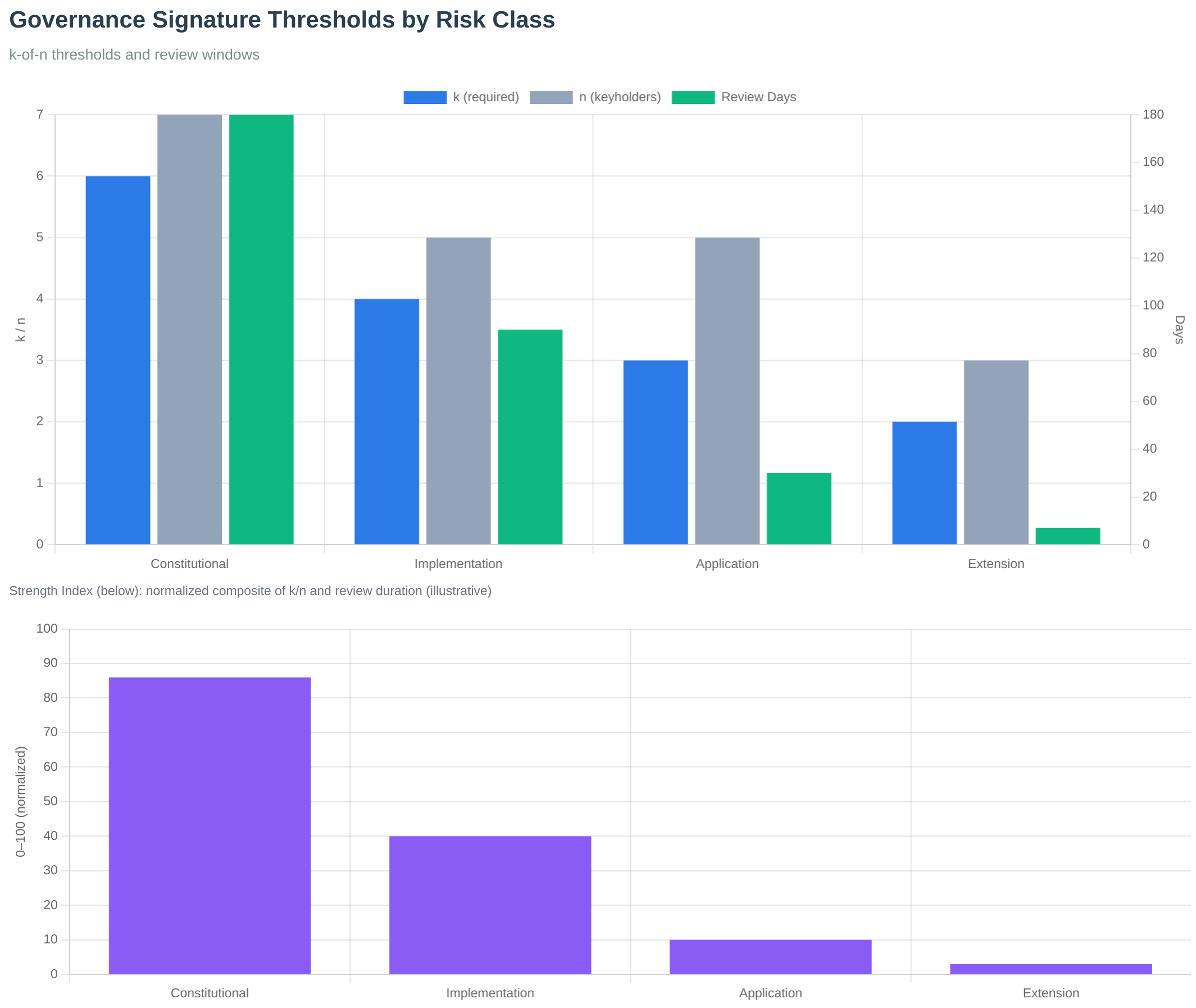 Figure: Signature thresholds by layer showing the graduated security model. Constitutional layers require 6-of-7, while extension layers require 2-of-3.
Governance Process Latency
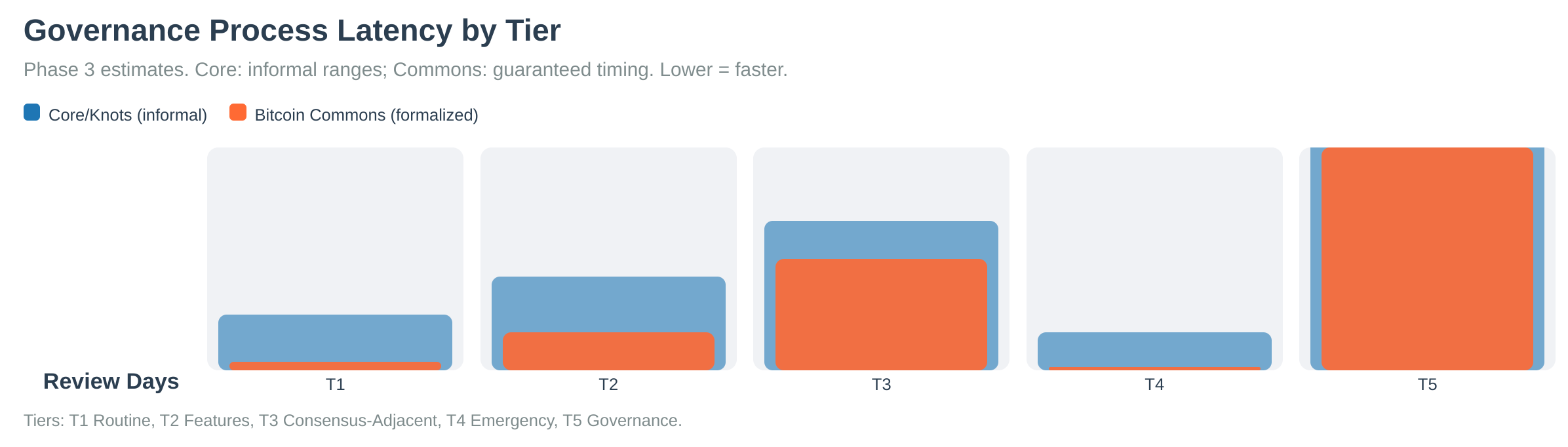 Figure: Governance process latency showing review periods and decision timelines across different tiers.
PR Review Time Distribution
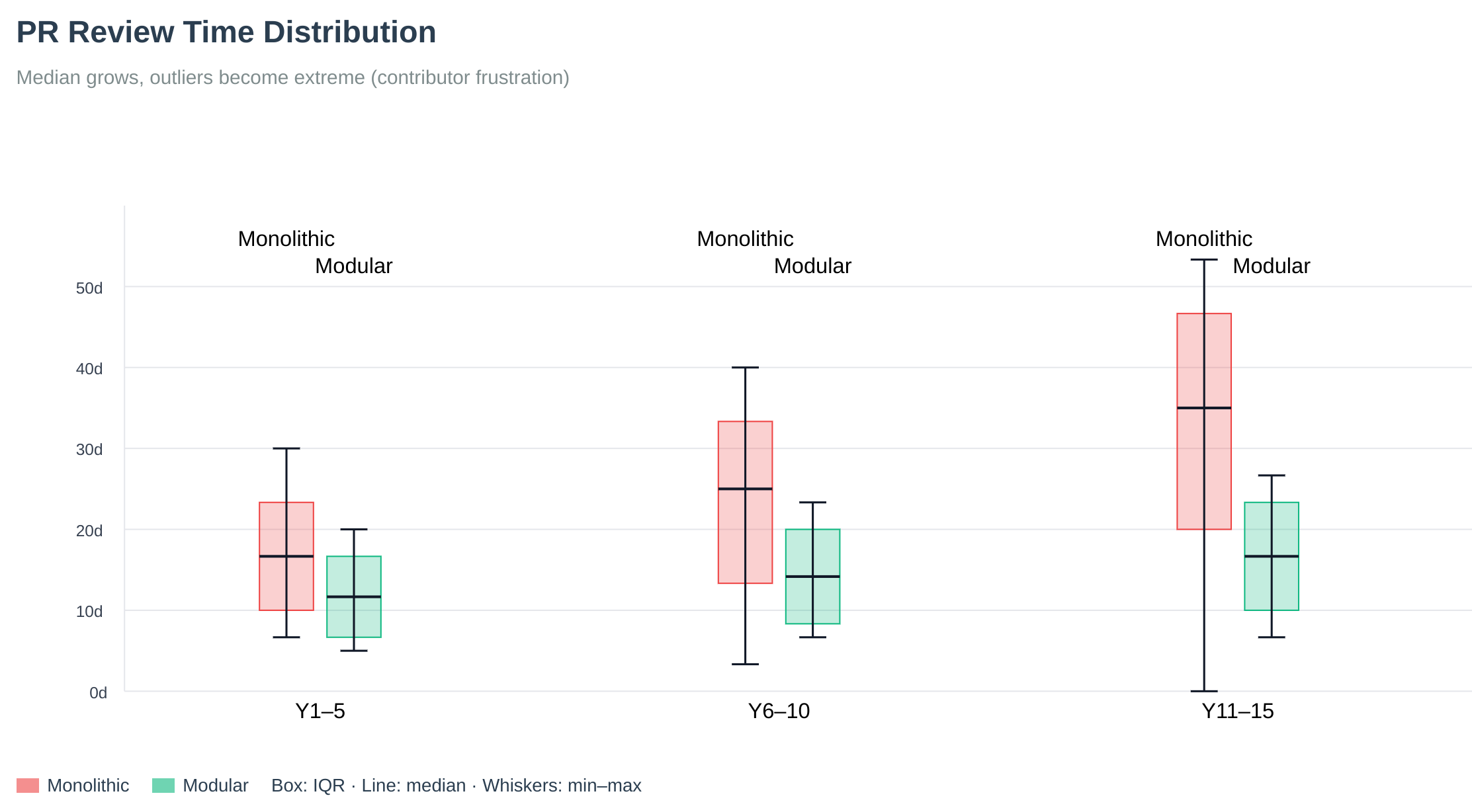 Figure: Pull request review time distribution. Long tails reveal why throughput stalls without process and tooling. Bitcoin Commons addresses this through structured review periods and automated tooling.
See Also
Operator quick answers (FAQ)
- Do I need governance to run a node?
- What is Bitcoin Commons vs BLVM?
- What are layers, tiers, and signatures?
- Why “6x harder to capture”?
- Is the system production ready? (governance is not universally activated)
Governance docs
- PR Process - How governance applies to pull requests
- Layer-Tier Model - Layer and tier combination rules
- Multisig Configuration - Signature threshold configuration
- Governance Overview - Governance system introduction
- Keyholder Procedures - Maintainer responsibilities
Governance layers and tiers
Overview
Bitcoin Commons implements dual-dimensional governance combining Layers (repository architecture) and Tiers (action classification). When both apply, the system uses the most restrictive wins rule, taking the highest signature requirement and longest review period.
PR action tiers (1-5) are defined in governance action-tiers.yml with narrative in action tiers. Emergency classes use emergency-tiers.yml only.
Layer System
The layer system maps repository architecture to governance requirements:
| Layer | Repository | Purpose | Signatures | Review Period |
|---|---|---|---|---|
| 1 | blvm-spec | Constitutional | 6-of-7 | 180 days |
| 2 | blvm-consensus | Constitutional | 6-of-7 | 180 days |
| 3 | blvm-protocol | Implementation | 4-of-5 | 90 days |
| 4 | blvm-node / blvm | Application | 3-of-5 | 60 days |
| 5 | blvm-sdk | Extension | 2-of-3 | 14 days |
Note: For consensus rule changes, Layer 1-2 require 365 days review period.
Tier System
The tier system classifies changes by action type:
| Tier | Type | Signatures | Review Period |
|---|---|---|---|
| 1 | Routine Maintenance | 3-of-5 | 7 days |
| 2 | Feature Changes | 4-of-5 | 30 days |
| 3 | Consensus-Adjacent | 5-of-5 | 90 days |
| 4 | Emergency Actions | 4-of-5 | 0 days |
| 5 | Governance Changes | 5-of-5 | 180 days |
Tier 5 special process (wider maintainer pool and emergency keyholders) is documented in governance policy, not in action-tiers.yml.
Combination Rules
When both Layer and Tier requirements apply, the system takes the most restrictive (highest) requirements:
| Layer | Tier | Final Signatures | Final Review | Source |
|---|---|---|---|---|
| 1 | 1 | 6-of-7 | 180 days | Layer 1 |
| 1 | 2 | 6-of-7 | 180 days | Layer 1 |
| 1 | 3 | 6-of-7 | 180 days | Layer 1 |
| 1 | 4 | 6-of-7 | 180 days | Layer 1 |
| 1 | 5 | 6-of-7 | 180 days | Layer 1 |
| 2 | 1 | 6-of-7 | 180 days | Layer 2 |
| 2 | 2 | 6-of-7 | 180 days | Layer 2 |
| 2 | 3 | 6-of-7 | 180 days | Layer 2 |
| 2 | 4 | 6-of-7 | 180 days | Layer 2 |
| 2 | 5 | 6-of-7 | 180 days | Layer 2 |
| 3 | 1 | 4-of-5 | 90 days | Layer 3 |
| 3 | 2 | 4-of-5 | 90 days | Layer 3 |
| 3 | 3 | 5-of-5 | 90 days | Tier 3 |
| 3 | 4 | 4-of-5 | 90 days | Layer 3 |
| 3 | 5 | 5-of-5 | 180 days | Tier 5 |
| 4 | 1 | 3-of-5 | 60 days | Layer 4 |
| 4 | 2 | 4-of-5 | 60 days | Combined Layer 4 + Tier 2 |
| 4 | 3 | 5-of-5 | 90 days | Tier 3 |
| 4 | 4 | 4-of-5 | 60 days | Combined Layer 4 + Tier 4 |
| 4 | 5 | 5-of-5 | 180 days | Tier 5 |
| 5 | 1 | 3-of-5 | 14 days | Combined Layer 5 + Tier 1 |
| 5 | 2 | 4-of-5 | 30 days | Tier 2 |
| 5 | 3 | 5-of-5 | 90 days | Tier 3 |
| 5 | 4 | 4-of-5 | 14 days | Combined Layer 5 + Tier 4 |
| 5 | 5 | 5-of-5 | 180 days | Tier 5 |
Examples
| Example | Layer | Tier | Result | Source |
|---|---|---|---|---|
| Bug fix in blvm-protocol | 3 (4-of-5, 90d) | 1 (3-of-5, 7d) | 4-of-5, 90d | Layer 3 |
| New feature in blvm-sdk | 5 (2-of-3, 14d) | 2 (4-of-5, 30d) | 4-of-5, 30d | Tier 2 |
| Consensus change in blvm-spec | 1 (6-of-7, 180d) | 3 (5-of-5, 90d) | 6-of-7, 180d | Layer 1 |
| Emergency fix in blvm-node | 4 (3-of-5, 60d) | 4 (4-of-5, 0d) | 4-of-5, 60d | Combined Layer 4 + Tier 4 |
Implementation
#![allow(unused)] fn main() { pub fn get_combined_requirements(layer: i32, tier: u32) -> (usize, usize, i64) { let (layer_sigs_req, layer_sigs_total) = Self::get_threshold_for_layer(layer); let layer_review = Self::get_review_period_for_layer(layer, false); let (tier_sigs_req, tier_sigs_total) = Self::get_tier_threshold(tier); let tier_review = Self::get_tier_review_period(tier); // Take most restrictive (layer_sigs_req.max(tier_sigs_req), layer_sigs_total.max(tier_sigs_total), layer_review.max(tier_review)) } }
Test: cd blvm-commons && cargo test threshold
Published tables above are derived from the same max-rule at book build time (mdbook-governance-vars). Merge enforcement in blvm-commons still uses hardcoded values in threshold.rs until that code loads YAML (see plan backlog).
Configuration
config/repository-layers.yml- Layer definitionsconfig/action-tiers.yml- Tier definitions (action tiers)config/emergency-tiers.yml- Emergency classes (separate from action tiers)config/tier-classification-rules.yml- PR classification
Source
See Also
- PR Process - How governance tiers apply to pull requests
- Governance Model - Governance system
- Multisig Configuration - Signature threshold configuration
- Governance Overview - Governance system introduction
Governance configuration
On current
blvm-commonsmain, YAML loads throughsrc/config/loader.rs(GovernanceConfigFilesand related types). Older doc links tosrc/governance/config_registry.rs,config_reader.rs,yaml_loader.rs, and similar files do not exist in that form; use loader.rs and the governance repoconfig/tree as the live references.
Overview
The Bitcoin Commons configuration system exposes governance-controlled parameters through typed YAML. YAML files are the source of truth, with a database-backed registry for governed changes and a fallback chain when files are missing.
Published policy tables in this book (for example PR Process, Layer-Tier Model) use [[gov:KEY]] placeholders expanded at mdbook build from modules/governance/config/*.yml via mdbook-governance-vars. That keeps narrative docs aligned with YAML; merge enforcement in blvm-commons may still use hardcoded thresholds until runtime YAML loading is implemented.
Architecture
The configuration system has three core components:
1. YAML Files (Source of Truth)
YAML configuration files in the governance/config/ directory serve as the authoritative source for all configuration defaults. These files are version-controlled and human-readable.
Key Files:
action-tiers.yml- PR action tier definitions (see action tiers)repository-layers.yml- Layer definitions and requirementsemergency-tiers.yml- Emergency response classes (separate from action tiers)governance-fork.yml- Governance fork configurationmaintainers/*.yml- Maintainer configurations by layerrepos/*.yml- Repository-specific configurations
2. ConfigRegistry (Database-Backed)
The ConfigRegistry stores all governance-controlled configuration parameters in a database, enabling governance-approved changes without modifying YAML files directly.
Features:
- Stores 87+ forkable governance variables
- Tracks change proposals and approvals
- Requires Tier 5 governance to modify
- Complete audit trail of all changes
- Automatic sync from YAML on startup
3. ConfigReader (Unified Interface)
The ConfigReader provides a type-safe interface for reading configuration values with caching and fallback support.
Features:
- Type-safe accessors (
get_i32(),get_f64(),get_bool(),get_string()) - In-memory caching (5-minute TTL)
- Automatic cache invalidation on changes
- Fallback chain support
Fallback Chain
The system uses a four-tier fallback chain for configuration values:
1. Cache (in-memory, 5-minute TTL)
↓ (if not found)
2. Config Registry (database, governance-controlled)
↓ (if not found)
3. YAML Config (file-based, source of truth)
↓ (if not found)
4. Hardcoded Defaults (safety fallback)
Implementation: See src/config/loader.rs in blvm-commons
Sync Mechanisms
sync_from_yaml()
On startup, the system automatically syncs YAML values into the database:
#![allow(unused)] fn main() { config_registry.sync_from_yaml(config_path).await?; }
This process:
- Loads all YAML configuration files
- Extracts configuration values using
YamlConfigLoader - Compares with database values
- Updates database if no governance history exists (preserves governance-approved changes)
sync_to_yaml()
When governance-approved changes are activated, the system can write changes back to YAML files. Full bidirectional sync is planned.
Configuration Categories
Configuration parameters are organized into categories:
- FeatureFlags: Feature toggles (e.g.,
feature_governance_enforcement) - Thresholds: Maintainer signature thresholds (e.g.,
tier_3_signatures_required) - TimeWindows: Review periods and time limits (e.g.,
tier_3_review_period_days) - Limits: Size and count limits (e.g.,
max_pr_size_bytes) - Network: Network-related parameters
- Security: Security-related parameters
- Other: Miscellaneous parameters
87+ Forkable Variables
The system manages 87+ governance-controlled configuration variables, organized into categories:
Complete Configuration Schema
| Category | Variables | Description |
|---|---|---|
| Action Tier Thresholds | 15 | Signature requirements and review periods for each tier |
| Commons Contributor Thresholds | 8 | Qualification thresholds and weight calculation |
| Governance Phase Thresholds | 11 | Phase boundaries (Early, Growth, Mature) |
| Repository Layer Thresholds | 9 | Signature requirements per repository layer |
| Emergency Tier Thresholds | 10 | Emergency action thresholds and windows |
| Governance Review Policy | 10 | Review period policies and requirements |
| Feature Flags | 7 | Feature enable/disable flags |
| Network & Security | 3 | Network and security configuration |
Total: 87+ variables
Action Tier Thresholds (15 variables)
| Variable | Default | Description |
|---|---|---|
tier_1_signatures_required | 3 | Tier 1: Required signatures (out of 5) |
tier_1_signatures_total | 5 | Tier 1: Total signatures available |
tier_1_review_period_days | 7 | Tier 1: Review period (days) |
tier_2_signatures_required | 4 | Tier 2: Required signatures (out of 5) |
tier_2_signatures_total | 5 | Tier 2: Total signatures available |
tier_2_review_period_days | 30 | Tier 2: Review period (days) |
tier_3_signatures_required | 5 | Tier 3: Required signatures (unanimous) |
tier_3_signatures_total | 5 | Tier 3: Total signatures available |
tier_3_review_period_days | 90 | Tier 3: Review period (days) |
tier_4_signatures_required | 4 | Tier 4: Required signatures (emergency) |
tier_4_signatures_total | 5 | Tier 4: Total signatures available |
tier_4_review_period_days | 0 | Tier 4: Review period (immediate) |
tier_5_signatures_required | 5 | Tier 5: Required signatures (governance) |
tier_5_signatures_total | 5 | Tier 5: Total signatures available |
tier_5_review_period_days | 180 | Tier 5: Review period (days) |
| signaling_tier_5_mining_percent | 50.0 | Tier 5: Fork signaling: mining / hashpower share (%) |
| signaling_tier_5_economic_percent | 60.0 | Tier 5: Fork signaling: participation-weight share (%) |
Commons Contributor Thresholds (8 variables)
| Variable | Default | Description |
|---|---|---|
commons_contributor_min_zaps_btc | 0.01 | Minimum zap contribution (BTC) |
commons_contributor_min_marketplace_btc | 0.01 | Minimum marketplace contribution (BTC) |
commons_contributor_measurement_period_days | 90 | Measurement period (days) |
commons_contributor_qualification_logic | "OR" | Qualification logic (OR/AND) |
commons_contributor_weight_formula | "linear" | Weight calculation formula |
commons_contributor_weight_cap | 0.10 | Maximum weight per contributor (10%) |
Governance Phase Thresholds (11 variables)
| Variable | Default | Description |
|---|---|---|
phase_early_max_blocks | 50000 | Early phase: Maximum blocks |
phase_early_max_contributors | 10 | Early phase: Maximum contributors |
phase_growth_min_blocks | 50000 | Growth phase: Minimum blocks |
phase_growth_max_blocks | 200000 | Growth phase: Maximum blocks |
phase_growth_min_contributors | 10 | Growth phase: Minimum contributors |
phase_growth_max_contributors | 100 | Growth phase: Maximum contributors |
phase_mature_min_blocks | 200000 | Mature phase: Minimum blocks |
phase_mature_min_contributors | 100 | Mature phase: Minimum contributors |
Repository Layer Thresholds (9 variables)
| Variable | Default | Description |
|---|---|---|
layer_1_2_signatures_required | 3 | Layer 1-2: Required signatures |
layer_1_2_signatures_total | 5 | Layer 1-2: Total signatures |
layer_1_2_review_period_days | 7 | Layer 1-2: Review period (days) |
layer_3_signatures_required | 4 | Layer 3: Required signatures |
layer_3_signatures_total | 5 | Layer 3: Total signatures |
layer_3_review_period_days | 30 | Layer 3: Review period (days) |
layer_4_signatures_required | 5 | Layer 4: Required signatures |
layer_4_signatures_total | 5 | Layer 4: Total signatures |
layer_4_review_period_days | 90 | Layer 4: Review period (days) |
layer_5_signatures_required | 5 | Layer 5: Required signatures |
layer_5_signatures_total | 5 | Layer 5: Total signatures |
layer_5_review_period_days | 180 | Layer 5: Review period (days) |
Complete Reference
Authoritative defaults and forkable parameters live in the governance repository under config/ (YAML) and ruleset-export-template*.y. Use blvm-commons/src/config/loader.rs for what the node loads today.
Governance Change Workflow
Changing a configuration parameter requires Tier 5 governance approval:
- Proposal: Create a configuration change proposal via PR
- Review: 5-of-5 maintainer signatures required
- Review Period: 180 days review period
- Activation: Change activated in database via
activate_change() - Sync: Change optionally synced back to YAML files
Usage Examples
Basic Configuration Access
#![allow(unused)] fn main() { use crate::governance::config_reader::ConfigReader; use crate::governance::config_registry::ConfigRegistry; use std::sync::Arc; // Initialize let registry = Arc::new(ConfigRegistry::new(pool)); let yaml_loader = YamlConfigLoader::new(config_path); let config = Arc::new(ConfigReader::with_yaml_loader( registry.clone(), Some(yaml_loader), )); // Read a value (with fallback) let review_period = config.get_i32("tier_3_review_period_days", 90).await?; let enabled = config.get_bool("feature_governance_enforcement", false).await?; }
Convenience Methods
#![allow(unused)] fn main() { // Get tier signatures let (required, total) = config.get_tier_signatures(3).await?; }
Integration with Validators
#![allow(unused)] fn main() { // ThresholdValidator with config support let validator = ThresholdValidator::with_config(config.clone()); // All methods use config registry let (req, total) = validator.get_tier_threshold(3).await?; }
Caching Strategy
- Cache TTL: 5 minutes (configurable via
cache_ttl) - Cache Invalidation:
- Automatic after config changes are activated
- Manual via
clear_cache()orinvalidate_key() - Cache Storage: In-memory
HashMap<String, serde_json::Value>
YAML Structure
YAML files use a structured format. Example from action-tiers.yml:
tiers:
- tier: 1
name: "Routine Maintenance"
signatures_required: 3
signatures_total: 5
review_period_days: 7
- tier: 3
name: "Consensus-Adjacent"
signatures_required: 5
signatures_total: 5
review_period_days: 90
The YamlConfigLoader extracts values from these files into a flat key-value structure for the registry.
Initialization
On system startup:
- Load YAML Files: System loads YAML configuration files
- Sync to Database:
sync_from_yaml()populates database from YAML - Initialize Defaults:
initialize_governance_defaults()registers any missing configs - Create ConfigReader: ConfigReader created with YAML loader for fallback access
Configuration Key Reference
All configuration keys follow a naming convention:
- Tier configs:
tier_{n}_{property} - Layer configs:
layer_{n}_{property}
See the governance repo config/ tree for the live key set.
Benefits
- YAML as Source of Truth: Human-readable, version-controlled defaults
- Governance Control: Database enables governance-approved changes without YAML edits
- Type Safety: Type-safe accessors prevent configuration errors
- Performance: Caching reduces database queries
- Flexibility: Fallback chain ensures system always has valid configuration
- Audit Trail: Complete history of all configuration changes
Source
Governance Fork System
Overview
The governance fork mechanism enables users to choose between different governance rulesets without affecting Bitcoin consensus. This provides an escape hatch for users who disagree with governance decisions while maintaining Bitcoin protocol integrity.
Fork Types
| Type | Definition | Compatibility | Examples |
|---|---|---|---|
| Soft Fork | Changes without breaking compatibility | Existing users continue, new users choose updated | Adding signature requirements, modifying time locks, updating thresholds |
| Hard Fork | Breaking changes | All users must choose, no backward compatibility | Changing signature schemes, modifying fundamental principles, removing tiers |
Ruleset Export
Export Format
Governance rulesets exported as versioned, signed packages in YAML format:
ruleset_version: "1.2.0"
export_timestamp: "YYYY-MM-DDTHH:MM:SSZ"
previous_ruleset_hash: "sha256:abc123..."
governance_rules:
action_tiers: { /* tier definitions */ }
repository_layers: { /* layer definitions */ }
maintainers: { /* maintainer registry */ }
emergency_procedures: { /* emergency protocols */ }
cryptographic_proofs:
maintainer_signatures: [ /* signed by maintainers */ ]
ruleset_hash: "sha256:def456..."
merkle_root: "sha256:ghi789..."
compatibility:
min_version: "1.0.0"
max_version: "2.0.0"
breaking_changes: false
Export Process
- Ruleset preparation (compile current governance rules from YAML files)
- Cryptographic signing (maintainers sign the ruleset)
- Hash calculation (generate tamper-evident hash)
- Merkle tree (create verification structure)
- Export generation (package for distribution)
- Publication (make available for download)
Versioning System
| Version Component | Meaning | Example |
|---|---|---|
| Major | Breaking changes (hard fork) | 2.0.0 (incompatible with 1.x) |
| Minor | New features (soft fork) | 1.2.0 (compatible with 1.x) |
| Patch | Bug fixes and improvements | 1.1.1 (compatible with 1.1.x) |
Compatibility: Compatible (upgrade without issues), Incompatible (must choose), Deprecated (removed), Supported (receives updates).
Adoption Tracking
Track ruleset adoption through: node count, hash rate, user count, exchange support.
Public Dashboard: Current distribution, adoption trends, geographic distribution, exchange listings.
Fork Decision Process
User Choice
- Download ruleset package
- Verify maintainer signatures
- Validate ruleset integrity (hash)
- Configure client (set ruleset)
- Announce choice (publicly declare)
Client Implementation
- Ruleset loading (load chosen ruleset)
- Signature verification (verify maintainer signatures)
- Rule enforcement (apply governance rules)
- Status reporting (report chosen ruleset)
- Update mechanism (handle ruleset updates)
Fork Resolution
Conflict Resolution
When forks occur:
- User notification (alert users to fork)
- Choice period (30 days to choose ruleset)
- Migration support (tools for ruleset migration)
- Documentation (clear migration guides)
- Support (community support during transition)
Fork Merging
Forks can be merged by: consensus building, gradual migration, feature adoption, clean slate.
Security Considerations
| Aspect | Requirements |
|---|---|
| Ruleset Integrity | Cryptographic signatures, hash verification, Merkle trees, timestamp anchoring |
| Fork Security | Replay protection, version validation, signature verification, threshold enforcement |
Examples
| Scenario | Type | Change | Result |
|---|---|---|---|
| Adding signature requirement | Soft Fork | Require 4-of-5 instead of 3-of-5 | Existing users continue with 3-of-5, new users use 4-of-5 |
| Changing signature scheme | Hard Fork | Switch from Ed25519 to Dilithium | Clean split into two governance models |
Configuration
governance/config/governance-fork.yml- Fork configurationgovernance/fork-registry.yml- Registered forks
Source
P2P governance-related extensions
Overview
The node can advertise governance-related P2P capability via the NODE_GOVERNANCE service bit in Version.services. Peers use that flag to identify nodes that participate in Commons-oriented extensions (for example ban list sharing: getbanlist / banlist). Relay and forwarding behavior are implemented in blvm-node networking code and gated by node configuration.
Architecture
Capability and peers
- Nodes set
NODE_GOVERNANCEwhen configured to advertise this capability (see service flags / node config). PeerManagercan track peers that advertised the governance bit for features that need governance-capable peers (e.g. ban-list gossip).
Concrete protocol surface today
- Ban list sharing:
GetBanList/BanList(and the corresponding framed command strings) are part of the shared protocol stack. - Other P2P commands follow the node’s allowlisted command set in
network/protocol.rsandblvm-protocol’snode_tcp/ wire layers.
Configuration
Optional [governance] settings in the node (e.g. commons_url, relay toggles) control whether the node forwards or integrates with blvm-commons-side HTTP APIs. Exact fields change over time; see the live configuration reference and blvm-node config sources.
Code references
| Area | Location |
|---|---|
| Service flag | blvm-protocol / blvm-node NODE_GOVERNANCE |
Framed commands & ProtocolMessage | blvm-node/src/network/protocol.rs, blvm-protocol/src/node_tcp.rs |
| Peer selection for governance bit | blvm-node/src/network/peer_manager.rs (governance feature) |
See also
- Node overview: networking and configuration entry points
- Module system:
EventType/ governance-related events (proposal lifecycle, webhooks, fork detection)
OpenTimestamps Integration
Overview
Bitcoin Commons uses OpenTimestamps (OTS) to anchor governance registries to the Bitcoin blockchain, providing cryptographic proof that governance state existed at specific points in time. This creates immutable historical records that cannot be retroactively modified.
Purpose
OpenTimestamps integration serves as a temporal proof mechanism by:
- Anchoring governance registries to Bitcoin blockchain
- Providing cryptographic proof of governance state
- Creating immutable historical records
- Enabling verification of governance timeline
Architecture
Monthly Registry Anchoring
Anchoring Schedule:
- Frequency: Monthly on the 1st day of each month
- Content: Complete governance registry snapshot
- Proof: OpenTimestamps proof anchored to Bitcoin
- Storage: Local proof files and public registry
Registry Structure
{
"version": "YYYY-MM",
"timestamp": "YYYY-MM-DDTHH:MM:SSZ",
"previous_registry_hash": "sha256:abc123...",
"maintainers": [...],
"authorized_servers": [...],
"audit_logs": {...},
"multisig_config": {...}
}
OTS Client
Client Implementation
The OtsClient handles communication with OpenTimestamps calendar servers:
- Calendar Servers: Multiple calendar servers for redundancy
- Hash Submission: Submits SHA256 hashes for timestamping
- Proof Generation: Receives OpenTimestamps proofs
- Verification: Verifies proofs against Bitcoin blockchain
Calendar Servers
Default calendar servers:
alice.btc.calendar.opentimestamps.orgbob.btc.calendar.opentimestamps.org
Proof Generation
OTS Proof Format
- Format: Binary OpenTimestamps proof
- Extension:
.json.ots(e.g.,YYYY-MM.json.ots) - Content: Cryptographic proof of registry existence
- Verification: Can be verified against Bitcoin blockchain
Proof Process
- Calculate Hash: SHA256 hash of registry JSON
- Submit to Calendar: POST hash to OpenTimestamps calendar
- Receive Proof: Calendar returns OTS proof
- Store Proof: Save proof file locally
- Publish: Make proof publicly available
Registry Anchorer
Monthly Anchoring
The RegistryAnchorer creates monthly governance registries:
- Registry Generation: Creates complete registry snapshot
- Hash Chain: Links to previous registry via hash
- OTS Stamping: Submits registry for timestamping
- Proof Storage: Stores proofs for verification
Registry Content
Monthly registries include:
- Maintainer information
- Authorized servers
- Audit log summaries
- Multisig configuration
- Previous registry hash (hash chain)
Verification
Proof Verification
OTS proofs can be verified:
ots verify YYYY-MM.json.ots
Verification Process
- Load Proof: Read OTS proof file
- Verify Structure: Validate proof format
- Check Calendar: Verify calendar server signatures
- Verify Bitcoin: Check Bitcoin blockchain anchor
- Verify Hash: Confirm hash matches registry
Integration with Governance
Audit Trail Anchoring
Audit log entries are anchored via monthly registries:
- Monthly Snapshots: Complete audit log state
- Hash Chain: Links between monthly registries
- Immutable History: Cannot be retroactively modified
- Public Verification: Anyone can verify proofs
Governance State Proof
Monthly registries prove governance state:
- Maintainer List: Who had authority at that time
- Server Authorization: Which servers were authorized
- Configuration: Governance configuration snapshot
- Timeline: Historical record of changes
Configuration
[ots]
enabled = true
aggregator_url = "https://alice.btc.calendar.opentimestamps.org"
monthly_anchor_day = 1 # Anchor on 1st of each month
registry_path = "./registries"
proofs_path = "./proofs"
Benefits
- Immutability: Proofs anchored to Bitcoin blockchain
- Verifiability: Anyone can verify proofs independently
- Historical Record: Complete timeline of governance state
- Tamper-Evident: Any modification breaks hash chain
- Decentralized: No single point of failure
Components
The OpenTimestamps integration includes:
- OTS client for calendar communication
- Registry anchorer for monthly anchoring
- Proof verification
- Hash chain maintenance
- Proof storage and publishing
Source
- anchor.rs
- client.rs
- verify.rs
- entry.rs
- config.rs
- blvm-commons/src/ots/, blvm-commons/src/audit/ (blvm-commons/src/audit/`)
Nostr Integration
Overview
Bitcoin Commons uses Nostr (Notes and Other Stuff Transmitted by Relays) for real-time transparency and decentralized governance communication. The system includes a multi-bot architecture for different types of announcements and status updates.
Purpose
Nostr integration serves as a transparency mechanism by:
- Publishing real-time governance status updates
- Providing public verification of server operations
- Enabling decentralized monitoring of governance events
- Creating an immutable public record of governance actions
Multi-Bot System
Bot Types
The system uses multiple bot identities for different purposes:
- gov: Governance announcements and status updates
- dev: Development updates and technical information
- research: Educational content (optional)
- network: Network metrics and statistics (optional)
Bot Configuration
[nostr.bots.gov]
nsec_path = "env:GOV_BOT_NSEC" # or file path
npub = "npub1..."
# Placeholder LN address (RFC 2606); use a real address in production.
lightning_address = "gov@example.org"
[nostr.bots.gov.profile]
name = "@BTCCommons_Gov"
about = "Bitcoin Commons Governance Bot"
picture = "https://bitcoincommons.org/logo.png"
Nostr Client
Client Implementation
The NostrClient manages connections to multiple Nostr relays:
- Multi-Relay Support: Connects to multiple relays for redundancy
- Event Publishing: Publishes events to all connected relays
- Error Handling: Handles relay failures gracefully
- Retry Logic: Automatic retry for failed publishes
Relay Management
#![allow(unused)] fn main() { let client = NostrClient::new(nsec, relay_urls).await?; client.publish_event(event).await?; }
Event Types
Governance Status Events (Kind 30078)
Published hourly by each authorized server:
- Server health status
- Binary and config hashes
- Audit log status
- Tagged with
d:governance-status
Server Health Events (Kind 30079)
Published when server status changes:
- Uptime metrics
- Last merge information
- Operational status
- Tagged with
d:server-health
Audit Log Head Events (Kind 30080)
Published when audit log head changes:
- Current audit log head hash
- Entry count
- Tagged with
d:audit-head
Governance Action Events
Published for governance actions:
- PR merges
- Review period notifications
- Keyholder announcements
Governance Publisher
Status Publishing
The StatusPublisher publishes governance status:
- Hourly Updates: Regular status updates
- Event Signing: Events signed with server key
- Multi-Relay: Published to multiple relays
- Error Recovery: Handles relay failures
Action Publishing
The GovernanceActionPublisher publishes governance actions:
- PR Events: Merge and review events
- Keyholder Events: Signature announcements
- Fork Events: Governance fork decisions
Zap Tracking
Zap Contributions
Zaps are tracked for contribution-based voting:
- Zap Tracker: Monitors Nostr zaps
- Contribution Recording: Records zap contributions
- Vote Conversion: Converts zaps to votes
- Real-Time Processing: Processes zaps as received
Zap-to-Vote
Zaps to governance events become votes:
- Proposal Zaps: Zaps to governance event IDs
- Vote Weight: Calculated using quadratic formula
- Vote Type: Extracted from zap message
- Database Storage: Stored in proposal_zap_votes table
Configuration
[nostr]
enabled = true
relays = [
"wss://relay.bitcoincommons.org",
"wss://nostr.bitcoincommons.org"
]
publish_interval_secs = 3600 # 1 hour
governance_config = "commons_mainnet"
[nostr.bots.gov]
nsec_path = "env:GOV_BOT_NSEC"
npub = "npub1..."
# Placeholder LN address (RFC 2606); use a real address in production.
lightning_address = "gov@example.org"
Real-Time Transparency
Public Monitoring
Anyone can monitor governance via Nostr:
- Event Filtering: Filter by event kind and tags
- Relay Queries: Query any Nostr relay
- Real-Time Updates: Receive updates as they happen
- Verification: Verify event signatures
Event Verification
All events are signed:
- Server Keys: Each server has Nostr keypair
- Event Signing: Events signed with server key
- Public Verification: Anyone can verify signatures
- Tamper-Evident: Cannot modify events without breaking signature
Benefits
- Decentralization: No single point of failure
- Censorship Resistance: Multiple relays, no central authority
- Real-Time: Immediate status updates
- Public Verification: Anyone can verify events
- Transparency: Complete public record of governance actions
Components
The Nostr integration includes:
- Multi-bot manager
- Nostr client with multi-relay support
- Event types (status, health, audit, actions)
- Governance publisher
- Status publisher
- Zap tracker and voting processor
Source
- bot_manager.rs
- config.rs
- client.rs
- events.rs
- governance_publisher.rs
- publisher.rs
- zap_tracker.rs
- zap_voting.rs
- blvm-commons/src/nostr/
Multisig Configuration
Bitcoin Commons uses multisig thresholds for governance decisions, with different thresholds based on the layer and tier of the change. See Layer-Tier Model for details.
Policy numbers below are expanded from governance YAML at book build time. Action tiers (PR classification 1-5) are documented separately in governance action tiers and config/action-tiers.yml.
Layer-Based Thresholds
Constitutional Layers (Layer 1-2)
- Orange Paper (Layer 1): 6-of-7 maintainers, 180 days (365 days for consensus changes)
- blvm-consensus (Layer 2): 6-of-7 maintainers, 180 days (365 days for consensus changes)
Implementation Layer (Layer 3)
- blvm-protocol: 4-of-5 maintainers, 90 days
Application Layer (Layer 4)
- blvm-node: 3-of-5 maintainers, 60 days
Extension Layer (Layer 5)
- blvm-sdk: 2-of-3 maintainers, 14 days
- governance: 2-of-3 maintainers, 14 days
- blvm-commons: 2-of-3 maintainers, 14 days
Tier-Based Thresholds
Tier 1: Routine Maintenance
- Signatures: 3-of-5 maintainers
- Review Period: 7 days
- Scope: Bug fixes, documentation, performance optimizations
Tier 2: Feature Changes
- Signatures: 4-of-5 maintainers
- Review Period: 30 days
- Scope: New RPC methods, P2P changes, wallet features
Tier 3: Consensus-Adjacent
- Signatures: 5-of-5 maintainers
- Review Period: 90 days
- Scope: Changes affecting consensus validation code
Tier 4: Emergency Actions
- Signatures: 4-of-5 maintainers
- Review Period: 0 days (immediate)
- Scope: Critical security patches, network-threatening bugs
Tier 5: Governance Changes
- Signatures: Special process: see governance policy (not the
tier_5_governancerow inaction-tiers.ymlalone) - Review Period: 180 days
- Scope: Changes to governance rules themselves
Combined Model
When both layer and tier apply, the system uses "most restrictive wins" rule. See Layer-Tier Model for the decision matrix.
Multisig Threshold Sensitivity
 Figure: Multisig threshold sensitivity analysis showing how different threshold configurations affect security and decision-making speed.
Governance Signature Thresholds
Figure: Signature thresholds by layer showing the graduated security model.
For configuration details, see the governance config/ directory in the governance repository.
Nested multisig (SDK)
Flat N-of-M thresholds above describe maintainer rules per layer. The SDK overview also documents nested multisig for team-based and hierarchical governance setups using blvm-sdk primitives, see that chapter for APIs beyond a single flat quorum.
See Also
- Layer-Tier Model - How layers and tiers combine
- PR Process - How thresholds apply to PRs
- Governance Model - Governance system
- Keyholder Procedures - Maintainer signing process
- Governance Overview - Governance system introduction
Keyholder Procedures
Cryptographic keyholders (maintainers) sign governance decisions. Procedures below apply to keyholders.
Maintainer Responsibilities
Maintainers are responsible for:
- Reviewing Changes: Understanding the impact of proposed changes
- Signing Decisions: Cryptographically signing approved changes
- Maintaining Keys: Securely storing and managing cryptographic keys
- Following Procedures: Adhering to governance processes and review periods
Signing Process
- Review PR: Understand the change and its impact
- Generate Signature: Use
blvm-signfrom blvm-sdk - Post Signature: Comment
/governance-sign <signature>on PR - Governance App Verifies: Cryptographically verifies signature
- Status Check Updates: Shows signature count progress
Key Management
Key Generation
blvm-keygen --output maintainer.key --format pem
Key Storage
- Development: Test keys can be stored locally
- Production: Keys should be stored in HSMs (Hardware Security Modules)
- Backup: Secure backup procedures required
Key Rotation
Keys can be rotated through the governance process. See maintainer guide for detailed procedures.
Emergency Keyholders
Emergency keyholders can activate emergency response classes defined in emergency-tiers.yml (see PR Process → Emergency Procedures):
- Activation (all classes): 5-of-7 emergency keyholders
- Critical class: 4-of-7 maintainer signatures after activation; maximum 7 days
- Urgent class: 5-of-7 signatures; maximum 30 days
- Elevated class: 6-of-7 signatures; maximum 90 days
Release Pipeline Gate Strength
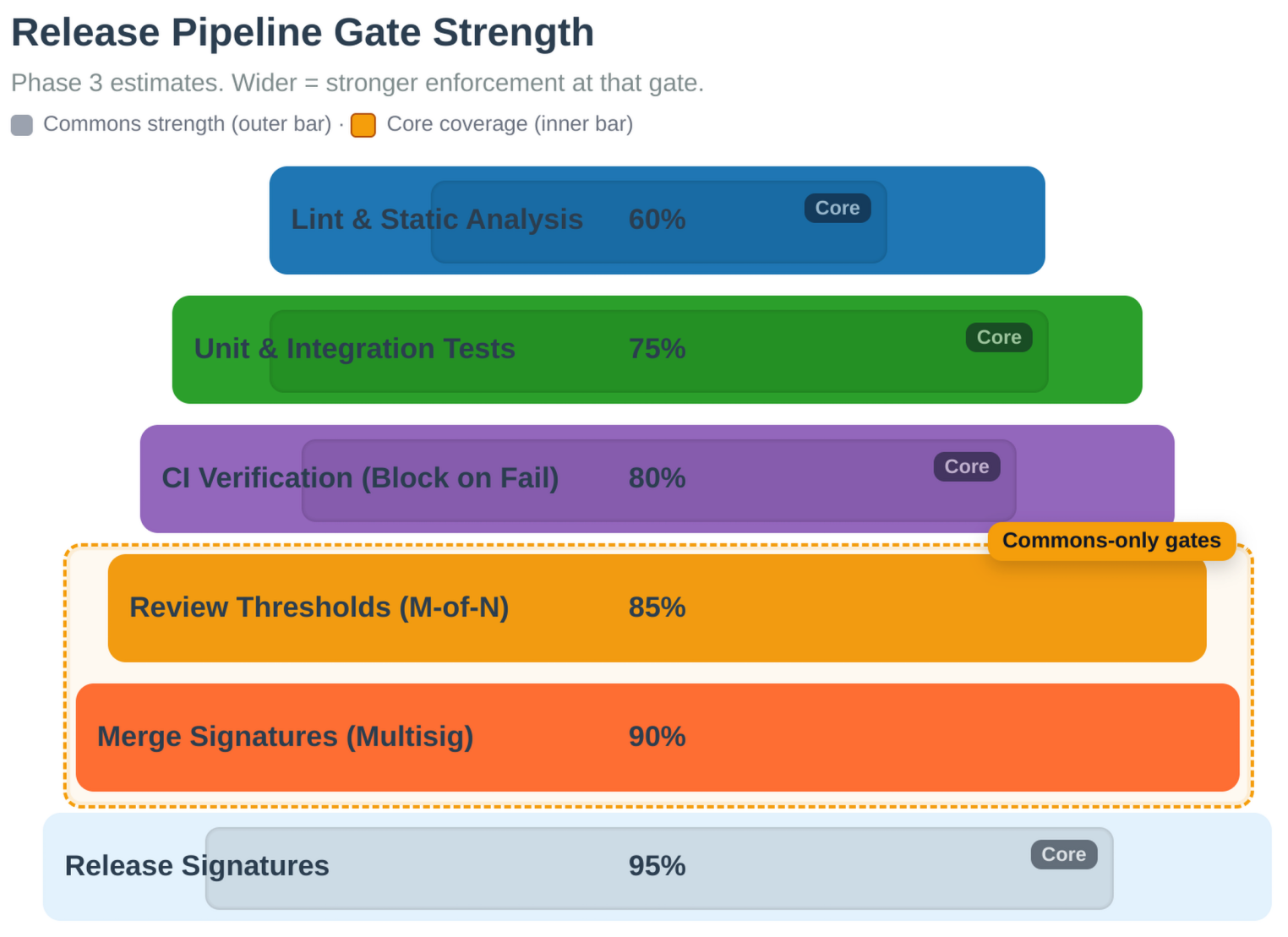 Figure: Gate strength across the release pipeline. Each gate requires specific signatures and review periods based on the change tier.
For detailed maintainer procedures, see maintainer guide.
See Also
- PR Process - How maintainers sign PRs
- Multisig Configuration - Signature threshold requirements
- Layer-Tier Model - Governance tier system
- Governance Model - Governance system
- Governance Overview - Governance system introduction
Audit Trails
Bitcoin Commons maintains immutable audit trails of all governance decisions using cryptographic hash chains and Bitcoin blockchain anchoring.
Audit Log System
The governance system maintains tamper-evident audit logs that record:
- All Governance Decisions: Every PR merge and maintainer signature milestone
- Maintainer Actions: Key generation, rotation, and usage
- Emergency Activations: Emergency mode activations and deactivations
Cryptographic Properties
- Hash Chains: Each log entry includes hash of previous entry
- Bitcoin Anchoring: Monthly registry anchoring via OpenTimestamps
- Immutable: Logs cannot be modified without detection
- Verifiable: Anyone can verify log integrity
Audit Log Verification
Audit logs can be verified using:
blvm-commons verify-audit-log --log-path audit.log
Three-Layer Verification Architecture
See Also
- Governance Overview - Governance system introduction
- Governance Model - Governance architecture
- Keyholder Procedures - Maintainer responsibilities
- OpenTimestamps Integration - OTS anchoring details
- Multisig Configuration - Signature requirements
The governance system implements three complementary verification layers:
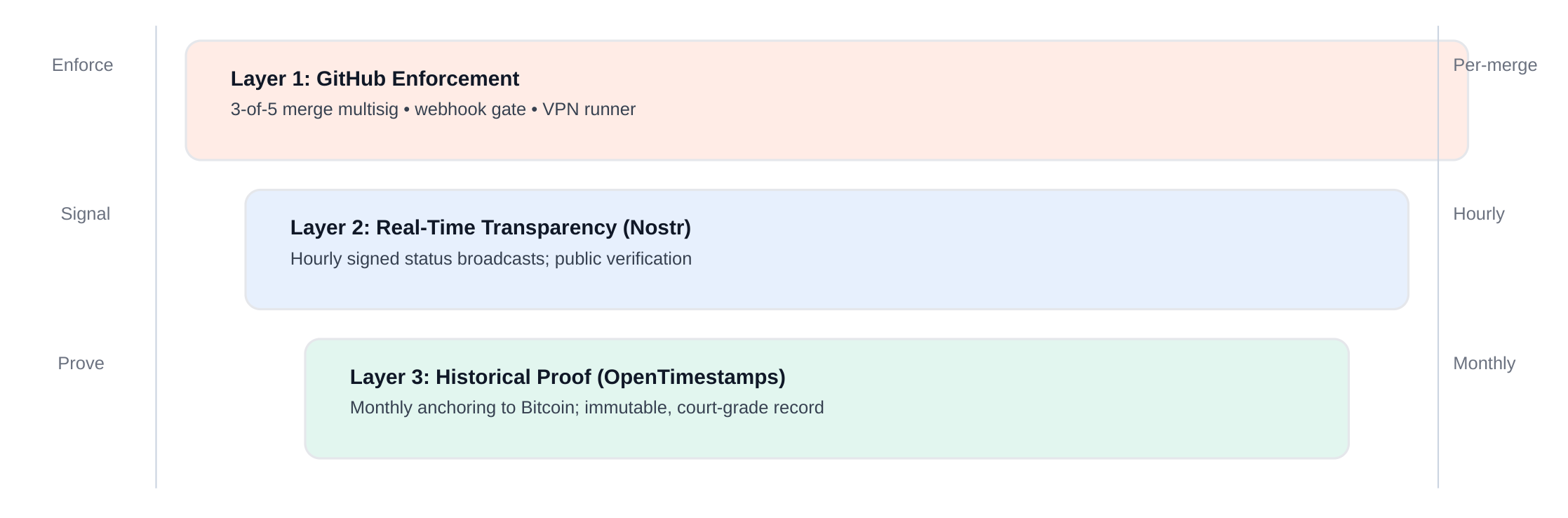 Figure: Three-layer verification: GitHub merge control, real-time Nostr transparency, and OpenTimestamps historical proof.
Audit Trail Completeness
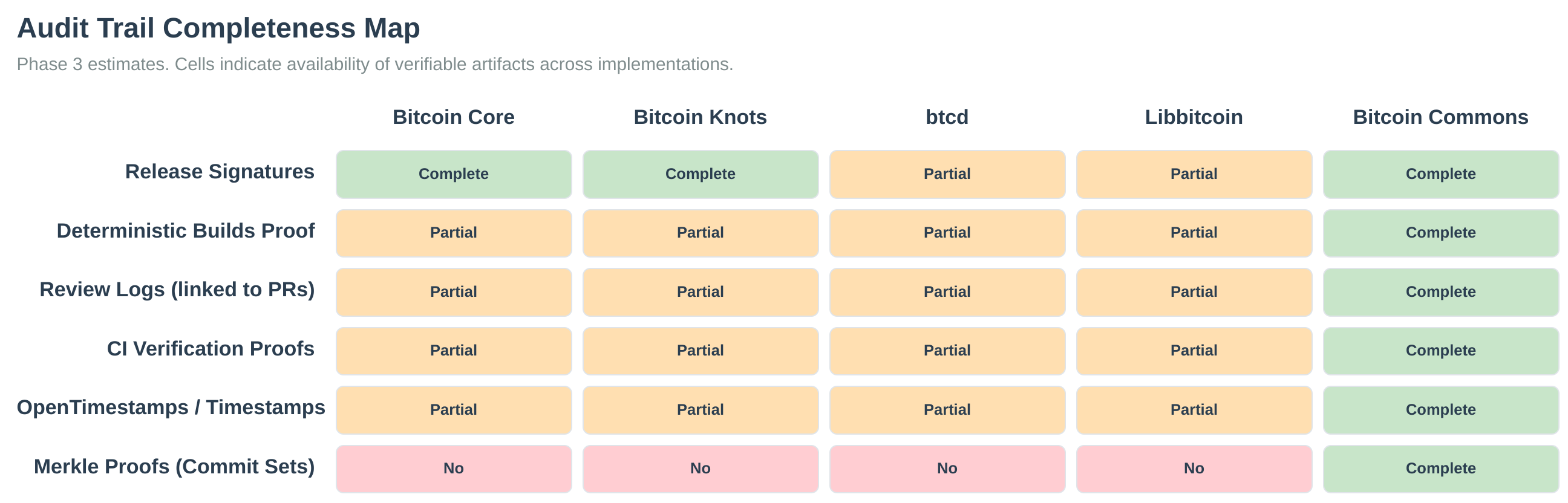 Figure: Audit-trail completeness across governance layers.
OpenTimestamps Integration
The system uses OpenTimestamps to anchor audit logs to the Bitcoin blockchain:
- Monthly Anchoring: Registry state anchored monthly
- Immutable Proof: Proof of existence at specific time
- Public Verification: Anyone can verify timestamps
For detailed audit log documentation, see the blvm-commons repository documentation.
Orange Paper
The normative Bitcoin consensus specification lives on thebitcoincommons.org, not inside this book. docs.thebitcoincommons.org (this site) documents how BLVM implements and operates on the network; the commons site hosts the auditable spec text itself.
Read the Orange Paper: thebitcoincommons.org/orange-paper.html · Consensus Spec (rule register): spec.html
Where to read the spec
Bitcoin Commons publishes several linked viewers, all sourced from blvm-spec on GitHub:
| Page | Source file | Role |
|---|---|---|
| Consensus Spec | consensus spec | Primary entry: numbered rules in RFC 2119 language, each tied to Orange Paper §refs and blvm-consensus |
| Orange Paper | Orange Paper source | Extended formal spec: navigation hub for PROTOCOL, ARCHITECTURE, and related definitions |
| PROTOCOL | protocol specification | Formal consensus mathematics (functions, invariants, proofs) |
| ARCHITECTURE | architecture spec | Implementation design and how spec pieces compose |
Cross-links between viewers rewrite internal markdown references (for example §5.3.1 in the Consensus Spec jumps to the matching section in PROTOCOL or ARCHITECTURE). The homepage spec section includes an interactive structure map (sunburst) over Orange Paper content.
Which page should I open?
| Goal | Start here |
|---|---|
| Audit a specific consensus requirement (MUST / SHOULD / MAY) | Consensus Spec |
| Understand the full formal model and how documents relate | Orange Paper |
| Read detailed math for a rule (functions, pre/postconditions) | PROTOCOL |
| See how spec maps to implementation structure | ARCHITECTURE |
| Run a node, configure RPC, modules, deployment | This book: Introduction, First node |
The Orange Paper name refers to the extended formal specification (Orange Paper source and its PROTOCOL / ARCHITECTURE companions). In BLVM discussions it is also treated as the intermediate representation (IR), the reference against which blvm-consensus is validated, not generated.
Audience: protocol specification is written for mathematicians and protocol reviewers, rules, invariants, and state transitions in standard notation, independent of any implementation language. Implementations in Rust (or future languages) conform to this document; they do not replace it as the normative audit surface.
Source and changes
All spec markdown is maintained in blvm-spec (Layer 1 constitutional repo). The commons viewers fetch live content from GitHub; edit the markdown there and open a pull request, do not expect the full spec text in blvm-docs.
In BLVM
blvm-consensus implements these rules. BLVM Specification Lock, tests, and review validate code against the spec. The Orange Paper is the IR, the implementation is not generated from it. See compiler-like architecture.
See also
Protocol Specifications
Bitcoin Improvement Proposals (BIPs) implemented in BLVM. Consensus-critical behavior lives in blvm-consensus with tests, review, and BLVM Specification Lock proofs. See Formal Verification.
Consensus-Critical BIPs
Script Opcodes:
- BIP65 (CLTV, opcode 0xb1): Locktime validation (
blvm-consensus/src/script/) - BIP112 (CSV, opcode 0xb2): Relative locktime via sequence numbers (
blvm-consensus/src/script/) - BIP68: Relative locktime sequence encoding (used by BIP112)
Time Validation:
- BIP113: Median time-past for CLTV timestamp validation (
blvm-consensus/src/block/mod.rs)
Transaction Features:
- BIP125 (RBF): Replace-by-fee with all 5 requirements (
blvm-consensus/src/mempool.rs) with tests - BIP141/143 (SegWit): Witness validation, weight calculation, P2WPKH/P2WSH (
blvm-consensus/src/segwit.rs) - BIP340/341/342 (Taproot): P2TR validation framework (
blvm-consensus/src/taproot.rs)
Network Protocol BIPs
- BIP152: Compact block relay - short transaction IDs, block reconstruction (see Compact block relay (BIP152))
- BIP157/158: Client-side block filtering - GCS filter construction, integrated with network layer, works over all transports (see BIP157/158)
- BIP155 addrv2: Varint-length peer addresses (
addrv2) on P2P wire (serialization in blvm-protocolwire,deserialize_addrv2/serialize_addrv2; node handling inblvm-nodeprotocol_adapter.rs, wire_dispatch.rs) - BIP331: Package relay - efficient transaction relay (see Package Relay)
Application-Level BIPs
- BIP21: Bitcoin URI scheme (
blvm-node/src/bip21.rs) - BIP32/39/44: HD wallets, mnemonic phrases, standard derivation paths (
blvm-node/src/wallet/) - BIP70: Payment protocol (full reimplementation,
blvm-node/src/network/bip70_handler.rs) - BIP174: PSBT format for hardware wallet support (
blvm-node/src/psbt.rs) - BIP350/351: Bech32m for Taproot (P2TR), Bech32 for SegWit (
blvm-node/src/bech32m.rs)
Experimental Features
Available with compile-time features (platform-dependent: see Release process: Build variants): UTXO commitments and Dandelion++ in blvm default features (omitted from portable Windows/aarch64 release CI); BIP119 CTV, Stratum V2 node demux, sigop counting, and Quinn transport typically require explicit --features.
Configuration Reference
Reference for BLVM node configuration options. Configuration can be provided via TOML file, JSON file, command-line arguments, or environment variables. See Node Configuration for usage examples.
On this page: Quick lookup · File format · Primary settings · IBD · Storage · Modules · RPC · Network · Experimental · CLI & ENV
Precedence: CLI > ENV > config file > defaults. Canonical defaults: This reference is the source of truth; other docs (e.g. first-node, storage-backends) give examples, use this page when you need exact defaults.
Path expansion: Path fields (storage.data_dir, modules.modules_dir, ibd.dump_dir, ibd.snapshot_dir) expand ~ to the home directory when loading from file.
Operator security: Exposure classes (RPC / P2P / QUIC), [rpc_auth] expectations, and maturity language (required / recommended / unsupported): Deployment posture and RPC transport × authentication.
Quick lookup (common keys)
| Goal | Where to look |
|---|---|
| P2P listen address | listen_addr (top level) |
| RPC bind | CLI --rpc-addr / BLVM_RPC_ADDR (not a NodeConfig port key). Defaults: mainnet 127.0.0.1:8332, testnet 127.0.0.1:18332, regtest 127.0.0.1:18443 |
| RPC auth | [rpc_auth]: required, tokens, admin_tokens, username, password |
| Data directory | [storage].data_dir |
| Database backend | [storage].database_backend (auto, heed3, rocksdb, …) |
| Network variant | protocol_version (BitcoinV1, Testnet3, Regtest) |
| Transport stack | transport_preference (tcponly, hybrid, …) |
| Module directory | [modules].modules_dir, inline pins under [modules] |
| IBD tuning | [ibd] and BLVM_IBD_* env vars: Mainnet initial sync |
| Pruning | [storage.pruning] |
| Logging | [logging].level |
Full tables below. Precedence: CLI > ENV > config file > defaults.
Configuration File Format
Configuration files support both TOML (.toml) and JSON (.json) formats. TOML is recommended for readability.
Example Configuration File
# blvm.toml
listen_addr = "127.0.0.1:8333"
transport_preference = "tcponly" # TOML: tcponly | irohonly | quinnonly | hybrid | all
max_peers = 100
protocol_version = "BitcoinV1"
[storage]
data_dir = "/var/lib/blvm"
database_backend = "auto"
[storage.cache]
block_cache_mb = 100
utxo_cache_mb = 50
header_cache_mb = 10
[storage.pruning]
mode = { type = "normal", keep_from_height = 0, min_recent_blocks = 288 }
auto_prune = true
auto_prune_interval = 144
[modules]
enabled = true
modules_dir = "modules"
data_dir = "data/modules"
[rpc_auth]
required = false
rate_limit_burst = 100
rate_limit_rate = 10
Primary settings
This section documents BLVM NodeConfig fields (the blvm / blvm-node configuration model). It is not a description of Bitcoin Core’s bitcoin.conf; Core uses different option names and file format. For mapping from Core, see Bitcoin Core bitcoin.conf versus BLVM.
Network settings
listen_addr
- Type:
SocketAddr(e.g.,"127.0.0.1:8333") - Default:
"127.0.0.1:8333" - Description: Network address to listen on for incoming P2P connections.
- Example:
listen_addr = "0.0.0.0:8333"(listen on all interfaces)
transport_preference
- Type:
string(enum) - Default (library): TCP-only
- TOML / JSON file: serde uses concatenated lowercase variant names, e.g.
tcponly,irohonly,quinnonly,hybrid,all(seeTransportPreferenceConfiginblvm-node). blvmCLI /BLVM_NODE_TRANSPORT: human-readable forms such astcp_only,iroh_only,hybrid.- Options (semantic):
- TCP-only: Bitcoin P2P compatible (default)
- Quinn-only: requires
quinnfeature - Iroh-only: requires
irohfeature - Hybrid: TCP + Iroh; requires
irohfeature - All: requires both
quinnandirohfeatures - Description: Transport protocol selection. See Transport Abstraction for details.
max_peers
- Type:
integer - Default:
100 - Description: Maximum number of simultaneous peer connections.
protocol_version
- Type:
string - Default:
"BitcoinV1" - Options:
"BitcoinV1"(mainnet),"Testnet3"(testnet),"Regtest"(regtest) - Description: Bitcoin protocol variant. See Protocol variants.
persistent_peers
- Type:
arrayofSocketAddr - Default:
[] - Description: List of peer addresses to connect to on startup. Format:
["192.168.1.1:8333", "example.com:8333"] - Example:
persistent_peers = ["192.168.1.1:8333", "10.0.0.1:8333"]
enable_self_advertisement
- Type:
boolean - Default:
true - Description: Whether to advertise own address to peers. Set to
falsefor privacy.
Block validation
Assume-valid settings map to Bitcoin Core -assumevalid / -assumevalidhash. The node merges this table into consensus BlockValidationConfig at startup.
block_validation.assume_valid_height
- Type:
integer(block height) - Default: Network-dependent when unset: mainnet 912 683, testnet 4 550 000, regtest 0 (see
default_assume_valid_height_for_networkinblvm-node) - Description: Skip script/signature verification for blocks below this height during connect. Block structure, Merkle roots, and proof-of-work are still validated.
- Example:
assume_valid_height = 0(validate all scripts)
block_validation.assume_valid_hash
- Type:
string(32-byte block hash, hex) or omitted - Default: none
- Description: When set, verify the block at
assume_valid_heightmatches this hash before skipping ancestor script checks. Takes precedence over height-only configuration.
Environment: BLVM_ASSUME_VALID_HEIGHT overrides assume_valid_height from file.
IBD Configuration
Parallel download and validation tuning under [ibd] (IbdConfig). Default mode = "parallel". LAN peers are auto-preferred; WAN-only parallel sync uses multi-peer work-stealing unless BLVM_IBD_WAN_SINGLE_PEER=1. Bandwidth limits when serving IBD to peers: [ibd_protection]: IBD Bandwidth Protection. Optional UTXO engine: BLVM_IBD_ENGINE=1: IBD UTXO engine.
ibd.chunk_size
- Type:
integer - Default:
128 - Description: Blocks requested per download chunk. ENV
BLVM_IBD_CHUNK_SIZE(allowed range 16-2000).
ibd.download_timeout_secs
- Type:
integer(seconds) - Default:
30 - Description: Per-block download timeout. ENV
BLVM_IBD_DOWNLOAD_TIMEOUT_SECS.
ibd.mode
- Type:
string - Default:
"parallel" - Options:
"parallel","sequential","earliest"(viaBLVM_IBD_MODE) - Description: Download scheduler mode.
sequentialuses single-peer Core-like fetch.
ibd.preferred_peers
- Type:
arrayofstring(host:port) - Default:
[] - Description: Pin download peers. ENV
BLVM_IBD_PEERS(comma-separated) overrides discovery.
ibd.max_ahead_blocks
- Type:
integeror omitted - Default: none (RAM-adaptive
MemoryGuard) - Description: Cap blocks buffered ahead of validation. ENV
BLVM_IBD_MAX_AHEAD.
ibd.memory_only
- Type:
boolean - Default:
false - Description: Keep IBD UTXO state in memory only (testing / constrained disk). ENV
BLVM_IBD_MEMORY_ONLY=1.
ibd.dump_dir / ibd.snapshot_dir
- Type:
string(path) or omitted - Default: none
- Description: Optional dump and snapshot directories for IBD tooling. ENV
BLVM_IBD_DUMP_DIR,BLVM_IBD_SNAPSHOT_DIR.
ibd.yield_interval
- Type:
integer(blocks) - Default:
1000 - Description: Validation loop yield cadence. ENV
BLVM_IBD_YIELD_INTERVAL.
ibd.eviction
- Type:
string - Default:
"fifo" - Options:
"fifo","lifo","dynamic"(ENVBLVM_IBD_EVICTION)
ibd.earliest_first
- Type:
boolean - Default:
false - Description: Assign all chunks to the fastest peer (Core-like). ENV
BLVM_IBD_EARLIEST_FIRST=1.
ibd.prefetch_workers / ibd.prefetch_queue_size
- Type:
integeror omitted - Default: none (auto from RAM tier)
- Description: UTXO prefetch pool sizing during legacy IBD path.
ibd.utxo_prefetch_lookahead
- Type:
integer - Default:
64 - Description: Blocks ahead to prefetch UTXOs for.
ibd.max_blocks_in_transit_per_peer
- Type:
integer - Default:
128(must stay ≥chunk_size) - Description: In-flight block permit count per peer. ENV
BLVM_IBD_MAX_BLOCKS_IN_TRANSIT.
ibd.headers_timeout_secs
- Type:
integer - Default:
30 - Description: Header download timeout. ENV
BLVM_IBD_HEADERS_TIMEOUT.
ibd.headers_max_failures
- Type:
integer - Default:
10 - Description: Header fetch failures before peer penalty. ENV
BLVM_IBD_HEADERS_MAX_FAILURES.
IBD bandwidth protection ([ibd_protection])
Limits bandwidth when serving IBD to peers (not when downloading). Defaults match IbdProtectionConfig in blvm-node. Full operator guide: IBD Bandwidth Protection.
| Key | Default |
|---|---|
max_bandwidth_per_peer_per_day_gb | 50 |
max_bandwidth_per_peer_per_hour_gb | 10 |
max_bandwidth_per_ip_per_day_gb | 100 |
max_bandwidth_per_ip_per_hour_gb | 20 |
max_bandwidth_per_subnet_per_day_gb | 500 |
max_bandwidth_per_subnet_per_hour_gb | 100 |
max_concurrent_ibd_serving | 3 |
ibd_request_cooldown_seconds | 3600 |
suspicious_reconnection_threshold | 3 |
reputation_ban_threshold | -100 |
enable_emergency_throttle | false |
emergency_throttle_percent | 50 |
Additional IBD environment variables (no [ibd] table key): BLVM_IBD_ENGINE, BLVM_IBD_ENGINE_PATH, BLVM_IBD_WAN_SINGLE_PEER, BLVM_IBD_CHECKPOINT_INTERVAL, BLVM_IBD_DEFER_CHECKPOINT_INTERVAL, BLVM_IBD_EXPORT_HEIGHT_OVERRIDE, BLVM_IBD_MAX_PARALLEL, BLVM_IBD_PIPELINE_DEPTH. See IBD UTXO engine and Mainnet initial sync.
Storage Configuration
storage.data_dir
- Type:
string(path) - Default:
"data" - Description: Directory for storing blockchain data (blocks, UTXO set, indexes).
storage.database_backend
- Type:
string(enum) - Default:
"auto" - Options:
"auto"- Select by build features: heed3 whenheed3feature enabled (blvmdefault, Linux x86_64 releases, and portable Windows / Linux aarch64 cross-releases), else RocksDB, else TidesDB, else Redb, else Sled. Not OS-specific: only the compile-time feature set matters. Portable cross-builds omit rocksdb/nix but include heed3 (bundled LMDB vialmdb-master3-sys)."rocksdb"- Use RocksDB (requiresrocksdbfeature; reads common LevelDB/blk*.datlayouts)"tidesdb"- Use TidesDB (if available)"heed3"- Use heed3 / LMDB (requiresheed3feature; UTXO values use rkyv encoding)"redb"- Use redb (pure Rust; common when building without RocksDB)"sled"- Use sled database (beta, fallback option)- Description: Database backend selection. System automatically falls back if preferred backend fails.
storage.heed3.map_size_mb
- Type:
integer(megabytes), optional - Default:
max(65536, dbcache_mb * 128)when unset - Description: LMDB virtual memory map size. Must be large enough for the full UTXO set; cannot shrink after creation without reopening.
storage.heed3.max_readers
- Type:
integer, optional - Default:
512 - Description: Maximum concurrent LMDB read transactions (MVCC readers).
storage.heed3.max_dbs
- Type:
integer, optional - Default:
KNOWN_TREE_NAMES + 8 - Description: Maximum named LMDB sub-databases (trees). Set once at environment creation.
storage.auto_migrate_core
- Type:
boolean - Default:
trueWhentrueand--data-dircontains a Bitcoin Core layout (chainstate/+blocks/),blvm startruns a one-time migration intostorage.core_migrate_destinationor<data-dir>/blvm/before opening the BLVM store. Requiresrocksdbfeature (blvmdefault features; absent from portable Windows/aarch64 releases). Disabled by--no-auto-migrateorBLVM_NO_AUTO_MIGRATE_CORE=1.
storage.core_migrate_destination
- Type:
string(path), optional - Default: unset (use
<datadir>/blvm/when migrating from a Core datadir) - Description: Override BLVM native store path for Core drop-in migration. Overridden by
--migrate-destinationorBLVM_CORE_MIGRATE_DESTINATION.
storage.reuse_core_block_files
- Type:
boolean - Default:
true - Description: During Core migration, migrate UTXOs and indexes only; leave Core
blocks/in place and read block bodies from Coreblk*.datvia a fallback reader. Default avoids copying ~700 GB of block files on mainnet. Coreblocks/must remain on disk while BLVM runs. SetfalseorBLVM_REUSE_CORE_BLOCK_FILES=0to copy block bodies into the BLVM store (self-contained store, roughly double block disk use). Overridden byBLVM_REUSE_CORE_BLOCK_FILESwhen set.
Storage Cache
storage.cache.block_cache_mb
- Type:
integer(megabytes) - Default:
100 - Description: Size of block cache in megabytes. Caches recently accessed blocks.
storage.cache.utxo_cache_mb
- Type:
integer(megabytes) - Default:
50 - Description: Size of UTXO cache in megabytes. Caches frequently accessed UTXOs.
storage.cache.header_cache_mb
- Type:
integer(megabytes) - Default:
10 - Description: Size of header cache in megabytes. Caches block headers.
Pruning Configuration
storage.pruning.mode
- Type:
object(enum with variants) - Default: Aggressive (configurable; for full archival nodes use Disabled or Normal)
- Options: Disabled, Normal (
keep_from_height,min_recent_blocks), Aggressive (keep_from_height,keep_commitments,keep_filtered_blocks,min_blocks), Custom (fine-grained control) - Description: Pruning mode configuration. See Pruning Modes below.
storage.pruning.auto_prune
- Type:
boolean - Default:
true(if mode is Aggressive),falseotherwise - Description: Automatically prune old blocks periodically as chain grows.
storage.pruning.auto_prune_interval
- Type:
integer(blocks) - Default:
144(~1 day at 10 min/block) - Description: Prune every N blocks when
auto_pruneis enabled.
storage.pruning.min_blocks_to_keep
- Type:
integer(blocks) - Default:
144(~1 day at 10 min/block) - Description: Minimum number of blocks to keep as safety margin, even with aggressive pruning.
storage.pruning.prune_on_startup
- Type:
boolean - Default:
false - Description: Prune old blocks when node starts (if they exceed configured limits).
storage.pruning.incremental_prune_during_ibd
- Type:
boolean - Default:
true(if Aggressive mode) - Description: Prune old blocks incrementally during initial block download (IBD), keeping only a sliding window. Requires UTXO commitments.
storage.pruning.prune_window_size
- Type:
integer(blocks) - Default:
144(~1 day) - Description: Number of recent blocks to keep during incremental pruning (sliding window).
storage.pruning.min_blocks_for_incremental_prune
- Type:
integer(blocks) - Default:
288(~2 days) - Description: Minimum blocks before starting incremental pruning during IBD.
Pruning Modes
Disabled Mode
[storage.pruning]
mode = { type = "disabled" }
Keep all blocks. No pruning performed.
Normal Mode
[storage.pruning]
mode = { type = "normal", keep_from_height = 0, min_recent_blocks = 288 }
keep_from_height: Keep blocks from this height onwards (default:0)min_recent_blocks: Keep at least this many recent blocks (default:288= ~2 days)
Aggressive Mode
[storage.pruning]
mode = { type = "aggressive", keep_from_height = 0, keep_commitments = true, keep_filtered_blocks = false, min_blocks = 144 }
Requires: utxo-commitments feature enabled.
keep_from_height: Keep blocks from this height onwards (default:0)keep_commitments: Keep UTXO commitments for pruned blocks (default:true)keep_filtered_blocks: Keep spam-filtered blocks for pruned range (default:false)min_blocks: Minimum blocks to keep as safety margin (default:144= ~1 day)
Custom Mode
[storage.pruning]
mode = {
type = "custom",
keep_headers = true, # Always required for PoW verification
keep_bodies_from_height = 0,
keep_commitments = false,
keep_filters = false,
keep_filtered_blocks = false,
keep_witnesses = false,
keep_tx_index = false
}
Fine-grained control over what data to keep:
keep_headers: Keep block headers (always required, default:true)keep_bodies_from_height: Keep block bodies from this height onwardskeep_commitments: Keep UTXO commitments (if feature enabled)keep_filters: Keep BIP158 filters when pruning (requires filter data on disk)keep_filtered_blocks: Keep spam-filtered blockskeep_witnesses: Keep witness data (for SegWit verification)keep_tx_index: Keep transaction index
Storage compression ([storage.compression])
Requires: compression compile-time feature (in blvm default features; omitted from portable Windows/aarch64 release CI). Off at runtime until this table is present in blvm.toml. Block/witness zstd applies on all backends; UTXO zstd is incompatible with heed3/rkyv: use block/witness/index compression only on default heed3 builds, or set database_backend = "rocksdb" if you need UTXO compression.
| Key | Default (when table present) | Description |
|---|---|---|
block_compression_enabled | true | zstd-compress block bodies in the local store |
block_compression_level | 3 | zstd level for blocks |
witness_compression_enabled | true | zstd-compress witness blobs |
witness_compression_level | 2 | zstd level for witnesses |
utxo_compression_enabled | true | zstd-compress UTXO values (not heed3/rkyv) |
utxo_compression_level | 1 | zstd level for UTXOs |
Transaction indexing ([storage.indexing])
Optional address and value-range indexes (off by default). See Transaction Indexing.
| Key | Default | Description |
|---|---|---|
enable_address_index | false | Index outputs by scriptPubKey hash |
enable_value_index | false | Index outputs by logarithmic value bucket |
strategy | "eager" | "eager" = index at block connect; "lazy" = defer until query or background worker |
max_indexed_addresses | 0 | Cap distinct address keys (0 = unlimited) |
enable_compression | false | zstd-compress index blobs (requires compression in binary: blvm default features; omitted from portable Windows/aarch64 release builds) |
background_indexing | false | With lazy, advanced indexing on txindex-bg thread after connect |
UTXO Commitments Pruning (Experimental)
Requires: utxo-commitments feature enabled.
[storage.pruning.utxo_commitments]
keep_commitments = true
keep_filtered_blocks = false
generate_before_prune = true
max_commitment_age_days = 0 # 0 = keep forever
BIP158 Filter Pruning
Requires: BIP158 filter data (always available in default node builds).
[storage.pruning.bip158_filters]
keep_filters = true
keep_filter_headers = true # Always required for verification
max_filter_age_days = 0 # 0 = keep forever
Module System Configuration
modules.enabled
- Type:
boolean - Default:
true - Description: Enable the module system. Set to
falseto disable all modules.
modules.modules_dir
- Type:
string(path) - Default:
"modules" - Description: Directory containing module binaries and manifests.
modules.data_dir
- Type:
string(path) - Default:
"data/modules" - Description: Directory for module data (state, configs, logs).
modules.socket_dir
- Type:
string(path) - Default:
"data/modules/sockets" - Description: Directory for IPC sockets used for module communication.
modules.registry_url
- Type:
string(URL) - Default:
https://raw.githubusercontent.com/BTCDecoded/blvm/main/registry/modules.json - Description: Discovery index (
modules.json) for bootstrap-download of pinned modules missing on disk. Requires thegovernancefeature on theblvmbuild (on by default). If unset, the node may fall back to[modules.blvm-marketplace] registry_urlwhen that table exists: prefer setting this key on[modules]directly. See Marketplace module.
modules.enabled_modules (version pins)
- Type: map of module name → semver constraint (inline
[modules]keys,[modules.enabled_modules]table, or legacy array) - Default:
{}(empty: no bootstrap; discover and auto-load only modules already undermodules_dir) - Description: Allowlist of modules to auto-load. Each entry may include a version constraint. When
registry_urlis set, missing modules (or on-disk versions that do not match the constraint) are bootstrap-downloaded from each module’s GitHub Releases (highest release matching the constraint). - Constraints:
0.1.*(same major/minor),0.*(same major), exact0.1.2, or*/ legacy array entry (unpinned: manifest frommain, floating version). - Example (inline pins):
[modules]
registry_url = "https://raw.githubusercontent.com/BTCDecoded/blvm/main/registry/modules.json"
blvm-miniscript = "0.1.*"
blvm-zmq = "0.1.*"
- Example (spawn overrides + pin: use
versionin the module table; inlinename = "…"conflicts with[modules.name]in TOML): see ZMQ module for topic keys:
[modules.blvm-zmq]
version = "0.1.*"
hashblock = "tcp://127.0.0.1:28332"
- Legacy (unpinned):
enabled_modules = ["blvm-miniscript", "blvm-zmq"]
modules.disabled_modules
- Type:
arrayofstring - Default:
[] - Description: Module manifest names to never auto-load or bootstrap. Wins over
enabled_modulesif both list the same name.
modules.marketplace_fetch_enabled
- Type:
boolean - Default:
false - Description: When
loadmodulecannot find a module locally, callblvm-marketplacevia inter-module IPC to fetch it before retrying discovery. Requiresblvm-marketplaceloaded. Distinct from startup registry bootstrap (registry_url). See Marketplace module.
modules.module_configs
- Type: per-module override tables under
[modules.<name>] - Default: none
- Description: Module-specific configuration overrides (merged into module spawn env). The
[modules.<name>]table key must match the module manifestname(e.g.blvm-lightning, not a shortened alias). Use aversion = "0.1.*"key in the same table when the module also needs spawn settings (see above). - Example:
[modules.blvm-lightning]
version = "0.1.*"
port = "9735"
network = "mainnet"
Module Resource Limits
[module_resource_limits]
default_max_cpu_percent = 50 # CPU limit (0-100%)
default_max_memory_bytes = 536870912 # Memory limit (512 MB)
default_max_file_descriptors = 256 # File descriptor limit
default_max_child_processes = 10 # Child process limit
module_startup_wait_millis = 100 # Startup wait time
module_socket_timeout_seconds = 5 # Socket timeout
module_socket_check_interval_millis = 100
module_socket_max_attempts = 50
RPC Configuration
rpc_auth.required
- Type:
boolean - Default:
false - Description: Require authentication for RPC requests. Set to
truefor production. - See also: RPC transport × authentication (TCP HTTP vs QUIC vs REST).
rpc_auth.tokens
- Type:
arrayofstring - Default:
[] - Description: Bearer tokens (
Authorization: Bearer …). Read-only unless also listed inadmin_tokens. - Example:
tokens = ["token1", "token2"]
rpc_auth.admin_tokens
- Type:
arrayofstring - Default:
[] - Description: Tokens with admin privileges (
getblocktemplate,submitblock,generatetoaddress,prioritisetransaction,savemempool,stop, module load/unload, network manipulation, etc.). Bearer tokens intokens/token_filemust appear here (or use[rpc_auth].passwordfor HTTP Basic) to call admin methods; an empty list means no bearer token is admin by default. - Example:
admin_tokens = ["mining-admin-token"]
rpc_auth.username
- Type:
string(optional) - Default: none
- Description: HTTP Basic auth username (Bitcoin Core / ckpool
auth). If omitted, any username is accepted when the password matches.
rpc_auth.password
- Type:
string(optional) - Default: none
- Description: HTTP Basic auth password (ckpool
pass,curl -u). Automatically registered as admin when set. Use only on loopback RPC or behind TLS.
rpc_auth.certificates
- Type:
arrayofstring - Default:
[] - Description: Valid certificate fingerprints for certificate-based authentication.
rpc_auth.rate_limit_burst
- Type:
integer - Default:
100 - Description: RPC rate limit burst size (token bucket).
rpc_auth.rate_limit_rate
- Type:
integer - Default:
10 - Description: RPC rate limit (requests per second).
[rest_api] (config file only)
Requires rest-api compile-time feature. When enabled = true, the node starts REST at startup on listen_addr or the default loopback port (8080 when RPC is 8332, 18080 when RPC is 18332, otherwise RPC port + 10000). See RPC API: REST.
[rest_api]
enabled = true
listen_addr = "127.0.0.1:8080" # optional; defaults from RPC port
payment_endpoints_enabled = false # requires bip70-http when true
Network Configuration
Network Timing
[network_timing]
target_peer_count = 8 # Target outbound peers (typical deployments use a similar range)
peer_connection_delay_seconds = 2 # Wait before connecting to database peers
addr_relay_min_interval_seconds = 8640 # Min interval between addr broadcasts (2.4 hours)
max_addresses_per_addr_message = 1000 # Max addresses per addr message
max_addresses_from_dns = 100 # Max addresses from DNS seeds
Request Timeouts
[request_timeouts]
async_request_timeout_seconds = 300 # Timeout for async requests (getheaders, getdata)
utxo_commitment_request_timeout_seconds = 30
request_cleanup_interval_seconds = 60 # Cleanup interval for expired requests
pending_request_max_age_seconds = 300 # Max age before cleanup
DoS Protection
[dos_protection]
max_connections_per_window = 10 # Max connections per IP per window
window_seconds = 60 # Time window for rate limiting
max_message_queue_size = 10000 # Max message queue size
max_active_connections = 200 # Max active connections
auto_ban_threshold = 3 # Violations before auto-ban
ban_duration_seconds = 3600 # Ban duration (1 hour)
Relay Configuration
[relay]
max_relay_age = 3600 # Max age for relayed items (1 hour)
max_tracked_items = 10000 # Max items to track
enable_block_relay = true # Enable block relay
enable_tx_relay = true # Enable transaction relay
enable_dandelion = false # Enable Dandelion++ privacy relay
Address Database
[address_database]
max_addresses = 10000 # Max addresses to store
expiration_seconds = 86400 # Address expiration (24 hours)
Peer Rate Limiting
[peer_rate_limiting]
default_burst = 100 # Token bucket burst size
default_rate = 10 # Messages per second
Ban List Sharing
[ban_list_sharing]
enabled = true # Enable ban list sharing
share_mode = "periodic" # "immediate", "periodic", or "disabled"
periodic_interval_seconds = 300 # Sharing interval (5 minutes)
min_ban_duration_to_share = 3600 # Min ban duration to share (1 hour)
Experimental Features
Platform / build: Items here need compile-time features that may be missing on Windows or Linux aarch64 portable release builds. Dandelion++, Iroh, and UTXO commitments are in
blvmdefault features (Linux x86_64 release artifacts use the same set). CTV, Stratum V2 node demux, and Quinn still require explicit--featureson most artifacts. See Release process: Build variants.
Dandelion++ Privacy Relay
Requires: dandelion feature enabled.
[dandelion]
stem_timeout_seconds = 10 # Stem phase timeout
fluff_probability = 0.1 # Probability of fluffing at each hop (10%)
max_stem_hops = 2 # Max stem hops before forced fluff
Stratum V2 Mining
Requires: stratum-v2 feature enabled.
[stratum_v2]
enabled = false
# Optional pool / upstream URL for merge-mining or related orchestration (not the miner-facing TCP bind)
pool_url = "tcp://pool.example.com:3333"
# Informational on the node config only: dedicated miner TCP is bound by the blvm-stratum-v2 module
listen_addr = "127.0.0.1:3333"
p2p_stratum_demux = true # false = disable P2P Stratum TLV demux (module miner TCP unchanged)
transport_preference = "tcponly"
merge_mining_enabled = false
secondary_chains = []
Note: transport_preference inside [stratum_v2] follows the same serde rules as the top-level field; in TOML prefer tcponly / variants per TransportPreferenceConfig.
Command-Line Arguments
Configuration can be overridden via command-line arguments. CLI overrides ENV and config file.
Global: --network / -n, --rpc-addr / -r, --listen-addr / -l, --data-dir / -d, --config / -c, --verbose / -v
Advanced: --assumevalid, --noassumevalid, --assumeutxo, --target-peer-count, --async-request-timeout, --module-max-cpu-percent, --module-max-memory-bytes
Feature flags: --enable-stratum-v2, --enable-dandelion, --enable-sigop and --disable-* counterparts (each requires the matching compile-time feature in the blvm / blvm-node binary). --enable-bip158 / --disable-bip158 only record logged preference, BIP158 filter code is always included in default builds (no bip158 Cargo feature).
| --verbose | -v | false | Verbose logging |
| --no-auto-migrate | | false | Skip Core datadir auto-migration on start (rocksdb builds) |
| --migrate-destination | |: | BLVM store path for Core migration (default <datadir>/blvm) |
| --migrate-core-only | | false | Migrate from Core datadir and exit |
Commands: start (default), status, health, version, chain, peers, network, sync, config show|validate|path|set|convert-core, configpath <module> (offline module config path), load / unload / reload / module list (RPC to running node; admin auth), migrate core (rocksdb), rpc, plus dynamic blvm <module-cli> … from loaded modules (e.g. blvm sync-policy list)
blvm config convert-core: draft blvm.toml from Core bitcoin.conf:
blvm config convert-core /path/to/bitcoin.conf # writes config.toml
blvm config convert-core ~/.bitcoin/bitcoin.conf blvm.toml # custom output path
blvm config convert-core ~/.bitcoin/bitcoin.conf --verbose
Arguments: input (Core config file), optional output path (default config.toml), --verbose / -v. Review output: remove legacy [network] wrappers; map rpcuser/rpcpassword to [rpc_auth] or tokens; set --rpc-addr and storage.data_dir separately. See Node configuration: bitcoin.conf vs BLVM.
blvm --config /path/to/config.toml
blvm --network mainnet --data-dir /var/lib/blvm
blvm config show
CLI behavior is documented in this section; run blvm --help for the full generated flag list.
Environment Variables
Configuration can also be set via environment variables (prefixed with BLVM_). ENV overrides config file.
export BLVM_NETWORK=testnet
export BLVM_DATA_DIR=/var/lib/blvm
export BLVM_RPC_ADDR=127.0.0.1:8332
export BLVM_ASSUME_VALID_HEIGHT=912683
export BLVM_IBD_EVICTION=dynamic
export BLVM_IBD_ENGINE=1
export BLVM_IBD_WAN_SINGLE_PEER=1
export BLVM_NETWORK_TARGET_PEER_COUNT=125
Key ENV categories: Node (BLVM_DATA_DIR, BLVM_NETWORK, BLVM_LISTEN_ADDR, BLVM_RPC_ADDR), Core drop-in (BLVM_AUTO_MIGRATE_CORE, BLVM_NO_AUTO_MIGRATE_CORE, BLVM_CORE_MIGRATE_DESTINATION, BLVM_REUSE_CORE_BLOCK_FILES, BLVM_CORE_MIGRATE_BLOCK_WORKERS, BLVM_CORE_MIGRATE_BLOCK_BATCH), Block validation (BLVM_ASSUME_VALID_HEIGHT), Network timing (BLVM_NETWORK_TARGET_PEER_COUNT, BLVM_NETWORK_PEER_CONNECTION_DELAY), Request timeouts (BLVM_REQUEST_ASYNC_TIMEOUT, etc.), Module limits (BLVM_MODULE_MAX_*), IBD (BLVM_IBD_*, including BLVM_IBD_ENGINE, BLVM_IBD_WAN_SINGLE_PEER), Storage (BLVM_DBCACHE_MB, BLVM_ROCKSDB_*), External (RPC_AUTH_TOKENS, COMMONS_API_KEY, RUST_LOG).
Additional or experimental BLVM_* names may exist; use blvm --help and the node’s config schema as the source of truth in this repository.
Configuration Precedence
- Command-line arguments (highest priority)
- Environment variables (e.g.
BLVM_DATA_DIR,BLVM_IBD_EVICTION) - Configuration file
- Default values (lowest priority)
Config-file-only options: relay, dandelion, peer_rate_limiting, rest_api, ban_list_sharing have no ENV overrides. Use CLI flags (e.g. --enable-dandelion) or config file.
Validation
The node validates configuration on startup. Invalid configurations will cause the node to exit with an error message indicating the problem.
Common validation errors:
- Pruning mode requires features that aren't enabled
- Invalid network addresses
- Resource limits set to zero
- Conflicting transport preferences
Source
See Also
- Node Configuration - Quick start guide
- Storage Backends - Backend selection and Core drop-in
- Transport Abstraction - Transport options
- Building modules - Module system details
JSON-RPC error reference
Complete error catalog for the BLVM node JSON-RPC surface. Method parameters and examples: RPC API Reference.
Source of truth: blvm-node/src/rpc/errors.rs (RpcError, RpcErrorCode).
Two response shapes
Successful JSON-RPC envelope
{
"jsonrpc": "2.0",
"result": { ... },
"id": 1
}
JSON-RPC error envelope (handler / parse errors)
Returned when the request is valid JSON-RPC but the method handler fails (or JSON parse fails inside the RPC processor):
{
"jsonrpc": "2.0",
"error": {
"code": -32602,
"message": "Invalid params",
"data": { "parameter": "blockhash", "suggestions": ["..."] }
},
"id": 1
}
data is optional. BLVM helpers often populate suggestions, txid, rejection_code, or field-level invalid_fields.
HTTP transport errors (auth, rate limits, size)
When authentication, RBAC, or rate limiting fails before JSON-RPC dispatch, the server returns an HTTP status with a non-JSON-RPC body:
{
"error": {
"code": 401,
"message": "Invalid authentication token"
}
}
error.code is the HTTP status number (401, 403, 429, 413), not a JSON-RPC code. Clients must check HTTP status and this shape separately from JSON-RPC error.code.
| HTTP status | Typical cause |
|---|---|
| 401 | Missing/invalid Bearer or Basic credentials; auth failure tracker block |
| 403 | Authenticated but non-admin caller invoked an admin-only method |
| 429 | User, IP, or per-method rate limit exceeded |
| 413 | Request body larger than configured max |
Standard JSON-RPC 2.0 errors
| Code | Name | When |
|---|---|---|
| -32700 | Parse error | Request body is not valid JSON |
| -32600 | Invalid Request | JSON is not a valid JSON-RPC 2.0 request object |
| -32601 | Method not found | Unknown method (core or module RPC not registered) |
| -32602 | Invalid params | Bad parameter type, missing required param, invalid hex/address |
| -32603 | Internal error | Unhandled server error; storage not initialized; unexpected handler failure |
Common -32602 helpers
| Helper | Typical message pattern | data hints |
|---|---|---|
invalid_params | Free-form message | : |
missing_parameter | Missing required parameter: {name} | parameter, expected_type, suggestions |
invalid_hash_format | Invalid hash format: … | hash, expected_length, suggestions |
invalid_address_format | Invalid address format: … | address, expected_format, suggestions |
invalid_params_with_fields | Custom message | invalid_fields[] with field + reason |
Bitcoin-style application errors
Same numeric codes as common Bitcoin node RPC docs. Disambiguate by message when codes collide.
| Code | Enum / theme | Default message | Typical methods |
|---|---|---|---|
| -1 | TxAlreadyInChain | Transaction already in block chain | sendrawtransaction, testmempoolaccept |
| -1 | TxMissingInputs | Missing inputs | sendrawtransaction (unknown prevouts) |
| -5 | BlockNotFound | Block not found | getblock, getblockheader, invalidateblock, … |
| -5 | TxNotFound | Transaction not found | getrawtransaction, getmempoolentry |
| -5 | UtxoNotFound | No such UTXO | gettxout |
| -25 | TxRejected | Transaction rejected | sendrawtransaction, consensus/policy rejection |
| -27 | TxAlreadyInMempool | Transaction already in mempool | sendrawtransaction |
-25 transaction rejected details
tx_rejected, tx_rejected_with_context, and tx_rejected_insufficient_fee may include:
data field | Meaning |
|---|---|
txid | Transaction hash |
rejection_code | Short machine-oriented code |
details | Structured rejection context |
reason | e.g. insufficient_fee |
required_fee_rate / provided_fee_rate | sat/vB comparison |
required_fee_satoshis / provided_fee_satoshis | Absolute fee comparison |
suggestions | Human-readable remediation hints |
Consensus failures from blvm_protocol::ConsensusError map to -25 with message prefix Consensus error:.
BLVM server errors (-32000 to -32099)
Reserved JSON-RPC server error range.
| Code | When |
|---|---|
| -32001 | Method needs a module that is not loaded (e.g. getdescriptorinfo, analyzepsbt → load blvm-miniscript) |
Message pattern: Method '{method}' requires the blvm-miniscript module to be loaded. Load it with: loadmodule "blvm-miniscript"
Other ServerError(n) codes may appear as the implementation grows; treat unknown negatives in this band as server/configuration errors.
Internal errors operators see often
| Message | Cause | Fix |
|---|---|---|
Storage not available. This operation requires storage to be initialized. | Handler called before storage is ready | Wait for node startup / sync; check datadir permissions |
Tip block not found | Chain tip missing in store | Corrupt or empty datadir; re-sync |
Height parameter required / Block hash parameter required | Missing RPC param | Pass required argument |
Payment RPC not available | Payment feature not built or wired | Build with required features or use supported verify methods |
Admin-only methods
Authenticated callers without admin credentials receive HTTP 403 (not JSON-RPC -32603):
stop, loadmodule, unloadmodule, reloadmodule, runmodulecli, logging, invalidateblock, reconsiderblock, pruneblockchain, addnode, disconnectnode, setban, clearbanned, setnetworkactive, getblocktemplate, submitblock, generatetoaddress, sendrawtransaction, createrawtransaction, savemempool, prioritisetransaction.
REST /api/v1/* privileged routes use the same admin set via path→method mapping (rest/rbac.rs). See RPC API: REST authentication.
Admin tokens: [rpc_auth].admin_tokens, tokens also listed in admin_tokens, or HTTP Basic password registered as admin. See RPC transport × authentication.
Rate limiting defaults
When [rpc_auth] is enabled:
| Caller | Default bucket |
|---|---|
| Authenticated user | 100 burst, 10 req/sec |
| Unauthenticated (per IP) | 50 burst, 5 req/sec |
Per-method and per-user overrides are configurable. Violations return HTTP 429 with messages such as User rate limit exceeded, IP rate limit exceeded, or Method '{name}' rate limit exceeded.
Errors by operation (quick lookup)
| Operation | Common errors |
|---|---|
sendrawtransaction | -27 already in mempool; -1 in chain or missing inputs; -25 policy/consensus/fee; 403 without admin token |
getrawtransaction | -5 not found; -32602 bad txid hex |
getblock / getblockheader | -5 block not found; -32602 bad hash or height |
gettxout | -5 no such UTXO |
getblocktemplate / submitblock / generatetoaddress | 403 without admin; -32603 if protocol engine unavailable |
| Unknown method | -32601 |
| Module RPC (mesh, miniscript, …) | -32601 if module not loaded; -32001 for miniscript descriptor methods |
Module RPC not loaded
Dynamic module methods (mesh, miniscript overrides, …) return -32601 Method not found when the module is not loaded. Load the module with loadmodule before calling module RPCs.
See Also
- RPC API Reference: methods, auth, examples
- RPC transport × authentication: Bearer, Basic, admin tokens
- Deployment posture: production RPC exposure
- Troubleshooting: operator fixes
API Index
Quick reference and cross-references to all BLVM APIs across the ecosystem.
Complete API Documentation
API reference in this book (hosted at docs.thebitcoincommons.org):
- JSON-RPC errors: JSON-RPC error reference
- blvm-primitives - Foundation crate: types, serialization, crypto, opcodes, constants (shared by consensus and protocol; blvm-consensus re-exports for API compatibility)
- blvm-consensus - Consensus layer APIs (transaction validation, block validation, script execution)
- blvm-protocol - Protocol abstraction layer APIs (network variants, message handling)
- blvm-node - Node implementation APIs (storage, networking, RPC, modules)
- blvm-sdk - Developer SDK APIs (governance primitives, composition framework)
For full Rust type/signature documentation, build cargo doc --open in each crate repository.
Quick Reference by Component
Foundation (blvm-primitives)
Shared types, serialization, and crypto live in blvm-primitives. blvm-consensus depends on primitives and re-exports many types; blvm-protocol and blvm-node use those types through the Cargo dependency graph on consensus and protocol crates, not ad hoc duplicated definitions.
Key areas: types (Transaction, Block, BlockHeader, UTXO, Script, etc.), serialization, cryptographic operations, opcodes, constants.
Documentation: See Consensus Overview and Stack overview.
Consensus Layer (blvm-consensus)
Block and script logic live in the block/ and script/ submodules (directories), not single files. Canonical types and crypto are in blvm-primitives and re-exported by consensus.
Core Functions (Orange Paper spec names): full catalog: Consensus function catalog below.
CheckTransaction- Validate transaction structure and signaturesConnectBlock- Validate and connect block to chainEvalScript- Execute Bitcoin scriptVerifyScript- Verify script execution results
Note: These are Orange Paper mathematical specification names (PascalCase). The Rust API uses ConsensusProof struct methods (see API Usage Patterns below).
Key Types:
Transaction,Block,BlockHeaderUTXO,OutPointScript,ScriptOpcodeValidationResult
Documentation: See Consensus Overview and Formal Verification.
Consensus function catalog (Orange Paper names)
Reference list for contributors and spec readers. Rust paths: blvm-consensus.
| Category | Functions |
|---|---|
| Transaction validation | CheckTransaction, CheckTxInputs, EvalScript, VerifyScript |
| Block validation | ConnectBlock, ApplyTransaction, CheckProofOfWork, ShouldReorganize |
| Economic model | GetBlockSubsidy, TotalSupply, GetNextWorkRequired |
| Mempool protocol | AcceptToMemoryPool, IsStandardTx, ReplacementChecks |
| Mining protocol | CreateNewBlock, MineBlock, GetBlockTemplate |
| SegWit / Taproot | Witness weight, P2TR validation (see segwit.rs) |
Protocol Layer (blvm-protocol)
Core Abstractions:
BitcoinProtocolEngine- Protocol engine for network variantsNetworkMessage- P2P message typesProtocolVersion- Network variant (BitcoinV1, Testnet3, Regtest)
Key Types:
NetworkMessage,MessageTypePeerConnection,ConnectionStateBlockTemplate(for mining)
Documentation: See Protocol Overview and Network Protocol.
Node Implementation (blvm-node)
Node API
Main Node Type:
Node- Main node orchestrator
Key Methods:
Node::new(protocol_version: Option<ProtocolVersion>) -> Result<Self>- Create new nodeNode::start() -> Result<()>- Start the nodeNode::stop() -> Result<()>- Stop the node gracefully
Module System API
NodeAPI Trait - Interface for modules to query node state:
#![allow(unused)] fn main() { pub trait NodeAPI { async fn get_block(&self, hash: &Hash) -> Result<Option<Block>, ModuleError>; async fn get_block_header(&self, hash: &Hash) -> Result<Option<BlockHeader>, ModuleError>; async fn get_transaction(&self, hash: &Hash) -> Result<Option<Transaction>, ModuleError>; async fn has_transaction(&self, hash: &Hash) -> Result<bool, ModuleError>; async fn get_chain_tip(&self) -> Result<Hash, ModuleError>; async fn get_block_height(&self) -> Result<u64, ModuleError>; async fn get_utxo(&self, outpoint: &OutPoint) -> Result<Option<UTXO>, ModuleError>; async fn subscribe_events(&self, event_types: Vec<EventType>) -> Result<Receiver<ModuleMessage>, ModuleError>; // … plus P2P serve denylists, get_sync_status, ban_peer, maintenance mode: see trait. } }
The full NodeAPI surface includes events (subscribe_events) and targeted writes for P2P policy (block/tx getdata denylists), sync status, peer ban, and maintenance mode; see Module development.
Event Types: Catalog of shared EventType variants (not every module emits every type: see module pages).
EventType::NewBlock- New block connected to chainEventType::NewTransaction- New transaction in mempoolEventType::BlockDisconnected- Block disconnected (chain reorg)EventType::ChainReorg- Chain reorganization occurred
Payment Events:
EventType::PaymentRequestCreated,EventType::PaymentSettled,EventType::PaymentFailed,EventType::PaymentVerified,EventType::PaymentRouteFound,EventType::PaymentRouteFailed,EventType::ChannelOpened,EventType::ChannelClosed
Mining Events:
EventType::BlockMined,EventType::BlockTemplateUpdated,EventType::MiningDifficultyChanged,EventType::MiningJobCreated,EventType::ShareSubmitted,EventType::MergeMiningReward,EventType::MiningPoolConnected,EventType::MiningPoolDisconnected
Network Events:
EventType::PeerConnected,EventType::PeerDisconnected,EventType::MessageReceived,EventType::MessageSent,EventType::BroadcastStarted,EventType::BroadcastCompleted,EventType::RouteDiscovered,EventType::RouteFailed
Module Lifecycle Events:
EventType::ModuleLoaded,EventType::ModuleUnloaded,EventType::ModuleCrashed,EventType::ModuleDiscovered,EventType::ModuleInstalled,EventType::ModuleUpdated,EventType::ModuleRemoved
And many more. For complete list, see EventType enum and Event System.
ModuleContext - Context provided to modules:
#![allow(unused)] fn main() { pub struct ModuleContext { pub module_id: String, pub socket_path: String, pub data_dir: String, pub config: HashMap<String, String>, } }
Documentation: See Building modules for complete module API details.
RPC API
RPC Methods: JSON-RPC methods aligned with widely documented Bitcoin node APIs. 75 core methods in CORE_RPC_METHODS: full list in RPC API Reference. Module-loaded methods (mesh, miniscript overrides) register at runtime.
Key categories (summary: not exhaustive):
- Blockchain / raw tx / mempool / network / mining / control: Core parity surface (
getblockchaininfo,sendrawtransaction,getblocktemplate,generatetoaddress, …) - Module lifecycle:
loadmodule,unloadmodule,listmodules,getmoduleclispecs,runmodulecli(admin; local discovery; optional[modules].marketplace_fetch_enabledfor remote fetch viablvm-marketplace) - Mesh (requires
blvm-meshloaded):meshsendpacket,meshpollreceived,meshquoteroute,meshrequesthopinvoice - Miniscript overrides (requires
blvm-miniscript):getdescriptorinfo,analyzepsbt - Payment verification (compile-time
bip70-http/ctv; platform-dependent):verifyonchainpayment,verifyonchainpaymentbytx,verifycovenantproof,createpaymentrequest - REST
/api/v1/*: separate server; enable with[rest_api].enabled(rest-apifeature; see REST API)
Documentation: See RPC API Reference.
Storage API
Storage Trait:
Storage- Storage backend interface
Key Methods:
get_block(&self, hash: &Hash) -> Result<Option<Block>>get_block_header(&self, hash: &Hash) -> Result<Option<BlockHeader>>get_utxo(&self, outpoint: &OutPoint) -> Result<Option<UTXO>>get_chain_tip(&self) -> Result<Hash>get_block_height(&self) -> Result<u64>
Backends: Selected by database_backend (default auto resolves by build features: heed3 when heed3 enabled, then RocksDB, TidesDB, Redb, Sled). See Storage Backends and Configuration Reference.
Documentation: See Storage Backends and Node Configuration.
Developer SDK (blvm-sdk)
Module authoring (node feature)
- Crate: blvm-sdk (feature
node); procedural macros in blvm-sdk-macros (#[module],#[command],#[rpc_method],#[on_event],#[config],#[migration], etc.). - Entry:
blvm_sdk::module::prelude::*,run_module!,run_module_main!,ModuleBootstrap,ModuleDb,InvocationContext. - Documentation: Building modules, hello-module example.
Governance Primitives
Core Types:
GovernanceKeypair- Keypair for signingPublicKey- Public key (secp256k1)Signature- Cryptographic signatureGovernanceMessage- Message types (Release, ModuleApproval, BudgetDecision)Multisig- Threshold signature configuration
Functions:
sign_message(secret_key: &SecretKey, message: &[u8]) -> GovernanceResult<Signature>verify_signature(signature: &Signature, message: &[u8], public_key: &PublicKey) -> GovernanceResult<bool>
Documentation: See SDK API Reference.
Composition Framework
Core Types:
ModuleRegistry- Module discovery and managementNodeComposer- Node composition from modulesModuleLifecycle- Module lifecycle managementNodeSpec,ModuleSpec- Composition specifications
Documentation: See SDK API Reference.
API Usage Patterns
Consensus Validation
#![allow(unused)] fn main() { use blvm_consensus::{ConsensusProof, Transaction, Block}; // Create consensus proof instance let proof = ConsensusProof::new(); // Validate transaction let result = proof.validate_transaction(&tx)?; // Validate and connect block let (result, new_utxo_set) = proof.validate_block(&block, utxo_set, height)?; }
Alternative: Direct module functions are also available:
#![allow(unused)] fn main() { use blvm_consensus::{transaction, block, types::*}; // Validate transaction using direct module function let result = transaction::check_transaction(&tx)?; // Connect block using direct module function let (result, new_utxo_set, _undo_log) = block::connect_block( &block, &witnesses, utxo_set, height, None, network_time, network, )?; }
Protocol Abstraction
#![allow(unused)] fn main() { use blvm_protocol::{BitcoinProtocolEngine, ProtocolVersion}; // Create protocol engine for testnet let engine = BitcoinProtocolEngine::new(ProtocolVersion::Testnet3)?; }
Building modules
#![allow(unused)] fn main() { use blvm_node::module::traits::NodeAPI; // In module code, use NodeAPI trait through IPC let block = node_api.get_block(&hash).await?; let tip = node_api.get_chain_tip().await?; }
Governance Operations
#![allow(unused)] fn main() { use blvm_sdk::{GovernanceKeypair, GovernanceMessage, Multisig}; // Generate keypair and sign message let keypair = GovernanceKeypair::generate()?; let message = GovernanceMessage::Release { version, commit_hash }; let signature = sign_message(&keypair.secret_key_bytes(), &message.to_signing_bytes())?; }
API Stability
Stable APIs:
- Consensus layer (
blvm-consensus) - Stable API; validated with tests and spec-lock proofs - Protocol layer (
blvm-protocol) - Stable, Bitcoin-compatible - Node storage APIs - Stable
Development APIs:
- Module system APIs - Stable interface; implementation evolves with releases
- Composition framework - Active development
- Experimental features - Subject to change
Error Handling
All APIs use consistent error types:
blvm_consensus::ConsensusError- Consensus validation errorsblvm_protocol::ProtocolError- Protocol layer errorsblvm_node::module::ModuleError- Module system errorsblvm_sdk::GovernanceError- Governance operation errors
See Also
- SDK API Reference - Detailed SDK documentation
- Building modules - Module API usage
- RPC API Reference - RPC method documentation
- Configuration Reference - Configuration APIs
Glossary
Key terms and concepts used throughout the BLVM documentation.
BLVM Components
BLVM (Bitcoin Low-Level Virtual Machine) - Compiler-like infrastructure for Bitcoin implementations. See Introduction and compiler-like architecture.
Orange Paper - Normative mathematical specification of Bitcoin consensus (the reference IR for BLVM). Canonical edition: thebitcoincommons.org/orange-paper.html (overview hub); auditable rule register: spec.html. This book: Orange Paper. See compiler-like architecture.
Optimization Passes - Runtime optimizations in blvm-consensus (constant folding, SIMD, etc.). See Optimization passes.
blvm-primitives - Shared foundation crate: Bitcoin types, serialization, crypto, opcodes, constants. Used by blvm-consensus and blvm-protocol; consensus re-exports for API compatibility. See API Index.
blvm-consensus - Optimized mathematical implementation of Bitcoin consensus rules with formal verification. Builds on blvm-primitives; block/script logic in block/ and script/ submodules. See Consensus Overview.
blvm-protocol - Protocol abstraction layer for multiple Bitcoin variants (mainnet, testnet, regtest) while maintaining consensus compatibility. Uses blvm-primitives. See Protocol Overview.
blvm-node - Bitcoin node implementation with storage, networking, RPC, and mining capabilities. Intended as the reference full node; treat production deployment like any consensus-adjacent system (hardening, monitoring, System Status). See Node Overview.
blvm-sdk - Developer toolkit: governance primitives, node module authoring (macros, run_module!, node feature), composition, and CLI tools (keygen, sign, compose, etc.). See SDK Overview.
Governance
Bitcoin Commons - Forkable governance framework applying Elinor Ostrom's commons management principles through cryptographic enforcement. See Governance Overview.
5-Tier Governance Model - Constitutional governance system with graduated signature thresholds (3-of-5 to 6-of-7) and review periods (7 days to 365 days on constitutional layers) based on change impact. See Layer-Tier Model.
Forkable Governance - Governance rules can be forked by users if they disagree with decisions, creating exit competition and preventing capture. See Governance Fork.
Cryptographic Enforcement - All governance actions require cryptographic signatures from maintainers, making power visible and accountable. See Keyholder Procedures.
Technical Concepts
Verification and cryptography
BLVM Specification Lock: Z3-backed regression tests tying #[spec_locked] Rust functions to Orange Paper contracts. See Formal Verification.
Orange Paper (primary spec): Normative mathematical specification; audit surface for mathematicians independent of any implementation language. Not generated from code.
Differential testing: Empirical cross-check of BLVM vs Bitcoin Core (and libbitcoinkernel in Phase 2). Complements spec-lock; full-chain runs are operator-driven. See Differential Testing.
Constant-time (secret-path crypto): Side-channel discipline in blvm-secp256k1 for signing and secret scalars; consensus verify paths use public data only. timing policy. Distinct from spec-lock.
Proofs Locked to Code - Spec-lock proofs live with the functions they verify; code changes require proof updates. See Formal Verification.
Spec Drift Detection - Automated detection when implementation code diverges from the Orange Paper mathematical specification.
Compiler-Like Architecture
The Orange Paper is the spec (IR); blvm-consensus is the implementation, validated against that spec through tests, review, and BLVM Specification Lock. Optimization passes optimize the implementation. No code is generated from the IR. See Stack overview.
Process Isolation - Module system design where each module runs in a separate process with isolated memory, preventing failures from propagating to the base node.
IPC (Inter-Process Communication) - Communication mechanism between modules and the node using Unix domain sockets with length-delimited binary messages. See Module IPC Protocol.
Storage & Networking
Storage Backends - Database backends for blockchain data. database_backend = auto selects by build features (heed3 when enabled, then RocksDB, TidesDB, Redb, Sled). See Storage Backends and Configuration Reference.
Pruning - Storage optimization that removes old block data while keeping the UTXO set. Configurable to keep last N blocks.
Transport Abstraction - Unified abstraction supporting multiple transport protocols: TCP (default, Bitcoin P2P compatible) and Iroh/QUIC (experimental). See Transport Abstraction.
Network Variants - Bitcoin network types: Mainnet (BitcoinV1, production), Testnet3 (test network), Regtest (regression testing, isolated).
IBD engine - Optional age-tiered UTXO store during initial sync when BLVM_IBD_ENGINE=1. See IBD UTXO engine.
admin_tokens - RPC Bearer tokens with permission to call admin methods (getblocktemplate, submitblock, destructive control). Tokens in tokens alone are read-only unless also listed here. [rpc_auth].password (HTTP Basic) is registered as admin when set.
HTTP Basic RPC - Authorization: Basic using [rpc_auth].username / password. Used by ckpool and Bitcoin Core-style tools; bind RPC to loopback when using Basic auth.
ckpool - Solo mining pool software that talks to the node over JSON-RPC (HTTP Basic). See Mining Integration.
Core drop-in - Import a synced Bitcoin Core datadir into BLVM’s native store at <datadir>/blvm/ (requires rocksdb build). Stop Core before migrate. See Storage Backends: Bitcoin Core drop-in.
Consensus Rules - Mathematical rules that all Bitcoin nodes must follow to maintain network consensus. Defined in the Orange Paper and implemented in blvm-consensus.
BIP (Bitcoin Improvement Proposal) - Standards for Bitcoin protocol changes. BLVM implements numerous BIPs including BIP30, BIP34, BIP66, BIP90, BIP147, BIP141/143, BIP340/341/342. See Protocol Specifications.
SegWit (Segregated Witness) - BIP141/143 implementation separating witness data from transaction data, enabling transaction malleability fixes and capacity improvements.
Taproot - BIP340/341/342 implementation providing Schnorr signatures, Merkle tree scripts, and improved privacy.
RBF (Replace-By-Fee) - BIP125 implementation allowing transaction replacement with higher fees before confirmation.
Development
Module System - Process-isolated system supporting optional features (Lightning, merge mining, privacy enhancements) without affecting consensus or base node stability.
Module Manifest (module.toml) - Configuration file defining module metadata, capabilities, dependencies, and entry point.
Capabilities - Permissions system for modules. Capabilities use snake_case in module.toml and map to Permission enum variants. Core capabilities include: read_blockchain, read_utxo, read_chain_state, subscribe_events, send_transactions, read_mempool, read_network, network_access, read_lightning, read_payment, read_storage, write_storage, manage_storage, read_filesystem, write_filesystem, manage_filesystem, register_rpc_endpoint, manage_timers, report_metrics, read_metrics, discover_modules, publish_events, call_module, register_module_api. See Permission System for complete list.
RPC (Remote Procedure Call) - JSON-RPC 2.0 interface for interacting with the node. Methods follow conventions widely used by Bitcoin node RPC documentation.
Governance Status
Governance activation - Governance rules are not yet activated; test keys are used. When activated, real cryptographic keys and keyholder onboarding enforce governance. The system is experimental until then. See System Status.
Contributing to BLVM
Developer workflow from environment setup through merge.
New to the project? Read Repository layout first: why Bitcoin Commons uses separate repositories, how the crates fit together, and how local development and CI differ.
Code of Conduct
This project and everyone participating in it is governed by our Code of Conduct. By participating, you are expected to uphold this code.
Getting Started
Prerequisites
- Rust toolchain: Each repository sets a minimum in
Cargo.toml(rust-version, edition 2024 on current workspace crates). Userustc --versionand satisfy therust-versionof the crate you are building. For a workspace that pulls multiple crates, the effective floor is the maximumrust-versionamong packages you compile: see MSRV note (currently 1.85; CI pins 1.88). - Git - For version control
- Cargo - Included with Rust
- Text editor or IDE - Your choice
Development Setup
- Fork the repository you want to contribute to (e.g., blvm-consensus, blvm-protocol, blvm-node)
- Clone your fork:
git clone https://github.com/YOUR_USERNAME/blvm-consensus.git
cd blvm-consensus
- Add upstream remote:
git remote add upstream https://github.com/BTCDecoded/blvm-consensus.git
- Build the project:
cargo build
- Run tests:
cargo test
Contribution Workflow
1. Create a Feature Branch
Always create a new branch from main:
git checkout main
git pull upstream main
git checkout -b feature/your-feature-name
Branch naming conventions:
feature/- New featuresfix/- Bug fixesdocs/- Documentation changesrefactor/- Code refactoringtest/- Test additions
2. Make Your Changes
Follow these guidelines when making changes:
Code Style
- Follow Rust conventions - Use
cargo fmtto format code - Run clippy - Use
cargo clippy -- -D warningsto check for improvements - Write clear, self-documenting code - Code should be readable without excessive comments
Testing
- Write tests for all new functionality - See Testing Infrastructure for details
- Ensure existing tests continue to pass - Run
cargo testbefore committing - Add integration tests for complex features
- Aim for high test coverage: consensus code is exercised by unit tests, integration tests, fuzzing, and (where applicable) BLVM Specification Lock; CI does not enforce a single numeric coverage floor on every PR (optional coverage workflows exist per repository). Add tests that cover new behavior and edge cases; follow each crate’s CI and
CONTRIBUTINGfor what must pass before merge.
Documentation
- Document all public APIs - Use Rust doc comments (
///) - Update README files when adding features
- Include code examples in documentation
- Follow Rust documentation conventions
3. Commit Your Changes
Use conventional commit format:
type(scope): description
[optional body]
[optional footer]
Commit types:
feat- New featurefix- Bug fixdocs- Documentation changestest- Test additions/changesrefactor- Code refactoringperf- Performance improvementsci- CI/CD changeschore- Maintenance tasks
Examples:
feat(consensus): add OP_CHECKSIGVERIFY implementation
fix(node): resolve connection timeout issue
docs(readme): update installation instructions
test(block): add edge case tests for block validation
4. Push and Create Pull Request
git push origin feature/your-feature-name
Then open a Pull Request on GitHub. See the PR Process for details on governance tiers, review periods, and maintainer signatures. Your PR should include:
- Clear title - Describes what the PR does
- Detailed description - Explains the changes and why
- Reference issues - Link to related issues if applicable
- Checklist - Mark items as you complete them (see PR Checklist below)
Repository-Specific Guidelines
blvm-consensus
Critical: This code implements Bitcoin consensus rules. Any changes must:
- Match mainnet consensus rules: no undocumented deviations in consensus code
- Not deviate from the Orange Paper specifications - Mathematical correctness required
- Handle all edge cases correctly - Consensus code must be bulletproof
- Maintain mathematical precision - No approximations
Additional requirements:
- Dependencies: Follow the canonical blvm-consensus
Cargo.toml. Other BLVM crates are typically pulled with pre-1.0 semver ranges on crates.io; many third-party crates use=pins where listed. This is not “every dependency exact-pinned.” - Pure Functions: All functions must remain side-effect-free
- Testing: All mathematical functions must be thoroughly tested (see Testing Infrastructure)
- Formal Verification: Consensus-critical changes may require Z3 proofs (via BLVM Specification Lock)
blvm-protocol
- Protocol Abstraction: Changes must maintain clean abstraction
- Variant Support: Ensure all Bitcoin variants continue to work
- Backward Compatibility: Avoid breaking changes to protocol interfaces
blvm-node
- Consensus Integrity: Never modify consensus rules (use blvm-consensus for that)
- Production Readiness: Consider production deployment implications
- Performance: Maintain reasonable performance characteristics
- CI vs optional features: Default CI usually matches
cargo testwith default features, not--all-features. Full feature matrices and large integration suites can be much heavier (compile time, RAM). See blvm-node CONTRIBUTING (section on CI parity and optional features).
Resource-intensive builds (any repository)
cargo test --all-features, broad integration tests, or large workspace builds can exceed the resource profile of default CI. Read the target repository’s Contributing before assuming your laptop or CI tier is sufficient.
Pull Request Checklist
Before submitting your PR, ensure:
-
All tests pass - Run
cargo testlocally -
Code is formatted - Run
cargo fmt -
No clippy warnings - Run
cargo clippy -- -D warnings - Documentation is updated - Public APIs documented, README updated if needed
- Commit messages follow conventions - Use conventional commit format
- Changes are focused and atomic - One logical change per PR
- Repository-specific guidelines followed - See section above
Review Process
Canonical review docs (maintainer expectations vs AI “review intelligence”) live in the governance repository; this book summarizes PR mechanics only. See Review standards in the Governance section for links.
What Happens After You Submit a PR
- Automated CI runs - Tests, linting, and checks run automatically
- Governance classification: Your PR is assigned a governance tier and evaluated on a repository layer; effective rules combine both (see Layer-Tier Model)
- Maintainers review - Code review by project maintainers
- Signatures required - Maintainers must cryptographically sign approval (see PR Process)
- Review period: The effective layer + tier review period must elapse (see PR Process)
- Merge - Once all requirements are met, your PR is merged
Review Criteria
Reviewers will check:
- Correctness - Does the code work as intended?
- Consensus compliance: Does it match the Orange Paper and observed mainnet behavior? (for consensus code)
- Test coverage - Are all cases covered?
- Performance - No regressions?
- Documentation - Is it clear and complete?
- Security - Any potential vulnerabilities?
Getting Your PR Reviewed
- Be patient: effective wait times follow layer + tier (see Layer-Tier Model); they are not always the tier-only numbers (7-180 days).
- Respond to feedback - Address review comments promptly
- Keep PRs small - Smaller PRs are reviewed faster
- Update PR description - Keep it current as you make changes
Governance tiers and review time
Your PR gets a governance tier (what kind of change) and applies on a repository layer (which repo). Signature requirements and review clocks use the more restrictive of layer vs tier (“most restrictive wins”). Tier definitions, review periods, signatures, and emergency procedures: PR Process and Layer-Tier Model.
Testing Your Changes
See Testing Infrastructure for testing documentation. Key points:
- Unit tests - Test individual functions
- Integration tests - Test cross-module functionality
- Property-based testing - Test with generated inputs
- Fuzzing - Find edge cases automatically
- Differential testing: Cross-check vs Bitcoin Core (blvm-bench; full-chain program)
CI/CD Workflows
When you push code or open a PR, automated workflows run:
- Tests - All test suites run
- Linting - Code style and quality checks
- Coverage - Test coverage analysis
- Build verification - Ensures code compiles
See CI/CD Workflows for detailed information about what runs and how to debug failures.
Getting Help
- Discussions - Use GitHub Discussions for questions
- Issues - Use GitHub Issues for bugs and feature requests
- Security: report to security@thebitcoincommons.org and follow the relevant security policy in the relevant repository for disclosure details
Recognition
Contributors will be recognized in:
- Repository contributor lists files
- Release notes for significant contributions
- Organization acknowledgments
Questions?
If you have questions about contributing:
- Check existing discussions and issues
- Open a new discussion
- Contact maintainers privately for sensitive matters
Contributing to Documentation
For documentation-specific contributions (improving docs, fixing typos, adding examples), see Contributing to Documentation. That page covers:
- Documentation standards and style guidelines
- Where to contribute (source repos vs. unified docs)
- Documentation workflow
- Local testing of documentation changes
Note: Code contributions (this page) and documentation contributions (linked above) follow different workflows but both are welcome!
See Also
- Repository layout - Why the codebase uses separate repositories and how local vs CI builds work
- PR Process - Pull request review process and governance tiers
- CI/CD Workflows - What happens when you push code
- Testing Infrastructure - Testing guides
- Release Process - How releases are created
- Contributing to Documentation - Documentation contribution guide
PR security control classification
Contributor and CI documentation: how pull requests are classified against security controls and governance tiers. Operators preparing a mainnet deployment should start with Deployment posture instead.
Overview
Bitcoin Commons implements a security controls system that automatically classifies pull requests based on affected security controls and determines required governance tiers. This embeds security controls directly into the governance system, making it self-enforcing.
Architecture
Security Control Mapping
Security controls are defined in a YAML configuration file that maps file patterns to security controls:
- File Patterns: Glob patterns matching code files
- Control Definitions: Security control metadata
- Priority Levels: P0 (Critical), P1 (High), P2 (Medium), P3 (Low)
- Categories: Control categories (consensus_integrity, cryptographic, etc.)
Security Control Structure
security_controls:
- id: "A-001"
name: "Genesis Block Implementation"
category: "consensus_integrity"
priority: "P0"
description: "Proper genesis blocks"
files:
- "blvm-protocol/**/*.rs"
required_signatures: "7-of-7"
review_period_days: 180
requires_security_audit: true
requires_formal_verification: true
requires_cryptography_expert: false
Priority Levels
P0 (Critical)
Highest priority security controls:
- Impact: Blocks production deployment and security audit
- Requirements: Security audit, formal verification, cryptographer approval
- Governance Tier:
security_critical - Examples: Genesis block implementation, cryptographic primitives
P1 (High)
High priority security controls:
- Impact: Medium impact, may require cryptography expert
- Requirements: Security review, formal verification
- Governance Tier:
cryptographicorsecurity_enhancement - Examples: Signature verification, key management
P2 (Medium)
Medium priority security controls:
- Impact: Low impact
- Requirements: Security review by maintainer
- Governance Tier:
security_enhancement - Examples: Access control, rate limiting
P3 (Low)
Low priority security controls:
- Impact: Minimal impact
- Requirements: Standard review
- Governance Tier: None (standard process)
- Examples: Logging, monitoring
Control Categories
Consensus Integrity
Controls related to consensus-critical code:
- Max Priority: P0
- Examples: Block validation, transaction validation, UTXO management
- Requirements: Formal verification, security audit
Cryptographic
Controls related to cryptographic operations:
- Max Priority: P0
- Examples: Signature verification, key generation, hash functions
- Requirements: Cryptographer approval, side-channel analysis
Access Control
Controls related to authorization and access:
- Max Priority: P1
- Examples: Maintainer authorization, server authorization
- Requirements: Security review
Network Security
Controls related to network protocols:
- Max Priority: P1
- Examples: P2P message validation, relay security
- Requirements: Security review
Security Control Validator
Impact Analysis
The SecurityControlValidator analyzes security impact of changed files:
- File Matching: Matches changed files against control patterns
- Control Identification: Identifies affected security controls
- Priority Calculation: Determines highest priority affected
- Tier Determination: Determines required governance tier
- Requirement Collection: Collects additional requirements
Impact Levels
#![allow(unused)] fn main() { pub enum ImpactLevel { None, // No controls affected Low, // P2 controls Medium, // P1 controls High, // P0 controls Critical, // Multiple P0 controls } }
Governance Tier Mapping
Impact levels map to governance tiers:
- Critical/High:
security_criticaltier - Medium (crypto):
cryptographictier - Medium (other):
security_enhancementtier - Low:
security_enhancementtier - None: Standard tier
Placeholder Detection
Placeholder Patterns
The validator detects placeholder implementations in security-critical files:
PLACEHOLDER- See Threat Models for security documentation
0x00[PLACEHOLDER0x02[PLACEHOLDER0x03[PLACEHOLDER0x04[PLACEHOLDERreturn None as a placeholder- return vec![] as a placeholder
This is a placeholder
Placeholder Violations
Placeholder violations block PRs affecting P0 controls:
- Detection: Automatic scanning of changed files
- Blocking: Blocks production deployment
- Reporting: Detailed violation reports
Security Gate CLI
Status Check
Check security control status:
security-gate status
security-gate status --detailed
PR Impact Analysis
Analyze security impact of a PR:
security-gate check-pr 123
security-gate check-pr 123 --format json
Placeholder Check
Check for placeholder implementations:
security-gate check-placeholders
security-gate check-placeholders --fail-on-placeholder
Production Readiness
Verify production readiness:
security-gate verify-production-readiness
security-gate verify-production-readiness --format json
Integration with Governance
Automatic Classification
Security controls automatically classify PRs:
- File Analysis: Analyzes changed files
- Control Matching: Matches files to controls
- Tier Assignment: Assigns governance tier
- Requirement Collection: Collects requirements
PR Comments
The validator generates PR comments with security impact:
- Impact Level: Visual indicator of impact
- Affected Controls: List of affected controls
- Required Tier: Governance tier required
- Additional Requirements: List of requirements
- Blocking Status: Production/audit blocking status
Control Requirements
Security Critical Tier
Requirements for security_critical tier:
- All affected P0 controls must be certified
- No placeholder implementations in diff
- Formal verification proofs passing
- Security audit report attached to PR
- Cryptographer approval required
Cryptographic Tier
Requirements for cryptographic tier:
- Cryptographer approval required
- Test vectors from standard specifications
- Side-channel analysis performed
- Formal verification proofs passing
Security Enhancement Tier
Requirements for security_enhancement tier:
- Security review by maintainer
- Unit, integration, property, and differential tests across consensus, node, and SDK crates (see each repository's
cargo testtargets) - No placeholder implementations
Production Blocking
P0 Control Blocking
P0 controls block production deployment:
- Blocks Production: Cannot deploy to production
- Blocks Audit: Cannot proceed with security audit
- Requires Certification: Must be certified before merge
Components
The security controls system includes:
- Security control mapping (YAML configuration)
- Security control validator (impact analysis)
- Placeholder detection
- Security gate CLI tool
- Governance tier integration
- PR comment generation
Source
See Also
- Threat Models - Security threat analysis
- Developer Security Checklist - Security checklist for developers
- Security Architecture Review Template - Architecture review process
- Security Testing Template - Security testing guidelines
- Contributing - Development workflow
- PR Process - Security review in PR process
Repository layout
How the Bitcoin Commons Rust implementation is split across repositories, why, and how local development and CI relate.
Summary
Bitcoin Commons is a specification-first project. The canonical artifact is the specification: the Orange Paper together with the formal spec, and implementations conform to it. The Rust codebase under the BTCDecoded organization is the first implementation of that specification, not the reference and not a privileged one. The project anticipates multiple independent implementations over time, in other languages, each conforming to the same specification. No implementation is meant to be the one others defer to. That deference is reserved for the spec.
The rest of this document describes how that first implementation is organized: as independent, individually versioned crates across separate repositories rather than a single monorepo, with a local development workflow that recovers workspace ergonomics and a CI workflow that verifies the published dependency graph. The decisive reason is partial forkability: someone can fork or replace one volatile layer (for example the SDK) while continuing to consume stable lower layers from crates.io, unlike Bitcoin Core forks, which inherit an all-or-nothing maintenance burden.
What the Codebase Contains
The repositories described here make up the Rust implementation, the first implementation of the Bitcoin Commons specification. They fall into a few categories.
The layered core consists of blvm-primitives, blvm-consensus, blvm-protocol, blvm-node, and blvm-sdk. These form the spine of the system, from foundational types up through the node binary and the software development kit. Dependencies point inward only, with a deliberate volatility gradient: SDK and node change most often; consensus and primitives change least. That ordering is what makes per-layer forks practical, a fork of the SDK depends on published consensus crates, not on maintaining a copy of the whole core.
The standalone cryptographic and infrastructure crates include blvm-secp256k1, blvm-muhash, and blvm-miniscript. These have value entirely independent of Bitcoin Commons. Any Rust project that needs a fast secp256k1 implementation or a MuHash accumulator can consume these directly without adopting anything else from the project.
The modules include blvm-lightning, blvm-stratum-v2, blvm-mesh, blvm-governance, and blvm-selective-sync. Each targets a specific extension point and can be adopted on its own.
The verification layer is blvm-spec-lock, which locks the implementation to the formal specification.
Supporting repositories cover benchmarks, documentation, and continuous integration tooling.
The Central Principle: Specification-First Coherence
Correctness in Bitcoin Commons is enforced by the formal specification, not by the physical arrangement of any implementation's code. This is what explains nearly every structural decision below.
It holds at two levels. Across implementations, a future implementation in another language is correct because it conforms to the same specification the Rust implementation conforms to. Nothing about the Rust code is authoritative for that other implementation. The spec is. Within the Rust implementation, the consensus-critical layers agree with each other for the same reason: each one independently conforms to the Orange Paper and the formal spec, and the spec-lock proves that conformance.
In a typical layered application the layers agree because they are compiled together and their types line up at the boundaries. Proximity is load-bearing, so a monorepo is natural, because the structure itself is part of what keeps the system correct. Bitcoin Commons holds together differently. The agreement between components, and between entire implementations, is enforced at the level of the specification rather than by any code's physical layout, so the repository structure is not load-bearing for correctness. The specification is.
Because the spec rather than the structure holds the system together, the repositories can be arranged to serve other goals, independent consumption, clear boundaries, and resistance to structural drift, without sacrificing the guarantee that the components remain coherent. The same property that lets a separate C or Go implementation stand as a first-class citizen alongside the Rust one lets the Rust implementation's own crates live in separate repositories without losing coherence.
Historically, alternative Bitcoin implementations treated Core's source as the de facto specification because no implementation-agnostic formal spec existed. The Orange Paper changes that: coherence is a property of the specification and spec-lock, not of repository proximity. A monorepo is therefore not required to keep layers aligned, though it would still improve onboarding and atomic cross-layer edits, which is a real trade-off (see On the Choice of Structure).
Why Separate Repositories
Separate repositories are published rather than a single workspace for four reasons.
Partial forkability. Independent, versioned crates let an alternative implementation adopt or fork one layer while continuing to receive upstream releases of stable layers beneath it via normal Cargo resolution. Consolidating the core into one workspace would flatten the volatility gradient and turn every layer fork into a full-core fork, the maintenance model this project exists to avoid.
Independent consumption. Several crates have value outside the project. A separately published crate with its own version history can be adopted by any project in the ecosystem without taking on a dependency relationship to the node or its release cadence. This is ordinary practice in the Rust ecosystem for infrastructure and cryptographic libraries, where primitives are published as independent crates that unrelated projects consume piecemeal. That is the relevant comparison class, not single-product application monorepos.
Boundary enforcement. The governance model assigns jurisdiction by the public merge record per crate, with a contributor's domain extending one hop along the dependency graph, determined automatically rather than by human adjudication. This stays clean only when crate boundaries are hard and unambiguous. In a workspace, a contributor can introduce a path dependency that quietly couples two crates, and nothing structural prevents it. With separately published, versioned dependencies, crossing a boundary means taking a dependency on a published version, which makes coupling explicit rather than accidental. This applies to the dependency graph the same discipline the project applies through required independent review, removing reliance on human vigilance wherever a structural guarantee can replace it.
Design horizon. Bitcoin Commons is built to outlast its current contributors and to resist the slow concentration of authority that captures informally governed systems over time. Convention-enforced boundaries inside a workspace depend on every future reviewer noticing and rejecting boundary violations, and over a long enough horizon that vigilance cannot be assumed. Explicit, versioned, published boundaries do not depend on anyone noticing, because the cost of crossing them is built into the structure. That property compounds over time rather than decaying, and it maps onto the project's core purpose.
The Local Development Workflow
Local development uses a [patch.crates-io] section in the Cargo configuration that redirects the inter-crate dependencies to local paths. With a contributor's repositories checked out, the implementation compiles and tests as a single unit, the same as it would in a workspace, and changes spanning multiple crates can be developed and tested together without waiting on publication. The workspace ergonomics that make a monorepo pleasant are available during development, so the local friction of separate repositories is handled without collapsing the published structure.
The Continuous Integration Workflow
Continuous integration removes the [patch.crates-io] section. With the patch stripped, the build resolves dependencies against the actually published crates rather than local paths.
A workspace always builds against the in-tree code, so it never verifies that the published crates work together as published. Incompatibilities between published versions can go undetected until a downstream consumer hits them, because nothing in the project's own pipeline exercises the published-dependency path. Stripping the patch on CI closes that gap: the build resolves against the published crates and verifies the real dependency graph the way an external consumer experiences it. Local development exercises the convenient path through the patch, CI exercises the real path by removing it, and the path that ships is the one that gets verified.
On the Choice of Structure
The conventional default for a multi-crate Rust effort is a workspace monorepo, and for most projects that is the better choice. A monorepo improves discoverability, atomic cross-layer changes, and IDE/refactoring ergonomics, real advantages this structure pays for in coordination overhead and a higher onboarding bar (which subset of repos to clone, patch checkouts without automatic fallback to published crates).
A hybrid, workspace for the layered core, separate repos only for crypto primitives, was considered. It would recover much of the monorepo DX but would still flatten the volatility gradient: an SDK fork would become a fork of the entire core workspace, recreating Core-style all-or-nothing maintenance. That cost is unacceptable for a project whose purpose is sustainable partial adoption of alternative implementations.
Bitcoin Commons keeps separate published repositories because partial forkability, hard governance boundaries, and CI verification of the published dependency graph matter more than workspace convenience, which the local [patch.crates-io] workflow already approximates for day-to-day development. Mitigations for onboarding friction live in Contributing and ongoing docs/tooling work.
See Also
- Contributing: developer workflow from setup to merge
- Stack overview: six-layer stack
- Crate dependencies: crate dependency graph
- Layer-Tier Model: governance layers mapped to repositories
- CI/CD Workflows: what runs when you push code
Rust MSRV and pinned CI toolchains
Published blvm-* crates declare rust-version and edition in Cargo.toml. For any cargo build / cargo check graph, the compiler must satisfy the maximum rust-version among packages that graph actually compiles.
Representative graphs (re-audit before releases)
| Role | Typical crates | Effective MSRV (max of declares in graph) |
|---|---|---|
| Consensus development | blvm-consensus + deps | 1.85 |
| Protocol + consensus | blvm-protocol → blvm-consensus | 1.85 (consensus dominates) |
Node / blvm binary | blvm-node, blvm, SDK integration tests | 1.85 (pulls blvm-consensus) |
| Crypto-only | blvm-secp256k1 alone | Check crate Cargo.toml |
Edition: workspace crates on the node/consensus path use Rust edition 2024.
Inventory command (multi-repo workspace):
rg '^rust-version' --glob 'Cargo.toml'
rg '^edition' --glob 'Cargo.toml'
CI vs MSRV
The blvm repository pins CI via rust-toolchain.toml (currently 1.88.0). CI green does not prove builds on the oldest supported compiler unless you run cargo +<msrv> check (below).
Release checklist
Before publishing or bumping MSRV:
cargo +<MSRV> check -p <crate>on the narrowest graph you claim to support (add--featuresas needed).- Update
Cargo.tomlrust-versionwhen language features require it. - Record MSRV changes in changelog / release notes.
Operator-facing summary when policy shifts: Deployment posture and repo Contributing.
CI/CD Workflows
Overview
BLVM uses GitHub Actions for continuous integration and deployment. All workflows run on self-hosted Linux x64 runners to ensure security and deterministic builds.
Release channels: stable artifacts from main (versioned GitHub Releases + GHCR tags); rolling nightly from develop (nightly tag, ghcr.io/btcdecoded/blvm:nightly). See Release process: Release channels.
What Happens When You Push Code
On Push to Any Branch
When you push code to any branch, the following workflows may trigger:
- CI Workflow - Runs tests, linting, and build verification
- Coverage Workflow - Calculates test coverage
- Security Workflow - Runs security checks (if configured)
On push to main
When the release job runs (not every push: respect [skip_release] and workflow filters), blvm/.github/workflows/ci.yml may:
- Bump
Cargo.tomlpatch version and tagvX.Y.Z - Build Linux x86_64, Linux aarch64, and Windows release binaries
- Publish crates.io sets per repo policy (coordinated release scripts)
- Upload GitHub Release artifacts and dispatch
blvm-releasetowebsiteandcommons-website(install page at btcdecoded.org/install). Theblvm-docsbook install chapter is timeless and deploys only onblvm-docspushes.
See Release process for artifact variants and feature matrices.
On push to develop
The same ci.yml runs nightly-release on develop: rolling nightly tag, prerelease assets, and ghcr.io/btcdecoded/blvm:nightly, after optional develop crate-set publish/verify.
Repository-Specific CI Workflows
blvm-consensus
Workflows:
ci.yml- Runs test suite, linting, and build verificationcoverage.yml- Calculates test coverage
What Runs:
- Unit tests
- Integration tests
- Property-based tests
- BLVM Specification Lock (
check-driftthenverifyon self-hosted runners; required where#[spec_locked]is enabled) - Code formatting check (
cargo fmt --check) - Linting check (
cargo clippy)
blvm-protocol
Workflows:
ci.yml- Runs test suite and build verificationcoverage.yml- Calculates test coverage
What Runs:
- Unit tests
- Integration tests
- Protocol compatibility tests
- BLVM Specification Lock (where
#[spec_locked]is enabled) - Build verification
blvm-node
Workflows:
ci.yml- Runs test suite and build verificationcoverage.yml- Calculates test coverage
What Runs:
- Unit tests
- Integration tests
- Node functionality tests
- Network protocol tests
- BLVM Specification Lock (where
#[spec_locked]is enabled) - Build verification
blvm (Main Repository)
Workflows:
ci.yml- Runs tests across all componentscoverage.yml- Aggregates coverage from all reposrelease.yml- Official release workflowprerelease.yml- Prerelease workflownightly-prerelease.yml- Scheduled nightly builds
Reusable Workflows (blvm-commons)
The blvm-commons repository provides reusable workflows that other repositories call:
verify_consensus.yml
Purpose: Reusable workflow for multi-repo checkouts: runs tests and BLVM Specification Lock when the blvm-spec-lock input is true (mirrors per-crate Verify jobs).
Inputs:
repo- Repository nameref- Git reference (branch/tag)blvm-spec-lock- Boolean to run spec-lock (check-drift+verify)
What It Does:
- Checks out the repository
- Runs test suite
- Runs BLVM Specification Lock when enabled (same commands as Formal Verification)
- Reports results
build_lib.yml
Purpose: Deterministic library build with artifact hashing
Inputs:
repo- Repository nameref- Git referencepackage- Cargo package namefeatures- Feature flags to enableverify_deterministic- Optional: rebuild and compare hashes
What It Does:
- Builds the library with
cargo build --locked --release - Hashes outputs to
SHA256SUMS - Optionally verifies deterministic builds (rebuild and compare)
build_docker.yml
Purpose: Builds Docker images
Inputs:
repo- Repository nameref- Git referencetag- Docker image tagimage_name- Docker image namepush- Boolean to push to registry
What It Does:
- Builds Docker image
- Optionally pushes to registry
Workflow Dependencies and Ordering
Builds follow Cargo’s dependency graph (simplified view):
1. blvm-primitives: foundation types/crypto shared by consensus & protocol
↓
2. blvm-consensus: depends on primitives
↓
3. blvm-protocol: depends on consensus + primitives
↓
4. blvm-node: depends on protocol + consensus
↓
5. blvm (CLI): depends on blvm-node
blvm-sdk: depends on blvm-protocol + blvm-consensus (and optionally blvm-node); not a separate “no-deps” lane
↓
blvm-commons: depends on blvm-sdk + blvm-protocol
Security Gates: Consensus verification (tests + BLVM Specification Lock where #[spec_locked] is enabled) must pass before downstream builds proceed. Details: Formal Verification.
Self-Hosted Runners
All workflows run on self-hosted Linux x64 runners:
- Security: Code never leaves our infrastructure
- Performance: Faster builds, no rate limits
- Deterministic: Consistent build environment
- Labels: Optional labels (
rust,docker,blvm-spec-lock) optimize job assignment (note: label uses lowercase for technical compatibility)
Runner Policy:
- All jobs run on
[self-hosted, Linux, X64, builds]runners (workflows may also accept related label variants) - Workflows handle installation as fallback if labeled runners unavailable
- Repos should restrict Actions to self-hosted in settings
Deterministic Builds
All builds use deterministic build practices:
- Locked builds: When a lockfile is part of the workflow,
cargo build --locked(or equivalent) resolves dependencies exactly as locked. RootCargo.lockpolicy differs by repository, see each crate’s Contributing. - Toolchain Pinning: Per-repo
rust-toolchain.tomldefines exact Rust version - Artifact Hashing: All outputs hashed to
SHA256SUMS - Verification: Optional deterministic verification (rebuild and compare hashes)
Interpreting CI Results
✅ Success
All checks pass:
- ✅ Tests pass
- ✅ Linting passes
- ✅ Build succeeds
- ✅ Coverage meets threshold
Action: Your PR is ready for review (subject to governance requirements).
❌ Test Failures
One or more tests fail:
- Check the test output in the workflow logs
- Look for error messages and stack traces
- Run tests locally to reproduce:
cargo test
Common Causes:
- Logic errors in your code
- Test environment differences
- Flaky tests (timing issues)
❌ Linting Failures
Code style or quality issues:
- Formatting: Run
cargo fmtlocally - Clippy warnings: Run
cargo clippy -- -D warningsand fix issues
Action: Fix locally and push again.
❌ Build Failures
Code doesn't compile:
- Check compiler errors in workflow logs
- Build locally:
cargo build - Check for missing dependencies or version conflicts
Action: Fix compilation errors and push again.
⚠️ Coverage Below Threshold
Test coverage is below the required threshold:
- Add more tests to cover untested code
- Check coverage report to see what's missing
Action: Add tests to increase coverage.
Debugging CI Failures
1. Check Workflow Logs
Click on the failed check in your PR to see detailed logs:
- Expand failed job
- Look for error messages
- Check which step failed
2. Reproduce Locally
Run the same commands locally:
# Run tests
cargo test
# Check formatting
cargo fmt --check
# Run clippy
cargo clippy -- -D warnings
# Build
cargo build --release
3. Check for Environment Differences
CI runs in a clean environment:
- Dependencies are fresh
- No local configuration
- Specific Rust toolchain version
Solution: Use rust-toolchain.toml to pin Rust version.
4. Common Issues
Issue: Tests pass locally but fail in CI
- Cause: Timing issues, environment differences
- Solution: Make tests more robust, check for race conditions
Issue: Build works locally but fails in CI
- Cause: Dependency version mismatch, different lockfile, or different feature set
- Solution: Follow that repository’s Contributing and
.github/workflows/. Many BLVM crates do not commit a rootCargo.lock(see.gitignore); CI may still runcargo … --lockedwhen it generates or checks in a lockfile for that job. When a lockfile is present for your workflow, keep local resolution aligned (e.g. regenerate withcargo generate-lockfilewhere the project documents it).
Issue: Coverage calculation fails
- Cause: Coverage tool issues
- Solution: Check coverage tool version, ensure tests run successfully
Workflow Status Checks
PRs require all status checks to pass before merging:
- Required Checks: Must pass (configured per repository)
- Optional Checks: Can fail but won't block merge
- Status: Shown in PR checks section
Note: Even if all checks pass, PRs still require:
- Maintainer signatures (see PR Process)
- Review period to elapse
Best Practices
Before Pushing
- Run tests locally:
cargo test - Check formatting:
cargo fmt - Run clippy:
cargo clippy -- -D warnings - Build:
cargo build --release
During Development
- Push frequently: Small commits are easier to debug
- Check CI early: Don't wait until PR is "done"
- Fix issues immediately: Don't let failures accumulate
When CI Fails
- Don't panic: CI failures are normal during development
- Read the logs: Errors name the failing step or crate
- Reproduce locally: Fix the issue, then push again
- Ask for help: If stuck, ask in discussions or PR comments
Workflow Configuration
Workflows are configured in .github/workflows/ in each repository:
- Trigger conditions: When workflows run
- Job definitions: What each job does
- Runner requirements: Which runners to use
- Dependencies: Job ordering
Note: Workflows in blvm-commons are reusable and called by other repositories via workflow_call.
Workflow Optimization
Caching Strategies
For self-hosted runners, local caching can provide significant performance improvements:
Local Caching System
Using /tmp/runner-cache with rsync can be much faster than GitHub Actions cache for self-hosted runners (measure on your hardware):
- No API rate limits: Local filesystem access
- Faster restore: rsync is much faster than GitHub cache API
- Works offline: Once cached, no network needed
- Preserves symlinks: Better than GitHub cache for complex builds
Shared Setup Jobs
Use a single setup job that all other jobs depend on:
- Checkout dependencies once: Avoid redundant checkouts
- Generate cache keys once: Share keys via job outputs
- Parallel execution: Other jobs can run in parallel after setup
Cross-Repo Build Artifact Caching
Cache target/ directories for dependencies across workflow runs:
- Don't rebuild dependencies: Cache blvm-consensus and blvm-protocol build artifacts
- Faster incremental builds: Only rebuild what changed
- Shared across repos: Same cache can be used by multiple repositories
Cache Key Strategy
Use deterministic cache keys based on:
- Dependency inputs: often a
Cargo.lockhash when the workflow commits or restores one; otherwise manifest hashes (Cargo.toml/ workspace definition) plus toolchain - Rust toolchain version (for toolchain changes)
- Combined key:
${DEPS_KEY}-${TOOLCHAIN}
Disk Space Management
For long-running runners, implement cache cleanup:
- Automatic cleanup: Remove caches older than N days
- Keep recent caches: Maintain last N cache entries
- Emergency cleanup: Check disk space and clean if >80% full
BLVM repositories: scheduled workflows such as cleanup-runner-disk.yml (e.g. blvm, blvm-node, blvm-sdk) prune stale trees under /tmp/runner-cache/… (namespaced per repo where configured). Node CI documents BLVM_RUNNER_BUILD_ROOT / sibling purge behavior in blvm-node/.github/workflows/ci.yml: keep per-job build roots off shared parent directories unrelated to that workflow.
Performance Improvements
With proper caching optimization:
- Dependency checkout: ~30s (once in setup job)
- Cache restore: ~5s per job (local cache vs ~20s for GitHub cache)
- Dependency build: ~30s (cached artifacts vs ~5min without cache)
- Total overhead: ~2min vs ~35min without optimization
Estimated speedup: measure setup overhead locally on self-hosted runners (varies by disk and cache state).
Additional Resources
- Testing Infrastructure - Testing documentation
- Release Process - How releases are created
- PR Process - Pull request review process
Pull Request Process
For human maintainer expectations and the AI review intelligence operating document (alternative implementation vs Core fork, flags, Compact alignment), see Review standards.
Overview
BLVM uses a 5-tier constitutional governance model with cryptographic signatures to ensure secure, transparent, and accountable code changes. Every PR is automatically classified into a governance tier based on the scope and impact of the changes.
PR Lifecycle
1. Developer Opens PR
When you open a Pull Request:
- Automated CI runs - Tests, linting, and build verification
- Governance tier classification - PR is automatically classified (with temporary manual override available)
- Status checks appear - Shows what needs to happen for merge
2. Maintainers Review and Sign
Maintainers review your code and cryptographically sign approval:
- Review PR - Understand the change and its impact
- Generate signature - Use
blvm-signfrom blvm-sdk - Post signature - Comment
/governance-sign <signature>on PR - Governance App verifies - Cryptographically verifies signature
- Status check updates - Shows signature count progress
3. Review Period Elapses
Each tier has a specific review period that must elapse:
- Tier 1: 7 days
- Tier 2: 30 days
- Tier 3: 90 days
- Tier 4: 0 days (immediate)
- Tier 5: 180 days
The review period starts when the PR is opened and all required signatures are collected.
4. Requirements Met → Merge Enabled
Once all requirements are met:
- Required signatures collected
- Review period elapsed
- All CI checks pass
The PR can be merged.
Governance Tiers
Tier 1: Routine Maintenance
Scope: Bug fixes, documentation, performance optimizations
Requirements:
- Signatures: 3-of-5 maintainers
- Review Period: 7 days
- Restriction: Non-consensus changes only
Examples:
- Fixing a typo in documentation
- Performance optimization in non-consensus code
- Bug fix in node networking code
- Code refactoring
Tier 2: Feature Changes
Scope: New RPC methods, P2P changes, wallet features
Requirements:
- Signatures: 4-of-5 maintainers
- Review Period: 30 days
- Requirement: Must include technical specification
Examples:
- Adding a new RPC method
- Implementing a new P2P protocol feature
- Adding wallet functionality
- New SDK features
Tier 3: Consensus-Adjacent
Scope: Changes affecting consensus validation code
Requirements:
- Signatures: 5-of-5 maintainers
- Review Period: 90 days
- Requirement: Formal verification (BLVM Specification Lock) required
Examples:
- Changes to consensus validation logic
- Modifications to block/transaction validation
- Updates to consensus-critical algorithms
Note: This tier requires the most scrutiny because changes can affect network consensus.
Tier 4: Emergency Actions
Scope: Critical security patches, network-threatening bugs
Requirements:
- Signatures: 4-of-5 maintainers
- Review Period: 0 days (immediate)
- Requirement: Post-mortem required
Severity classes (incident path; see Emergency Procedures):
- Critical: network-threatening (short maximum duration once activated)
- Urgent security: serious issues (intermediate duration cap)
- Elevated priority: important but not critical (longer cap)
Examples:
- Critical security vulnerability
- Network-threatening bug
- Consensus-breaking issue requiring immediate fix
Tier 5: Governance Changes
Scope: Changes to governance rules themselves
Requirements:
- Signatures: Special process (5-of-7 maintainers + 2-of-3 emergency keyholders): see governance policy and action tiers (not the
action-tiers.ymlrow alone) - Review Period: 180 days
Examples:
- Changing signature requirements
- Modifying review periods
- Updating governance tier definitions
Layer + Tier Combination
The governance system combines two dimensions:
- Layers (repository layout) - Which repository the change affects
- Tiers (Action Classification) - What type of change is being made
When both apply, the system uses "most restrictive wins" rule:
| Example | Layer | Tier | Final Signatures | Final Review | Source |
|---|---|---|---|---|---|
| Bug fix in Protocol Engine | 3 | 1 | 4-of-5 | 90 days | Layer 3 |
| New feature in Developer SDK | 5 | 2 | 4-of-5 | 30 days | Tier 2 |
| Consensus change in Orange Paper | 1 | 3 | 6-of-7 | 180 days | Layer 1 |
| Emergency fix in Reference Node | 4 | 4 | 4-of-5 | 60 days | Combined Layer 4 + Tier 4 |
See Layer-Tier Model for the complete decision matrix.
Signature Requirements by Layer
In addition to tier requirements, layers have their own signature requirements:
- Layer 1-2 (Constitutional): 6-of-7 maintainers, 180 days (365 days for consensus changes)
- Layer 3 (Implementation): 4-of-5 maintainers, 90 days
- Layer 4 (Application): 3-of-5 maintainers, 60 days
- Layer 5 (Extension): 2-of-3 maintainers, 14 days
The most restrictive requirement (layer or tier) applies.
Maintainer Signing Process
How Maintainers Sign
- Review PR: Understand the change and its impact
- Generate signature: Use
blvm-signfrom blvm-sdk:
blvm-sign --message "Approve PR #123" --key ~/.blvm/maintainer.key
- Post signature: Comment on PR:
/governance-sign <signature>
- Governance App verifies: Cryptographically verifies signature
- Status check updates: Shows signature count progress
Signature Verification
The Governance App cryptographically verifies each signature:
- Uses secp256k1 ECDSA (Bitcoin-compatible)
- Verifies signature matches maintainer's public key
- Ensures signature is for the correct PR
- Prevents signature reuse
Emergency Procedures
The numbered governance tiers (Tier 1-5) above describe normal pull-request classification. Emergency response classes are a separate axis: when incident handling is escalated, parameters follow the governance repo's config/emergency-tiers.yml (activation by 5-of-7 emergency keyholders, then the thresholds below). Do not confuse "Critical emergency" here with governance Tier 1, which means routine maintenance PRs.
Governance Tier 4 (PR classification for emergency merges) remains 4-of-5 maintainers and 0-day review as in the Tier 4 section above. The classes below describe post-activation incident governance on the wider maintainer pool where the YAML specifies 7 eligible signers.
Critical emergency (network-threatening)
- Review period: 0 days
- Maintainer signatures: 4-of-7 (per
emergency-tiers.yml) - Activation: 5-of-7 emergency keyholders
- Maximum duration: 7 days
Urgent security issue
- Review period: 7 days
- Maintainer signatures: 5-of-7
- Activation: 5-of-7 emergency keyholders
- Maximum duration: 30 days
Elevated priority
- Review period: 30 days
- Maintainer signatures: 6-of-7
- Activation: 5-of-7 emergency keyholders
- Maximum duration: 90 days
How to Get Your PR Reviewed
1. Ensure PR is Ready
- All CI checks pass
- Code is well-documented
- Tests are included
- PR description is clear
2. Be Patient
Effective review time is set by combining repository layer and governance tier (most restrictive wins). The bullets below are tier-only floors where the layer does not impose something stricter, for example, a Tier 1 change in a Layer 3 repository can still require 90 days (see the matrix in the Layer-Tier Model).
- Tier 1: 7 days minimum when layer allows
- Tier 2: 30 days minimum when layer allows
- Tier 3: 90 days minimum when layer allows
- Tier 4: 0 days (immediate once signatures and checks are met)
- Tier 5: 180 days minimum when layer allows
3. Respond to Feedback
- Address review comments promptly
- Update PR as needed
- Keep PR description current
4. Keep PRs Small
- Smaller PRs are reviewed faster
- Easier to understand
- Less risk of issues
5. Communicate
- Update PR description if scope changes
- Respond to questions
- Ask for help if stuck
PR Status Indicators
Your PR will show status indicators:
- Signature progress:
3/5 signatures collected - Review period:
5 days remaining - CI status: All checks passing/failing
Common Questions
How do I know what tier my PR is?
The Governance App automatically classifies your PR. You'll see the tier in the PR status checks.
Can I speed up the review process?
No. Effective review periods are fixed by layer + tier rules to ensure adequate scrutiny. However, you can:
- Ensure your PR is ready (all checks pass)
- Respond to feedback quickly
- Keep PRs small and focused
What if I disagree with the tier classification?
Contact maintainers. There's a temporary manual override available for tier classification.
Can I merge my own PR?
No. All PRs require maintainer signatures and review period to elapse, regardless of who opened it.
Additional Resources
- Contributing Guide - Complete developer workflow
- Governance Model - Detailed governance documentation
- Layer-Tier Model - Complete decision matrix
Release Process
Overview
BLVM uses an automated release pipeline that builds and releases the entire ecosystem when code is merged to main in any repository. The system uses Cargo's dependency management to build repositories in the correct order.
Release Triggers
Automatic Release (Push to Main)
The release pipeline automatically triggers when:
- A commit is pushed to the
mainbranch in any repository - The commit changes code files (not just documentation)
- Paths ignored: markdown files,
.github/**,docs/**
What happens:
- Version is auto-incremented (patch version: X.Y.Z → X.Y.(Z+1))
- Dependencies are published to crates.io
- All repositories are built in dependency order
- Release artifacts are created
- GitHub release is created
- All repositories are tagged with the version
Manual Release (Workflow Dispatch)
You can manually trigger a release with:
- Custom version tag (e.g.,
v0.2.0) - Platform selection (linux, windows, or both)
- Option to skip tagging (for testing)
When to use:
- Major or minor version bumps
- Coordinated releases
- Testing release process
Version Numbering
Automatic Version Bumping
When triggered by a push to main:
- Reads current version from
blvm/versions.toml(fromblvm-consensusversion) - Auto-increments the patch version (X.Y.Z → X.Y.(Z+1))
- Generates a release set ID (e.g.,
set-2025-0123)
Manual Version Override
When using workflow dispatch:
- Provide a specific version tag (e.g.,
v0.2.0) - The pipeline uses your provided version instead of auto-incrementing
Semantic Versioning
BLVM uses Semantic Versioning:
- MAJOR (X.0.0): Breaking changes
- MINOR (0.X.0): New features, backward compatible
- PATCH (0.0.X): Bug fixes, backward compatible
Release notes: deployment maturity (D4)
Operator-facing artifacts should include one sentence pointing at Deployment posture (RPC exposure, QUIC × auth limits) and RPC transport × authentication.
Example:
Operators remain responsible for
[rpc_auth]on non-loopback RPC; QUIC JSON-RPC uses HTTP/3 and shares the Bearer/RpcAuthManagercontract with TCP HTTP: still treat the UDP QUIC listener as its own exposure surface. See Deployment posture and RPC transport × authentication in the BLVM docs.
Build Process
Dependency Order
Publishing and local builds follow each crate’s Cargo dependency graph (not a single linear list). In practice:
- Foundation: blvm-primitives is shared by blvm-consensus and blvm-protocol.
- Core node path: blvm-consensus → blvm-protocol → blvm-node →
blvmCLI binary (theblvmcrate depends onblvm-node). - SDK / governance: blvm-sdk depends on blvm-protocol and blvm-consensus (and optionally blvm-node via features). blvm-commons depends on blvm-sdk and blvm-protocol.
So blvm-sdk is not a leaf with “no dependencies”; it sits beside the node stack and pulls protocol/consensus crates.
Build Variants
Stable GitHub Releases ship one base binary set per tag (see Release artifacts). Experimental compile-time features are not published as separate release tarballs on every stable tag.
Base variant (stable releases)
Purpose: Default binaries on GitHub Releases and GHCR stable tags.
Cargo features (platform-specific: see CI ci.yml):
| Platform | Build command (summary) | Feature set |
|---|---|---|
| Linux x86_64 | cargo build --release | blvm default features (see blvm/Cargo.toml; rocksdb optional, not in defaults) |
| Linux aarch64 | Cross-build via scripts/ci-build-aarch64.sh | Same as Linux x86_64 (BLVM_LINUX_RELEASE_FEATURES in scripts/ci-portable-cross-features.sh) |
| Windows x86_64 | Cross-build, --no-default-features | Linux defaults minus Unix-only nix / libc (BLVM_PORTABLE_CROSS_FEATURES) |
Core P2P, RPC, storage, modules, iroh, dandelion, sigop, governance, REST /api/v1/*, BIP70 payment RPC, and storage/index zstd compression are in the shared release feature set on all platforms. Runtime compression stays off until configured ([storage.compression] or storage.indexing.enable_compression). RocksDB remains opt-in (--features rocksdb). Other extras (CTV, Stratum V2, …) still require explicit --features or the experimental CI bundle when not in your binary.
Experimental variant (source build)
Purpose: Optional features enabled at compile time (release CI uses production,utxo-commitments,ctv,dandelion,stratum-v2,sigop,iroh; local builds may use --all-features or pick features).
Features (experimental / non-base release build):
- UTXO commitments
- Dandelion++ privacy relay
- BIP119 CheckTemplateVerify (CTV)
- Stratum V2 mining integration
- Signature operations counting
- Iroh transport support
BIP158 compact block filter support is included in default builds as well (CLI/ENV preference flags; no separate bip158 Cargo feature on the default release binary).
Use for: Development, testing, and operators who compile locally.
See Installation: Experimental build variant.
Platforms
Stable release artifacts include:
- Linux x86_64:
.deb,.rpm, Arch.pkg.tar.gz, standalone binary,.tar.gz - Linux aarch64: standalone binary,
.tar.gz - Windows x86_64: portable
.exe,.zip(MinGWgnutarget)
Rolling nightly binaries and ghcr.io/btcdecoded/blvm:nightly are published from the develop branch (see Release channels).
Release Artifacts
Binaries Included
Stable release archives include:
blvm- Bitcoin reference nodeblvm-keygen- Key generation toolblvm-sign- Message signing toolblvm-verify- Signature verification toolblvm-commons- Governance application server (Linux only)key-manager- Key management utilitytest-content-hash- Content hash testing tooltest-content-hash-standalone- Standalone content hash test
Archive Formats
Each release tag produces platform archives (Linux .tar.gz, Windows .zip, plus checksum files). Download matrix: btcdecoded.org/install. Platform/feature notes: Installation: Platform matrix.
Release Notes
Automatically generated release notes includes:
- Release date
- Component versions
- Build variant descriptions
- Installation instructions
- Verification instructions
Quality Assurance
Deterministic Build Verification
The pipeline verifies builds are reproducible by:
- Building once and saving binary hashes
- Cleaning and rebuilding
- Comparing hashes (must match exactly)
Note: Non-deterministic builds are warnings (not failures) but should be fixed for production.
Test Execution
All repositories run their test suites:
- Unit tests
- Integration tests
- Library and binary tests
- Excluded: Doctests (for build speed)
Test Requirements:
- All tests must pass
- 30-minute timeout per repository
- Single-threaded execution to avoid resource contention
Release channels
| Channel | Source | Artifacts | crates.io |
|---|---|---|---|
| Stable | main release job | Versioned GitHub Release + ghcr.io/btcdecoded/blvm:{version} | Stable crate versions |
| Develop / nightly | develop branch | Rolling nightly tag, ghcr.io/btcdecoded/blvm:nightly | Coordinated pre-release set when published |
Stable releases trigger repository_dispatch(blvm-release) on website and commons-website so btcdecoded.org/install picks up new artifacts. The blvm-docs book points there for downloads and does not redeploy on each blvm tag.
Git Tagging
Automatic Tagging
When a release succeeds, the pipeline:
- Creates git tags in all repositories with the version tag
- Tags are annotated with release message
- Pushes tags to origin
Repositories Tagged:
blvm-consensusblvm-protocolblvm-nodeblvmblvm-sdkblvm-commons
Tag Format
- Format:
vX.Y.Z(e.g.,v0.1.0) - Semantic versioning
- Immutable once created
GitHub Release
Release Creation
The pipeline creates a GitHub release with:
- Tag: Version tag (e.g.,
v0.1.0) - Title:
Bitcoin Commons v0.1.0 - Body: Generated from release notes
- Artifacts: All binary archives and checksums
- Type: Official release (not prerelease)
Release Location
Releases are created in the blvm repository as the primary release point for the ecosystem.
Cargo Publishing
Publishing Strategy
To avoid compiling all dependencies when building the final blvm binary, all library dependencies are published to crates.io as part of the release process.
Publishing Order (respect Cargo edges; automation can batch steps):
- blvm-primitives (shared foundation)
- blvm-consensus (depends on primitives)
- blvm-protocol (depends on consensus + primitives)
- blvm-node (depends on protocol + consensus)
- blvm-sdk (depends on protocol + consensus; optional blvm-node via features), not independent of the consensus stack
- blvm-commons (depends on sdk + protocol)
blvmbinary crate (depends on blvm-node) when publishing the CLI
Publishing Process
The release pipeline automatically:
- Publishes dependencies in dependency order to crates.io
- Waits for publication to complete before building dependents
- Updates Cargo.toml in dependent repos to use published versions
- Builds final binary using published crates (no compilation of dependencies)
Benefits
- Faster builds: Final binary uses pre-built dependencies
- Better caching: Cargo can cache published crates
- Version control: Exact versions published and tracked
- Reproducibility: Same versions available to all users
- Distribution: Users can depend on published crates directly
Crate Names
Published crates use the same names as the repositories:
blvm-consensus→blvm-consensusblvm-protocol→blvm-protocolblvm-node→blvm-nodeblvm-sdk→blvm-sdk
Version Coordination
versions.toml
The blvm/versions.toml file tracks:
- Current version of each repository
- Dependency requirements
- Release set ID
Updating Versions
For major/minor version bumps:
- Manually edit
versions.toml - Update version numbers
- Trigger release with workflow dispatch
- Provide the new version tag
For patch releases:
- Automatic via push to main
- Patch version auto-increments
Release Verification
Verifying Release Artifacts
- Download artifacts from GitHub release
- Download SHA256SUMS file
- Verify checksums:
sha256sum -c SHA256SUMS
- Verify signatures (if GPG signing is enabled)
Verifying Deterministic Builds
For deterministic build verification:
- Check release notes for deterministic build status
- Compare hashes from multiple builds (if available)
- Rebuild from source and compare hashes
Getting Notified of Releases
GitHub Notifications
- Watch repository: Get notified of all releases
- Release notifications: GitHub will notify you of new releases
Release Announcements
Announce releases through:
- GitHub release notes
- Project website
- Community channels (if configured)
Best Practices
When to Release
- Automatic: After merging PRs to main (recommended)
- Manual: For major/minor version bumps
- Skip: For documentation-only changes (auto-ignored)
Version Strategy
- Patch: Bug fixes, minor improvements (auto-increment)
- Minor: New features, backward compatible (manual)
- Major: Breaking changes (manual)
Release Frequency
- Regular: After each merge to main (automatic)
- Scheduled: For coordinated releases (manual)
- Emergency: For critical fixes (manual with version override)
Troubleshooting
Build Failures
Common Issues:
- Missing dependencies: Check all repos are cloned
- Cargo config issues: Pipeline auto-fixes common problems
- Windows cross-compile: Verify MinGW is installed
Solutions:
- Check build logs in GitHub Actions
- Verify all repositories are accessible
- Ensure Rust toolchain is up to date
Test Failures
Common Issues:
- Flaky tests: Check for timing issues
- Resource contention: Tests run single-threaded
- Timeout: Tests have 30-minute limit
Solutions:
- Review test output in logs
- Check for CI-specific test issues
- Consider skipping problematic tests temporarily
Tagging Failures
Common Issues:
- Tag already exists: Pipeline skips gracefully
- Permission issues: Verify
REPO_ACCESS_TOKENhas write access
Solutions:
- Check if tag exists before release
- Verify token permissions
- Use
skip_taggingoption for testing
Upgrading an existing deployment
Before upgrading, read GitHub Releases for breaking config, storage, or RPC changes. Stop the node, back up the datadir, then replace the binary: see Node Operations: Updates.
Additional Resources
- CI/CD Workflows - Detailed CI/CD documentation
- Contributing Guide - Developer workflow
- GitHub Releases - All releases
Testing Infrastructure
Overview
Bitcoin Commons uses BLVM Specification Lock, property-based testing, fuzzing, integration tests, runtime assertions, and MIRI. Proof scope: proof limitations.
Testing Strategy
Layered Verification
- Formal Verification: Z3 proofs via BLVM Specification Lock on spec-locked consensus code
- Property-Based Testing (Proptest): Randomized invariant checks
- Fuzzing (libFuzzer): Random input exploration
- Integration Tests: End-to-end scenarios
- Unit Tests: Per-function tests
- Runtime Assertions: Optional invariant checks (feature-gated)
- MIRI: Undefined-behavior detection on selected tests
Test Types
Unit Tests
Unit tests verify individual functions in isolation:
- Location:
tests/directory,#[test]functions - Coverage: Public functions
- Examples: Transaction validation, block validation, script execution
Property-Based Tests
Property-based tests verify mathematical invariants:
- Location:
tests/consensus_property_tests.rsand other property test files - Coverage: Mathematical invariants
- Tool: Proptest
Integration Tests
Integration tests verify end-to-end correctness:
- Location:
tests/integration/directory - Coverage: Multi-component scenarios
- Examples: BIP compliance, historical replay, mempool mining
Fuzzing
Coverage-guided fuzzing uses libFuzzer via cargo-fuzz on unstructured byte inputs. It complements spec-lock, unit tests, and property tests; it does not replace them.
Source of truth
Harness names and crate wiring live in each repo’s fuzz/Cargo.toml ([[bin]] entries). Implementation sources are under fuzz/fuzz_targets/. Do not treat prose (here or in READMEs) as an inventory; it goes stale.
| Crate | Location |
|---|---|
| blvm-consensus | blvm-consensus/fuzz |
| blvm-protocol | blvm-protocol/fuzz |
| blvm-node | blvm-node/fuzz |
| blvm-sdk | blvm-sdk/fuzz |
Local monorepo checkouts often use [patch.crates-io] in fuzz/Cargo.toml so fuzz crates resolve path dependencies; continuous integration may build fuzz targets against crates.io instead (see comments in each repo’s fuzz/Cargo.toml, for example blvm-consensus/fuzz and blvm-protocol/fuzz).
Quick start (consensus)
cd blvm-consensus/fuzz
./init_corpus.sh # optional: seed corpora
cargo +nightly fuzz run <target_name>
Pick <target_name> from fuzz/Cargo.toml. The fuzz/ directory also contains scripts (e.g. campaign runners, corpus helpers, sanitizer build helpers), use what matches your workflow.
CI
Fuzz jobs are defined in the relevant repository’s GitHub Actions. Matrix steps and timeouts may not exercise every harness on every run; read the workflow for actual behavior.
Formal Verification (spec-lock)
Formal verification uses blvm-spec-lock / BLVM Specification Lock in blvm-consensus:
- Location:
src/,tests/ - Command:
cargo spec-lock verify(same command as CI; self-hosted runners in production workflows) - Inventory: verification policy
- Tool: blvm-spec-lock
See also: UTXO Commitments
Runtime Assertions
Runtime assertions catch violations during execution:
- Coverage: Critical paths with runtime assertions
- Production: Available via feature flag
MIRI Integration
MIRI detects undefined behavior:
- CI Integration: Automated undefined behavior detection
- Coverage: Property tests and critical unit tests
- Tool: MIRI interpreter
Coverage Statistics
Overall Coverage
| Verification Technique | Status |
|---|---|
| Formal Proofs (spec-lock) | ✅ Z3 proofs on spec-locked code (self-hosted CI) |
| Property Tests | ✅ Broad invariant coverage |
| Runtime Assertions | ✅ Feature-gated on selected paths |
| Fuzz Targets | ✅ Critical validation surfaces |
| MIRI Integration | ✅ UB checks on selected tests |
| Mathematical Specs | ✅ Orange Paper + docs |
Coverage by Consensus Area
Economic rules, PoW, transactions, blocks, scripts, reorg, crypto, mempool, SegWit, and serialization are covered by unit, property, integration, and fuzz tests, with BLVM Specification Lock on critical spec-locked paths. Details: verification policy.
Running Tests
Run All Tests
cd blvm-consensus
cargo test
Run Specific Test Type
# Unit tests
cargo test --lib
# Property tests
cargo test --test consensus_property_tests
# Integration tests
cargo test --test integration
# Fuzz (example; target name from fuzz/Cargo.toml)
cd fuzz && cargo +nightly fuzz run <target_name>
Run with MIRI
cargo +nightly miri test
Run Spec-Lock Verification
Mirror CI per Formal Verification:
export SPEC_LOCK_STRICT=1
export SPEC_LOCK_Z3_TIMEOUT_SECS=120
cargo spec-lock check-drift --crate-path . --spec-path ../blvm-spec/PROTOCOL.md ../blvm-spec/ARCHITECTURE.md --scoped-unparseables
cargo spec-lock verify --crate-path . --spec-path ../blvm-spec/PROTOCOL.md ../blvm-spec/ARCHITECTURE.md --timeout 120 --json-out spec_lock_verify.json
Filter to one function: cargo spec-lock verify --name <function> …. There is no --tier or --proof flag.
Coverage Goals
Target Coverage
Ongoing expansion of spec-lock coverage, property tests, fuzz corpora, runtime assertions, and integration scenarios. Status: verification policy, proof limitations.
Test Organization
Directory Structure
blvm-consensus/
├── src/ # Source; spec-lock on marked functions
├── tests/
│ ├── consensus_property_tests.rs # Main property tests
│ ├── integration/ # Integration tests
│ ├── unit/ # Unit tests
│ ├── fuzzing/ # Fuzzing helpers
│ └── verification/ # Verification tests
└── fuzz/
└── fuzz_targets/ # Fuzz targets
Edge Case Coverage
Beyond Proof Bounds
Edge cases beyond blvm-spec-lock proof bounds are covered by:
- Property-Based Testing: Random inputs of various sizes
- Mainnet Block Tests: Real Bitcoin mainnet blocks
- Integration Tests: Realistic scenarios
- Fuzz Testing: Random generation
Differential Testing
Cross-implementation checks compare BLVM validation with Bitcoin Core (RPC, historical replay, and a two-phase full-chain program). Primary harness: blvm-bench. See Differential Testing for layers, env vars, commands, and operator docs.
CI Integration
Automated Testing
All tests run in CI:
- Unit Tests: Required for merge
- Property Tests: Required for merge
- Integration Tests: Required for merge
- Fuzz Tests: Run on schedule
- Differential Tests: blvm-bench integration suite (self-hosted workflow currently paused; see Differential Testing)
- BLVM Specification Lock: Required merge gate where
#[spec_locked]is enabled (check-driftthenverifyon self-hosted runners; see Formal Verification) - MIRI: Run on property tests and critical unit tests
Test Metrics
- Property Test Functions: Multiple functions across all files
- Runtime Assertions: Multiple assertions (
assert!anddebug_assert!) - Fuzz Targets: Multiple fuzz targets
Components
The testing infrastructure includes:
- Unit tests for all public functions
- Property-based tests for mathematical invariants
- Integration tests for end-to-end scenarios
- Fuzz tests for edge case discovery
- blvm-spec-lock proofs for formal verification
- Runtime assertions for execution-time checks
- MIRI integration for undefined behavior detection
- Differential tests (see Differential Testing)
Source
- test scripts guide (test data helpers); verification policy (verification workflows)
- consensus_property_tests.rs
- mod.rs
- Formal Verification
- tests/
- proof limitations
- differential_tests.rs (consensus stub)
- blvm-bench integration tests, full-chain differential testing
- verification policy
- blvm-consensus/tests/, blvm-consensus/fuzz/, blvm-consensus/src/ (blvm-consensus/fuzz/blvm-consensus/src/`)
See Also
- Property-Based Testing - Verify mathematical invariants
- Differential Testing - Cross-check vs Core (RPC, historical, full-chain)
- Benchmarking - Performance measurement
- Snapshot Testing - Output consistency verification
- Formal Verification - blvm-spec-lock model checking
- UTXO Commitments - Spec-lock verification for UTXO operations
- Contributing - Testing requirements for contributions
Property-Based Testing
Overview
Bitcoin Commons uses property-based testing with Proptest to verify mathematical invariants across thousands of random inputs. The system includes property tests in the main test file and property test functions across all test files.
Property Test Categories
Economic Rules
prop_block_subsidy_halving_schedule- Verifies subsidy halves every 210,000 blocksprop_total_supply_monotonic_bounded- Verifies supply increases monotonically and is boundedprop_block_subsidy_non_negative_decreasing- Verifies subsidy is non-negative and decreasing
Proof of Work
prop_pow_target_expansion_valid_range- Verifies target expansion within valid rangeprop_target_expansion_deterministic- Verifies target expansion is deterministic
Transaction Validation
prop_transaction_output_value_bounded- Verifies output values are boundedprop_transaction_non_empty_inputs_outputs- Verifies transactions have inputs and outputsprop_transaction_size_bounded- Verifies transaction size is boundedprop_coinbase_script_sig_length- Verifies coinbase script sig length limitsprop_transaction_validation_deterministic- Verifies validation is deterministic
Script Execution
prop_script_execution_deterministic- Verifies script execution is deterministicprop_script_size_bounded- Verifies script size is boundedprop_script_execution_performance_bounded- Verifies script execution performance
Performance
prop_sha256_performance_bounded- Verifies SHA256 performanceprop_double_sha256_performance_bounded- Verifies double SHA256 performanceprop_transaction_validation_performance_bounded- Verifies transaction validation performanceprop_script_execution_performance_bounded- Verifies script execution performanceprop_block_subsidy_constant_time- Verifies block subsidy calculation is constant-timeprop_target_expansion_performance_bounded- Verifies target expansion performance
Deterministic Execution
prop_transaction_validation_deterministic- Verifies transaction validation determinismprop_block_subsidy_deterministic- Verifies block subsidy determinismprop_total_supply_deterministic- Verifies total supply determinismprop_target_expansion_deterministic- Verifies target expansion determinismprop_fee_calculation_deterministic- Verifies fee calculation determinism
Integer Overflow Safety
prop_fee_calculation_overflow_safety- Verifies fee calculation overflow safetyprop_output_value_overflow_safety- Verifies output value overflow safetyprop_total_supply_overflow_safety- Verifies total supply overflow safety
Temporal/State Transition
prop_supply_never_decreases_across_blocks- Verifies supply never decreasesprop_reorganization_preserves_supply- Verifies reorganization preserves supplyprop_supply_matches_expected_across_blocks- Verifies supply matches expected values
Compositional Verification
prop_connect_block_composition- Verifies block connection compositionprop_disconnect_connect_idempotency- Verifies disconnect/connect idempotency
SHA256 Correctness
sha256_matches_reference- Verifies SHA256 matches reference implementationdouble_sha256_matches_reference- Verifies double SHA256 matches referencesha256_idempotent- Verifies SHA256 idempotencysha256_deterministic- Verifies SHA256 determinismsha256_output_length- Verifies SHA256 output lengthdouble_sha256_output_length- Verifies double SHA256 output length
Proptest Integration
Basic Usage
#![allow(unused)] fn main() { use proptest::prelude::*; proptest! { #[test] fn prop_function_invariant(input in strategy) { let result = function_under_test(input); prop_assert!(result.property_holds()); } } }
Strategy Generation
Proptest generates random inputs using strategies:
#![allow(unused)] fn main() { // Integer strategy let height_strategy = 0u64..10_000_000; // Vector strategy let tx_strategy = prop::collection::vec(tx_strategy, 1..1000); // Custom strategy let block_strategy = (height_strategy, tx_strategy).prop_map(|(h, txs)| { Block::new(h, txs) }); }
Property Assertions
#![allow(unused)] fn main() { // Basic assertion prop_assert!(condition); // Assertion with message prop_assert!(condition, "Property failed: {}", reason); // Assertion with equality prop_assert_eq!(actual, expected); }
Property Test Patterns
Invariant Testing
Test that invariants hold across all inputs:
#![allow(unused)] fn main() { proptest! { #[test] fn prop_subsidy_non_negative(height in 0u64..10_000_000) { let subsidy = get_block_subsidy(height); prop_assert!(subsidy >= 0); } } }
Round-Trip Properties
Test that operations are reversible:
#![allow(unused)] fn main() { proptest! { #[test] fn prop_serialization_round_trip(tx in tx_strategy()) { let serialized = serialize(&tx); let deserialized = deserialize(&serialized)?; prop_assert_eq!(tx, deserialized); } } }
Determinism Properties
Test that functions are deterministic:
#![allow(unused)] fn main() { proptest! { #[test] fn prop_deterministic(input in input_strategy()) { let result1 = function(input.clone()); let result2 = function(input); prop_assert_eq!(result1, result2); } } }
Bounds Properties
Test that values stay within bounds:
#![allow(unused)] fn main() { proptest! { #[test] fn prop_value_bounded(value in 0i64..MAX_MONEY) { let result = process_value(value); prop_assert!(result >= 0 && result <= MAX_MONEY); } } }
Additional Property Tests
Property test suites
- Multiple
proptest!blocks for cross-cutting scenarios
Script Opcode Property Tests
- Multiple proptest! blocks for script opcode testing
SegWit/Taproot Property Tests
- Multiple proptest! blocks for SegWit and Taproot
Edge Case Property Tests
Multiple files with edge case testing:
tests/unit/block_edge_cases.rs: Multiple proptest! blockstests/unit/economic_edge_cases.rs: Multiple proptest! blockstests/unit/reorganization_edge_cases.rs: Multiple proptest! blockstests/unit/transaction_edge_cases.rs: Multiple proptest! blockstests/unit/utxo_edge_cases.rs: Multiple proptest! blockstests/unit/difficulty_edge_cases.rs: Multiple proptest! blockstests/unit/mempool_edge_cases.rs: Multiple proptest! blocks
Cross-BIP Property Tests
- Multiple proptest! blocks for cross-BIP validation
Statistics
- Property Test Blocks: Multiple proptest! blocks across all test files
- Property Test Functions: Multiple prop_* functions across all test files
Running Property Tests
Run All Property Tests
cargo test --test consensus_property_tests
Run Specific Property Test
cargo test --test consensus_property_tests prop_block_subsidy_halving_schedule
Run with Verbose Output
cargo test --test consensus_property_tests -- --nocapture
Run with MIRI
cargo +nightly miri test --test consensus_property_tests
Shrinking
Proptest automatically shrinks failing inputs to minimal examples:
- Initial Failure: Large random input fails
- Shrinking: Proptest reduces input size
- Minimal Example: Smallest input that still fails
- Debugging: Minimal example is easier to debug
Configuration
Test Cases
Default: 256 test cases per property test
#![allow(unused)] fn main() { proptest! { #![proptest_config(ProptestConfig::with_cases(1000))] #[test] fn prop_test(input in strategy) { // ... } } }
Max Shrink Iterations
Default: 65536 shrink iterations
#![allow(unused)] fn main() { proptest! { #![proptest_config(ProptestConfig { max_shrink_iters: 10000, ..ProptestConfig::default() })] #[test] fn prop_test(input in strategy) { // ... } } }
Integration with Formal Verification
Property tests complement BLVM Specification Lock (Z3 proofs on spec-locked code):
- Spec-lock: Formal proofs tied to Orange Paper contracts
- Proptest: Randomized invariant sampling over strategies
- Together: Complementary layers; see proof limitations
Components
The property-based testing system includes:
- Property tests in main test file
- Property test blocks across all files
- Property test functions
- Proptest integration
- Strategy generation
- Automatic shrinking
- MIRI integration
Source
- blvm-consensus/tests/consensus_property_tests.rs
- blvm-consensus/tests/unit/: script opcode, segwit/taproot property tests
- blvm-consensus/tests/cross_bip_property_tests.rs
See Also
- Testing Infrastructure - Overview of all testing techniques
- Fuzzing Infrastructure - Automated bug discovery
- Differential Testing - Cross-check vs Core (RPC, historical, full-chain)
- Formal Verification - BLVM Specification Lock verification
- Contributing - Testing requirements for contributions
Differential Testing
Overview
Differential testing compares BLVM validation against an independent reference, primarily Bitcoin Core, so consensus disagreements show up as test failures. Tooling lives in blvm-bench. A local stub in blvm-consensus/tests/integration/differential_tests.rs defers to bench for RPC and full-chain work.
This complements formal verification, property-based testing, and fuzzing.
Consensus vs policy
| In scope | Out of scope |
|---|---|
Block accept/reject, script execution on canonical blocks, UTXO updates in connect_block | Mempool policy, P2P, wallet |
Consensus mismatches are bugs. Mempool-policy mismatches may be intentional, document them.
Layers
| Layer | Entry point | Compares |
|---|---|---|
| Integration / BIP | tests/integration.rs | BLVM vs Core RPC on regtest blocks (BIP30, BIP34, BIP90, valid block) |
| Historical replay | test_historical_blocks_differential | Real mainnet blocks over a height range vs Core RPC or chunk cache |
| Per-input script | script_validation.rs | BLVM vs libbitcoinconsensus when prevouts are known |
| Full-chain Phase 1 | sort_merge_test step 6 | Every non-coinbase script on canonical mainnet |
| Full-chain Phase 2 | block_kernel_diff | BLVM connect_block vs libbitcoinkernel process_block |
| Internal fuzz | differential_fuzzing | Round-trips inside blvm-consensus (no external node) |
The full-chain program (Phase 1 + Phase 2) is the mainnet consensus differential. Integration and historical tests are faster dev/CI loops.
Full-chain status: Phase 1 and Phase 2 are operator-driven (resource-intensive; default target height ~900,000 blocks in blvm-bench tooling). They are complementary to spec-lock: local Z3 obligations on annotated functions vs global empirical agreement with Core across history. The self-hosted differential CI workflow may be paused, do not assume full-chain zero-divergence claims are CI-gated to chain tip without checking current operator logs. Clean runs: Phase 1 step 6 Failed: 0; Phase 2 per-height "match": true.
Operator detail: full-chain differential testing, differential testing README.
Integration tests
Regtest tests start a Core node, validate with BLVM, and compare via RPC (testmempoolaccept, submitblock in differential.rs).
cd blvm-bench
cargo test --test integration --features differential
Remote RPC (auto-discovery off):
export BITCOIN_RPC_HOST=node.example.com BITCOIN_RPC_PORT=8332
export BITCOIN_RPC_USER=rpcuser BITCOIN_RPC_PASSWORD=rpcpassword
export BITCOIN_NETWORK=mainnet BITCOIN_AUTO_DISCOVER=false
cargo test --test integration --features differential
Filter BIP tests: cargo test --test integration test_bip --features differential.
Tests skip Core comparison when no Core binary or RPC is found (CORE_PATH, standard install paths, or auto-discovery via NodeDiscovery).
Historical replay
HISTORICAL_BLOCK_START=0 HISTORICAL_BLOCK_END=1000 \
cargo test --test integration test_historical_blocks_differential --features differential
Optional: PARALLEL_WORKERS, CHUNK_SIZE, BLOCK_CACHE_DIR. With BLOCK_CACHE_DIR set (or large ranges without RPC), the harness uses parallel chunk replay. Pruned nodes are detected via getpruninginfo; start height is adjusted to available blocks.
Full-chain program (two phases)
Mainnet validation is split because running every script inside every connect_block is impractical at scale.
connect_block ≈ script_checks (Phase 1) + block rules (Phase 2)
| Phase | Tool | Checks |
|---|---|---|
| 1 | sort_merge_test step 6 | BLVM verify_script_with_context_full on every non-coinbase input |
| 2 | block_kernel_diff | Per-block accept/reject vs libbitcoinkernel |
Phase 1 reference is the canonical chain (Core already accepted these blocks), not per-input bitcoinconsensus. Phase 2 can skip scripts on both sides via --blvm-assume-valid-height and --kernel-skip-scripts so block rules are not re-checked after Phase 1; CLI defaults for assume-valid are off (0).
Phase 1: build and run step 6 after steps 1-5 produce joined_sorted.bin:
cargo build --release --features differential --bin sort_merge_test
export BLOCK_CACHE_DIR=/path/to/chunk-cache START_HEIGHT=0 END_HEIGHT=<tip>
./target/release/sort_merge_test step6
Clean run: step 4 Unmatched inputs: 0; step 6 Failed: 0, progress M:0 F:0 E:0.
Phase 2: requires libbitcoinkernel (BITCOIN_CORE_LIB_DIR):
cargo build --release --features bitcoinkernel --bin block_kernel_diff
Clean run: per-height JSONL with "match": true; empty *.divergences.jsonl. Bootstrap, checkpoints, and parallel lanes: block_kernel_diff.rs module docs and scripts/restart-kernel-diff-500k.sh.
Other checks
script_validation.rs: targeted BLVM vsbitcoinconsensus(differentialfeature); not the Phase 1 engine.- JSON vectors: blvm-consensus unit tests; provenance in test data sources.
- Internal fuzz:
cd blvm-consensus/fuzz && cargo +nightly fuzz run differential_fuzzing(Fuzzing).
CI
.github/workflows/differential-tests.yml on a self-hosted runner is paused (workflow_dispatch only; job if: false). When enabled, it runs cargo test --test integration --features differential. Full-chain phases are operator-driven.
Limitations
- Some integration paths note imperfect block wire serialization for Core submission; violation detection still applies (differential testing README).
- Phase 2 needs a block index covering the compared height range.
See also
Benchmarking Infrastructure
Overview
Bitcoin Commons maintains benchmarking infrastructure to measure and track performance across components. Benchmarks are published at benchmarks.thebitcoincommons.org.
Benchmark Infrastructure
blvm-bench Repository
The benchmarking infrastructure is maintained in a separate repository (blvm-bench) that:
- Runs performance benchmarks across all BLVM components
- Parallel benchmark execution for efficient testing
- Differential testing infrastructure (cross-check vs Bitcoin Core)
- FIBRE protocol performance benchmarks
- Generates benchmark reports and visualizations
- Publishes results to
benchmarks.thebitcoincommons.org - Tracks performance over time
- Optional A/B comparisons when a second implementation is available in your bench setup
Storage backend benchmarks
blvm-bench includes heed3 zero-copy / LMDB storage comparisons against other backends. Run locally or inspect results on benchmarks.thebitcoincommons.org; see the blvm-bench README.
Automated Benchmark Generation
Benchmarks are generated automatically via GitHub Actions workflows:
- Scheduled Runs: Regular benchmark runs on schedule
- PR Triggers: Benchmarks run on pull requests
- Release Triggers: Full benchmark suite before releases
- Results Publishing: Automatic publishing to benchmark website
Published Benchmarks
Benchmark Website
All benchmark results are published at:
- URL: benchmarks.thebitcoincommons.org
- Content: Performance metrics, comparisons, historical trends
- Format: Interactive charts and detailed reports
Benchmark Categories
Benchmarks cover:
-
Consensus Performance
- Block validation speed
- Transaction validation speed
- Script execution performance
- UTXO operations
-
Network Performance
- P2P message handling
- Block propagation
- Transaction relay
- Network protocol overhead
-
Storage Performance
- Database operations
- Index operations
- Cache performance
- Disk I/O
-
Memory Performance
- Memory usage
- Allocation patterns
- Cache efficiency
- Memory leaks
Running Benchmarks Locally
Prerequisites
# Install Rust benchmarking tools
cargo install criterion
# Install benchmark dependencies
cargo build --release --benches
Run All Benchmarks
cd blvm-consensus
cargo bench
Run Specific Benchmark
# Run specific benchmark suite
cargo bench --bench block_validation
# Run specific benchmark
cargo bench --bench block_validation -- block_connect
Benchmark Configuration
Benchmarks can be configured via environment variables:
# Set benchmark iterations
export BENCH_ITERATIONS=1000
# Set benchmark warmup time
export BENCH_WARMUP_SECS=5
# Set benchmark measurement time
export BENCH_MEASUREMENT_SECS=10
Benchmark Structure
Criterion Benchmarks
Benchmarks use the Criterion.rs framework:
#![allow(unused)] fn main() { use criterion::{black_box, criterion_group, criterion_main, Criterion}; fn benchmark_block_validation(c: &mut Criterion) { c.bench_function("block_connect", |b| { let block = create_test_block(); b.iter(|| { black_box(validate_block(&block)); }); }); } criterion_group!(benches, benchmark_block_validation); criterion_main!(benches); }
Benchmark Groups
Benchmarks are organized into groups:
- Block Validation: Block connection, header validation
- Transaction Validation: Transaction parsing, input validation
- Script Execution: Script VM performance, opcode execution
- Cryptographic: SHA256, double SHA256, signature verification
- UTXO Operations: UTXO set updates, lookups, batch operations
Interpreting Results
Performance Metrics
Benchmarks report:
- Throughput: Operations per second
- Latency: Time per operation
- Memory: Memory usage per operation
- CPU: CPU utilization
Comparisons
When configured, benches may compare runs against a reference build or historical BLVM baselines:
- Relative performance: Speedup/slowdown vs baseline
- Regression detection: Catch performance cliffs across commits
Historical Trends
Benchmark results track performance over time:
- Performance Regression Detection: Identify performance regressions
- Optimization Validation: Verify optimization effectiveness
- Release Impact: Measure performance impact of releases
Benchmark Workflows
GitHub Actions
Benchmark workflows in blvm-bench:
- Scheduled Benchmarks: Daily/weekly benchmark runs
- PR Benchmarks: Benchmark on pull requests
- Release Benchmarks: Full benchmark suite before releases
- Results Publishing: Automatic publishing to website
Benchmark Artifacts
Workflows generate:
- Benchmark Reports: Detailed performance reports
- Visualizations: Charts and graphs
- Comparison data: Baseline vs current (when enabled)
- Historical Data: Performance trends
Performance Targets
Consensus Performance
- Block Validation: Target <100ms per block (mainnet average)
- Transaction Validation: Target <1ms per transaction
- Script Execution: Target <10ms per script (average complexity)
Network Performance
- Block Propagation: Target <1s for block propagation
- Transaction Relay: Target <100ms for transaction relay
- P2P Overhead: Target <5% protocol overhead
Storage Performance
- Database Operations: Target <10ms for common queries
- Index Operations: Target <1ms for index lookups
- Cache Hit Rate: Target >90% cache hit rate
Benchmark Best Practices
Benchmark Design
- Isolate Components: Benchmark individual components
- Use Realistic Data: Use real-world data when possible
- Warm Up: Include warmup iterations
- Multiple Runs: Run benchmarks multiple times
- Statistical Analysis: Use statistical methods for accuracy
Benchmark Maintenance
- Regular Updates: Update benchmarks with code changes
- Performance Monitoring: Monitor for regressions
- Documentation: Document benchmark methodology
- Reproducibility: Ensure benchmarks are reproducible
Components
The benchmarking infrastructure includes:
- Criterion.rs benchmark framework
- Automated benchmark generation (GitHub Actions)
- Benchmark website (benchmarks.thebitcoincommons.org)
- Performance tracking and visualization
- Optional external baselines when wired in blvm-bench
- Historical performance trends
Source
blvm-benchrepository, benchmark results at benchmarks.thebitcoincommons.org
See Also
- Testing Infrastructure - Overview of all testing techniques
- Node Performance - Performance optimizations
- CI/CD Workflows - CI integration
- Contributing - Performance requirements for contributions
Snapshot Testing
Overview
Bitcoin Commons uses snapshot testing to verify that complex data structures and outputs don't change unexpectedly. Snapshot tests capture the output of functions and compare them against stored snapshots, making it easy to detect unintended changes.
Purpose
Snapshot testing serves to:
- Detect Regressions: Catch unexpected changes in output
- Verify Complex Outputs: Test complex data structures without writing detailed assertions
- Document Behavior: Snapshots serve as documentation of expected behavior
- Review Changes: Interactive review of snapshot changes
Architecture
Snapshot Testing Library
Bitcoin Commons uses insta for snapshot testing:
- Snapshot Storage: Snapshots stored in
.snapfiles - Version Control: Snapshots committed to git
- Interactive Review: Review changes before accepting
- Format Support: Text, JSON, YAML, and custom formats
Usage
Creating Snapshots
#![allow(unused)] fn main() { use insta::assert_snapshot; #[test] fn test_example() { let result = compute_something(); assert_snapshot!("snapshot_name", result); } }
Snapshot Examples
Content Hash Snapshot
#![allow(unused)] fn main() { #[test] fn test_content_hash_snapshot() { let validator = ContentHashValidator::new(); let content = b"test content for snapshot"; let hash = validator.compute_file_hash(content); assert_snapshot!("content_hash", hash); } }
Directory Hash Snapshot
#![allow(unused)] fn main() { #[test] fn test_directory_hash_snapshot() { let validator = ContentHashValidator::new(); let files = vec![ ("file1.txt".to_string(), b"content1".to_vec()), ("file2.txt".to_string(), b"content2".to_vec()), ("file3.txt".to_string(), b"content3".to_vec()), ]; let result = validator.compute_directory_hash(&files); assert_snapshot!("directory_hash", format!( "file_count: {}\ntotal_size: {}\nmerkle_root: {}", result.file_count, result.total_size, result.merkle_root )); } }
Version Format Snapshot
#![allow(unused)] fn main() { #[test] fn test_version_format_snapshot() { let validator = VersionPinningValidator::default(); let format = validator.generate_reference_format( "v1.2.3", "abc123def456", "sha256:fedcba9876543210" ); assert_snapshot!("version_format", format); } }
Running Snapshot Tests
Run Tests
cargo test --test snapshot_tests
Or using Makefile:
make test-snapshot
Updating Snapshots
Interactive Review
When snapshots change (expected changes):
cargo insta review
This opens an interactive review where you can:
- Accept changes
- Reject changes
- See diffs
Update Command
make update-snapshots
Snapshot Files
File Location
- Location:
tests/snapshots/ - Format:
.snapfiles - Version Controlled: Yes
File Structure
Snapshot files are organized by test module:
tests/snapshots/
├── validation_snapshot_tests/
│ ├── content_hash.snap
│ ├── directory_hash.snap
│ └── version_format.snap
└── github_snapshot_tests/
└── ...
Best Practices
1. Commit Snapshots
- Commit
.snapfiles to version control - Review snapshot changes in PRs
- Don't ignore snapshot files
2. Review Changes
- Always review snapshot changes before accepting
- Understand why snapshots changed
- Verify changes are expected
3. Use Descriptive Names
- Use clear snapshot names
- Include context in snapshot names
- Group related snapshots
4. Test Complex Outputs
- Use snapshots for complex data structures
- Test formatted output
- Test serialized data
Troubleshooting
Snapshots Failing
If snapshots fail unexpectedly:
- Review changes:
cargo insta review - If changes are expected, accept them
- If changes are unexpected, investigate
Snapshot Not Found
If snapshot file is missing:
- Run test to generate snapshot
- Review generated snapshot
- Accept if correct
CI Integration
GitHub Actions
Snapshot tests run in CI:
- On PRs: Run snapshot tests
- On Push: Run snapshot tests
- Fail on Mismatch: Tests fail if snapshots don't match
Local CI Simulation
# Run snapshot tests (like CI)
make test-snapshot
Configuration
Insta Configuration
Configuration file: .insta.yml
# Insta configuration
snapshot_path: tests/snapshots
Test Suites
Validation Snapshots
Tests for validation functions:
- Content hash computation
- Directory hash computation
- Version format generation
- Version parsing
GitHub Snapshots
Tests for GitHub integration:
- PR comment formatting
- Status check formatting
- Webhook processing
Source
- snapshot_tests.rs (
instasnapshots; inlinemod validation_snapshot_tests) - testing setup
- snapshot_tests.rs
- .insta.yml
- blvm-commons/tests/snapshot/, blvm-commons testing setup
See Also
- Testing Infrastructure - Overview of all testing techniques
- Property-Based Testing - Verify invariants with random inputs
- Fuzzing Infrastructure - Automated bug discovery
- Contributing - Testing requirements for contributions
Benefits
- Easy Regression Detection: Catch unexpected changes easily
- Complex Output Testing: Test complex structures without detailed assertions
- Documentation: Snapshots document expected behavior
- Interactive Review: Review changes before accepting
- Version Control: Track changes over time
Components
The snapshot testing system includes:
- Insta snapshot testing library
- Snapshot test suites
- Snapshot file management
- Interactive review tools
- CI integration
Frequently Asked Questions
Short answers for operators and developers. Project positioning (Bitcoin Commons narrative, governance framing): thebitcoincommons.org FAQ.
Governance philosophy and tier mechanics: Governance Overview and Governance Model.
General
What is BLVM?
BLVM (Bitcoin Low-Level Virtual Machine) is compiler-like infrastructure for Bitcoin: the Orange Paper spec, blvm-consensus, blvm-protocol, blvm-node, and blvm-sdk. See Introduction.
Is this a fork of Bitcoin?
No. BLVM does not fork Bitcoin’s chain or consensus rules. It implements the same consensus rules as mainnet Bitcoin.
Is the system production ready?
BLVM publishes a full node stack, crates, tests, and formal verification tooling, but readiness depends on your deployment: apply your own security review, RPC hardening, and monitoring. Governance enforcement is not universally activated (test keys in default deployments). See Deployment posture and System Status. “Artifacts exist” is accurate; “production mainnet node with live governance” is not yet.
Where is the code?
Repositories under BTCDecoded (e.g. blvm, blvm-node, blvm-consensus). The umbrella release binary is built from the blvm crate.
Running a node
How do I install BLVM?
Pre-built packages and binaries: btcdecoded.org/install (current release). Platform/feature notes: Installation. Verify checksums on every download.
How do I run my first node?
Quick Start (regtest, ~5 minutes) or First Node Setup (config file; mainnet IBD for first sync).
What must I do before mainnet?
See Deployment posture: RPC auth, bind addresses, release verification, backups, and module supply chain.
How do I configure the node?
blvm.toml, CLI flags, and BLVM_* environment variables. Precedence: CLI > ENV > file > defaults. Node Configuration, Configuration Reference.
Can I start from an existing Bitcoin Core datadir?
Yes, with the rocksdb feature (blvm default features; portable Windows/aarch64 release builds use redb/sled instead): stop bitcoind, point --data-dir at a synced Core tree, migrate once to <datadir>/blvm/. See Operations: Core datadir.
What storage backends are supported?
database_backend = "auto" (usually heed3 in default builds), or explicit rocksdb, redb, sled, tidesdb. See Storage Backends.
What experimental compile-time features exist?
Stable GitHub Releases ship platform-specific feature sets (see Release process: Build variants). blvm default features (local cargo build and Linux x86_64 release artifacts) include Dandelion++, Iroh, UTXO commitments, BIP70/REST, and compression; portable Windows and Linux aarch64 release CI builds omit several of those. BIP119 CTV, Stratum V2 node demux, sigop counting, and Quinn still often need explicit --features. See Installation: experimental variant.
What RPC methods are available?
JSON-RPC aligned with common Bitcoin node docs, plus BLVM-specific and module-extended methods. See RPC API Reference and the parity table there.
How do I troubleshoot?
Appendix: Troubleshooting. Mainnet IBD: Troubleshooting: Mainnet IBD.
Governance
Questions operators and new contributors often ask before reading the full governance docs.
Do I need governance to run a node?
No. Running a BLVM node does not require tiers, multisig, or governance tooling. Use the Operator guide and Deployment posture. Governance applies when you contribute code, review PRs, or sign releases.
What is Bitcoin Commons vs BLVM?
BLVM is the technical stack (spec, node, SDK). Bitcoin Commons is the governance framework (tiers, signatures, fork rules). They are related but serve different roles. See Governance Overview.
What are layers, tiers, and signatures?
Layers map repo areas (consensus, protocol, node, modules). Tiers set how many signatures a change needs. Signatures are cryptographic approvals from registered keyholders. Constitutional layers need more signatures than extension layers. Details: Governance Model, Layer-Tier Model.
Why “6x harder to capture”?
Bitcoin Commons applies graduated signature thresholds and review periods so capturing governance requires compromising many independent keyholders across layers, not a single maintainer group. See Governance Model.
Modules and development
How does the module system work?
Optional features run in isolated processes with IPC. See Module catalog and Building modules.
Can I build my own module?
Yes. Start with Building your first module, then Building modules.
How can I contribute?
Contributing, Contributing to Documentation.
What documentation should I read?
Use the Introduction: Who is this for paths. Operators: Getting Started + Node + Security. Developers: SDK + Modules. Researchers: Orange Paper + Formal Verification.
Spec and verification
What is the Orange Paper?
The normative mathematical specification of Bitcoin consensus (implementation-agnostic IR). Hosted on thebitcoincommons.org; in-book digest: Orange Paper.
What is the primary verification artifact?
The Orange Paper is the normative spec. Spec-lock, differential testing, fuzzing, and proptest enforce alignment with it; they do not replace it. Details: Formal Verification.
Is formal verification “proof instead of testing”?
No. Rust + Tests + Math Specs = Source of Truth. See Formal Verification and Differential Testing.
Does spec-lock prove constant-time cryptography?
No. Spec-lock checks consensus conformance on public inputs; secret-path timing is blvm-secp256k1. See Formal Verification → What formal verification delivers.
How does formal verification work?
BLVM Specification Lock binds #[spec_locked] functions to Orange Paper contracts; Z3 checks obligations on merge. Formal Verification, verification policy.
Troubleshooting
Common issues and solutions when running BLVM nodes. See Node Operations for operational details.
Symptom guide
Start from what you observe: each row links to a section on this page.
| If you see… | Go to |
|---|---|
Quiet after start, no IBD: lines | Mainnet IBD |
Address already in use | Port already in use |
Connection refused on RPC | RPC connection refused |
Unauthorized / 403 on mining RPC | RPC authentication |
| Core migrate fails / lock error | Core drop-in migration |
Failed to initialize database | Database backend fails |
| Corruption / inconsistent chain | Corrupted database |
| 0 peers | No peer connections |
| Module won't load | Module not loading |
Mainnet IBD
First-time sync setup: First Node Setup: Mainnet initial sync.
| Symptom | Fix |
|---|---|
| Quiet 15-60s after start | Wait for peer discovery → IBD: lines |
| P2P 8333 in use | Stop Core or change listen_addr |
blvm sync won't connect | blvm --network mainnet --config … sync |
| Slow / stalled sync | Auto-LAN when Core on LAN; else BLVM_IBD_PEERS=<ip>:8333 |
| Slow near ~900k+ | Normal after assume-valid |
| Lost progress | Same --data-dir; do not delete the active backend directory (heed3/, rocksdb/, etc.) mid-IBD |
Node Won't Start
Port Already in Use
Error: Address already in use or Port 8332 already in use
Solution:
# Use a different JSON-RPC bind (full host:port)
blvm --rpc-addr 127.0.0.1:8334
# Or pick a different P2P listen address
blvm --listen-addr 0.0.0.0:8334
# Or find and stop the process using the port
lsof -i :8332
kill <PID>
Permission Denied
Error: Permission denied when accessing data directory
Solution:
# Fix directory permissions
sudo chown -R $USER:$USER /var/lib/blvm
# Or use a user-writable directory
blvm --data-dir ~/.blvm
Storage Issues
Bitcoin Core drop-in migration
| Symptom | Fix |
|---|---|
| Migration refused / lock error | Stop bitcoind; remove stale chainstate/LOCK or bitcoind.pid only when Core is not running |
| Wrong chain after migrate | Set --network to match the Core datadir (mainnet / testnet / regtest) |
| Re-import on every start | Check blvm_meta/migration.json under the BLVM store; use --no-auto-migrate after a successful migrate |
| Pruned Core datadir | Use a full node copy; default reuse_core_block_files requires readable block files at the tip |
| Disk filling during migrate | Default should not copy blocks; if copying, set reuse_core_block_files = false explicitly: otherwise check you are not re-migrating into a fresh store with reuse disabled |
| Interrupted migrate | Resume with blvm migrate core or restart with auto-migrate; checkpoint at blvm_meta/migration_checkpoint.json |
See Starting from a Bitcoin Core datadir.
Database Backend Fails
Error: Failed to initialize database backend
Solution:
- The system automatically falls back to alternative backends when the chosen one fails
- Check data directory permissions and sufficient disk space
- Set backend explicitly in config if needed:
[storage] database_backend = "rocksdb"/"heed3"/"redb"/"sled"/"tidesdb", or keep"auto"(default builds usually pick heed3 first). See Configuration Reference.
Corrupted Database
Error: Database corruption or inconsistent state
Solution:
- Stop the node before deleting anything.
- Identify the active backend under
{data_dir}: e.g.heed3/,rocksdb/,redb/,sled/,tidesdb/(see Storage backends). - Back up the datadir, then remove only the corrupted backend subtree (not generic
data/blocks/data/chainstateCore paths unless you intentionally reset a Core-import layout). - Restart; expect resync or migration depending on what you removed.
For Core chainstate import errors (LevelDB .ldb vs RocksDB layout, mixed .ldb + .sst index), see Storage backends: Core LevelDB interop and use blvm config convert-core / migration tooling rather than blind rm -rf.
Network Issues
No Peer Connections
Symptoms: Node starts but shows 0 connections
Solutions:
- Check firewall settings (port 8333 for mainnet, 18333 for testnet)
- Verify network connectivity
- Try adding manual peers:
persistent_peersinblvm.toml, or theaddnodeRPC method after the node is up - Check DNS seed resolution
Connection Drops
Symptoms: Connections established but immediately drop
Solutions:
- Check network stability
- Verify protocol version compatibility
- Review node logs for specific error messages
- Adjust transport in
blvm.toml(transport_preference = "tcponly", etc.) or setBLVM_NODE_TRANSPORT(e.g.tcp_only): there is no--transportflag onblvm
RPC Issues
RPC Connection Refused
Error: Connection refused when calling RPC
Solutions:
- Verify the process is listening on
--rpc-addr(mainnet default127.0.0.1:8332; testnet127.0.0.1:18332; regtest127.0.0.1:18443when usingblvmwithout overrides) - Check bind address: use
0.0.0.0:8332when exposing RPC in a container - Check firewall for the RPC port you configured
RPC Authentication Errors
Error: Unauthorized or authentication failures
Solutions:
- Configure
[rpc_auth]tokens (orRPC_AUTH_TOKENS/token_file) whenrequired = true - Send
Authorization: Bearer <token>on HTTP JSON-RPC requests - For admin-only methods (
generatetoaddress,getblocktemplate,submitblock,loadmodule, …), use a token listed inadmin_tokensor HTTP Basicpassword: otherwise HTTP 403 (not JSON-RPC -32603). See JSON-RPC error reference - For local development only, leave
[rpc_auth].required = false(not for production)
savemempool / mempool.dat errors
Error: savemempool fails with I/O or “no such file or directory” for the data directory
Cause: Earlier builds wrote mempool.dat only when the data directory already existed.
Solutions:
- Use a current build:
savemempoolcreates the data directory (parent ofmempool.dat) before writing - Ensure
--data-dir/DATA_DIRpoints to the intended location - Check disk space and permissions on the data directory path
Module System Issues
Module Not Loading
Error: Module fails to load or start
Solutions:
- Verify
module.tomlexists and is valid (manifestnamematches[modules]pin and[modules.<name>]table keys) - Check module binary exists at the path expected by
module.tomlentry_pointunder[modules].modules_dir - Review node stdout /
RUST_LOG(module subprocess output is forwarded over IPC; there is no fixeddata/modules/logs/tree in core) - Inspect module state under
{modules.data_dir}/<manifest-name>/(default{modules.data_dir}isdata/modulesrelative to the process unless configured) - Verify module capabilities in
module.tomlmatch what the module requests at runtime - Ensure
[modules].socket_direxists and is writable (defaultdata/modules/sockets)
IPC Connection Failures
Error: Module cannot connect to node IPC
Solutions:
- Ensure
[modules].socket_direxists (defaultdata/modules/socketsunder the node working directory unless overridden inblvm.toml) - Check file permissions on the socket directory
- Verify the module process can access Unix domain sockets on the host
- Restart the node to recreate IPC sockets after crashes
Performance Issues
Slow Initial Sync
Symptoms: Node takes very long to sync
Solutions:
- Tune
[storage.pruning]inblvm.toml(see Storage backends); pruning is not toggled via ad-hocblvm --pruning …flags - Increase cache sizes in config
- Use a storage backend suited to your workload (see Storage Backends)
- Check network bandwidth and latency
High Memory Usage
Symptoms: Node uses excessive memory
Solutions:
- Reduce cache sizes in config
- Enable pruning to reduce data size
- Check for memory leaks in logs
- Consider using lighter storage backend
Getting Help
- Check node logs: console output from
blvm --verbose, orRUST_LOG/[logging]filter in config - Review Configuration for options
- See RPC API for available methods
- Check GitHub issues for known problems
See Also
- Node Operations - Node management and operations
- Node Configuration - Configuration options
- Getting Started - First node setup
- FAQ - Frequently asked questions
- Starting from a Bitcoin Core datadir - Import a synced Core datadir
- Upgrading an existing deployment - Version upgrades
Contributing to BLVM Documentation
Documentation Philosophy
The public book is built from blvm-docs: most content is authored in src/. A small, explicit set of pages uses mdBook {{#include}} to embed files from a local modules/ checkout (governance narrative and governance config YAML verified in deploy CI). The Orange Paper and Consensus Spec live on thebitcoincommons.org, see Orange Paper. Crate-specific documentation (e.g. blvm-consensus/docs/) stays in those repositories; this book links to them or summarizes them unless you add another include.
Where to contribute:
- Component-specific documentation → Edit in the source repository (e.g.,
blvm-consensus/docs/) - Cross-cutting documentation → Edit in this repository (e.g.,
blvm-docs/src/architecture/) - Navigation structure → Edit book navigation in this repository
Documentation Standards
Content principles (keep docs timeless and accurate)
-
Diátaxis type: Optional HTML comment on page 1:
<!-- diataxis: tutorial | how-to | reference | explanation -->(see Operator guide, Developer guide for hub examples). -
Current state only: Describe how things work and where things live now. Do not describe what was removed, refactored, or "we recently changed X."
-
No plan artifacts: No task IDs, "Phase 2", "we removed X", or references to internal plans or WIP.
-
No unsubstantiated numbers: Do not claim specific speedups (e.g. "10-50x faster") unless citing published benchmarks. Describe optimizations and point to benchmarks.thebitcoincommons.org or local runs.
-
Governance policy numbers: Tier, layer, emergency, and matrix thresholds use
[[gov:KEY]]placeholders (expanded at build from governanceconfig/*.yml). Wired chapters include PR process, contributing, layer-tier model, multisig configuration, keyholder procedures, governance fork/model, component relationships, module system, SDK overview/getting-started/examples/api-reference, quick-start, security controls, FAQ/glossary, and related captions. CI runsscripts/check-governance-literals.shon those files. Do not hand-editN-of-Mliterals; change YAML upstream and add allowlisted keys inmdbook-governance-varsif needed. Tier 5 special process remains prose + links to governance policy / action tiers. -
Accurate feature status: Do not label features as "deprecated" when they are actively reimplemented (e.g. BIP70).
-
IR vs implementation: The Orange Paper is the spec (IR). The implementation is validated against it (e.g. blvm-spec-lock). Do not say the IR is "transformed" or "generated" into code.
-
API reference: The canonical API reference is this book (API Index, SDK API Reference). Do not point users to docs.rs as the primary API docs; link in-book or docs.thebitcoincommons.org.
-
Storage default:
database_backend = "auto"resolves by build features: heed3 (ifheed3feature) → RocksDB → TidesDB → Redb → Sled. Do not describe "redb" or "RocksDB" as the default without this context. -
Paths: Code links must use actual paths:
block/,script/(dirs),node/parallel_ibd/(dir), blvm-protocol for spam_filter/utxo_commitments; noblock.rs,script.rs,parallel_ibd.rsas single files, no utxostore_proofs. -
Brittle links: Prefer file or module links without line-number anchors (
#L123). Line numbers break as code changes; use them only when pointing to a stable, narrow section and prefer "seepath/to/file.rs" when the exact line is not critical. -
No meta openers: Do not restate the page title ("This document explains…", "This guide covers…"). Start with substance.
-
No hedge labels: Avoid
(illustrative),(non-binding), "napkin math", and similar disclaimers. Either cite a benchmark source, give a concrete example with its assumptions, or say figures depend on deployment, once, without stacking qualifiers. -
Plain adjectives: Cut filler (
comprehensive,robust,seamless,unified) when they add no information. Prefer what the code actually does. -
Experimental compile-time features: Flag sections that need non-
productionbuilds with a blockquote at the section or page top:> **Experimental build**: …linking to Installation: experimental variant. -
Admonitions: Use HTML callouts for operator-critical notes (styles in
custom.css):
<div class="admonition danger">
<div class="admonition-title">Danger</div>
Stop bitcoind before migrating a Core datadir.
</div>
Types: note, tip, warning, danger. Prefer these over bare bold for data-loss or security-critical instructions.
Follow the Content principles above and the Contributing chapter.
Markdown Format
- Use standard Markdown (no mdBook-specific syntax in source repos)
- Follow consistent heading hierarchy
- Use relative links for internal documentation
- Include code examples where helpful
Style Guidelines
- Clarity: Write clearly and concisely
- Completeness: Cover all important aspects
- Examples: Include practical examples
- Links: Link to related documentation
- Code: Include testable code examples where possible
File Organization
Each source repository should maintain documentation in:
repository-root/
├── README.md # High-level overview
├── docs/
│ ├── README.md # Documentation index
│ ├── architecture.md # Component architecture
│ ├── guides/ # How-to guides
│ ├── reference/ # Reference documentation
│ └── examples/ # Code examples
Contribution Workflow
For Source Repository Documentation
- Fork the source repository (e.g.,
blvm-consensus) - Make documentation improvements
- Submit a pull request to the source repository
- After merge, the canonical prose lives in that repository; it appears on the documentation site when blvm-docs is updated (new or edited
src/chapters, refreshed links, or{{#include}}sources that point at your changes).
For Cross-Cutting Documentation
- Fork this repository (
blvm-docs) - Edit files in
src/directory (not in submodules) - Submit a pull request
- After merge, GitHub Actions will automatically rebuild and deploy
For Navigation Changes
- Edit book navigation to add/remove/modify navigation
- Create corresponding content files if needed
- Submit a pull request
Local Testing
Before submitting changes:
- Clone the repository:
git clone https://github.com/BTCDecoded/blvm-docs.git
- Governance includes:
mdbook buildneeds these paths when governance chapters use{{#include}}:
- governance README and governance policy (included from Governance Overview and Governance Model)
- Deploy CI also requires
modules/governance/config/action-tiers.yml,repository-layers.yml, andemergency-tiers.yml(policy data alongside prose).
Clone governance if needed. With a sibling checkout, from blvm-docs/modules/:
ln -sf ../../governance governance
The Orange Paper and Consensus Spec are on the Bitcoin Commons website, not embedded here. This book links via Orange Paper.
- Serve locally:
mdbook serve
-
Review changes at
http://localhost:3000 -
Check for broken links:
mdbook test
modules/blvm submodule
The modules/blvm submodule is the meta-repo (blvm build/orchestration tree). Its docs/ tree is for umbrella workflows and release tooling, not the same as this book’s src/. Prefer editing cross-cutting narrative in blvm-docs/src/ unless the change belongs to meta-repo CI or release docs only.
Review Process
- All documentation changes require review
- Maintainers will review for clarity, completeness, and accuracy
- Technical accuracy is especially important for consensus and protocol documentation
Major documentation update checklist
When refreshing docs for a release or large refactor, explicitly verify (not only path fixes):
| Area | Ask |
|---|---|
| SDK / modules | Are blvm-sdk module APIs documented? (#[module], run_module!, prelude, blvm-sdk-macros) |
| User CLI | Do modules that register CLI document blvm <group> … and that the module must be loaded? |
| New crates | Is every user-facing crate listed in stack overview, glossary, and api-index? |
| First-class modules | Does each shipped module have a book page (not only a GitHub link)? Modules may be omitted from SUMMARY.md deliberately (source kept under src/modules/ but not built into the public book). |
| Composition | Is blvm-compose still accurately described if the composition API changed? |
| Node config | Do defaults (IBD, storage, pruning) match code and configuration-reference? |
| Optional features | If a feature is user-visible (e.g. WASM modules, extra transports), is it mentioned in the right node/sdk section? |
Add missing sections rather than assuming “the plan” covered developer ergonomics, those are easy to omit.
Questions?
- Open an issue for questions about documentation structure
- Ask in GitHub Discussions for general questions
- Contact maintainers for repository-specific questions
Developer Security Checklist
Use this checklist when writing new code or modifying existing code to ensure security best practices.
Before Writing Code
- Understand the security implications of your changes
-
Identify affected security controls (check
governance/config/security-control-mapping.yml) - Review relevant security documentation
- Consider threat model for your changes
Input Validation
- Validate all user inputs at boundaries
- Sanitize inputs before processing
- Use type-safe APIs (Rust's type system)
- Reject invalid inputs early
- Validate data from external sources (network, files, databases)
Examples:
#![allow(unused)] fn main() { // ✅ Good: Validate input fn process_amount(amount: u64) -> Result<u64, Error> { if amount > MAX_AMOUNT { return Err(Error::AmountTooLarge); } Ok(amount) } // ❌ Bad: No validation fn process_amount(amount: u64) -> u64 { amount // Could overflow } }
Authentication & Authorization
- Implement proper authentication (if applicable)
- Check authorization before sensitive operations
- Use principle of least privilege
- Verify permissions at every boundary
- Don't trust client-side authorization checks
Examples:
#![allow(unused)] fn main() { // ✅ Good: Check authorization fn transfer_funds(from: Account, to: Account, amount: u64) -> Result<(), Error> { if !from.has_permission(Permission::Transfer) { return Err(Error::Unauthorized); } // ... transfer logic } // ❌ Bad: No authorization check fn transfer_funds(from: Account, to: Account, amount: u64) { // ... transfer logic without checking permissions } }
Cryptographic Operations
- Use well-tested cryptographic libraries (secp256k1, bitcoin_hashes)
- Never hardcode keys or secrets
- Use cryptographically secure random number generation
- Follow Bitcoin standards (BIP32, BIP39, BIP44)
- Verify signatures completely
- Use constant-time operations where needed (avoid timing attacks)
Examples:
#![allow(unused)] fn main() { // ✅ Good: Use secure random use rand::rngs::OsRng; let mut rng = OsRng; let key = secp256k1::SecretKey::new(&mut rng); // ❌ Bad: Insecure random let key = secp256k1::SecretKey::from_slice(&[1, 2, 3, ...])?; }
Consensus & Protocol
- Implement consensus rules exactly as specified
- Validate all protocol messages
- Handle network errors gracefully
- Prevent DoS attacks (rate limiting, resource limits)
- Don't bypass consensus validation
Examples:
#![allow(unused)] fn main() { // ✅ Good: Validate consensus rules fn validate_block(block: &Block) -> Result<(), ConsensusError> { if !block.verify_merkle_root() { return Err(ConsensusError::InvalidMerkleRoot); } // ... more validation } // ❌ Bad: Skip validation fn validate_block(block: &Block) -> Result<(), ConsensusError> { Ok(()) // No validation! } }
Memory Safety
- Prefer safe Rust code
-
Document and justify any
unsafecode - Ensure proper resource cleanup (Drop trait)
- Avoid memory leaks (use RAII patterns)
- Check bounds before array/vector access
Examples:
#![allow(unused)] fn main() { // ✅ Good: Safe Rust let value = vec.get(index).ok_or(Error::OutOfBounds)?; // ❌ Bad: Unsafe indexing let value = vec[index]; // Could panic }
Error Handling
- Don't leak sensitive information in errors
- Use specific error types
- Handle all error cases
- Fail securely (default deny)
- Log errors appropriately (no sensitive data)
Examples:
#![allow(unused)] fn main() { // ✅ Good: Generic error message return Err(Error::AuthenticationFailed); // Doesn't reveal why // ❌ Bad: Leaks information return Err(Error::InvalidPassword("user123")); // Reveals username }
Dependencies
- Use minimal dependencies
- Keep dependencies up-to-date
- Pin consensus-critical dependencies to exact versions
- Check for known vulnerabilities (cargo audit)
- Review dependency licenses
Examples:
# ✅ Good: Pin critical dependencies
[dependencies]
secp256k1 = "=0.28.0" # Exact version for consensus-critical
# ❌ Bad: Allow version ranges for critical code
[dependencies]
secp256k1 = "^0.28" # Could break consensus
Testing
- Write security-focused tests
- Test edge cases and boundary conditions
- Test error handling paths
- Include fuzzing for consensus/protocol code
- Test with malicious inputs
- Achieve adequate test coverage
Examples:
#![allow(unused)] fn main() { #[test] fn test_amount_overflow() { assert!(process_amount(u64::MAX).is_err()); } #[test] fn test_invalid_signature() { let invalid_sig = vec![0u8; 64]; assert!(verify_signature(&invalid_sig).is_err()); } }
Documentation
- Document security assumptions
- Document threat model considerations
- Document security implications of design decisions
- Update security documentation if adding new controls
- Document configuration security requirements
Code Review
- Request security review for security-sensitive code
- Address security review feedback
- Update security control mapping if needed
- Ensure appropriate governance tier is selected
Post-Implementation
- Verify security tests pass
- Check for new security advisories
- Update threat model if needed
- Document any security trade-offs
Security Control Categories
Category A: Consensus Integrity
- Genesis block implementation
- SegWit witness verification
- Taproot support
- Script execution limits
- UTXO set validation
Category B: Cryptographic
- Maintainer key management
- Emergency signature verification
- Multisig threshold enforcement
- Key derivation and storage
Category C: Governance
- Tier classification logic
- Database query implementation
- Cross-layer file verification
Category D: Data Integrity
- Audit log hash chain
- OTS timestamping
- State synchronization
Category E: Input Validation
- GitHub webhook signature verification
- Input sanitization
- SQL injection prevention
- API rate limiting
Resources
- PR security control classification
- Threat Models
- blvm-node security policy (reference node security practices)
Security Architecture Review Template
Use this template when conducting security architecture reviews for new features, major changes, or system components.
Review Information
Component/Feature: [Name of component or feature]
Reviewer: [Name]
Date: [Date]
Review Type: [Initial / Follow-up / Final]
Affected Security Controls: [List control IDs, e.g., A-001, B-002]
Executive Summary
Brief Description: [One-paragraph summary of the component/feature and its security implications]
Security Risk Level:
- Low
- Medium
- High
- Critical
Recommendation:
- Approve
- Approve with conditions
- Request changes
- Reject
Architecture Overview
Component Description
[Detailed description of the component, its purpose, and how it fits into the system]
Data Flow
[Describe how data flows through the component, including inputs, outputs, and transformations]
Threat Model
[Identify potential threats, attackers, and attack vectors]
Security Analysis
Authentication & Authorization
Current Implementation: [Describe how authentication and authorization are handled]
Security Assessment:
- Authentication is properly implemented
- Authorization checks are present at all boundaries
- Principle of least privilege is followed
- No privilege escalation vulnerabilities
- Session management is secure (if applicable)
Issues Found: [List any authentication/authorization issues]
Recommendations: [List recommendations for improvement]
Cryptographic Operations
Current Implementation: [Describe cryptographic operations used]
Security Assessment:
- Cryptographic primitives are appropriate and well-tested
- Key management follows best practices
- No hardcoded keys or secrets
- Random number generation is secure
- Signature verification is complete
- Constant-time operations used where needed
Issues Found: [List any cryptographic issues]
Recommendations: [List recommendations for improvement]
Input Validation & Sanitization
Current Implementation: [Describe input validation approach]
Security Assessment:
- All inputs are validated at boundaries
- Input sanitization is appropriate
- No injection vulnerabilities (SQL, command, etc.)
- Path traversal is prevented
- Buffer overflows are prevented
- Integer overflow/underflow is handled
Issues Found: [List any input validation issues]
Recommendations: [List recommendations for improvement]
Data Protection
Current Implementation: [Describe how sensitive data is protected]
Security Assessment:
- Sensitive data is encrypted at rest (if applicable)
- Sensitive data is encrypted in transit
- No sensitive data in logs
- No sensitive data in error messages
- Proper data retention and deletion
Issues Found: [List any data protection issues]
Recommendations: [List recommendations for improvement]
Error Handling
Current Implementation: [Describe error handling approach]
Security Assessment:
- Errors don't leak sensitive information
- Error handling is comprehensive
- Fail-secure defaults are used
- No information disclosure through errors
Issues Found: [List any error handling issues]
Recommendations: [List recommendations for improvement]
Network Security
Current Implementation: [Describe network security measures]
Security Assessment:
- Network communication is encrypted (TLS)
- DoS protection is implemented
- Rate limiting is appropriate
- Network message validation is complete
- Protocol security is maintained
Issues Found: [List any network security issues]
Recommendations: [List recommendations for improvement]
Consensus & Protocol Compliance
Current Implementation: [Describe consensus/protocol implementation]
Security Assessment:
- Consensus rules are correctly implemented
- No consensus bypass vulnerabilities
- Protocol compliance is maintained
- Network compatibility is preserved
Issues Found: [List any consensus/protocol issues]
Recommendations: [List recommendations for improvement]
Security Controls Mapping
Affected Controls: [List all security controls affected by this component]
| Control ID | Control Name | Priority | Status | Notes |
|---|---|---|---|---|
| A-001 | Genesis Block | P0 | ✅ Complete | - |
| B-002 | Emergency Signatures | P0 | ⚠️ Partial | Needs review |
Required Actions:
- Security audit required (P0 controls)
- Formal verification required (consensus-critical)
- Cryptography expert review required
Testing & Validation
Current Testing: [Describe existing tests]
Security Testing Assessment:
- Security tests are included
- Edge cases are tested
- Fuzzing is appropriate (if applicable)
- Integration tests cover security scenarios
- Test coverage is adequate
Recommendations: [List testing recommendations]
Dependencies
Dependencies: [List security-sensitive dependencies]
Security Assessment:
- Dependencies are up-to-date
- No known vulnerabilities
- Consensus-critical dependencies are pinned
- Licenses are compatible
Issues Found: [List dependency issues]
Compliance & Governance
Governance Tier: [Identify required governance tier]
Compliance:
- Appropriate governance tier is selected
- Required signatures are identified
- Review period is appropriate
Risk Assessment
Identified Risks
| Risk | Severity | Likelihood | Impact | Mitigation |
|---|---|---|---|---|
| Example risk | High | Medium | Critical | Mitigation strategy |
Risk Summary
[Overall risk assessment and summary]
Recommendations
Critical (Must Fix)
[List critical issues that must be fixed before approval]
High Priority
[List high-priority recommendations]
Medium Priority
[List medium-priority recommendations]
Low Priority
[List low-priority recommendations]
Approval
Reviewer Signature: [Name]
Date: [Date]
Status: [Approved / Conditionally Approved / Rejected]
Conditions (if applicable): [List any conditions for approval]
Follow-up
Required Actions: [List actions required before final approval]
Follow-up Review Date: [Date for follow-up review, if needed]
References
- PR security control classification
- Threat Models
- Developer Security Checklist
- Security Testing Template
- blvm-node security policy (reference node security practices)
Security Testing Template
Use this template to plan and document security testing for new features, components, or security-sensitive changes.
Test Information
Component/Feature: [Name of component or feature]
Tester: [Name]
Date: [Date]
Test Type: [Unit / Integration / Fuzzing / Penetration / Review]
Affected Security Controls: [List control IDs]
Test Objectives
Primary Objectives:
- Verify input validation
- Verify authentication/authorization
- Verify cryptographic operations
- Verify consensus compliance
- Verify error handling
- Verify data protection
- Verify DoS resistance
Secondary Objectives: [List any additional testing objectives]
Test Scope
In Scope: [List what is being tested]
Out of Scope: [List what is explicitly not being tested]
Assumptions: [List any assumptions made during testing]
Test Environment
Environment Details:
- OS: [Operating system]
- Rust Version: [Version]
- Dependencies: [Key dependencies and versions]
- Network: [Network configuration if applicable]
Test Data: [Describe test data used]
Test Cases
Input Validation Tests
Test Case 1: Valid Input
- Description: Test with valid inputs
- Steps: [Test steps]
- Expected Result: [Expected behavior]
- Actual Result: [Actual behavior]
- Status: [Pass / Fail / Blocked]
Test Case 2: Invalid Input - Boundary Values
- Description: Test with boundary values (min, max, zero)
- Steps: [Test steps]
- Expected Result: [Expected behavior]
- Actual Result: [Actual behavior]
- Status: [Pass / Fail / Blocked]
Test Case 3: Invalid Input - Type Mismatch
- Description: Test with wrong data types
- Steps: [Test steps]
- Expected Result: [Expected behavior]
- Actual Result: [Actual behavior]
- Status: [Pass / Fail / Blocked]
Test Case 4: Invalid Input - Injection Attempts
- Description: Test for SQL injection, command injection, etc.
- Steps: [Test steps]
- Expected Result: [Expected behavior]
- Actual Result: [Actual behavior]
- Status: [Pass / Fail / Blocked]
Authentication & Authorization Tests
Test Case 5: Valid Authentication
- Description: Test successful authentication
- Steps: [Test steps]
- Expected Result: [Expected behavior]
- Actual Result: [Actual behavior]
- Status: [Pass / Fail / Blocked]
Test Case 6: Invalid Authentication
- Description: Test with invalid credentials
- Steps: [Test steps]
- Expected Result: [Expected behavior]
- Actual Result: [Actual behavior]
- Status: [Pass / Fail / Blocked]
Test Case 7: Authorization Bypass
- Description: Test attempts to bypass authorization
- Steps: [Test steps]
- Expected Result: [Expected behavior]
- Actual Result: [Actual behavior]
- Status: [Pass / Fail / Blocked]
Test Case 8: Privilege Escalation
- Description: Test for privilege escalation vulnerabilities
- Steps: [Test steps]
- Expected Result: [Expected behavior]
- Actual Result: [Actual behavior]
- Status: [Pass / Fail / Blocked]
Cryptographic Tests
Test Case 9: Signature Verification
- Description: Test signature verification with valid signatures
- Steps: [Test steps]
- Expected Result: [Expected behavior]
- Actual Result: [Actual behavior]
- Status: [Pass / Fail / Blocked]
Test Case 10: Invalid Signature
- Description: Test signature verification with invalid signatures
- Steps: [Test steps]
- Expected Result: [Expected behavior]
- Actual Result: [Actual behavior]
- Status: [Pass / Fail / Blocked]
Test Case 11: Key Management
- Description: Test key generation, storage, and usage
- Steps: [Test steps]
- Expected Result: [Expected behavior]
- Actual Result: [Actual behavior]
- Status: [Pass / Fail / Blocked]
Test Case 12: Random Number Generation
- Description: Test cryptographic random number generation
- Steps: [Test steps]
- Expected Result: [Expected behavior]
- Actual Result: [Actual behavior]
- Status: [Pass / Fail / Blocked]
Consensus & Protocol Tests
Test Case 13: Consensus Rule Compliance
- Description: Test consensus rule implementation
- Steps: [Test steps]
- Expected Result: [Expected behavior]
- Actual Result: [Actual behavior]
- Status: [Pass / Fail / Blocked]
Test Case 14: Protocol Message Validation
- Description: Test protocol message validation
- Steps: [Test steps]
- Expected Result: [Expected behavior]
- Actual Result: [Actual behavior]
- Status: [Pass / Fail / Blocked]
Test Case 15: Consensus Bypass Attempts
- Description: Test attempts to bypass consensus rules
- Steps: [Test steps]
- Expected Result: [Expected behavior]
- Actual Result: [Actual behavior]
- Status: [Pass / Fail / Blocked]
Error Handling Tests
Test Case 16: Error Information Disclosure
- Description: Test that errors don't leak sensitive information
- Steps: [Test steps]
- Expected Result: [Expected behavior]
- Actual Result: [Actual behavior]
- Status: [Pass / Fail / Blocked]
Test Case 17: Error Recovery
- Description: Test error recovery mechanisms
- Steps: [Test steps]
- Expected Result: [Expected behavior]
- Actual Result: [Actual behavior]
- Status: [Pass / Fail / Blocked]
DoS Resistance Tests
Test Case 18: Resource Exhaustion
- Description: Test resistance to resource exhaustion attacks
- Steps: [Test steps]
- Expected Result: [Expected behavior]
- Actual Result: [Actual behavior]
- Status: [Pass / Fail / Blocked]
Test Case 19: Rate Limiting
- Description: Test rate limiting mechanisms
- Steps: [Test steps]
- Expected Result: [Expected behavior]
- Actual Result: [Actual behavior]
- Status: [Pass / Fail / Blocked]
Test Case 20: Memory Exhaustion
- Description: Test resistance to memory exhaustion
- Steps: [Test steps]
- Expected Result: [Expected behavior]
- Actual Result: [Actual behavior]
- Status: [Pass / Fail / Blocked]
Fuzzing Tests
Fuzzing Tool: [Tool used, e.g., cargo-fuzz, AFL]
Fuzzing Duration: [Duration]
Coverage: [Code coverage achieved]
Issues Found: [List issues found during fuzzing]
Fuzzing Results: [Summary of fuzzing results]
Penetration Tests
Penetration Test Scope: [Describe penetration testing scope]
Issues Found: [List issues found during penetration testing]
Penetration Test Results: [Summary of penetration test results]
Test Results Summary
Total Test Cases: [Number]
Passed: [Number]
Failed: [Number]
Blocked: [Number]
Critical Issues: [Number]
High Issues: [Number]
Medium Issues: [Number]
Low Issues: [Number]
Issues Found
Critical Issues
Issue 1: [Title]
- Description: [Description]
- Impact: [Impact]
- Steps to Reproduce: [Steps]
- Recommendation: [Recommendation]
- Status: [Open / Fixed / Deferred]
High Issues
[List high-priority issues]
Medium Issues
[List medium-priority issues]
Low Issues
[List low-priority issues]
Recommendations
Immediate Actions: [List immediate actions required]
Short-term Actions: [List short-term actions]
Long-term Actions: [List long-term actions]
Test Coverage
Code Coverage: [Percentage]
Security Control Coverage: [Percentage]
Coverage Gaps: [List areas with insufficient coverage]
Sign-off
Tester: [Name]
Date: [Date]
Status: [Pass / Fail / Conditional Pass]
Approval: [Approval from security team/maintainers]
References
- PR security control classification
- Threat Models
- Developer Security Checklist
- Security Architecture Review Template
- blvm-node security policy (reference node security practices)